Key takeaways
- Compare the best wireless gaming keyboard and mouse combos for a cable-free desk, with tri-mode and 2.4G sets, battery life and mouse DPI compared for play.
A wireless combo solves the messiest part of a gaming desk in one box: the keyboard and mouse arrive matched, share one receiver, and leave the desk free of cables. The real decision is how much wireless freedom the buyer actually needs, because a 2.4G receiver gives the lowest lag for games, Bluetooth suits a laptop that moves around, and a wired fallback covers charging days. Battery life, switch feel and mouse sensitivity all shape the daily experience far more than the lighting pattern on the box.

This guide is for players building a clean wireless desk, laptop gamers who want a full setup, and anyone who wants a matched keyboard and mouse without buying each piece separately. Each pick below was chosen from the name and specifications on its Amazon product page, so every claim about connection, battery and DPI traces back to the listing rather than a guess.
Quick Picks
As an Amazon Associate we earn from qualifying purchases.
| Product | Best for | Key spec from title |
|---|---|---|
| Redragon S101M-KS | Tri-mode freedom for PC gaming | Tri-mode wireless, 4800 DPI mouse |
| Snpurdiri 60 percent Wireless Combo | A compact desk with a small footprint | 2.4G wireless, 2000mAh keyboard battery |
| RedThunder K10 Wireless | Long battery life for daily play | 2.4G wireless, 3800mAh battery |
How to Choose
Connection modes and lag
The connection decides how the combo feels in a game, so read the listing for the modes it names. A 2.4G receiver gives the lowest lag and the most stable link for fast games, which is why most gaming combos lead with it. Bluetooth adds convenience for laptops and tablets, though it can lag slightly in twitchy shooters. Tri-mode sets add a wired USB-C fallback, which keeps the set working while the batteries charge. A single shared receiver is worth checking too, since it leaves the second USB port free for a headset or drive. A receiver that stores inside the mouse or keyboard travels safely, so check where it hides before the first trip.
Keyboard feel and layout
Combo keyboards are usually membrane boards with a mechanical feel rather than true mechanical switches, so the typing experience depends on key travel and layout. A full-size board with a number pad suits players who use macros and media keys, while a compact 60 percent board frees mouse space on a small desk. Anti-ghosting matters when several keys press at once, and dedicated multimedia keys keep volume and playback controls within reach. Check the layout on the listing and confirm the key count matches the desk space available. Key travel also shapes the feel: a deeper press suits heavy typists, while a shallow press suits fast double-taps in games.
Mouse sensitivity and shape
The mouse in a combo is often simpler than a standalone gaming mouse, so the DPI range and shape deserve a close look. A mouse that reaches 3200 to 4800 DPI covers most games when paired with a sensible in-game sensitivity, and five or more DPI steps let the buyer switch between desktop work and games quickly. The shape is usually a symmetric or mildly ergonomic body, which suits a palm or claw grip at medium hand sizes. Check the button count and the DPI steps the listing names before choosing. A mouse with a DPI-shift button earns its place here, since it jumps between desktop and game sensitivity without opening any software.
Battery life and charging
Battery life decides how often the set interrupts play, so compare the numbers the listing gives for the keyboard and the mouse separately. A large keyboard battery can last weeks with lighting off, while the mouse usually needs charging sooner because it moves constantly. Rechargeable batteries beat disposable ones for a daily driver, and a USB-C port charges faster than an older connector. Also check whether the set works while plugged in, since a wired fallback turns charging time into play time. A low-battery warning light helps too, since it gives a heads-up before the set dies in the middle of a match.
The 3 Best Options
Redragon S101M-KS
The S101M-KS is the most flexible combo in this set, because it connects three ways: a 2.4G receiver for low-lag gaming, Bluetooth for laptops and tablets, and a wired USB-C link for charging days. One shared receiver controls both the keyboard and the mouse, so a single USB port covers the whole desk. The full-size keyboard carries RGB backlighting and ten dedicated multimedia keys, while the mouse reaches 4800 DPI across five sensitivity levels. Redragon lists up to 300 hours of keyboard battery life with the lighting off, which keeps charging rare. The ten multimedia keys control volume and playback without leaving the game.
Specs
- Tri-mode connection: 2.4G, Bluetooth and wired USB-C
- One shared 2.4G receiver for keyboard and mouse
- 4800 DPI gaming mouse with 5 sensitivity levels
- 10 dedicated multimedia keys
- RGB backlit full-size keyboard
Best for: Players who want one combo that works wirelessly, over Bluetooth and wired.
Watch out for: The keyboard is a membrane design, so buyers expecting true mechanical switches should check the listing first.
Snpurdiri 60 percent Wireless Combo
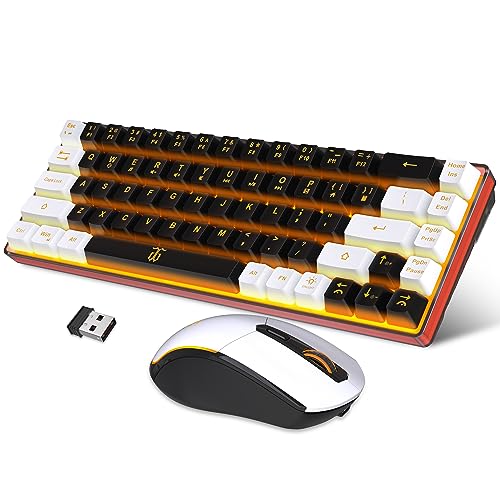
The Snpurdiri 60 percent combo suits small desks where a full-size board would crowd the mouse. Its compact keyboard uses a mechanical-feel membrane layout with anti-ghosting keys and orange backlighting, while the RGB mouse pairs over the same stable 2.4G link with a range of up to 10 meters. A 2000mAh keyboard battery and a 500mAh mouse battery deliver more than 40 hours of use, and both parts recharge over USB. The black-and-white finish stands out on a dark desk, and the small footprint leaves room for wide mouse sweeps. The anti-ghosting keys handle multi-key presses during busy fights, and the rechargeable batteries remove the cost of disposables.
Specs
- 2.4G wireless connection, up to 10 meters range
- 2000mAh keyboard battery, 500mAh mouse battery
- 60 percent mechanical-feel keyboard with anti-ghosting
- Orange backlit keys with breathing mode
- RGB gaming mouse
Best for: Small desks where a compact keyboard leaves more room for the mouse.
Watch out for: The 60 percent layout drops the number pad, so buyers who need it should pick a full-size set.
RedThunder K10 Wireless
The RedThunder K10 is the endurance pick for players who hate charging. Its keyboard carries a 3800mAh rechargeable battery, the largest in this set, and the 2.4G link keeps lag low through long sessions. The mechanical-feel keyboard pairs with a 7D mouse that reaches 3200 DPI, and both parts share one USB receiver. RGB backlighting runs across the board with several modes, and the full-size layout keeps the number pad and media controls in place. A single charge covers days of evening play before the cable comes out. The shared receiver pairs both parts to one port.
Specs
- 2.4G wireless connection with one shared receiver
- 3800mAh rechargeable keyboard battery
- 3200 DPI 7D gaming mouse
- RGB backlit mechanical-feel keyboard
- Full-size layout with number pad
Best for: Daily players who want the longest stretch between charges.
Watch out for: The set uses a single 2.4G receiver, so keep it safe since no Bluetooth fallback is listed.
Which One Fits Your Situation
You want the most connection options
Pick the Redragon S101M-KS. Tri-mode support covers a 2.4G receiver for games, Bluetooth for a laptop, and a wired link for charging days, so the set adapts to any desk. The full-size keyboard and 4800 DPI mouse cover both work and play. The ten multimedia keys control volume and playback without leaving the game, and the shared receiver leaves the second USB port free for a headset.
Your desk is small and the mouse needs room
Pick the Snpurdiri 60 percent combo. The compact keyboard frees a wide sweep area for the mouse, and the 2.4G link stays stable across the room. The orange backlighting and small footprint suit a tidy setup. The 2000mAh keyboard battery and 500mAh mouse battery deliver more than 40 hours of use, and both parts recharge over USB between sessions.
You play every evening and hate charging
Pick the RedThunder K10. The 3800mAh keyboard battery lasts the longest here, and the 2.4G link keeps lag low through long sessions. The full-size layout keeps every key where the fingers expect it. The 7D mouse reaches 3200 DPI for games, and the full-size layout keeps the number pad and media controls where the fingers expect them.
Common Mistakes
- Buying a combo for its lighting and then finding the mouse DPI steps do not match the games played.
- Ignoring battery life and discovering the keyboard dies mid-match on a Friday night.
- Choosing a compact layout without noticing the number pad is gone, then missing it during work.
- Assuming every wireless combo includes Bluetooth, when many run on a 2.4G receiver alone.
- Forgetting to check whether the set works while plugged in, which turns charging time into dead time.
Frequently Asked Questions
Is a 2.4G receiver fast enough for gaming?
Yes for most players. A 2.4G receiver gives a direct radio link with low lag, close to a wired connection in everyday play. Bluetooth can lag slightly more, which is why gaming combos lead with 2.4G and keep Bluetooth as a convenience mode for laptops and casual use, while a wired fallback covers charging days without a pause.
Do wireless combos work while charging?
It depends on the set. Tri-mode combos like the Redragon keep working over a wired USB-C link while charging, while receiver-only sets may need a pause. Check the listing for a wired mode before buying if long sessions matter. If the set uses a shared receiver only, the mouse may pause while it charges, so confirm the charging behavior on the listing first.
Is a membrane keyboard good enough for gaming?
For most players, yes. Membrane combo keyboards offer a soft, quiet key feel with anti-ghosting for multi-key presses, and they cost far less than mechanical boards. True mechanical switches give a crisper feel and longer life, but the difference matters most to competitive players and heavy typists who press keys all day.
Can one receiver really run both the keyboard and mouse?
Yes. Most wireless combos pair both parts to a single shared receiver, so one USB port covers the whole set. The receiver usually stores in the mouse or keyboard when traveling, so check where it hides before the first trip and keep a spare port free for a headset.
A wireless combo is worth buying when the connection, battery and layout all fit the desk it will live on, so the buyer should compare those three points before the lighting. Any of the three picks above clears a cable-free desk well, and the right one is the set whose connection modes and battery life match the way its owner actually plays. Check the connection modes, the battery numbers and the layout before the lighting, and the set will fit the desk it lives on.
FAQ
Is a 2.4G receiver fast enough for gaming?
Do wireless combos work while charging?
Is a membrane keyboard good enough for gaming?
Can one receiver really run both the keyboard and mouse?
More from Amazon
Programs that pair well with the guide above. Offers and eligibility are set by Amazon and may change.
Free shipping on eligible items, Prime Video and more. Eligible new members can start with a free trial.
Start a Prime free trialAd-free music streaming. Eligible new subscribers can start with a free trial.
Try Music Unlimited freeA Prime membership for ages 18-24 with a trial period. Eligibility is set by Amazon.
See Prime for Young AdultsAudiobooks and podcasts to listen to on the go. Eligible new members can start with a free trial.
Try Audible freeAs an Amazon Associate we earn from qualifying purchases.