Our Top Picks
 Logitech G305 LIGHTSPEED Wireless Gaming Mouse4.6" x 2.4" x 1.5"6.2 x 4 x 1.5 inches0.3 poundsCheck on Amazon
 Razer Orochi V2 Wireless Gaming Mouse4.26 x 1.52 inch (Pack of 1)4.26 x 1.52 x 2.47 inches0.13 poundsCheck on Amazon


Giving a gaming mouse is a risk-management exercise. You usually do not know the recipient’s hand size, grip style, or the games they play most, so the safest gift is a broadly liked shape in a color they will enjoy, one that works the moment it is plugged in. The alternative is a statement piece — an unusual shell or a display dock — chosen for a known enthusiast whose tastes you already understand. This guide separates those two bets so the mouse under the tree feels chosen, not guessed.
The picks below serve four kinds of giver: parents buying a first gaming mouse for a teenager, partners adding color-matched gear to an RGB desk, friends choosing a portable mouse for a laptop gamer, and buyers who want one impressive box for an enthusiast who already owns the basics. Every pick was chosen from the product names and specifications on its Amazon product page, with recipient fit, presentation, and zero-setup appeal weighed ahead of raw numbers.
Quick Picks
As an Amazon Associate we earn from qualifying purchases
| Product | Best for | Key spec from title |
|---|---|---|
| Logitech G203 Lightsync | A teenager’s first gaming mouse | LIGHTSYNC RGB in four color options |
| Logitech G305 Lightspeed (Blue) | A color-matched desk gift with no charging cable to manage | Lightspeed wireless in the blue colorway |
| Razer Orochi V2 | A laptop gamer who plays away from a fixed desk | 60 g portable with up to 950-hour battery |
| GravaStar Mercury M1 Pro | An enthusiast who collects statement hardware | Magnesium-alloy skeleton shell |
| EPOMAKER NEX Lite Wireless Gaming Mouse | A desk-display gift with its dock in the box | RGB charging dock with a display screen |
How to Choose
Start With the Recipient, Not the Spec Sheet
Hand size is the detail most likely to sink a gift mouse, so estimate it before anything else. A teenager or a smaller-handed adult will get on well with compact symmetrical shapes, while a large-handed desktop player needs a fuller shell and will feel cramped on a mini mouse. Think about their games too: fast shooters reward light mice and simple button layouts, while strategy and MMO players use extra programmable buttons daily. If you genuinely cannot judge, choose the middle path — a medium, symmetrical, mainstream shape is the hardest gift to get wrong.
Setup Friction: Wired Simplicity vs Wireless Freedom
Setup friction decides whether a gift gets used on day one. A wired mouse needs nothing: plug it in and it plays, with no receiver to lose and no battery to charge, which suits younger recipients and shared family PCs. Wireless models feel more generous and keep a desk tidy, but they add a USB receiver, a charging routine, or replaceable batteries to the recipient’s life. Check what the mouse asks of its owner: software that is optional is fine, software required for basic functions is a chore. The kindest gifts work fully the moment they are connected.
Presentation: Color, Lighting, and the Unboxing
A gift mouse is seen before it is used, so presentation carries real weight. Color options matter: a blue or lilac mouse that matches a recipient’s setup shows thought in a way a default black shell cannot. RGB lighting adds to that first impression, especially for younger gamers building a lit desk. Docks and display screens push a mouse further into gift territory because the box contains something to show off, not just a peripheral to plug in. None of this replaces fit, but between two mice that suit the same hands, pick the one that looks like a present.
Return-Proofing: Mainstream Shapes and Easy Exchanges
Even a careful giver can miss on shape, so plan for the exchange before you buy. Mainstream brands and their best-known shapes are the safest ground: sizing advice is easy to find, and a swap for a different model in the same range is painless. Exotic shells, skeleton designs, and strongly sculpted shapes are exciting gifts for the right person and awkward ones for the wrong person, because comfort is personal and hard to predict. Keep the receipt, favor listings with straightforward returns, and avoid personalized or limited variants that cannot be exchanged if the fit disappoints.
The 5 Best Options
Logitech G203 Lightsync

For a first gaming mouse, the G203 Lightsync is the low-risk classic: a small symmetrical shape that suits the smaller hands of a teenager, a wired connection that needs no charging or pairing, and lighting that makes it feel like gaming gear rather than a borrowed office mouse. Four color options let you match a bedroom setup instead of defaulting to black. It asks nothing of the recipient beyond plugging it in, and its six buttons are enough for the shooters and sandbox games most new players start with.
Specs
- 8,000 DPI sensor, adjustable from 200 to 8,000 in G HUB
- 6 programmable buttons
- LIGHTSYNC RGB with wave, screen sampler, and audio visualizer effects
- Classic small symmetrical shape
- Wired connection
- Mechanical spring button tensioning
- Color options: Black, White, Blue, and Lilac
Best for: A teenager receiving a first gaming mouse, or any smaller-handed player who wants color and lighting with zero setup.
Watch out for: Wired only, and the compact shape suits small-to-medium hands — a large-handed recipient will find it cramped; confirm the color variant selected at checkout.
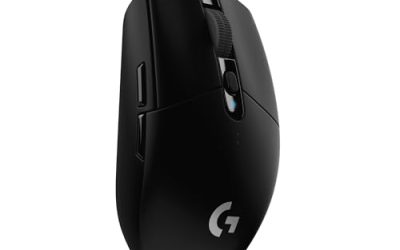
Logitech G305 Lightspeed (Blue)
The G305 Lightspeed is the gift for someone whose desk already has a color theme: this listing is the blue colorway, so it lands as a deliberate match rather than another black peripheral. Lightspeed wireless keeps the surface clean, the shape is a proven all-rounder for small-to-medium hands, and a single AA battery runs for months, so the recipient is not managing a charging cable. It suits a partner or friend who games at a tidy desk and values a mouse that disappears into daily use between sessions.
Specs
- HERO sensor up to 12,000 DPI
- Lightspeed 1 ms wireless via USB nano receiver
- Up to 250 hours on one AA battery
- 99 g
- 6 programmable buttons
- Blue colorway listing
Best for: A partner or friend with a color-themed desk who wants wireless freedom without a charging routine.
Watch out for: It runs on a replaceable AA (no recharging) and has no Bluetooth; the receiver stores inside the shell — show the recipient where it lives before it gets lost.
Razer Orochi V2
Some recipients game wherever the laptop lands, and the Orochi V2 is built for exactly that person. It is genuinely tiny and light, slips into a laptop sleeve, and its dual-mode wireless covers both a gaming session over the receiver and casual use over Bluetooth. Battery life stretches to hundreds of hours, so it will not die mid-trip. As a gift it says you noticed how they actually play: on sofas, in dorm rooms, and at kitchen tables rather than at a fixed battlestation.
Specs
- Under 60 g without battery
- HyperSpeed 2.4 GHz and Bluetooth dual-mode wireless
- Up to 950 hours on Bluetooth, 425 hours on HyperSpeed
- Runs on AA or AAA batteries, either fits
- Compact egg shape
- Black listing
Best for: A laptop gamer who plays in different places and needs a mouse that travels in a sleeve.
Watch out for: It is genuinely tiny — a gift for a large-handed desktop player will miss; best aimed at laptop and portable setups.
GravaStar Mercury M1 Pro
The Mercury M1 Pro is the statement piece of this list: a hollowed magnesium-alloy shell that looks like concept hardware and feels like an event to unbox. It suits the enthusiast who already owns a competent mouse and would never buy themselves something this theatrical. Under the styling sits a serious sensor and tri-mode wireless, so it plays as well as it photographs. Give it to the person who shows their desk to visitors, and whose setup is a hobby in its own right rather than just a tool.
Specs
- Magnesium alloy hollowed shell
- PAW3395 sensor up to 26,000 DPI
- Tri-mode wireless: 2.4 GHz, Bluetooth, or wired
- RGB accents
- About 88 g
Best for: An enthusiast who treats hardware as a hobby and enjoys a mouse that doubles as a display piece.
Watch out for: The open skeleton design and aggressive styling divide opinion, and the shape is a commitment — best for a recipient who loves statement hardware; keep the receipt for a shape swap.
EPOMAKER NEX Lite Wireless Gaming Mouse
The NEX Lite turns a mouse into a desk display: it arrives with an RGB charging dock that has its own small screen, so the gift keeps presenting itself every day rather than vanishing under the recipient’s hand. The mouse itself is a light right-handed shape suited to everyday gaming, and the dock removes charging cables from the routine entirely. It fits a recipient building a showcase desk — a streamer, a dorm-room decorator — who enjoys gear that doubles as decor and likes their setup to look finished.
Specs
- 65 g right-handed shape
- PAW3311 sensor
- Wireless connection
- Included RGB charging dock with a small display screen
Best for: A streamer or desk decorator who wants a gift that stays on display between gaming sessions.
Watch out for: The dock needs a permanent USB port and desk footprint; EPOMAKER’s software is less polished than Logitech and Razer equivalents — a recipient who hates tinkering may prefer pick 1 or 2.
Which One Fits Your Situation
A Parent Buying a First Gaming Mouse for a Teenager
Start with the Logitech G203 Lightsync. It is wired, so there is nothing to charge, pair, or lose; the compact shape suits younger hands; and the lighting makes it unmistakably gaming gear. If the teenager already games on a laptop around the house, the Razer Orochi V2 is the step up — small, light, and wireless, with battery life measured in hundreds of hours rather than days.
A Partner Adding Color-Matched Gear to an RGB Desk
The Logitech G305 Lightspeed in blue is the deliberate match: a colorway chosen for the desk rather than the default black, with wireless tidiness and months of battery life. For a bolder statement, the GravaStar Mercury M1 Pro brings a magnesium skeleton shell and RGB accents that turn the mouse into a display piece. Either shows you picked for their setup, not just their specs.
A Friend Gifting a Portable Mouse to a Laptop Gamer
The Razer Orochi V2 is the natural pick: under 60 g, small enough for a laptop sleeve, and able to switch between its gaming receiver and Bluetooth for everyday use. Its battery runs for hundreds of hours, so it suits someone who plays in different places and cannot be bothered with charging cables. The G305 Lightspeed is the alternative if they prefer a more conventional shape.
One Impressive Box for an Enthusiast Who Owns the Basics
Skip the safe shapes and go theatrical. The GravaStar Mercury M1 Pro, with its hollowed magnesium shell, is the mouse an enthusiast admires but rarely buys for themselves. The EPOMAKER NEX Lite is the other route: a light mouse whose RGB charging dock and display screen give the gift a permanent place on the desk. Both work best when you know the recipient enjoys hardware as a hobby.
Common Mistakes
- Buying by sensor numbers alone and ignoring whether the shape fits the recipient’s hand.
- Giving a tiny travel mouse to a large-handed desktop player, or a full-size shell to a small-handed teenager.
- Forgetting that a wireless gift may need batteries, a spare USB port for the receiver, or a charging routine the recipient never asked for.
- Choosing the wildest design for someone whose taste you do not actually know, instead of a mainstream shape that is easy to exchange.
- Assuming a color name means the same shade on screen and on the desk — check which colorway the listing actually selects.
Frequently Asked Questions
Is a wired or wireless mouse the better gift?
Wireless feels more generous and keeps a desk tidy, but wired is the safer gift for a first mouse: nothing to charge, no receiver to lose, and it works the second it is plugged in. Choose wireless when you know the recipient’s setup — a laptop gamer or a tidy-desk partner — and wired when the mouse will be shared, moved between PCs, or used by a younger player.
How do I pick the right size without measuring their hand?
Use what you know: teenagers and smaller adults generally suit compact symmetrical mice, while tall adults with larger hands need fuller shells. If the recipient already owns a mouse, a similar size in their current model is the safest guide. When in doubt, pick a medium mainstream shape and keep the receipt — size is the most common reason a gift mouse gets exchanged.
Does the recipient need gaming software for these mice to work?
No. Every mouse here moves, clicks, and scrolls the moment it is connected, with no account or software required. The optional apps from Logitech, Razer, or EPOMAKER only unlock extras such as remapped buttons, lighting effects, and sensitivity fine-tuning. That distinction matters for gifts: a recipient who dislikes tinkering can ignore the software entirely, while an enthusiast can install it later and personalize the mouse at their own pace.
What if the mouse does not suit them?
Comfort is personal, so treat an exchange as a normal outcome rather than a failed gift. Mainstream shapes from Logitech and Razer are the easiest to swap for a different size or model, which is one reason they anchor this list. Buy from a listing with straightforward returns, keep the packaging intact until the fit is confirmed, and avoid limited color variants that cannot be exchanged.
FAQ
Is a wired or wireless mouse the better gift?
How do I pick the right size without measuring their hand?
Does the recipient need gaming software for these mice to work?
What if the mouse does not suit them?
More from Amazon
Programs that pair well with the guide above. Offers and eligibility are set by Amazon and may change.
Send a Prime gift membership to someone who would use free shipping and Prime Video.
Gift Amazon PrimeGive audiobooks to someone who loves to listen. Plans and prices are set by Amazon.
Gift AudibleFree shipping on eligible items, Prime Video and more. Eligible new members can start with a free trial.
Start a Prime free trialAd-free music streaming. Eligible new subscribers can start with a free trial.
Try Music Unlimited freeAs an Amazon Associate we earn from qualifying purchases.