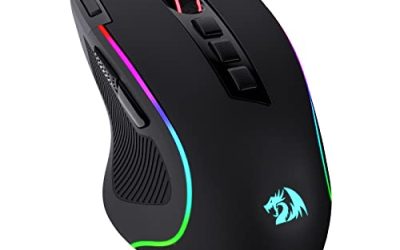
Key takeaways
- Gaming mice that skip the companion app entirely: plug-and-play picks with onboard DPI buttons and stored profiles, chosen from Amazon listing details.
Choosing a gaming mouse without software is really a decision about control: who holds your settings, you or a companion app that needs an account, an update, and a background process. A mouse that stores its behaviour in its own hardware keeps working the same way on a work laptop, a friend’s PC, or a fresh Windows install, with nothing to download before you play.
This guide is for players who are tired of bloated utilities, people who game on machines they cannot install programs on, and anyone who wants a spare mouse that simply works. Every pick below was chosen from its Amazon listing title and stated specifications, and each one either states plug-and-play use with no software required or carries onboard controls for changing settings on the mouse itself.
Quick Picks
As an Amazon Associate we earn from qualifying purchases
| Product | Best for | Key spec from title |
|---|---|---|
| Logitech G502 HERO | Stored profiles and lots of buttons | HERO 25K sensor, 25,600 DPI |
| Lomiluskr AJ52 RGB Wired Gaming Mouse | Stepping through many sensitivity levels | 200-4800 DPI adjustable |
| SMAIGE Gaming Mouse Wired | Straightforward plug-in play on any computer | 4 adjustable DPI up to 3200 DPI |
| CHONCHOW Gaming Mouse | Home and office desks that also see gaming | 6 buttons, 7 color LED light |
| MELOGAGA Wired Gaming Mouse | Quiet clicks with zero setup | 1200-3200 DPI, quiet click, plug & play |
How to Choose
Check what the listing actually promises about software
Start with the words in the listing itself. The clearest signal is an explicit plug-and-play statement saying no drivers or software need to be installed, which means the mouse runs on the operating system’s built-in support. A second, different signal is onboard memory or an onboard profile switch, which means settings live inside the mouse rather than in an app. Treat vague phrases like “easy to customise” with suspicion, because they often describe optional software rather than hardware controls. If the listing never says how settings are handled without an app, assume an app is involved.
Count the onboard controls you will really use
Without software, the physical controls on the shell are your entire settings menu, so inventory them before buying. A dedicated DPI button behind the scroll wheel is the minimum worth having, since sensitivity is the one adjustment nearly every player changes between games. Some mice add a second button for stepping down as well as up, and a few carry a profile switch that swaps whole stored layouts. Buttons that only exist as fixed forward and back inputs are fine for browsing, but they do nothing for in-game tuning, so weigh the control layout against the adjustments you actually make.
Match the DPI steps to your games
Driverless mice change sensitivity in fixed steps rather than a continuous slider, so the number and spacing of those steps matters more than the headline maximum. A mouse offering four stages between roughly 1200 and 3200 DPI suits shooters played at low sensitivity and general desktop work, because each press of the button lands somewhere predictable. Models with seven narrower steps give finer control when you switch between a sniper scope and close-quarters play. Think about the two or three sensitivity values you genuinely use, then check the listed steps include something close to each of them.
Decide how much lighting and extras matter
Lighting is where driverless mice differ most in daily use. On a plug-and-play model the lighting usually cycles through its colours automatically or ties its colour to the current DPI level, which doubles as a quick visual check of your sensitivity. If you want one fixed colour or lights that react to a game, that normally requires the maker’s software, so a no-software mouse may not deliver it. Likewise, button remapping and macros are software features on most models. Go in expecting excellent basic pointing and clicking, and treat anything beyond that as a bonus the listing must name explicitly.
The 5 Best Options
Logitech G502 HERO

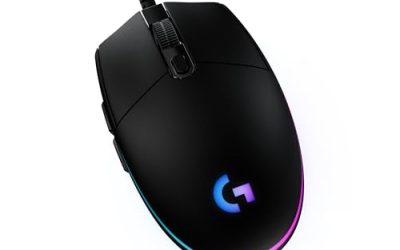
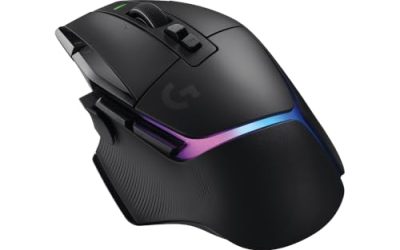
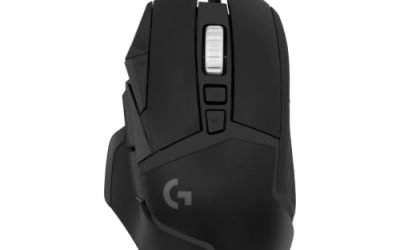
This is the pick for players who want their settings to travel with the mouse. The listing states on-board memory, so profiles are stored in the mouse itself rather than depending on a program staying open, and physical DPI buttons beside the main click let you shift sensitivity mid-game without opening anything. Eleven buttons and an adjustable weight system give it far more hardware-level flexibility than the simpler plug-and-play models here, while the wired connection keeps setup to a single USB plug on PC or Mac.
Specs
- Sensor: HERO 25K
- DPI: up to 25,600 DPI
- Buttons: 11
- On-board memory for stored profiles
- Adjustable weights
- Lighting: RGB
- Connection: wired USB
- Compatibility: PC and Mac, as stated in the listing title
Best for: players who switch between several games and want stored profiles plus on-mouse DPI shifting.
Watch out for: building brand-new custom profiles is a software task; the onboard strength here is carrying and recalling settings, not creating them.
ASIN: B07GBZ4Q68
Lomiluskr AJ52 RGB Wired Gaming Mouse

The AJ52’s listing states the arrangement plainly: plug and play, with no need to install extra drivers or software. Its top-mounted DPI button works through seven levels from 200 to 4800 DPI, and the lighting colour changes with each level, so you can read your current sensitivity from the glow instead of guessing. Seven buttons cover the usual gaming and browsing inputs, and the wired USB connection suits a permanent desk setup where the mouse never needs pairing, charging, or a utility watching over it.
Specs
- DPI: 200-4800 adjustable across 7 levels
- Buttons: 7
- Acceleration: 10G, as stated in the listing
- Lighting: RGB, colour linked to DPI level
- Connection: wired, USB 2.0 port
- Setup: plug and play, no drivers or software to install, as stated in the listing
Best for: players who change sensitivity often and want many fixed steps with a colour cue for each one.
Watch out for: the listing describes the buttons as programmable, and programming them is the optional software’s job; the no-software promise covers plugging in, playing, and DPI changes.
ASIN: B082ZQT81M
SMAIGE Gaming Mouse Wired

Few listings state the no-software case as directly as this one: plug and play, with no extra drivers or software to install, over a standard USB connection. Four DPI stages at 1000, 1600, 2400 and 3200 switch on the fly from the mouse, covering the jump between careful aim and fast desktop travel across a large monitor. Six buttons handle clicks, scrolling, and forward and back navigation, and the stated compatibility spans Windows, Mac OS and Linux, which makes it an easy spare to keep in a laptop bag for whatever machine you land on.
Specs
- DPI: 1000 / 1600 / 2400 / 3200, switched on the fly
- Buttons: 6
- Lighting: 7-colour breathing LED
- Connection: wired, USB 2.0 / 3.0 port
- Compatibility: Windows, Mac OS and Linux, as stated in the listing
- Setup: plug and play, no drivers or software required, as stated in the listing
Best for: a dependable second mouse for mixed computers, where it must work instantly with nothing installed.
Watch out for: the 3200 DPI ceiling is modest, so players who run very high sensitivity on large displays should check the steps suit them first.
ASIN: B08RDCZMNC
CHONCHOW Gaming Mouse

CHONCHOW’s listing describes a wired mouse with plug-and-play installation where no additional software is required, which is exactly the arrangement this guide is about. Sensitivity moves through four stages from 1200 to 3200 DPI using the button on top of the shell, so changing pace between a shooter and a strategy game takes a press rather than a settings window. Six buttons include the DPI control alongside the usual click, wheel, and side inputs, and the seven-colour LED lighting runs on its own cycle without asking you to configure anything first.
Specs
- DPI: 1200 to 3200 across 4 settings
- Buttons: 6, including the DPI button
- Lighting: 7-colour LED
- Connection: wired USB
- Model name: Gaming mouse A-G5, as stated in the listing
- Setup: plug and play, no additional software required, as stated in the listing
Best for: shared home computers and office desks that double for gaming after hours, with nothing to install.
Watch out for: the buttons are fixed in function, so anyone who relies on remapped side buttons should look at the onboard-memory pick instead.
ASIN: B0C4H4C7BS
MELOGAGA Wired Gaming Mouse

This one removes software from the equation entirely: the listing notes its six buttons are not programmable, so there is nothing to configure and nothing to install. Sensitivity still adjusts on the fly through four stages, 1200, 1600, 2400 and 3200 DPI, switched without drivers in what the listing describes as plug-and-play use. Quiet clicks suit late sessions in shared rooms, the seven-colour lighting can be toggled with a button combination on the mouse, and stated support covers both Windows and macOS, which is less common among basic wired gaming mice.
Specs
- DPI: 1200 / 1600 / 2400 / 3200, switched on the fly
- Buttons: 6, not programmable, as stated in the listing
- Lighting: 7-colour RGB LED
- Clicks: quiet click design, as stated in the listing title
- Connection: wired USB
- Compatibility: Windows and macOS, as stated in the listing
- Setup: plug and play, as stated in the listing title
Best for: late-night or shared-room players who want quiet clicks and a mouse that asks nothing of them.
Watch out for: fixed buttons and fixed DPI steps are the whole deal here; if you later want macros or custom sensitivity values, this design cannot grow with you.
ASIN: B0FM4HM7SZ
Which One Fits Your Situation
You game on a computer you cannot install programs on
Work and school machines often block new software, which rules out most mainstream gaming mice. Choose the SMAIGE or the CHONCHOW, because both listings state plug-and-play use with no software to install, so every feature they offer works the moment the USB plug goes in. Their onboard DPI buttons still let you adjust sensitivity for different games, and nothing about them phones home or asks for an account.
You play several games with different sensitivity needs
Jumping between a tactical shooter and a fast arena game usually means two very different DPI values. The Lomiluskr AJ52 fits this pattern well, since its button steps through seven levels and the lighting colour tracks the level you are on. If you also want different button layouts per game, the Logitech G502 HERO is the stronger fit, because its on-board memory carries stored profiles from one computer to the next.
You share a desk or play late at night
When other people are sleeping or working nearby, click noise matters as much as tracking. The MELOGAGA is the natural choice here, with quiet clicks named in its listing title and a lighting toggle worked by a button combination rather than an app. It also suits a family computer, because its fixed buttons cannot be accidentally remapped by someone else, and there is no utility for another user to misconfigure.
You want one mouse for gaming and everyday work
A dual-purpose desk needs a mouse that feels ordinary in a spreadsheet and capable in a game. The CHONCHOW covers both with its standard six-button layout and mid-range DPI steps, while the G502 HERO adds adjustable weights and extra buttons for players whose work involves shortcuts. Either way, the absence of required software means the mouse behaves identically on your home PC and a work laptop.
Common Mistakes
- Assuming plug and play means every feature works without software, when remapping and macros on many models still live in an optional app.
- Chasing the highest maximum DPI instead of checking whether the fixed steps include the sensitivity values you actually play at.
- Forgetting that lighting on a driverless mouse usually cycles on its own, so a single fixed colour may not be available.
- Buying a mouse with onboard memory but never saving a profile to it, then wondering why settings reset on a new computer.
- Overlooking operating system support in the listing, especially when the mouse will also be used with a Mac or a Linux machine.
Frequently Asked Questions
Can I change DPI on a gaming mouse without any software?
Yes, provided the mouse has a physical DPI button, which every pick in this guide does. Pressing it steps through the fixed sensitivity levels stored in the mouse, such as the four stages on the SMAIGE or the seven levels on the Lomiluskr AJ52. You cannot type in an exact custom value, but you can change sensitivity instantly, mid-game, with nothing installed.
What is the difference between plug and play and onboard memory?
A plug-and-play mouse simply works when connected, using the operating system’s built-in support, and its settings are whatever the hardware offers by default. Onboard memory goes further by storing profiles inside the mouse, so layouts you saved earlier travel with it between computers. The G502 HERO lists on-board memory in its title, while the simpler picks here rely on plug-and-play operation alone.
Will a no-software gaming mouse work on a Mac?
Often, yes, but check the listing rather than assuming. The SMAIGE states compatibility with Mac OS alongside Windows and Linux, and the MELOGAGA lists macOS support as well. Basic clicking, scrolling, and DPI buttons rely on standard USB behaviour, so they generally carry over. Extra buttons may act as plain forward and back inputs on a Mac, which is worth knowing before you buy.
What do I give up by skipping the companion app?
Mainly fine-grained customisation: typing exact DPI values instead of stepping through presets, recording macros, remapping every button, and setting one fixed lighting colour or effect. What you keep is the core of gaming performance, namely the sensor, the clicks, and on-the-fly sensitivity changes. For many players that trade is worthwhile, because the mouse then behaves identically on every computer it touches.
FAQ
Can I change DPI on a gaming mouse without any software?
What is the difference between plug and play and onboard memory?
Will a no-software gaming mouse work on a Mac?
What do I give up by skipping the companion app?
More from Amazon
Programs that pair well with the guide above. Offers and eligibility are set by Amazon and may change.
Free shipping on eligible items, Prime Video and more. Eligible new members can start with a free trial.
Start a Prime free trialAd-free music streaming. Eligible new subscribers can start with a free trial.
Try Music Unlimited freeA Prime membership for ages 18-24 with a trial period. Eligibility is set by Amazon.
See Prime for Young AdultsAudiobooks and podcasts to listen to on the go. Eligible new members can start with a free trial.
Try Audible freeAs an Amazon Associate we earn from qualifying purchases.