Key takeaways
- Five wireless gaming mice built for claw grip, compared by rear hump, length, weight and balance, from a compact mini shell to a safe medium all-rounder.
Claw grip looks simple until you shop for it. A mouse can be light, fast and expensive, yet still fight your hand if the hump sits too far forward, the rear is too narrow to brace against, or the weight balance pulls the back down every time you lift. The real decision is not which sensor tops a chart, but which shell lets your fingertips steer while the base of your palm stays anchored.
This guide is for wireless players who claw, from relaxed claw on a medium hand to aggressive claw on a smaller one. The five picks below were chosen from their Amazon titles and specifications: rear-weighted humps, moderate lengths, low weights and shapes that sellers and makers describe for claw or small-hand use.
Quick Picks
As an Amazon Associate we earn from qualifying purchases
| Product | Best for | Key spec from title |
|---|---|---|
| LAMZU Maya X | The safe medium-large all-rounder | 47g, PAW3950 sensor, 30,000 DPI |
| Corsair M75 AIR | High-arched rear for a braced claw | 60g, 26,000 DPI sensor, symmetric shape |
| Pulsar X2 v2 | Classic claw shape on a medium shell | 53g, PAW3395 sensor, optical switches |
| LAMZU Atlantis Mini Pro | Small hands and aggressive claw | 51g, PAW3395 sensor, 4K compatible |
| ASUS ROG Harpe Ace Aim Lab Edition | Low, flat claw with tri-mode use | 54g, 36K DPI, tri-mode connectivity |
How to Choose
Put the hump position before the sensor
For claw grip, where the shell peaks matters more than how high it peaks. A hump set toward the rear gives the base of your palm something to brace against while your fingers stay arched and mobile, which is the whole point of the grip. A centre hump pushes the hand into a palm-claw hybrid and can cramp the fingers on longer shells. Compare side-profile photos before spec sheets: the Atlantis Mini Pro and X2 v2 both carry their volume behind the midpoint, while the flatter Harpe Ace suits players whose claw is low and fingertip-led rather than palm-anchored.
Match length to your hand, not your desk
Length decides whether a claw feels controlled or crowded. As a rough guide, hands under about 18 cm usually claw more comfortably on shells near 117 to 120 mm, which is Atlantis Mini Pro territory, while hands around 19 to 20 cm tend to prefer the longer class of the X2 v2 and the 124 mm Maya X. Too long, and your fingertips land past the main buttons’ sweet spot; too short, and the rear leaves your palm floating, so every lift becomes a squeeze instead of a pivot.
Keep weight low, but check the balance
Every mouse here sits between 47 and 60 grams, so raw weight alone will not separate them. Balance will. A rear-heavy mouse can feel planted for claw stops yet drag on vertical flicks, while a front-heavy one tips forward when you lift and re-centre. Listings rarely publish balance, so read the shape cues instead: batteries and shells that carry volume at the back, like the X2 v2, tend to feel anchored, whereas evenly spread ultralights such as the Maya X feel neutral. If you micro-adjust with your fingertips, neutral usually wins.
Treat high polling as a battery trade
Polling above 1,000 Hz is now common in this class, with 8K on the Maya X, its receiver included in the box, and 4K compatibility on the X2 v2 and Atlantis Mini Pro. Higher polling can smooth cursor steps on high-refresh monitors, but it drains batteries much faster and needs the receiver close and unobstructed. The honest default for most claw players is 1,000 or 2,000 Hz for daily play, raising it for ranked sessions. Check what the quoted battery life assumes: LAMZU’s 80 hours for the Maya X, for example, is the 1,000 Hz figure, not the 8K one.
The 5 Best Options
LAMZU Maya X
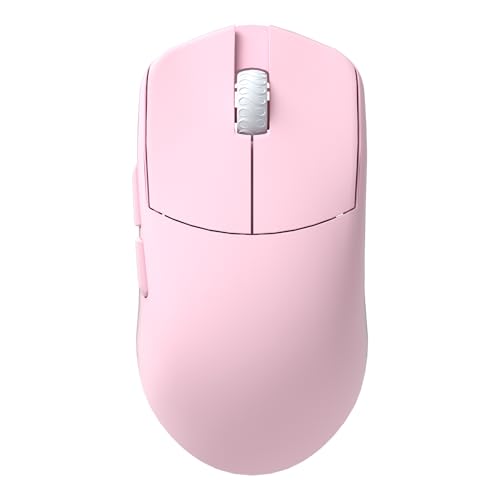
The Maya X is the larger, calmer option in this list, and the easiest step up for claw players leaving a mainstream medium mouse. LAMZU kept the shell at a full 124 mm long yet held the weight to 47 grams, so the rear still fills the base of the palm while the front stays easy to redirect with the fingers. The symmetrical shape is deliberately safe rather than extreme, the PAW3950 sensor and optical switches cover the competitive basics, and the 8K receiver is included rather than sold separately, which removes the usual accessory decision.
Specs
- Weight: 47 g
- Color: Pink
- Sensor: PAW3950
- Maximum DPI: 30,000
- MCU: Nordic 52840
- Switches: Optical switch
- Buttons: 6
- Battery life: Up to 80 hours
- Connectivity: 2.4G wireless and USB wired
Best for: Medium to larger hands wanting a full-size claw shell at the lowest weight here.
Watch out for: The open-bottom shell can let dust reach the wheel and sensor area, so it rewards a clean desk and pad.
ASIN: B0DRF794PT
Corsair M75 AIR

The M75 AIR earns its claw place through its back rather than its front. Its narrow shell carries a high, arched rear, and that support is what a claw hand braces against: the base of the palm stays planted on the hump while the arched fingers steer a symmetrical shape that weighs 60 grams. Corsair’s MARKSMAN sensor and SLIPSTREAM wireless cover the performance side, optical switches keep clicks immediate, and Bluetooth gives the same mouse a second life on a laptop. Choose it if you want a mainstream brand and a fuller rear than the mini shells offer.
Specs
- Weight: 60 g
- Color: White
- Shape: Symmetric shape
- Sensor: CORSAIR MARKSMAN optical sensor
- Maximum DPI: 26,000
- Battery life: 34 hours
- Model: CH-931D101-NA
- Compatibility: PC and Mac, iCUE compatible
Best for: Claw players who brace hard on a high rear hump and want a mainstream brand.
Watch out for: The 34-hour battery figure is the shortest here, so expect a regular charging habit rather than monthly top-ups.
ASIN: B0CV16JRPL
Pulsar X2 v2

The X2 v2 is the purist’s claw pick in this list. Pulsar kept the X2’s signature shape, a symmetrical shell with a wide rear and a hump that supports the palm base, then rebuilt the internals and trimmed the weight to 53 grams. That combination is exactly what relaxed and aggressive claw players ask for: the back fills the hand so stops feel deliberate, while the front stays low enough for fingertip corrections. Optical switches, a PAW3395 sensor and 2.4 GHz wireless with a 1 ms report keep the spec sheet current without adding software weight or decorative extras.
Specs
- Weight: 53 g
- Shape: Symmetrical, medium size
- Sensor: PAW3395
- Maximum DPI: 26,000
- Tracking speed: 650 IPS
- Switches: Optical switches
- Connectivity: 2.4 GHz wireless, 1 ms report rate
- Polling: 1,000 Hz, 4K polling ready
Best for: Claw players who want a wide, supportive rear and a classic esports shape.
Watch out for: Higher polling needs the separate 4K setup, and the minimalist package assumes you are comfortable adjusting settings on the mouse itself.
ASIN: B0CH9YTXT5
LAMZU Atlantis Mini Pro

The Atlantis Mini Pro is built for the hands the bigger mice leave behind. Its hourglass waist, wide rear and rear-biased hump are repeatedly described for claw use, and at roughly 117 mm long it lets smaller hands reach the front buttons without stretching the claw flat. The Polar White listing pairs a 51-gram shell with a PAW3395 sensor, a Nordic 52840 MCU and mechanical switches, and it is 4K compatible if you add the matching receiver later. If aggressive claw on a medium mouse makes your fingers ache, this smaller, curvier shell is the deliberate fix.
Specs
- Weight: 51 g
- Shape: Symmetrical, for small-hand gamers
- Sensor: PAW3395
- Maximum DPI: 26,000
- MCU: Nordic 52840
- Switches: Mechanical switches
- Polling: 4K compatible
- Length: About 4.61 in, with a 2.48 in rear width
Best for: Small to medium hands using an aggressive claw grip.
Watch out for: The compact shell can feel cramped for hands over about 19 cm, and 4K polling requires a compatible receiver rather than the bundled one.
ASIN: B0CLYBDR26
ASUS ROG Harpe Ace Aim Lab Edition

The Harpe Ace takes a different route to claw comfort: instead of a tall rear hump, it uses a low, flat-topped shell developed with esports players and Aim Lab, so the fingers arch over a surface that never pushes back. That suits pincer and fingertip-leaning claw styles, especially on medium hands that find humped mice tiring. At 54 grams it stays easy to lift, the ROG AimPoint sensor reaches 36,000 DPI, and tri-mode connectivity means the same mouse can run 2.4 GHz for matches, Bluetooth for a laptop and wired while charging.
Specs
- Weight: 54 g
- Sensor: ROG AimPoint optical sensor
- Maximum DPI: 36,000
- Connectivity: Tri-mode, 2.4 GHz, Bluetooth and wired
- Battery life: Up to 90 hours
- Model: P713 ROG Harpe Ace Aim Lab Edition
- Extras: Aim Lab Settings Optimizer support
Best for: Low, flat claw and pincer-claw players who also need Bluetooth for a second machine.
Watch out for: Players who brace hard against a rear hump may find the flat profile under-supportive compared with the X2 v2.
ASIN: B0BSKX9V7C
Which One Fits Your Situation
Your hand is small and your claw is aggressive
Pick the LAMZU Atlantis Mini Pro. Its shorter length, narrow waist and wide rear were shaped for exactly this grip, so your fingers can stay curled without the front buttons drifting out of reach. The 51-gram weight also helps when most of your movement comes from the fingers and wrist rather than the arm. If your hand is closer to medium and you want the same idea with more rear volume, step up to the Pulsar X2 v2 instead.
You play ranked shooters every night
Pick the LAMZU Maya X. The 8K receiver comes in the box, the PAW3950 sensor and optical switches cover the competitive checklist, and at 47 grams the full-size shell is still the lightest mouse here. Its 80-hour rating at 1,000 Hz also means sensible settings will not leave you charging between sessions. Players who want a higher, more braced rear for the same role should look at the Corsair M75 AIR instead.
You are replacing a wired claw mouse and hate change
Pick the Pulsar X2 v2 if your old mouse had a wide rear and a supportive hump, because its shape philosophy is the closest match. Pick the LAMZU Maya X instead if your old mouse was a neutral medium-to-large symmetrical shell, because its safe shape changes the feel the least while removing the cable. Either way, keep your sensitivity unchanged for the first week; the weight drop alone will make your flicks overshoot until your stopping habits adjust.
One mouse has to cover gaming and a work laptop
Pick the ASUS ROG Harpe Ace Aim Lab Edition. Tri-mode connectivity is the practical difference here: leave the 2.4 GHz receiver in your gaming PC, pair Bluetooth with the laptop, and plug in the cable when the battery runs low at your desk. Its low profile also looks and feels less extreme in an office setting than the humped esports shells, while the 54-gram weight and 36,000 DPI sensor keep it fully capable when the ranked queue opens.
Common Mistakes
- Buying by sensor numbers alone, when hump position and length decide whether a claw grip works at all.
- Choosing a mini shell for a large hand, then squeezing harder to compensate and blaming the coating for fatigue.
- Leaving polling at 4K or 8K permanently, draining the battery and gaining nothing on a 144 Hz monitor.
- Parking the wireless receiver behind a metal PC case, then judging the mouse for dropouts it did not cause.
- Switching shape, weight and sensitivity on the same day, which makes it impossible to tell what actually improved.
Frequently Asked Questions
Is claw grip better on a lighter mouse?
Usually, yes, within reason. Claw players stop and restart the mouse constantly with their fingers, so a shell in the low 50-gram range tires the hand less than a 90-gram one. Lighter is not automatically better, though: if the mouse feels so light that you squeeze to control it, a slightly heavier, rear-supportive shape like the X2 v2 can feel calmer and more accurate.
What size mouse suits a medium hand for claw grip?
For a hand around 18 to 20 cm long, a shell roughly 119 to 125 mm long is the usual starting point, which covers the Maya X and X2 v2 here. Width matters too: a wider rear suits relaxed claw, while a narrower waist suits aggressive claw. If you sit between sizes, choose based on how much palm contact you like, not on length alone.
Does 8K polling make a real difference for claw players?
It can smooth the cursor path on a 240 Hz or faster monitor, and claw players make many small corrections where that smoothness is visible. The cost is battery life and a stricter receiver setup, and the gain shrinks on slower monitors. A sensible pattern is 1,000 or 2,000 Hz for everyday play, then 4K or 8K for serious sessions, rather than treating the highest number as a permanent setting.
Can a claw grip mouse also work for palm grip?
A relaxed claw mouse with a longer, fuller rear, such as the Maya X, can double for palm grip between games. A dedicated claw shell like the Atlantis Mini Pro cannot, really: its short length and rear hump leave a palm grip unsupported and cramped. If you switch grips by genre, buy for the grip you use in your main competitive game and accept the compromise elsewhere.
FAQ
Is claw grip better on a lighter mouse?
What size mouse suits a medium hand for claw grip?
Does 8K polling make a real difference for claw players?
Can a claw grip mouse also work for palm grip?
More from Amazon
Programs that pair well with the guide above. Offers and eligibility are set by Amazon and may change.
Free shipping on eligible items, Prime Video and more. Eligible new members can start with a free trial.
Start a Prime free trialAd-free music streaming. Eligible new subscribers can start with a free trial.
Try Music Unlimited freeA Prime membership for ages 18-24 with a trial period. Eligibility is set by Amazon.
See Prime for Young AdultsAudiobooks and podcasts to listen to on the go. Eligible new members can start with a free trial.
Try Audible freeAs an Amazon Associate we earn from qualifying purchases.