Key takeaways
- Compare the best BenQ Zowie gaming mice, from the EC2-DW and ZA13-DW 4K wireless models to the EC-CW line, by shape, sensor, weight and polling rate.
BenQ Zowie builds gaming mice the way tournament organisers build stages: plain, predictable and free of anything that can go wrong at the wrong moment. There is no companion software, no lighting and no account to sign into. Every setting that matters, DPI and polling rate included, is changed with buttons on the underside of the mouse, and the shape range has been refined for years rather than reinvented each season. That focus is why Zowie shells keep showing up on professional desks long after flashier mice have been replaced.
The trade-off is that choosing a Zowie is almost entirely a shape decision. The EC line is right-handed and ergonomic, the ZA line is symmetrical with a tall rear hump, the U line is symmetrical and built around claw grip, and the current DW generation adds 4K wireless polling and lighter shells to all three families. This guide compares the five Zowie mice that cover those shapes best, so you can match the shell to your hand and grip instead of guessing from a product photo.
As an Amazon Associate, we earn from qualifying purchases.
Quick Picks
| Product | Best for | Key point |
|---|---|---|
| BenQ Zowie EC2-DW | Right-handed players who want the classic EC shape with modern 4K wireless | The ergonomic default, now at 60 g with a PAW3950 sensor |
| BenQ Zowie ZA13-DW | Fingertip and claw players who like a high rear hump | Symmetrical shell that supports fast lifting and quick stops |
| BenQ Zowie U2 | Claw-grip players who want curved sides that lock the hand in | Built for claw stability with a PAW3395 sensor |
| BenQ Zowie EC2-CW | Palm-grip players who want wireless freedom without chasing specs | The larger, calmer EC with a 1000 Hz enhanced receiver |
| BenQ Zowie EC1-CW | Players with larger hands who palm a big ergonomic shell | The biggest EC shape in the wireless CW line |
How to Choose
Pick the shape family first. Zowie naming is consistent once you learn it. EC mice are right-handed ergonomic shells with a smooth rightward curve. ZA mice are symmetrical with the hump placed high and toward the rear, which suits fingertip and claw grips. The U series is symmetrical with inward-curved sides designed to stabilise a claw grip. Within each family, the number sets the size: 1 is large, 2 is medium, 3 is small. Hand size and grip style narrow the field faster than any sensor figure.
DW versus CW wireless. The newer DW models pair a PixArt PAW3950 sensor with an enhanced receiver that doubles as a charging dock and unlocks 2000 Hz and 4000 Hz polling. The earlier CW models use a PixArt 3370 sensor and run at 1000 Hz through a smaller enhanced receiver. Both are driverless and both are proven in competition. The DW line is lighter and faster on paper; the CW line is the calmer buy if 1000 Hz already feels instant to you and you prefer the slightly heavier, more planted feel.
Polling rate and battery move together. On the DW models, Zowie lists roughly 80 hours of play at 1000 Hz, dropping to about 24 hours at 4000 Hz. Higher polling smooths the cursor path in small steps, but the honest difference is subtle outside fast flicks in tactical shooters. Most players should run 1000 or 2000 Hz daily and save 4000 Hz for matches, which keeps charging to a weekly habit instead of a nightly one.
Driverless is a feature, not a missing extra. There is no Zowie software to install, update or troubleshoot. DPI steps and polling rate are set on the mouse itself, and the settings travel with the hardware to any PC, including a tournament machine you have never touched. If you rely on per-game button remaps or macros, Zowie is the wrong brand; if you want a mouse that behaves identically everywhere, it is the point of the brand.
Best Options
BenQ Zowie EC2-DW

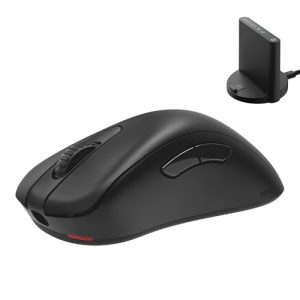
The EC2-DW is the current flagship of the shape that made Zowie famous. The medium right-handed shell keeps the gentle curves EC users expect, but the weight drops to 60 g and the sensor steps up to the PixArt PAW3950. The enhanced receiver sits on the desk as a charging dock, keeps the wireless link close to the mouse and unlocks polling rates up to 4000 Hz. For most right-handed players moving to wireless Zowie, this is the one to measure the others against.
Clicks use the fast, crisp switches Zowie tunes for its DW line, and the side buttons sit high enough to avoid accidental presses during wide swipes. Because everything is set on the underside, there is nothing to configure when you sit down at a new PC.
Specs
- Sensor PixArt PAW3950 optical; DPI steps 400 / 800 / 1000 / 1200 / 1600 / 3200; polling rate 125 / 500 / 1000 / 2000 / 4000 Hz via the enhanced receiver; weight 60 g; right-handed ergonomic shape; 2.4 GHz wireless plus USB-C wired use; battery up to 80 hours at 1000 Hz and about 24 hours at 4000 Hz; driverless, no software
Best for: Right-handed players who want the classic EC shape with modern 4K wireless
Watch out for: The shape is medium, so players with large hands who palm fully may find the EC1-DW size suits them better; 4000 Hz polling shortens battery life sharply
BenQ Zowie ZA13-DW

The ZA13-DW takes the symmetrical ZA shape, with its tall hump placed toward the rear of the shell, and rebuilds it at 65 g with the PAW3950 sensor and the same 4K enhanced receiver as the EC-DW line. The high hump fills the back of the palm during fingertip and claw grips, which gives the hand a reference point for lifting the mouse quickly and setting it back down on target. Among the three ZA sizes, the 13 is the smallest, aimed at small to medium hands.
Zowie shapes the left side of the ZA shell to reduce the thumb angle, which is meant to make rapid clicking more comfortable during long sessions. As with every Zowie, DPI and polling changes happen on the underside, and the spare skates in the box are a thoughtful touch for a mouse built around consistent glide.
Specs
- Sensor PixArt 3950 optical; DPI steps 400 / 800 / 1000 / 1200 / 1600 / 3200; polling rate up to 4000 Hz via the enhanced receiver; weight 65 g; symmetrical shape with a high rear hump; length about 121.7 mm and height about 40.2 mm; 2.4 GHz wireless plus USB-C wired use; battery up to 80 hours at 1000 Hz and about 24 hours at 4000 Hz; driverless, no software
Best for: Fingertip and claw players who like a high rear hump
Watch out for: The tall hump can feel intrusive for relaxed palm grips, and the smallest ZA size will feel cramped under large hands
BenQ Zowie U2

The U2 is Zowie’s claw-grip specialist. Its symmetrical shell curves inward on both sides, giving the fingers a ledge to pull against, and the overall profile stays low and controlled rather than tall. Inside is a PixArt PAW3395 sensor and a standard 1000 Hz wireless link, so the U2 gives up the DW line’s 4K polling in exchange for the shape claw players ask for. At 60 g it stays easy to micro-adjust during tracking-heavy fights.
The U2 suits players who found the ZA hump too tall and the FK-style flat shells too slippery. It is a shape-first mouse: buy it because the sides fit your grip, not because the spec sheet outruns the DW models.
Specs
- Sensor PixArt PAW3395 optical; DPI steps 400 / 800 / 1000 / 1200 / 1600 / 3200; polling rate up to 1000 Hz; weight 60 g; symmetrical shape with inward-curved sides for claw grip; 2.4 GHz wireless plus USB-C wired use; driverless, no software
Best for: Claw-grip players who want curved sides that lock the hand in
Watch out for: Polling tops out at 1000 Hz, so players set on 4K wireless should look at the DW models instead
BenQ Zowie EC2-CW

The EC2-CW is the medium ergonomic shell from the first Zowie wireless generation. It pairs a PixArt 3370 sensor with an enhanced receiver that holds a stable 1000 Hz connection, and the shell carries a little more weight than the DW models, which some palm-grip players prefer for controlled, deliberate movement. The shape is the same proven EC curve, sized for small to medium hands.
Because the CW generation has been on the market longer, it is also the line to watch for availability in waves: Zowie tends to sell its wireless mice in production runs, and listings can thin out between them. If the EC2-CW is in stock and the EC2-DW’s extras do not matter to you, the CW remains a sound, quieter buy.
Specs
- Sensor PixArt 3370 optical; DPI steps 400 / 800 / 1000 / 1200 / 1600 / 3200; polling rate 1000 Hz via the enhanced receiver; weight 77 g; right-handed ergonomic shape; 2.4 GHz wireless plus USB-C wired use and charging; driverless, no software
Best for: Palm-grip players who want wireless freedom without chasing specs
Watch out for: Heavier than the EC2-DW and limited to 1000 Hz; stock arrives in batches, so availability comes and goes
BenQ Zowie EC1-CW

The EC1-CW is the large version of the CW ergonomic shell, built for bigger hands and full palm contact. It shares the PixArt 3370 sensor, 1000 Hz enhanced receiver and driverless setup of the EC2-CW, and adds the extra length and width that stop larger hands from curling over the front of a medium mouse. At 79 g it has the planted, steady feel that palm-grip players often describe as confidence in slow tracking.
If your hand measures at the larger end and medium mice leave your fingers hanging off the front edge, the EC1-CW is the Zowie shaped for you. Players who split the difference between palm and claw may still prefer the medium EC2 sizes.
Specs
- Sensor PixArt 3370 optical; DPI steps 400 / 800 / 1000 / 1200 / 1600 / 3200; polling rate 1000 Hz via the enhanced receiver; weight 79 g; right-handed ergonomic shape, large size; 2.4 GHz wireless plus USB-C wired use and charging; driverless, no software
Best for: Players with larger hands who palm a big ergonomic shell
Watch out for: The large shell is too much mouse for small hands or fingertip grips, and polling is 1000 Hz only
Which One Fits
Right-handed players who want the most current Zowie should take the EC2-DW: it keeps the beloved EC curve and adds the lightest shell and fastest wireless the brand offers. Fingertip and claw players who steer with a tall rear hump belong on the ZA13-DW, while strict claw players who want sides that actively hold the fingers should choose the U2. If 1000 Hz already feels instant and you like a slightly heavier, calmer mouse, the EC2-CW saves the decision effort, and large-handed palm players get their version in the EC1-CW.
A simple way to decide is to measure your hand and name your grip honestly. Zowie publishes full dimensions for every shell, and the difference between the 1, 2 and 3 sizes matters more than any other line on the spec sheet.
Common Mistakes
Buying by sensor instead of shape. Every mouse here tracks flawlessly at the level humans can perceive. The wrong shell will bother you in every session; a slightly older sensor will not. Choose the family and size first, then check the generation.
Running 4000 Hz all the time. The battery cost is real and the benefit is situational. Set 1000 or 2000 Hz for daily play and raise it for matches, using the button on the underside.
Expecting software features. Zowie mice have no remapping suite, no lighting controls and no cloud profiles. Players who need macros should look at brands built around software ecosystems instead.
Ignoring the size number. An EC1 and an EC3 share a name and almost nothing else in hand feel. Check the length against your current mouse before ordering.
FAQ
Are Zowie mice really used by professional players?
Yes. Zowie shells, especially the EC line, have been a fixture on professional desks in tactical shooters for years, largely because the shapes are stable across generations and the driverless setup behaves identically on any PC, including stage machines.
Do Zowie mice need software or drivers?
No. Every Zowie mouse in this guide is driverless. DPI and polling rate are changed with buttons on the underside of the mouse, and the settings are stored in the hardware, so the mouse works the same way on any computer you plug it into.
What is the difference between the DW and CW models?
DW models are the newer generation: a PixArt PAW3950 sensor, lighter shells and polling rates up to 4000 Hz through an enhanced receiver that also works as a charging dock. CW models use a PixArt 3370 sensor, run at 1000 Hz and carry slightly heavier shells.
Which Zowie mouse is best for claw grip?
The U2 was designed specifically around claw grip, with inward-curved sides that give the fingers purchase. The ZA line, including the ZA13-DW, is the other strong option, since its high rear hump supports the lifted-palm posture claw players use.
Final Verdict
Zowie remains the easiest brand to recommend to players who know their grip and want zero fuss: pick the EC2-DW for the modern ergonomic default, the ZA13-DW for a high-hump symmetrical shell, the U2 for claw stability, and the CW models when a heavier 1000 Hz mouse at the right size is all you need. Measure your hand, name your grip, and the range narrows to one obvious mouse.
FAQ
Are Zowie mice really used by professional players?
Do Zowie mice need software or drivers?
What is the difference between the DW and CW models?
Which Zowie mouse is best for claw grip?
More from Amazon
Programs that pair well with the guide above. Offers and eligibility are set by Amazon and may change.
Free shipping on eligible items, Prime Video and more. Eligible new members can start with a free trial.
Start a Prime free trialAd-free music streaming. Eligible new subscribers can start with a free trial.
Try Music Unlimited freeA Prime membership for ages 18-24 with a trial period. Eligibility is set by Amazon.
See Prime for Young AdultsAudiobooks and podcasts to listen to on the go. Eligible new members can start with a free trial.
Try Audible freeAs an Amazon Associate we earn from qualifying purchases.