Key takeaways
- Sensor Quality: A clean, accurate optical sensor matters more than a huge max DPI number; look for consistent tracking without smoothing or acceleration at your actual playing sensitivity.
- DPI Range and Adjustability: Most competitive players game between 400-1600 DPI, so prioritize a mouse with easy on-the-fly DPI switching over one that only advertises a flashy maximum.
- Wired vs Wireless: Modern wireless sensors like Lightspeed rival wired latency, but if you’re unsure, a reliable wired connection removes any doubt during ranked play.
- Weight and Shape: Lighter mice suit fast flick-based FPS aim, while heavier, ergonomic shapes benefit slower, precision-focused genres and larger hands.
- Button Layout: MMO and MOBA players benefit from extra programmable side buttons and macros, while FPS players often prefer a simpler, symmetrical design with fewer distractions.
Choosing the right DPI setting for gaming isn’t as simple as cranking the number as high as possible. Sensitivity that’s too high leads to overshooting targets and jittery aim, while sensitivity that’s too low forces slow, exhausting arm movements during fast-paced matches. The real challenge is matching your mouse’s sensor capabilities, your grip style, and your genre of choice into a setup that feels natural under pressure.
This guide breaks down what actually matters when shopping for a gaming mouse in 2026, from sensor quality to button layout, and reviews six of the most popular options on the market today. Whether you’re chasing competitive FPS precision or want a do-it-all mouse for MOBA and MMO grinding, you’ll find a solid pick below.
Our top picks


As an Amazon Associate we earn from qualifying purchases at no extra cost to you. Ratings are shown as listed on Amazon.
🎮 Get More From Your Setup — Free
Prime Gaming gives you free PC games every month, in-game loot, and a free Twitch channel sub — plus fast free shipping on all the gear above. New members get a 30-day free trial.
Watch: Best Mouse Dpi For Gaming — Video Review
How to Choose a Mouse DPI For Gaming (2026)
- Sensor Quality: A clean, accurate optical sensor matters more than a huge max DPI number; look for consistent tracking without smoothing or acceleration at your actual playing sensitivity.
- DPI Range and Adjustability: Most competitive players game between 400-1600 DPI, so prioritize a mouse with easy on-the-fly DPI switching over one that only advertises a flashy maximum.
- Wired vs Wireless: Modern wireless sensors like Lightspeed rival wired latency, but if you’re unsure, a reliable wired connection removes any doubt during ranked play.
- Weight and Shape: Lighter mice suit fast flick-based FPS aim, while heavier, ergonomic shapes benefit slower, precision-focused genres and larger hands.
- Button Layout: MMO and MOBA players benefit from extra programmable side buttons and macros, while FPS players often prefer a simpler, symmetrical design with fewer distractions.
The Best Mouse DPI For Gaming (2026)s Reviewed
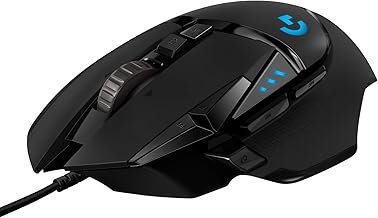
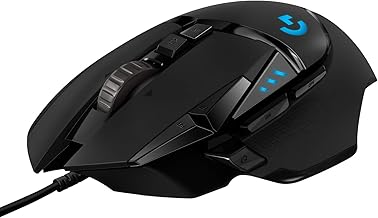
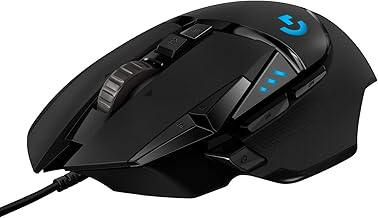
Logitech G502 Hero
The G502 Hero remains a benchmark for good reason: its HERO 25K sensor delivers flawless tracking at any DPI, and the adjustable weight system lets you fine-tune feel for your grip and genre. With 11 programmable buttons and on-board memory, it’s versatile enough for FPS, MMO, or everyday use.
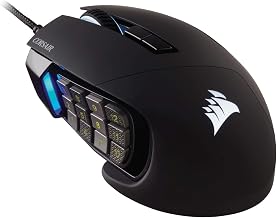
Redragon M901K
The M901K is built for players who want maximum control at a budget price, packing 19 macro-programmable buttons and weight tuning into one MMO-focused shell. It won’t match premium sensors for pure precision, but its button count and customization are hard to beat for the cost.
Razer DeathAdder Elite
A longtime esports favorite, the DeathAdder Elite pairs a 16,000 DPI optical sensor with a comfortable, ergonomic shape that suits palm and claw grips alike. Its mechanical switches and consistent tracking make it a dependable choice for FPS players who value reliability over gimmicks.
Logitech G305 Lightspeed
The G305 proves wireless doesn’t mean compromise, using the same HERO sensor found in Logitech’s wired flagships alongside a featherweight 99g body. With up to 250 hours of battery life on a single AA, it’s an excellent low-latency option for players who hate cable drag.
Redragon M612
The M612 offers a comfortable ergonomic grip and 8,000 DPI optical sensor at an entry-level price, making it a solid pick for casual gamers or anyone building their first dedicated gaming setup. Remappable keys and lag-free wired performance round out a capable budget package.
Frequently Asked Questions
What DPI should I actually use for gaming?
Most competitive gamers play between 400 and 1600 DPI, adjusting in-game sensitivity separately for finer control. Higher advertised DPI figures mainly indicate sensor headroom, not a setting you need to max out.
Does higher DPI mean a better mouse?
Not necessarily. A mouse with a clean 12,000 DPI sensor and no smoothing can outperform one advertising 26,000 DPI with inconsistent tracking, so sensor quality matters more than the raw number.
Is wireless fast enough for competitive gaming now?
Yes, modern wireless technologies like Logitech’s Lightspeed offer response times comparable to wired connections, making wireless a legitimate option even for ranked and competitive play.
How many buttons do I actually need?
FPS players typically need only 2-7 buttons for core functions, while MMO and MOBA players benefit from mice with 12+ programmable buttons to handle ability rotations and macros.
Final Thoughts
For most gamers, the Logitech G502 Hero remains the best all-around choice thanks to its sensor accuracy and adjustable design, while the Razer DeathAdder Elite is ideal for FPS purists wanting a proven ergonomic shape. If you want to cut the cord without sacrificing performance, the Logitech G305 Lightspeed is the smartest wireless pick on this list.