Our Top Picks
 Razer DeathAdder Essential Ergonomic Wired Gaming Mouse5.01 x 2.86 x 1.69 inches0.3 poundsCheck on Amazon
At this budget the real decision is not which mouse has the biggest DPI number on the box, because nearly every model here advertises more sensitivity than anyone actually uses in a match. The decision is where the money went instead: a trustworthy sensor, a shape that suits your hand and grip, switches that will survive a couple of years of ranked play, and how the rest of the budget is split between shape, buttons and lighting on a wired mouse that simply tracks well.
This guide is for first-time PC builders, students upgrading from a bundled office mouse, and console players adding a desk setup, all working with the same hard ceiling. The five picks below were chosen from their Amazon listing titles and stated specifications, covering compact and ergonomic shapes, a featherweight right-handed option, and one button-heavy model for MMO players.
Quick Picks
As an Amazon Associate we earn from qualifying purchases
| Product | Best for | Key spec from title |
|---|---|---|
| Logitech G203 LIGHTSYNC | Most buyers, small to medium hands | 8,000 DPI sensor, 6 programmable buttons, LIGHTSYNC RGB |
| HyperX Pulsefire Core | Seven buttons and RGB on a budget | Pixart 3327 sensor up to 6,200 DPI, 7 programmable buttons, 87 g |
| Razer DeathAdder Essential | Palm grip and larger hands | 6,400 DPI optical sensor, 5 programmable buttons, ergonomic shape |
| ASUS TUF Gaming M3 Gen II | Lightest pick, fingertip and claw grip | 8,000 DPI sensor, 59 g lightweight, 6 programmable buttons |
| Redragon M711 Cobra | RGB fans and extra buttons | 10,000 DPI adjustable, 7 programmable buttons, RGB backlight |
How to Choose
Sensor quality matters more than the DPI ceiling
Every mouse in this guide reaches at least 6,400 DPI, yet most players settle between 400 and 3,200 DPI in real games, so the headline number is the least useful figure on the box. What separates a good budget sensor from a poor one is clean tracking at those everyday settings: no smoothing that blurs small corrections, no acceleration that changes how far the cursor travels based on speed, and enough tracking speed to survive fast flicks. The M711 Cobra states 100 IPS, for example, an honest figure for this tier, and the Pulsefire Core names its Pixart 3327 sensor rather than hiding behind a headline number. Pick a named optical sensor with a stated IPS rating over an anonymous sensor with a huge DPI claim.
Shape, size and weight decide comfort
A mouse that fights your hand will feel inaccurate no matter how good its sensor is. Measure your hand from wrist to middle fingertip, then compare it with the lengths in the Specs lists below: the G203 runs about 116 mm long and suits small to medium hands, while the DeathAdder Essential stretches to roughly 127 mm and fills a palm grip properly. Weight shapes fatigue too. The TUF Gaming M3 Gen II at 59 g rewards quick fingertip movements, the Pulsefire Core at 87 g feels steadier for tracking, and heavier ergonomic shells suit relaxed palm players who move from the arm rather than the wrist.
Why every pick here is wired
At this ceiling, a cable is a feature rather than a compromise. Every mouse in this guide connects over wired USB, so none of them needs batteries, charging or a receiver, and none carries the extra weight those parts add. That is how the TUF Gaming M3 Gen II reaches 59 g and how the G203 and Pulsefire Core keep their shapes simple and light for the sensor class they offer. A modern braided or flexible cable on a desk with a little slack drags far less than older stiff cables did. Choose wired here and spend the whole budget on sensor, switches and shape.
Buttons, switches and software support
Count the buttons you will actually bind. Six is the sweet spot for shooters, giving you melee, push-to-talk and a gadget key without crowding the shell, while the M711 Cobra’s seven buttons and side layout suit MOBA and MMO players who live on shortcuts. Switch ratings tell you about longevity: the DeathAdder Essential’s mechanical switches and the Pulsefire Core’s switches, rated for 20 million clicks, are built for years of clicking. Finally, check the software. Logitech G HUB, Razer Synapse and HyperX NGenuity all store DPI steps and remaps, and onboard memory, listed on the Pulsefire Core, keeps your settings when you move to another PC.
The 5 Best Options
Logitech G203 LIGHTSYNC

The G203 is the default recommendation at this ceiling because it gets the fundamentals right in a small, safe shape. Its classic six-button layout and symmetrical shell work for claw and fingertip grips, the LIGHTSYNC lighting strip adds desk appeal without raising the price, and G HUB lets you store up to five DPI presets you can cycle mid-game. Small to medium hands will feel at home; it is the mouse to buy when you want one decision, made well, and no interest in experimenting with exotic shapes or button grids.
Specs
- Sensor: gaming-grade optical, 200 to 8,000 DPI
- Buttons: 6 programmable
- Lighting: LIGHTSYNC RGB, approximately 16.8 million colors
- Report rate: 1,000 Hz (1 ms)
- Weight: 85 g (mouse only)
- Dimensions: 116.6 x 62.15 x 38.2 mm
- Cable: 2.1 m
- Software: Logitech G HUB
- Connection: wired USB
Best for: first gaming mouse buyers with small to medium hands
Watch out for: the compact shell feels cramped for large hands using a full palm grip
ASIN: B07YN82X3B
HyperX Pulsefire Core
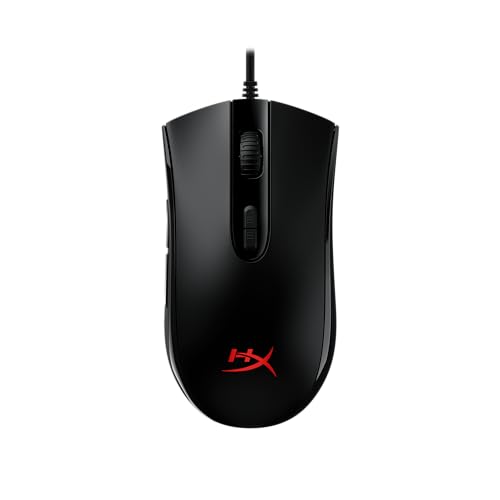
The Pulsefire Core is the pick for players who want a named sensor and a fuller button set without leaving the budget tier. Its Pixart 3327 optical sensor tracks up to 6,200 DPI with no hardware acceleration, seven programmable buttons cover shooter and MOBA bindings alike, and the symmetrical shell suits palm and claw grips. HyperX NGenuity handles RGB, DPI and macros and saves them to onboard memory, while large mouse skates keep the glide smooth. Textured sides help the 87 g body stay planted during quick lifts and repositioning between fights.
Specs
- Sensor: Pixart 3327 optical, native DPI up to 6,200
- Buttons: 7 programmable
- Switches: rated for 20 million clicks
- Lighting: customizable RGB
- Weight: 87 g
- Dimensions: 4.7 x 2.5 inches (length x width)
- Model number: HX-MC004B
- Software: HyperX NGenuity, onboard memory
- Connection: wired USB
Best for: players who want seven buttons, RGB and a named Pixart sensor
Watch out for: the 6,200 DPI ceiling is the lowest here, even though it covers real gaming settings
ASIN: B07H3GFJJ2
Razer DeathAdder Essential
The DeathAdder Essential exists for hands the compact mice leave unsupported. Its right-handed ergonomic shell is longer and taller, with a curved back that fills the palm and rubber side grips that keep control during long sessions. The 6,400 DPI optical sensor covers every realistic sensitivity setting, five programmable buttons handle the essentials, and Razer’s mechanical switches give the main clicks a firm, deliberate feel. Players who rest their whole hand on the mouse and move in broad, steady sweeps will find this the most natural fit in the guide, especially in slower tactical shooters and single-player games.
Specs
- Sensor: optical, up to 6,400 DPI
- Buttons: 5 programmable
- Switches: Razer mechanical switches
- Grips: rubber side grips
- Model number: RZ01-03850100-R3U1
- Dimensions: 5 x 2.43 inches (length x width)
- Connection: wired
- Software: Razer Synapse
- Lighting: single-color green logo LED
Best for: palm-grip players and larger hands wanting an ergonomic shape
Watch out for: right-handed only, and the larger shell is a poor match for fingertip grip
ASIN: B094PS5RZQ
ASUS TUF Gaming M3 Gen II

The TUF Gaming M3 Gen II is the lightest mouse here, and that 59 g build is its whole argument: quick stops, fast direction changes and low fatigue for fingertip and claw players in fast shooters. Its optical sensor reaches 8,000 DPI, six programmable buttons cover the essentials, and the right-handed ergonomic shell adds durability touches rarely seen at this level, with IP56 dust and water resistance and an ASUS Antibacterial Guard coating. PTFE feet keep the glide smooth, and the wired USB connection needs no battery or receiver.
Specs
- Sensor: optical, up to 8,000 DPI
- Buttons: 6 programmable
- Weight: 59 g
- Resistance: IP56 dust and water resistance
- Coating: ASUS Antibacterial Guard
- Shape: right-handed ergonomic
- Lighting: RGB
- Connection: wired USB
- Compatibility: PC and Mac
Best for: fingertip and claw players who prioritize the lightest mouse for fast shooters
Watch out for: the right-handed shell does not suit left-handed players
ASIN: B0C1T2HL7L
Redragon M711 Cobra

The M711 Cobra is the value maximalist of the group: seven programmable buttons, RGB backlighting with multiple effects, and DPI that adjusts in fine steps from a single button press, all in a sculpted right-handed shell. Five DPI presets ship ready at 500, 1,000, 2,000, 3,000 and 5,000, and the range can be fine-tuned in steps of 100 up to 10,000, which suits players who swap between genres often. The braided cable and textured grip keep it feeling more expensive than it is. MOBA and MMO players who bind abilities to the mouse get the most from this one.
Specs
- Sensor: optical, adjustable 100 to 10,000 DPI
- DPI presets: 500, 1,000, 2,000, 3,000 and 5,000, adjustable in steps of 100
- Buttons: 7 programmable
- Tracking: 100 IPS maximum tracking speed, 20G acceleration
- Lighting: RGB backlight, 16.8 million colors
- Dimensions: 5.0 x 2.6 x 1.6 inches
- Cable: 1.8 m braided fiber
- Connection: wired USB
Best for: MOBA and MMO players who want extra buttons and RGB on the tightest budget
Watch out for: software is a separate download from Redragon rather than a polished suite
ASIN: B0751D11BL
Which One Fits Your Situation
You are building your first gaming PC
Start with the Logitech G203 LIGHTSYNC. It is the safest shape in the guide, the software is the easiest to learn, and its sensor and switches leave nothing obvious to upgrade for a long while. Spend the money you save on a decent mouse pad instead of chasing features you have not yet learned to miss.
You swap between shooters and MOBAs
Take the HyperX Pulsefire Core. Its seven programmable buttons hold a push-to-talk key, a melee bind and ability shortcuts at once, the Pixart 3327 sensor stays honest at the sensitivities both genres use, and NGenuity saves your DPI steps and macros to onboard memory. One mouse then covers a ranked shooter evening and a MOBA session without rebinding everything between games.
Your hand aches after long sessions
Choose the Razer DeathAdder Essential. Its tall, curved ergonomic shell supports a relaxed palm grip instead of forcing your fingers to hover, and the rubber side grips reduce the squeeze needed to lift and reposition it. If your current mouse is a small bundled model, the size jump alone usually explains the discomfort.
You play fast shooters with a fingertip grip
Pick the ASUS TUF Gaming M3 Gen II. At 59 g it starts and stops with the least effort here, the 8,000 DPI optical sensor covers every sensitivity a shooter player realistically sets, and the light right-handed shell keeps long flick-heavy sessions from tiring your hand. Pair it with a large cloth pad to give those quick movements room.
Common Mistakes
- Buying by the highest DPI number, when sensor cleanliness at 800 to 3,200 DPI is what you will actually feel in game.
- Ignoring hand size, then blaming aim when a mouse that is too small or too large forces an awkward grip.
- Chasing the lightest headline weight without checking the shape, since a light shell that fights your grip still aims badly.
- Assuming more buttons always helps; extra buttons in the wrong place cause misclicks until you relearn the shell.
- Forgetting the mouse pad, since a worn or glossy desk surface can make a good sensor track badly.
Frequently Asked Questions
Is a wired mouse still fast enough for competitive shooters?
Yes. Every pick in this guide is wired, so the signal travels straight down the cable with no receiver, pairing or battery in between, and wired polling at this tier is built for competitive play. You also never pause a session to charge or swap a battery. Cable management is the only trade-off, and a little slack or a simple bungee removes most of the drag players worry about.
How much DPI do I actually need for gaming?
Far less than the boxes suggest. Most shooter players use 400 to 1,600 DPI with in-game sensitivity doing the rest of the work, and strategy or MOBA players rarely pass 3,200. Every mouse here clears those ranges comfortably. Treat anything above roughly 8,000 DPI as headroom for very high-resolution displays, not as a quality measure.
Which grip style should I choose a mouse for?
Match the mouse to the grip you already use rather than retraining your hand. Palm players who rest their whole hand down suit the DeathAdder Essential. Claw and fingertip players, who steer with their fingers and prefer quick lifts, suit the lighter G203, Pulsefire Core and TUF Gaming M3 Gen II. Your current office mouse is a good test: copy its grip, then check which shape above supports it.
Can these mice work on a console or a Mac?
The wired picks connect over USB and work for basic pointing on consoles that support mouse input and on Macs, and the TUF Gaming M3 Gen II lists PC and Mac support on its listing, though companion software for remapping buttons is generally a Windows download. Each one needs a free USB port, since none of them pairs over Bluetooth. Check your platform’s game support too, since many console titles limit mouse use to menus or specific modes.
FAQ
Is a wired mouse still fast enough for competitive shooters?
How much DPI do I actually need for gaming?
Which grip style should I choose a mouse for?
Can these mice work on a console or a Mac?
More from Amazon
Programs that pair well with the guide above. Offers and eligibility are set by Amazon and may change.
Free shipping on eligible items, Prime Video and more. Eligible new members can start with a free trial.
Start a Prime free trialAd-free music streaming. Eligible new subscribers can start with a free trial.
Try Music Unlimited freeA Prime membership for ages 18-24 with a trial period. Eligibility is set by Amazon.
See Prime for Young AdultsAudiobooks and podcasts to listen to on the go. Eligible new members can start with a free trial.
Try Audible freeAs an Amazon Associate we earn from qualifying purchases.