Our Top Picks
 Razer DeathAdder Essential Ergonomic Wired Gaming Mouse5.01 x 2.86 x 1.69 inches0.3 poundsCheck on Amazon


An affordable gaming mouse has one job above all: track cleanly, feel right in your hand for hours, and keep working through daily play without missing clicks or dragging. The hard part is that the highest sensor number does not always sit in the most comfortable shell, and a mouse that looks fast on paper can still cramp your hand after one long session or stutter on fast flicks. The real choice is matching sensor, shape, weight, and connection to the games you actually play, not chasing the biggest number on the box.
This guide is for first-time PC gamers building a setup, players upgrading from a bundled office mouse, laptop gamers who want one mouse for class and for matches, and competitive players who need a reliable spare. The four mice below were chosen from the names and specifications on their Amazon listings, covering a button-heavy wired pick, a compact wired pick, a wireless pick, and an ergonomic classic.
Quick Picks
As an Amazon Associate, we earn from qualifying purchases.
| Product | Best for | Key spec from title |
|---|---|---|
| Logitech G502 HERO | Button-heavy play and many binds | HERO 25K sensor, 25,600 DPI |
| Logitech G203 LIGHTSYNC | A first gaming mouse for smaller hands | 8,000 DPI sensor, LIGHTSYNC RGB |
| Logitech G305 LIGHTSPEED | Wireless play without a cable | HERO 12K sensor, 12,000 DPI, 250-hour battery |
| Razer DeathAdder Essential | Long sessions with a palm grip | 6,400 DPI sensor, ergonomic right-handed shape |
How to Choose
Start with the sensor, then stop chasing DPI
A sensor reports where your hand moves, and every mouse in this guide does that cleanly. The G203 tops out at 8,000 DPI, the DeathAdder Essential at 6,400, the G305 at 12,000, and the G502 HERO at 25,600, yet all four track smoothly because their sensors hold a straight line without smoothing or acceleration. What separates a good sensor from a weak one is fast flicks: a weak sensor spins out or jitters when you swipe hard, while a strong one keeps reporting. Unless you play on very low sensitivity with big arm movements, any of these four has more headroom than you need, so pick shape first and let the sensor decide.
Match the shape to your grip and hand size
Your grip decides which shape feels right. Palm grips rest the whole hand on the mouse and suit tall, full shapes like the DeathAdder Essential and the G502 HERO, while claw grips arch the fingers and suit compact symmetric bodies like the G305. Fingertip grips barely touch the mouse and favor light, short bodies like the G203. Hand size matters just as much: a short mouse can feel cramped in a large palm, and a long mouse can feel like a brick in a small hand. Measure from wrist to middle fingertip and compare it with the listing dimensions, and pick a shape you can hold for an hour without thinking about it.
Decide between wired and wireless
A wired mouse never needs a battery and never drops its link, which keeps the G502 HERO and the G203 popular for competitive play. The trade is the cable: a stiff cord drags across the desk and tugs at your aim, so pick a light, flexible cable and give it slack with a bungee or a clip. A wireless mouse like the G305 removes that drag, reports at 1 millisecond, and runs up to 250 hours on a single AA battery, but it adds a receiver to keep track of and a battery to swap. The G305 has no Bluetooth fallback, so a lost receiver means no connection. Pick wired for zero upkeep and wireless for a clean desk.
Count the buttons you will actually press
Extra buttons only help if you press them, so count the binds your games really need first. The DeathAdder Essential and the G203 give you five and six programmable buttons, which cover movement, DPI switching, and core abilities for most players. The G305 matches that with six buttons and adds wireless freedom, while the G502 HERO jumps to eleven buttons plus a dual-mode wheel for players who map whole ability bars. All four store settings in on-board memory and program through free software, G HUB for the Logitech mice and Synapse 3 for the Razer. Start with two or three binds, learn them until they feel automatic, and only then add more.
The 4 Best Options
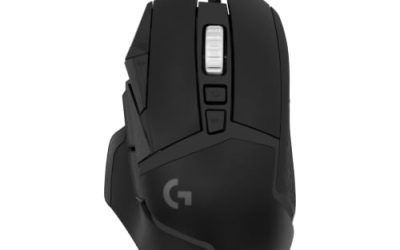
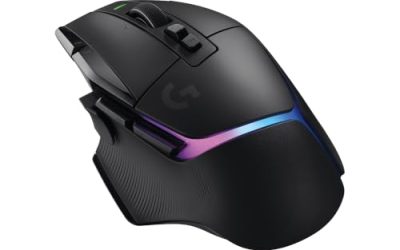
Logitech G502 HERO

The G502 HERO is the button-heavy pick of this guide, and it suits players who want a mouse that can carry a whole loadout of binds. Eleven programmable buttons, a dual-mode scroll wheel that flips between notched steps and free spin, and five removable 3.6-gram weights let you tune both the controls and the heft to your hand. The HERO 25K sensor tracks up to 25,600 DPI with no smoothing, and on-board memory holds your profiles when you move between machines. At 121 grams before weights it is the heaviest mouse here, so it fits palm grips and larger hands best.
Specs
- HERO 25K sensor, up to 25,600 DPI
- 11 programmable buttons
- Dual-mode hyper-fast scroll wheel
- Five removable 3.6g tuning weights
- On-board memory, model 910-005469
- 121 grams, 1.57 x 2.95 x 5.2 inches
Best for: Button-heavy play, MMO and strategy games, and larger hands.
Watch out for: At 121 grams it is heavy, and the large shape can crowd small hands; owner reports also mention switch double-clicking over time, so keep the return window in mind.
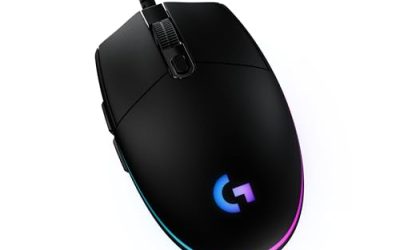
Logitech G203 LIGHTSYNC
The G203 LIGHTSYNC is the compact wired pick, built for smaller hands and for players buying their first gaming mouse. Its 8,000 DPI optical sensor tracks cleanly for everyday play, six programmable buttons cover the binds most players actually use, and LIGHTSYNC RGB lights the rear band and logo in any color you set in G HUB. At 85 grams with a 116.6 mm body it stays nimble in claw and fingertip grips, and on-board memory keeps your settings on the mouse itself.
Specs
- 8,000 DPI gaming-grade optical sensor
- LIGHTSYNC RGB lighting
- 6 programmable buttons
- On-board memory, model 910-005790
- 85 grams, 116.6 x 62.15 x 38.2 mm
- Wired USB, 2.1 m cable
Best for: First gaming mice and smaller hands.
Watch out for: The small body can feel cramped for large palms, and the sensor can spin out on very fast swipes at low sensitivity.
Logitech G305 LIGHTSPEED
The G305 LIGHTSPEED is the wireless pick, and it proves that cutting the cable does not mean giving up responsiveness. Its HERO 12K sensor reaches 12,000 DPI, the LIGHTSPEED link reports at 1 millisecond, and a single AA battery runs for up to 250 hours, so you can go weeks between battery swaps. The USB receiver stows inside the body for travel, six programmable buttons handle your binds, and the 99-gram frame suits claw and palm grips alike.
Specs
- HERO 12K sensor, 200 to 12,000 DPI
- LIGHTSPEED wireless, 1 ms report rate
- Up to 250 hours on one AA battery
- 6 programmable buttons, on-board memory
- 99 grams, built-in USB receiver storage
- Model 910-005280
Best for: Wireless play on a desk or in a laptop bag.
Watch out for: There is no Bluetooth fallback if the USB receiver is lost, and the single AA battery adds weight compared with rechargeable mice.
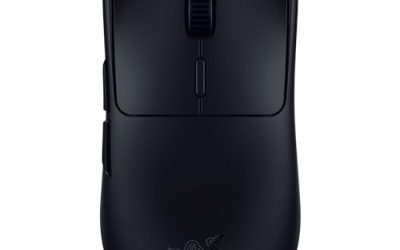
Razer DeathAdder Essential
The DeathAdder Essential is the ergonomic classic of the group, built around the right-handed palm shape Razer has used for years. Its 6,400 DPI optical sensor tracks steadily, five programmable buttons cover the essentials, and mechanical switches rated to 10 million clicks give the buttons a crisp, consistent feel. Rubber side grips hold your thumb and fingers in place, the 96-gram body stays comfortable through long sessions, and Razer Synapse 3 handles remapping and lighting.
Specs
- True 6,400 DPI optical sensor
- 5 programmable buttons
- Mechanical switches rated to 10 million clicks
- Rubber side grips, right-handed ergonomic shape
- 96 grams, 127 x 73 x 43 mm, 1.8 m cable
- 1000 Hz polling, Razer Synapse 3, model RZ01-03850100-R3U1
Best for: Long sessions with a palm grip.
Watch out for: Razer lists this model as Legacy, so confirm the listing is the current Classic Black model RZ01-03850100-R3U1 before ordering; right-handed only.
Which One Fits Your Situation
You play MMO or strategy games with lots of keys
Pick the G502 HERO. Eleven programmable buttons put abilities, items, and macros under your thumb and fingers, and the dual-mode wheel flips to free spin for fast scrolling through long inventories. The tunable weights let you settle the heft exactly where you like it, and on-board memory carries your setup to any machine you sit at.
You want your first gaming mouse
Pick the G203 LIGHTSYNC. It is small, light, and simple to set up, with six buttons and RGB lighting that make the jump from an office mouse feel like a real upgrade. The 8,000 DPI sensor handles everyday play without fuss, and the compact shape suits smaller hands and claw grips.
You hate cables and want one mouse for laptop and desk
Pick the G305 LIGHTSPEED. The wireless link feels wired at 1 millisecond, the receiver hides inside the body when you pack up, and a single AA battery runs for up to 250 hours, so the mouse is always ready. At 99 grams it travels well in a laptop bag on trips.
You play long sessions and want a comfortable palm shape
Pick the DeathAdder Essential. The tall, right-handed ergonomic body fills a palm grip naturally, the rubber side grips keep your fingers planted, and the 96-gram weight stays easy on the wrist through long evenings of play every night. Five buttons keep things simple while Synapse 3 handles remapping, lighting, and the rest.
Common Mistakes
- Buying the highest DPI number on the box instead of checking whether the shape fits your grip and hand size.
- Picking a large, heavy mouse for small hands, or a tiny mouse for a large palm, then blaming the sensor for the discomfort.
- Forgetting the cable: a stiff cord drags and fights your aim, while a wireless mouse needs a charged battery and a safe spot for its receiver.
- Mapping every button on day one instead of learning two or three core binds first and adding more once they feel natural.
- Assuming every listing with the same model name is the same variant — check the model number and color before ordering, since variants share names.
Frequently Asked Questions
How much DPI do I actually need?
Most players settle between 800 and 3,200 DPI, and a higher ceiling is sensitivity, not accuracy. What matters more is a sensor that tracks straight without smoothing or spin-outs on fast flicks. All four mice here clear that bar, so choose by shape and connection first and treat DPI as a secondary number.
Is wireless as fast as wired for gaming?
A modern 1-millisecond wireless link like LIGHTSPEED feels wired to most players, and the G305 proves it with a 1-millisecond report rate. Keep the receiver close to the mouse, keep the battery fresh, and the link stays consistent. If you still worry about latency, a wired mouse removes the question entirely.
What grip style should I use?
Palm, claw, and fingertip grips describe how your hand meets the mouse, and the right one is the one that feels natural after an hour of play. Large, tall shapes suit palm grips, compact symmetric shapes suit claw and fingertip grips, and small hands usually prefer a shorter body. Try the shape, not the label.
Do I need software for a gaming mouse?
You need it once, to set DPI steps, remap buttons, and tune lighting, and then on-board memory stores those settings on the mouse. Logitech mice use G HUB and the DeathAdder uses Razer Synapse 3, both free. Without software the mouse still works, but you lose the custom binds and lighting.
FAQ
How much DPI do I actually need?
Is wireless as fast as wired for gaming?
What grip style should I use?
Do I need software for a gaming mouse?
More from Amazon
Programs that pair well with the guide above. Offers and eligibility are set by Amazon and may change.
Free shipping on eligible items, Prime Video and more. Eligible new members can start with a free trial.
Start a Prime free trialAd-free music streaming. Eligible new subscribers can start with a free trial.
Try Music Unlimited freeA Prime membership for ages 18-24 with a trial period. Eligibility is set by Amazon.
See Prime for Young AdultsAudiobooks and podcasts to listen to on the go. Eligible new members can start with a free trial.
Try Audible freeAs an Amazon Associate we earn from qualifying purchases.