Our Top Picks
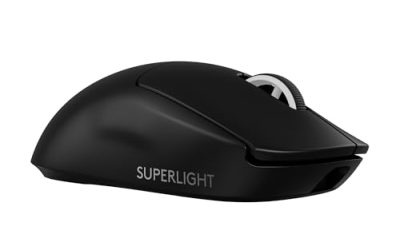
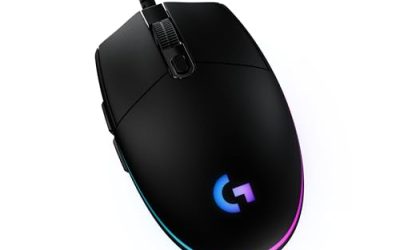
 Logitech G Pro X Superlight 2 Lightspeed WirelessClassic1.57 x 2.5 x 4.92 inches0.1 poundsCheck on Amazon
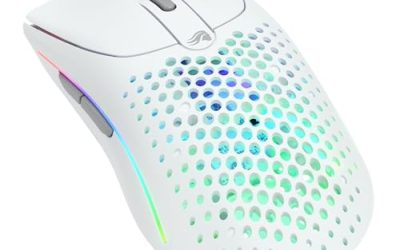
 Razer DeathAdder V3 Pro Wireless Gaming Mouse1000 Hz5.01 x 2.65 x 1.69 inches0.1 poundsCheck on Amazon
Disclosure: As an Amazon Associate, we earn from qualifying purchases.
Our top pick: Logitech G502 X LIGHTSPEED. Runner-up: Logitech G PRO X Superlight 2.
A gaming mouse with long battery life changes how a setup feels day to day. Instead of planning a session around a charging cable, you can play for days, and plug it in when it suits you.
Battery life depends on the connection and polling rate: a mouse on a fast 2.4 GHz link at a high polling rate runs down sooner than the same mouse on Bluetooth at a low rate. This guide states the mode alongside each figure, so you can compare like with like.
The five mice below are all wireless, rechargeable over USB-C, with a manufacturer-stated battery life, a high-DPI optical sensor and programmable buttons.
Quick Picks
- Logitech G502 X LIGHTSPEED — Best overall: up to 140 hours of battery life with 13 programmable controls.
- Logitech G PRO X Superlight 2 — Best lightweight pick: 60 grams with up to 95 hours of battery life.
- Razer DeathAdder V3 Pro — Best ergonomic pick: a right-handed shape with up to 90 hours of battery life.
- SteelSeries Aerox 5 Wireless — Best for Bluetooth use: up to 180 hours in Bluetooth and low-power wireless mode.
- Razer Basilisk V3 Pro 35K — Best for long Bluetooth sessions: up to 210 hours on Bluetooth.
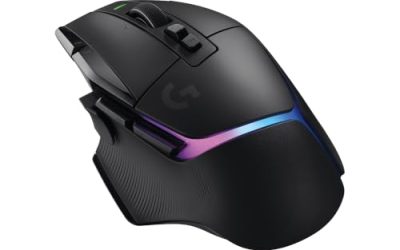
Logitech G502 X LIGHTSPEED

OUR TOP PICK
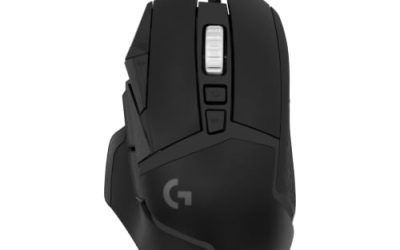
The Logitech G502 X LIGHTSPEED is the top pick because it pairs the longest wireless battery figure here with the most controls. As stated on the Amazon listing, its battery lasts up to 140 hours under constant motion, which is the figure Logitech gives for its wireless connection in regular use.
It is also the most button-heavy mouse in this guide, with 13 programmable controls as stated on the listing, giving you room to map abilities, macros and DPI shifts. It uses the HERO 25K sensor, with a DPI range of 100 to 25,600 as stated on the listing, and LIGHTFORCE hybrid optical-mechanical switches. Five on-board memory profiles let you carry settings with the mouse.
At 102 grams, as stated on the listing, it is the heaviest mouse in this guide. It charges over USB-C and is POWERPLAY compatible, so it can charge wirelessly on a compatible mat.
Specs
– Model: 910-006178
– Weight: 102 g (3.59 oz), as stated on the listing
– Sensor: HERO 25K, 100 to 25,600 DPI, as stated on the listing
– Battery life: up to 140 hours under constant motion, as stated on the listing
– Programmable controls: 13, as stated on the listing
– Charging: USB-C, POWERPLAY compatible, as stated on the listing
– Switches: LIGHTFORCE hybrid optical-mechanical, as stated on the listing
– On-board memory profiles: 5, as stated on the listing
Pros
– Longest stated wireless battery life in this guide, at up to 140 hours
– 13 programmable controls, the most in this guide
– USB-C charging and POWERPLAY compatibility
– Five on-board memory profiles
Cons
– Heaviest mouse in this guide at 102 grams
– Its larger shape and button layout take more adjustment than a simpler mouse
Logitech G PRO X Superlight 2
The Logitech G PRO X Superlight 2 is the lightweight pick in this guide, and it shows that a light mouse can still last a long time between charges. It weighs 60 grams as stated on the listing, and its battery is stated to last up to 95 hours. It is built for players who want the mouse to feel almost absent in the hand.
The sensor is the HERO 2, with a DPI range up to 44,000 as stated on the listing, and the mouse supports polling up to 8 kHz over LIGHTSPEED wireless. A higher polling rate means the mouse reports its position more often, and it also draws more power, so the stated battery figure of up to 95 hours should be read alongside the way you set the mouse up.
With five programmable buttons as stated on the listing, the Superlight 2 keeps its controls simple, which is part of how it stays so light. It uses LIGHTFORCE hybrid switches, the same switch family as the G502 X LIGHTSPEED above, and it charges over USB-C. It is also POWERPLAY compatible, so it can charge on a compatible POWERPLAY mat. The shape is symmetrical and low, which suits a claw or fingertip grip.
Specs
– Model: 910-006628
– Weight: 60 g, as stated on the listing
– Sensor: HERO 2, up to 44,000 DPI, as stated on the listing
– Polling rate: up to 8 kHz over LIGHTSPEED, as stated on the listing
– Battery life: up to 95 hours, as stated on the listing
– Programmable buttons: 5, as stated on the listing
– Charging: USB-C, POWERPLAY compatible, as stated on the listing
– Switches: LIGHTFORCE hybrid switches, as stated on the listing
Pros
– Very light at 60 grams
– Up to 95 hours of battery life for a mouse this light
– Sensor up to 44,000 DPI with polling up to 8 kHz
– USB-C charging and POWERPLAY compatibility
Cons
– Only five programmable buttons, fewer than the button-heavy mice in this guide
– Running it at its highest polling rate will use the battery sooner
Razer DeathAdder V3 Pro
The Razer DeathAdder V3 Pro is the ergonomic pick in this guide. It is a right-handed ergonomic mouse, shaped to fill the palm and support the hand during long sessions, and it weighs 63 grams as stated on the listing. That makes it nearly as light as the Superlight 2, with a shape that suits a palm or relaxed claw grip. Its battery is stated to last up to 90 hours at 1,000 Hz, which is the polling rate the figure is tied to on the listing.
The sensor is the Focus Pro 30K optical sensor, with a DPI range up to 30,000 as stated on the listing. It uses Gen-3 optical switches and HyperSpeed Wireless, Razer’s low-latency 2.4 GHz wireless connection. The mouse has five programmable buttons as stated on the listing, keeping the layout simple. It charges over USB-C.
It is the pick for a player who wants comfort first, with a battery that covers many sessions before charging.
Specs
– Model: RZ01-04630100-R3U1
– Weight: 63 g, as stated on the listing
– Sensor: Focus Pro 30K optical sensor, up to 30,000 DPI, as stated on the listing
– Battery life: up to 90 hours at 1,000 Hz, as stated on the listing
– Switches: Gen-3 optical switches, as stated on the listing
– Wireless: HyperSpeed Wireless, as stated on the listing
– Programmable buttons: 5, as stated on the listing
– Charging: USB-C, as stated on the listing
– Shape: right-handed ergonomic, as stated on the listing
Pros
– Light at 63 grams for an ergonomic mouse
– Right-handed ergonomic shape for palm and relaxed claw grips
– Up to 90 hours of battery life at 1,000 Hz
– USB-C charging
Cons
– Only five programmable buttons
– Shorter stated battery life than the G502 X LIGHTSPEED and the Basilisk V3 Pro 35K
SteelSeries Aerox 5 Wireless

The SteelSeries Aerox 5 Wireless is the most versatile mouse in this guide when it comes to connections, and its battery figures need to be read with the connection in mind. As stated on the listing, it lasts up to 180 hours in Bluetooth and low-power 2.4 GHz mode, and up to 80 hours in default 2.4 GHz mode. The headline figure of up to 180 hours applies to the low-power modes, while the figure for regular 2.4 GHz gaming use is up to 80 hours.
The Aerox 5 Wireless weighs 74 grams as stated on the listing, between the ultralight mice and the heavier G502 X LIGHTSPEED. It uses the TrueMove Air optical sensor, with a DPI range up to 18,000 as stated on the listing, and Quantum 2.0 Wireless, which covers both 2.4 GHz and Bluetooth 5.0. Bluetooth is a lower-power connection that suits everyday use and travel, while 2.4 GHz is the faster connection for gaming.
With nine programmable buttons as stated on the listing, the Aerox 5 Wireless sits between the simple five-button mice and the button-heavy models in this guide. It is also rated IP54 for dust and splash resistance as stated on the listing, and its fast-charge feature is stated as 15 minutes of charging for 40 hours of use.
Specs
– Model: 62406
– Weight: 74 g, as stated on the listing
– Sensor: TrueMove Air optical sensor, up to 18,000 DPI, as stated on the listing
– Battery life: up to 180 hours in Bluetooth and low-power 2.4 GHz mode, up to 80 hours in default 2.4 GHz mode, as stated on the listing
– Programmable buttons: 9, as stated on the listing
– Wireless: Quantum 2.0 Wireless, 2.4 GHz and Bluetooth 5.0, as stated on the listing
– Resistance: IP54 dust and splash resistance, as stated on the listing
– Fast charge: 15 minutes for 40 hours of use, as stated on the listing
Pros
– Up to 180 hours in Bluetooth and low-power wireless mode
– Dual 2.4 GHz and Bluetooth 5.0 connections
– Nine programmable buttons
– Fast charge: 15 minutes for 40 hours of use
Cons
– Up to 80 hours in default 2.4 GHz mode, so the headline figure does not apply to regular gaming use
– Lower maximum DPI than the other mice in this guide
Razer Basilisk V3 Pro 35K

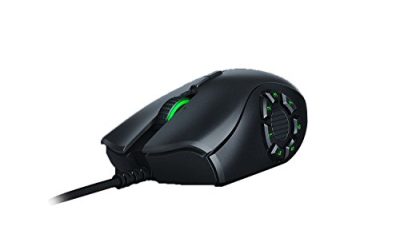
The Razer Basilisk V3 Pro 35K is the most feature-heavy mouse in this guide, and it also has one of the longest battery figures here when used over Bluetooth. As stated on the listing, its battery lasts up to 140 hours on HyperSpeed Wireless at 1,000 Hz and up to 210 hours on Bluetooth. The Bluetooth figure is the longest in this guide, and the wireless figure matches the G502 X LIGHTSPEED at up to 140 hours.
The sensor is the Focus Pro 35K Optical Sensor Gen-2, with a DPI range up to 35,000, a tracking speed of 750 IPS and acceleration of 70 G as stated on the listing. It has 13 customizable controls as stated on the listing, the same count as the G502 X LIGHTSPEED, and a HyperScroll Tilt Wheel, which can switch between a smooth free-spin mode and a tactile stepped mode and can tilt for horizontal scrolling. It uses Gen-3 optical switches, and it connects over HyperSpeed Wireless, Bluetooth or wired USB-C.
The Basilisk V3 Pro 35K is larger and more sculpted than the ultralight models here. The white model used here is model RZ01-05240200-R3U1, and the black version uses a different ASIN, so check the listing for the colour you want.
Specs
– Model: RZ01-05240200-R3U1 (White)
– Sensor: Focus Pro 35K Optical Sensor Gen-2, up to 35,000 DPI, 750 IPS, 70 G, as stated on the listing
– Battery life: up to 140 hours on HyperSpeed Wireless at 1,000 Hz, up to 210 hours on Bluetooth, as stated on the listing
– Customizable controls: 13, as stated on the listing
– Scroll wheel: HyperScroll Tilt Wheel, as stated on the listing
– Switches: Gen-3 optical switches, as stated on the listing
– Connections: HyperSpeed Wireless, Bluetooth, wired USB-C, as stated on the listing
Pros
– Up to 210 hours on Bluetooth, the longest Bluetooth figure in this guide
– Up to 140 hours on HyperSpeed Wireless at 1,000 Hz
– 13 customizable controls with a HyperScroll Tilt Wheel
– Three connection options: wireless, Bluetooth and wired USB-C
Cons
– Larger and more sculpted than the ultralight mice in this guide
– The white model and the black model use different ASINs, so check the colour listing before buying
How to Choose
Begin with the battery figure and the mode it applies to. The G502 X LIGHTSPEED states up to 140 hours under constant motion over wireless, and the Basilisk V3 Pro 35K states up to 140 hours on HyperSpeed Wireless at 1,000 Hz, so those two lead on wireless battery life. The Aerox 5 Wireless states up to 180 hours in Bluetooth and low-power mode but up to 80 hours in default 2.4 GHz mode, and the Basilisk V3 Pro 35K states up to 210 hours on Bluetooth. Compare the figure for the mode you will use most.
Next, weigh weight against battery life. The Superlight 2 weighs 60 grams and lasts up to 95 hours, the DeathAdder V3 Pro weighs 63 grams and lasts up to 90 hours at 1,000 Hz, and the Aerox 5 Wireless weighs 74 grams with up to 80 hours in default wireless mode. The G502 X LIGHTSPEED weighs 102 grams and lasts up to 140 hours, so it trades weight for battery life and controls. A light mouse is easier to move and lift often, while a heavier mouse can feel steadier.
Then look at buttons and shape. The G502 X LIGHTSPEED and the Basilisk V3 Pro 35K each have 13 programmable or customizable controls, which suits a player who maps many abilities to the mouse. The Aerox 5 Wireless has nine programmable buttons, a middle ground, while the Superlight 2 and the DeathAdder V3 Pro each have five, for a simple layout. Shape matters too: the DeathAdder V3 Pro is right-handed ergonomic for palm and relaxed claw grips, the Basilisk V3 Pro 35K is larger and sculpted for a palm grip, and the Superlight 2 is symmetrical and low for claw and fingertip grips.
Finally, check charging. Every mouse in this guide charges over USB-C. The two Logitech mice are also POWERPLAY compatible, and the Aerox 5 Wireless has a fast-charge feature stated as 15 minutes for 40 hours of use. Before buying, confirm the model and colour on the listing, especially for the Basilisk V3 Pro 35K, where white and black use different ASINs.
FAQs
How long should a wireless gaming mouse battery last?
It depends on the mouse and the mode you use it in. The mice in this guide state figures from up to 80 hours in default 2.4 GHz mode to up to 210 hours on Bluetooth, with the G502 X LIGHTSPEED and the Basilisk V3 Pro 35K both stating up to 140 hours over their fast wireless connections. Higher polling and constant motion use the battery sooner, so treat the stated figure as a guide for the conditions given.
Does using Bluetooth make a gaming mouse battery last longer?
In this guide, yes, for the mice that state separate figures. The Aerox 5 Wireless states up to 180 hours in Bluetooth and low-power mode against up to 80 hours in default 2.4 GHz mode, and the Basilisk V3 Pro 35K states up to 210 hours on Bluetooth against up to 140 hours on HyperSpeed Wireless at 1,000 Hz. Bluetooth draws less, but it is not the connection for fast competitive play, where the lower latency of a 2.4 GHz link matters more.
Is a lighter gaming mouse always better for long sessions?
Not always. A lighter mouse, such as the 60-gram Superlight 2 or the 63-gram DeathAdder V3 Pro, is easier to move and lift repeatedly, which can reduce fatigue in fast games. A heavier mouse, such as the 102-gram G502 X LIGHTSPEED, can feel steadier and can carry a larger battery and more buttons. Match weight and shape to your hand first, then check the battery figure fits how you play.
Conclusion
For most players who want a gaming mouse with long battery life, the Logitech G502 X LIGHTSPEED is the top pick, with up to 140 hours of battery life under constant motion and 13 programmable controls. The Logitech G PRO X Superlight 2 is the runner-up for players who want a light mouse, at 60 grams with up to 95 hours of battery life. The Razer DeathAdder V3 Pro suits a right-handed ergonomic grip, the SteelSeries Aerox 5 Wireless suits a player who switches between gaming and Bluetooth use, and the Razer Basilisk V3 Pro 35K suits a player who wants the longest Bluetooth battery figure and the most controls. Before buying, check the battery figure for the mode you will use and the model and colour on the listing.
FAQ
How long should a wireless gaming mouse battery last?
Does using Bluetooth make a gaming mouse battery last longer?
Is a lighter gaming mouse always better for long sessions?
More from Amazon
Programs that pair well with the guide above. Offers and eligibility are set by Amazon and may change.
Free shipping on eligible items, Prime Video and more. Eligible new members can start with a free trial.
Start a Prime free trialAd-free music streaming. Eligible new subscribers can start with a free trial.
Try Music Unlimited freeA Prime membership for ages 18-24 with a trial period. Eligibility is set by Amazon.
See Prime for Young AdultsAudiobooks and podcasts to listen to on the go. Eligible new members can start with a free trial.
Try Audible freeAs an Amazon Associate we earn from qualifying purchases.