Key takeaways
- Find the best gaming mouse for RTS games, with button-rich designs for unit groups and macros, plus the sensor and comfort checks that matter for every matchup.
Real-time strategy games ask the mouse to do two jobs at once: point precisely at tiny units and fire off grouped commands without a pause. A shooter mouse built for flick shots can feel thin here, because the hand needs a stable grip for long sessions and enough buttons to hold control groups, camera jumps and production hotkeys. The real decision is how many commands belong on the mouse at all, since a side panel with a dozen buttons helps only when the thumb can find each one by feel in the middle of a battle.


This guide is for StarCraft and Age of Empires players, base builders who run long campaigns, and anyone who wants a button-rich mouse for strategy play. Each pick below was chosen from the name and specifications on its Amazon product page, so every claim about buttons, sensor and weight traces back to the listing rather than a guess.
Quick Picks
As an Amazon Associate we earn from qualifying purchases.
| Product | Best for | Key spec from title |
|---|---|---|
| Razer Naga Trinity | Swappable side panels for any command load | 16,000 DPI sensor, up to 19 buttons |
| Corsair Scimitar RGB Elite | A full 12-button grid for control groups | 18,000 DPI sensor, 17 buttons |
| Logitech G600 | Twenty buttons for heavy macro users | 20 programmable buttons, 12-button panel |
| Logitech G502 HERO | A balanced pick for strategy and shooters | HERO 25K sensor, 25,600 DPI, 11 buttons |
How to Choose
Button layout and thumb reach
Buttons are the heart of an RTS mouse, yet the count alone says little about how the mouse feels in a battle. A 12-button side grid suits players who map every control group to the thumb, while a smaller cluster of four to six buttons suits players who keep most commands on the keyboard. The panel shape matters as much as the count: raised, separated keys let the thumb tell them apart by touch, while a flat grid invites misclicks when the action speeds up. Before buying, picture the thumb moving across the panel during a fight and ask whether each button sits within easy reach.
Sensor accuracy at low speeds
RTS play moves the mouse in small, careful steps rather than fast flicks, so the sensor must track cleanly at low speeds and hold still when the hand pauses over a unit. A modern optical sensor follows slow drags without jitter and keeps the cursor steady during precise box selections. The top DPI number matters less here than stable tracking in the 800 to 1600 DPI band, where most strategy players set their sensitivity. Check the sensor name on the listing and favor a proven optical sensor over a high headline figure.
Comfort for long sessions
Strategy matches can run for an hour or more, so the shell must support the hand through the whole game. A contoured right-handed shape with a thumb rest keeps the wrist neutral during long base-building stretches, while a light shell reduces fatigue when the hand moves constantly between the minimap and the main view. Weight near 100 grams or more often steadies the hand for careful clicks, which is the opposite of the featherweight preference in shooters. Hold the shape in mind and match it to the grip used most.
Software and onboard profiles
Macros turn a button-rich mouse into a real strategy tool, and the software decides how far that goes. A good desktop app lets the buyer record multi-step macros, bind them to any side button and store the setup in profiles for different games. Onboard memory matters when the mouse moves between computers, since the profiles travel with the mouse instead of living on one machine. Check whether the listing names onboard storage and how many profiles it holds before choosing.
The 4 Best Options
Razer Naga Trinity
The Naga Trinity is the most flexible mouse in this set, because its side panel swaps between three layouts. A two-button plate suits players who keep most commands on the keyboard, a seven-button plate covers common control groups, and a twelve-button plate holds a full macro load for heavy strategy sessions. The 5G optical sensor tracks up to 16,000 DPI, and up to nineteen programmable buttons cover unit groups, camera jumps and production queues. Chroma lighting and a contoured right-handed shell round out a mouse that adapts as the buyer’s command style changes.
Specs
- 5G optical sensor, up to 16,000 DPI
- Interchangeable side plates with 2, 7 and 12 buttons
- Up to 19 programmable buttons
- Mechanical mouse switches
- Wired USB connection
Best for: Players who want one mouse that adapts from light to heavy button layouts.
Watch out for: The side plates add small parts to keep track of, so store the unused plates somewhere safe.
Corsair Scimitar RGB Elite
The Scimitar RGB Elite is built for players who want a full command grid under the thumb. Its twelve-button side panel slides forward or back on a Key Slider, so the grid can sit exactly where the thumb rests, and seventeen programmable buttons cover control groups, macros and camera moves. The optical sensor reaches 18,000 DPI, and iCUE software handles macros, lighting and profiles in one place. A contoured shell and textured grip keep the hand steady through long matches, and the wired connection stays constant without charging breaks.
Specs
- Optical sensor, up to 18,000 DPI
- 17 programmable buttons
- 12-button side panel with Key Slider adjustment
- iCUE software for macros and profiles
- Wired USB connection
Best for: Strategy players who map a full set of control groups to the thumb.
Watch out for: The wide shell suits medium to large hands, so small hands should check the grip first.
Logitech G600

The G600 is the classic heavy-button mouse for players who want the most commands on the mouse itself. Twenty programmable buttons include a twelve-button thumb panel and a dedicated G-Shift button that doubles every other button while held, which turns a modest layout into a deep macro board. The laser sensor tracks up to 8,200 DPI, and RGB lighting marks the thumb panel so the buyer can find groups by color. Three onboard profiles store the setup on the mouse, and the sculpted right-handed shape supports long sessions without wrist strain.
Specs
- Laser sensor, up to 8,200 DPI
- 20 programmable buttons
- 12-button thumb panel with G-Shift doubling
- 3 onboard profiles
- Wired USB connection
Best for: Heavy macro users who want the deepest button layout in this set.
Watch out for: The listing can show limited stock from third-party sellers, so confirm the seller and availability on the listing before ordering.
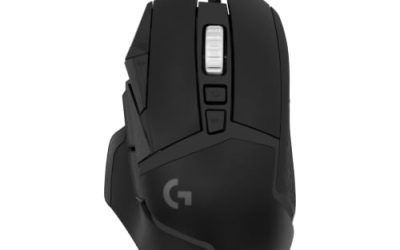
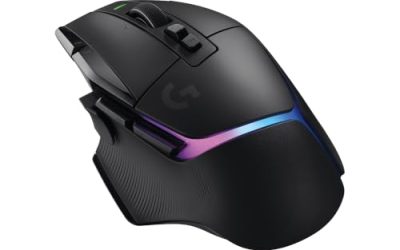
Logitech G502 HERO

The G502 HERO is the balanced pick for players who split time between strategy games and shooters. Eleven programmable buttons hold the most-used control groups and macros without overwhelming the thumb, and the HERO 25K sensor tracks up to 25,600 DPI with clean low-speed accuracy. Five removable weights tune the balance for slow, deliberate clicks or faster map movement. A familiar shape fits medium to large hands, and the wired connection keeps every command steady through long campaigns and quick matches alike.
Specs
- HERO 25K optical sensor, up to 25,600 DPI
- 11 programmable buttons
- 5 removable weights for balance tuning
- LIGHTSYNC RGB lighting
- Wired USB connection
Best for: Players who want a button-rich mouse that still works well in shooters.
Watch out for: The side buttons sit close together, so players with thick thumbs should check the spacing.
Which One Fits Your Situation
You play StarCraft-style games with many control groups
Pick the Scimitar RGB Elite. The sliding twelve-button grid sits exactly under the thumb, and seventeen programmable buttons hold every army group, camera jump and production macro. The iCUE software keeps profiles tidy for each matchup. The Key Slider moves the grid to match the thumb, and the wired connection stays steady through long tournament-style matches without charging breaks.
You switch between strategy and other genres
Pick the Naga Trinity. The swappable side plates change the button load in seconds, so a light two-button plate suits shooters while the twelve-button plate handles heavy strategy sessions. One mouse covers the whole library. The 5G optical sensor tracks up to 16,000 DPI, and the mechanical switches give a crisp click that holds up through years of daily play.
You want the most macros on the mouse itself
Pick the G600. Twenty buttons plus G-Shift doubling give the deepest command board here, and three onboard profiles store different setups for different games. The sculpted shell supports long sessions. The RGB lighting marks the thumb panel so groups can be found by color in the dark, and the twelve-button panel keeps every macro within thumb reach.
You want one mouse for strategy and shooters
Pick the G502 HERO. Eleven buttons cover the essential groups without crowding the thumb, and the proven sensor tracks cleanly in both slow strategy play and fast shooter matches. Five removable weights tune the balance for slow strategy clicks or faster shooter movement, and the familiar shape fits medium to large hands in either genre.
Common Mistakes
- Buying the mouse with the most buttons and then using only three of them, because an unused grid adds weight and width without helping the game.
- Setting DPI too high for precise unit selection, which makes the cursor skip past small units when the hand moves.
- Ignoring the thumb panel shape and discovering mid-match that the buttons blur together under the thumb.
- Skipping macros entirely, which leaves the main advantage of a button-rich mouse unused.
- Forgetting onboard profiles and losing the whole setup when the mouse moves to another computer.
Frequently Asked Questions
How many buttons does an RTS mouse need?
Most strategy players use between six and twelve thumb buttons. A smaller cluster covers control groups and camera jumps, while a full twelve-button grid suits players who bind production and army commands to the mouse. More buttons help only when the thumb can find each one by feel without looking down.
Is a high DPI useful in strategy games?
Not really. RTS play rewards steady, precise movement in the 800 to 1600 DPI band, where small drags select units cleanly. A very high DPI makes the cursor jump across the map with tiny wrist movements, so the sensor quality at low speeds matters far more than the top number.
Do I need macros for RTS games?
Macros help when the same sequence repeats often, such as queuing units or jumping between bases. They are not required, and many strong players use only control groups and camera hotkeys. Start with a few simple macros and add more only when a sequence feels slow by hand.
Can a button-rich mouse work for shooters too?
Yes, though the extra width and weight can slow flick shots. A mouse like the G502 HERO or Naga Trinity with a light plate handles shooters well, while a wide grid mouse suits slower games better. Pick the shape for the genre played most.
A strategy mouse earns its place by putting commands where the thumb already rests, so the buyer should weigh the button layout and comfort first and treat the sensor number as a secondary check. Any of the four picks above handles real-time strategy well, and the right one is the mouse whose panel matches the way its owner actually plays.
FAQ
How many buttons does an RTS mouse need?
Is a high DPI useful in strategy games?
Do I need macros for RTS games?
Can a button-rich mouse work for shooters too?
More from Amazon
Programs that pair well with the guide above. Offers and eligibility are set by Amazon and may change.
Free shipping on eligible items, Prime Video and more. Eligible new members can start with a free trial.
Start a Prime free trialAd-free music streaming. Eligible new subscribers can start with a free trial.
Try Music Unlimited freeA Prime membership for ages 18-24 with a trial period. Eligibility is set by Amazon.
See Prime for Young AdultsAudiobooks and podcasts to listen to on the go. Eligible new members can start with a free trial.
Try Audible freeAs an Amazon Associate we earn from qualifying purchases.