Our Top Picks
 Logitech G Pro X Superlight 2 Lightspeed WirelessClassic1.57 x 2.5 x 4.92 inches0.1 poundsCheck on Amazon


Buying a wireless gaming mouse for your left hand is really a decision about side buttons. Plenty of mice wear an “ambidextrous” label because the shell is symmetrical, yet the thumb buttons still sit on the left flank, where a left-handed grip covers them with ring and pinky fingers instead of a thumb. The real choice is between the few designs with buttons you can move to the right flank and the honest symmetric shells that simply leave your thumb with nothing to press.
This guide serves left-handed FPS players who need a shell that tracks the same in either hand, MOBA and MMO players who refuse to give up thumb buttons, and anyone sharing a desk with a right-hander. Every pick below is wireless, and each one was chosen from the names and specifications printed on its Amazon product page, with button placement checked against how a left hand actually holds the mouse.
Quick Picks
As an Amazon Associate we earn from qualifying purchases
| Product | Best for | Key spec from title |
|---|---|---|
| Logitech G PRO 2 Lightspeed | Left thumb buttons without compromise | Switchable magnetic side buttons |
| Logitech G903 Lightspeed | Button-heavy games and larger hands | HERO 25K sensor, 25,600 DPI |
| Corsair M75 Wireless | Players who swap hands or share a desk | 26,000 DPI Marksman sensor |
| Logitech G PRO X Superlight 2 | Competitive FPS players chasing low weight | 44K DPI sensor, 8 kHz report rate |
| Logitech G305 Lightspeed | A first wireless mouse on a budget | 12,000 DPI, 250-hour battery |
How to Choose
Side buttons decide whether “ambidextrous” is real
A symmetrical shell is only half of left-handed usability. Held in your left hand, your thumb rests against the right flank of the mouse, so buttons mounted on the left flank end up under your ring finger, where they are slow to reach and easy to press by accident. Genuinely left-hand-friendly designs solve this three ways: magnetic buttons you can move between flanks, like the PRO 2 Lightspeed and M75 Wireless; configurable buttons fitted on both sides, like the G903; or no side buttons worth mentioning at all. Check which system a listing describes before assuming the shape alone makes a mouse left-handed.
Match the shell to your left-hand grip and hand size
Left-handed players often grip harder with the ring and pinky side, so shell length and hump position matter more than they do for right-handers. The mice here span a wide range: the G903 is a long 130 mm body that suits medium-to-large hands and a palm or relaxed claw grip, the PRO 2 and Superlight 2 sit in the middle at 125 mm, and the G305 is a compact 116.6 mm egg shape that favors smaller hands and fingertip control. Measure your current mouse before ordering; a shell that is too long pushes the main buttons past your fingertips.
Sensor and polling headlines matter less than you think
Every sensor in this guide tracks without smoothing or acceleration at speeds no human arm reaches, so a 44,000 DPI ceiling is a headline figure rather than a playing advantage; most left-handed players will settle between 400 and 3,200 DPI in game. Polling rate is the spec with a real, if small, effect: 1,000 Hz is the standard all five mice meet or beat, and the Superlight 2’s 8 kHz mode trims input delay further on high-refresh monitors. Prioritize a shape your left hand can hold for three hours over a spec sheet race you will never feel.
Battery style shapes your routine more than capacity
Two charging philosophies appear here. The rechargeable picks — PRO 2 Lightspeed, G903, M75 Wireless and Superlight 2 — run between roughly 65 and 140-plus hours per charge depending on lighting, and the G903 can even sit on a POWERPLAY pad and never need a cable. The G305 takes the opposite route: one AA battery rated for up to 250 hours, no charging port at all, and a spare cell in a drawer ends every low-battery moment in seconds. Pick based on whether you would rather plug in weekly or swap a battery a few times a year.
The 5 Best Options
Logitech G PRO 2 Lightspeed

If you want one mouse that treats the left hand as a first-class setup, this is it. The PRO 2 Lightspeed keeps the symmetrical shell of the original G Pro Wireless and adds magnetic side buttons you can fit on either flank, both flanks, or leave off entirely under blank covers, so your left thumb gets real, programmable buttons instead of dead plastic. The HERO 2 sensor, LIGHTFORCE hybrid switches and 80 g body suit fast FPS play, and the battery rating stretches charging into a rare chore. It fits left-handed claw and fingertip grips best; large-handed palm grippers may find the low, flat profile short on support.
Specs
- Sensor: HERO 2 optical, 100–32,000 DPI per the listing’s technical spec table
- Buttons: 4–8 total, with up to 4 switchable magnetic side buttons and covers included
- Weight: 80 g
- Battery: up to 95 hours with lighting off, 60 hours with default lighting
- Connectivity: LIGHTSPEED wireless, 1,000 Hz max report rate with the included receiver, USB-C charging
- Dimensions: 125.0 x 63.5 x 40.0 mm
- Model: 910-007246
Best for: Left-handed players who want working thumb buttons and current flagship hardware in one mouse.
Watch out for: The listing headline advertises a 44K DPI sensor while its own technical spec table lists 32,000 DPI as the maximum — read the spec table on the page before ordering so you know which figure applies.
ASIN: B0CJ4TPLRM
Logitech G903 Lightspeed
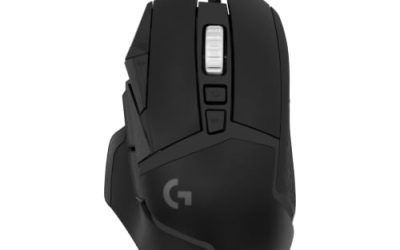
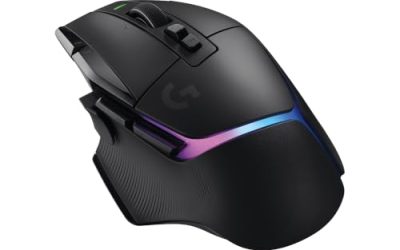
The G903 is the pick when buttons matter more than grams. Its symmetrical body carries configurable side buttons for both flanks — fit the pair on the right side for your left thumb, add the second pair as well, or blank them off with the included covers — and the programmable total climbs to eleven once the tilt wheel is counted. The HERO 25K sensor and LIGHTSPEED connection are older flagship hardware that still track flawlessly, and POWERPLAY compatibility means a fixed desk setup never needs a charging cable. At 107 g before the optional 10 g weight, it feels planted and deliberate rather than flicky.
Specs
- Sensor: HERO 25K optical, 100–25,600 DPI, 400+ IPS tracking
- Buttons: 7–11 programmable, with configurable side buttons and covers for both flanks
- Weight: 107 g, plus an optional 10 g weight included
- Battery: 140+ hours per the listing
- Connectivity: LIGHTSPEED wireless; POWERPLAY wireless charging compatible
- Dimensions: 130 x 67 x 40 mm
- Model: 910-005670
Best for: Left-handed MOBA, MMO and strategy players who want the deepest button layout on a wireless ambidextrous mouse.
Watch out for: Some fields on this listing still describe the earlier HERO 16K revision — confirm the model number 910-005670 and the HERO 25K title before ordering, and check whether the seller is shipping the current version.
ASIN: B07NSVMT22
Corsair M75 Wireless

Corsair built the M75 Wireless around the same idea as the PRO 2: magnetic side buttons on both flanks that swap between raised, clickable caps and smooth covers, so the flank under your pinky never fires by accident. A left-handed mode in iCUE moves the active button pair to your thumb side, and the hand-swap can also be triggered from the mouse itself. The 26,000 DPI Marksman sensor and optical main switches keep it credible for shooters, while SLIPSTREAM wireless for the gaming PC and Bluetooth for a second machine covers a mixed desk without re-pairing. At 89 g it lands between the ultralights and the G903.
Specs
- Sensor: CORSAIR MARKSMAN optical, 26,000 DPI
- Buttons: side buttons on both flanks, swappable magnetic raised or flat caps
- Weight: 89 g
- Connectivity: SLIPSTREAM wireless, Bluetooth, and wired USB
- Switches: optical main-button switches
- Software: iCUE, with a left-handed mode that swaps the active side buttons
- Model: CH-931D011-NA (White)
Best for: Players who alternate hands, share a mouse with a right-hander, or split time between a gaming PC and a laptop.
Watch out for: This ASIN is the white version of the mouse, and the side buttons ship in right-handed mode — budget a few minutes in iCUE to switch to left-handed mode before your first match.
ASIN: B0CTN2SRTH
Logitech G PRO X Superlight 2
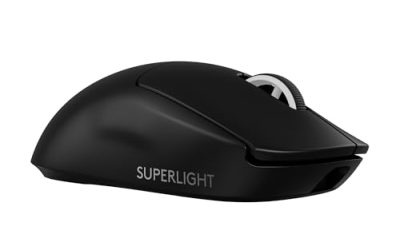
The Superlight 2 brings the sharpest hardware in this guide: a 60 g shell, a HERO 2 sensor rated to 44,000 DPI, and an 8 kHz report rate. The shell itself is genuinely symmetrical, so it glides and lifts identically in the left hand, and the 95-hour battery rating keeps it off the cable for weeks. The honest catch is printed on its flank — both side buttons sit on the left side, which puts them under your ring and pinky fingers in a left-handed grip. If your games live on the two main clicks, nothing here is quicker; if you lean on thumb buttons, look above.
Specs
- Sensor: HERO 2 optical, up to 44,000 DPI
- Report rate: up to 8 kHz
- Weight: 60 g
- Battery: up to 95 hours
- Buttons: 5 programmable, with both side buttons on the left flank
- Connectivity: LIGHTSPEED wireless, USB-C charging
- Model: 910-006628
Best for: Left-handed FPS and tactical shooter players who aim with the main clicks and want the lightest competitive shell available.
Watch out for: There are no right-flank buttons and no way to move the fitted pair — in a left hand the side buttons are effectively decorative, so skip this mouse if your binds depend on them.
ASIN: B09NBWL8J5
Logitech G305 Lightspeed
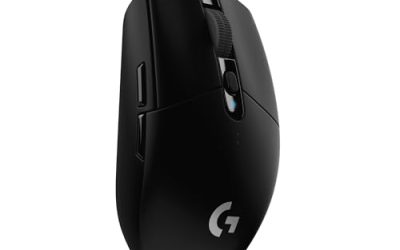
The G305 is the low-risk way to learn whether a symmetrical wireless mouse suits your left hand. Amazon’s own listing tags its hand orientation as ambidextrous, the HERO sensor tracks to 12,000 DPI with no smoothing, and a single AA battery is rated for up to 250 hours, so a dead battery is a ten-second fix. The compact egg shape favors small to medium hands and fingertip or claw grips, and the receiver stores inside the shell for travel. Like the Superlight 2, its two side buttons sit on the left flank only, so treat it as a shape trial and an everyday carry rather than a button platform.
Specs
- Sensor: HERO optical, 200–12,000 DPI
- Battery: up to 250 hours on 1 AA battery (included)
- Buttons: 6 programmable, with both side buttons on the left flank
- Weight: 99 g
- Connectivity: LIGHTSPEED wireless, 1 ms report rate
- Hand orientation: ambidextrous, per the listing
- Model: 910-005280
Best for: Left-handed players on a budget, smaller hands, and anyone who wants a travel or backup mouse that runs for months on one battery.
Watch out for: The battery is a disposable AA rather than a rechargeable cell, and there is no Bluetooth or wired fallback — if the receiver is lost, the mouse cannot connect at all.
ASIN: B07CMS5Q6P
Which One Fits Your Situation
You play competitive FPS with your left hand
Start with the PRO 2 Lightspeed if you still want a thumb button for melee or push-to-talk, because it is the only ultralight-class mouse here that moves buttons to your thumb. Choose the Superlight 2 instead if your binds live entirely on the main clicks and wheel: its 60 g shell and 8 kHz polling are built for flick-heavy play, and the symmetrical body will not fight a left-handed claw grip.
You need thumb buttons for MOBA, MMO or macro-heavy games
The G903 Lightspeed is your mouse. With configurable buttons on both flanks and up to eleven programmable controls including the tilt wheel, it carries more binds than any other wireless option a left hand can use properly. The PRO 2 Lightspeed is the lighter alternative when four side buttons are enough and you would rather give up the extra controls than carry the G903’s 107 g through long sessions.
You switch hands, share a desk, or game on two machines
Take the Corsair M75 Wireless. Its magnetic caps let you reconfigure the flanks in seconds when a right-hander borrows the mouse, the firmware-level hand swap works even without software, and Bluetooth pairing means a work laptop can share the same mouse without moving the SLIPSTREAM receiver from your gaming PC. It is the only pick here designed to change handedness as a routine, not a setup project.
You are testing left-handed play without spending much
The G305 Lightspeed answers the important question — does a symmetrical shell feel right in your left hand — for the least commitment. Its shape, sensor and wireless link are genuinely game-ready, and the AA battery removes charging from the experiment entirely. If the shape clicks and you later want thumb buttons under your left thumb, the PRO 2 Lightspeed is the natural upgrade path from here.
Common Mistakes
- Assuming “ambidextrous” on a box means the side buttons work for your thumb, when most symmetric mice still mount them on the left flank only.
- Buying a sculpted right-handed ergonomic mouse and planning to “just get used to it” in the left hand — the thumb rest and button angles fight you on every click.
- Forgetting to swap the primary button in your operating system or game settings, leaving your left index finger on the secondary click.
- Chasing the highest DPI figure on the listing instead of checking button placement, shell length and weight, which decide left-handed comfort.
- Waiting for a mirrored, left-hand-only wireless flagship: dedicated left-handed models are rare, mostly wired, and frequently out of stock, while swappable-button ambidextrous mice are sold new today.
Frequently Asked Questions
Is there a true left-handed wireless gaming mouse?
Dedicated mirrored models are extremely rare, and the best-known left-handed gaming mouse, Razer’s Naga Left-Handed Edition, is wired and often out of stock. In practice, the true left-handed wireless category is ambidextrous mice with buttons that move to the right flank — the PRO 2 Lightspeed, G903 Lightspeed and Corsair M75 Wireless in this guide are the current examples sold new.
Can I use a normal ambidextrous mouse in my left hand?
Yes, for movement and main clicks a symmetrical shell works identically in either hand, and mice like the Superlight 2 and G305 are shaped for it. The limitation is the side buttons: mounted on the left flank, they sit under your ring finger instead of your thumb. If your games need thumb buttons, choose a model with swappable or dual-flank buttons instead.
Should I swap the primary click buttons for left-handed use?
Most left-handed players find it natural to make the right-side physical button the primary click, so the index finger always does the main work; Windows, macOS and most games offer a swap setting. Some players instead keep the default layout and click with the middle finger. Either is fine — pick one arrangement and keep it consistent across every game and device.
Does an 8 kHz polling rate matter for left-handed players?
It matters the same as it does for right-handers: an 8 kHz report rate, as on the Superlight 2, trims the delay between mouse movement and the report reaching your PC, which is most noticeable on 240 Hz and faster monitors. It does nothing for button placement or shape, so treat it as a bonus on a mouse that already fits your hand, not a reason to buy.
FAQ
Is there a true left-handed wireless gaming mouse?
Can I use a normal ambidextrous mouse in my left hand?
Should I swap the primary click buttons for left-handed use?
Does an 8 kHz polling rate matter for left-handed players?
More from Amazon
Programs that pair well with the guide above. Offers and eligibility are set by Amazon and may change.
Free shipping on eligible items, Prime Video and more. Eligible new members can start with a free trial.
Start a Prime free trialAd-free music streaming. Eligible new subscribers can start with a free trial.
Try Music Unlimited freeA Prime membership for ages 18-24 with a trial period. Eligibility is set by Amazon.
See Prime for Young AdultsAudiobooks and podcasts to listen to on the go. Eligible new members can start with a free trial.
Try Audible freeAs an Amazon Associate we earn from qualifying purchases.