Key takeaways
- Match VRAM to your resolution: 8GB remains perfectly serviceable at 1080p, but if you plan to game at 1440p with high textures or ray tracing, prioritize a 16GB card. Texture quality is the first setting you’ll be forced to lower on an 8GB buffer, and it’s the setting that affects visual fidelity most.
- Consider upscaling and frame generation support: NVIDIA’s DLSS 4 and AMD’s FSR both extend the useful life of a midrange card considerably. Check which technologies the games you actually play support, as this can swing effective performance more than raw specs suggest.
- Check physical dimensions before buying: Triple-fan cards offer better thermals and lower noise, but they need roughly 300mm of clearance. Dual-fan 2.5-slot designs are far more forgiving in compact cases and often run quietly enough thanks to zero-RPM idle modes.
- Verify your power supply headroom: Modern midrange cards are efficient, but transient spikes still matter. A quality 600W–650W unit covers virtually every card in this bracket, and skimping here causes instability that’s easily mistaken for a faulty GPU.
- Weigh warranty and build quality: A three-year warranty and reinforced backplate are worth a modest premium on a card you intend to keep for several years. Cheaper board partner models sometimes cut corners on VRM cooling, which shows up as thermal throttling under sustained load.
What's inside
Buying a graphics card under $500 has always meant compromise, but in 2026 the nature of that compromise has shifted. VRAM is now the deciding factor for most buyers: 8GB cards still deliver excellent 1080p performance and strong upscaling support, yet a growing number of releases push past that buffer at 1440p with high textures and ray tracing enabled. Meanwhile, midrange pricing has stabilized enough that 16GB options genuinely fit inside a $500 budget — something that wasn’t reliably true a generation ago.
This guide focuses on cards that are actually available at or below $500, not hypothetical MSRPs. We’ve prioritized real-world value: frame rates per dollar, VRAM headroom for the next few years, cooling quality, and how well each card fits into a typical mid-tower build. Whether you’re targeting high-refresh 1080p esports, a balanced 1440p experience, or a quiet compact build, there’s a sensible pick below.
As an Amazon Associate we earn from qualifying purchases.





⚡ Save on Your Next PC — Amazon Prime
Prime members get fast free shipping on the systems above, plus early access to Prime Day & Black Friday PC deals. New members get a 30-day free trial.
Watch: Best Graphics Card Under $500 — Video Review
How to Choose Graphics Card Under $500
- Match VRAM to your resolution: 8GB remains perfectly serviceable at 1080p, but if you plan to game at 1440p with high textures or ray tracing, prioritize a 16GB card. Texture quality is the first setting you’ll be forced to lower on an 8GB buffer, and it’s the setting that affects visual fidelity most.
- Consider upscaling and frame generation support: NVIDIA’s DLSS 4 and AMD’s FSR both extend the useful life of a midrange card considerably. Check which technologies the games you actually play support, as this can swing effective performance more than raw specs suggest.
- Check physical dimensions before buying: Triple-fan cards offer better thermals and lower noise, but they need roughly 300mm of clearance. Dual-fan 2.5-slot designs are far more forgiving in compact cases and often run quietly enough thanks to zero-RPM idle modes.
- Verify your power supply headroom: Modern midrange cards are efficient, but transient spikes still matter. A quality 600W–650W unit covers virtually every card in this bracket, and skimping here causes instability that’s easily mistaken for a faulty GPU.
- Weigh warranty and build quality: A three-year warranty and reinforced backplate are worth a modest premium on a card you intend to keep for several years. Cheaper board partner models sometimes cut corners on VRM cooling, which shows up as thermal throttling under sustained load.
The Best Picks Reviewed
ASUS Dual RTX 5060 Ti 16GB OC
This is the sweet spot of the entire sub-$500 category, pairing a genuinely capable GPU with 16GB of GDDR7 that removes VRAM anxiety at 1440p entirely. The Dual cooler is a 2.5-slot design with 0dB idle, making it one of the few 16GB cards that fits comfortably in a mid-tower without dominating the build.
XFX Swift Radeon RX 9060 XT 16GB
AMD’s RDNA 4 midranger is the value champion here, offering 16GB of GDDR6 and strong rasterization performance for meaningfully less than comparable NVIDIA options. The triple-fan Swift cooler keeps temperatures and noise well in check, though you’ll want to confirm case clearance before ordering.
GIGABYTE RX 9060 XT Gaming OC ICE 16G
If you’re building a white or light-themed system, this ICE variant delivers the same 16GB RDNA 4 package with a genuinely well-engineered two-slot cooler using server-grade thermal gel and a reinforced structure. It’s a rare case where the aesthetic option doesn’t compromise on thermals or sag resistance.
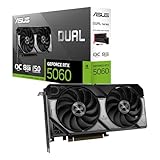
ASUS Dual RTX 5060 8GB OC
For dedicated 1080p gamers, particularly those playing competitive titles at high refresh rates, the 5060 delivers excellent frames per dollar with full DLSS 4 support and modern display outputs. The 8GB buffer is the clear limitation, so treat this as a resolution-appropriate pick rather than a future-proof one.
GIGABYTE RTX 5060 WINDFORCE OC 8G
The most affordable entry point to current-generation NVIDIA features, this WINDFORCE model undercuts most competitors while keeping thermals reasonable through a straightforward dual-fan design. It’s the sensible choice for budget builds and prebuilt upgrades where the priority is getting modern upscaling support at the lowest possible cost.
Frequently Asked Questions
Is 8GB of VRAM still enough in 2026?
At 1080p, yes — the vast majority of games run well on 8GB at high settings with upscaling enabled. At 1440p with ray tracing or ultra textures, you’ll increasingly hit the buffer limit, which manifests as stuttering rather than a gradual frame rate decline.
Should I choose NVIDIA or AMD in this price range?
AMD generally offers more VRAM and raw rasterization performance per dollar, while NVIDIA leads in ray tracing and has broader DLSS support across older titles. If you play a lot of ray-traced games or use GPU-accelerated creative software, lean NVIDIA; otherwise AMD is the stronger value.
What power supply do I need for these cards?
A quality 600W unit from a reputable manufacturer handles every card in this guide comfortably, including the 16GB models. If you’re pairing one with a high-core-count CPU, stepping up to 650W or 750W provides useful headroom.
Can these cards handle 4K gaming?
The 16GB options can manage 4K in less demanding titles or with aggressive upscaling, but this bracket is designed around 1080p and 1440p. If 4K is your primary target, budget accordingly — expect to spend considerably more for a consistently smooth experience.
Final Thoughts
For most buyers, the ASUS Dual RTX 5060 Ti 16GB is the card to beat under $500, combining current-generation NVIDIA features with enough VRAM to stay relevant at 1440p for years. If you want maximum performance per dollar and don’t need NVIDIA’s ray tracing lead, the XFX Swift RX 9060 XT 16GB is an outstanding alternative, while the GIGABYTE RTX 5060 WINDFORCE OC 8G remains the smartest pick for pure 1080p builds on a tighter budget.