Key takeaways
- Graphics reality check: Under $800, most machines rely on integrated graphics like Radeon RX Vega 8. Expect smooth 1080p performance in League of Legends, Valorant, CS2, Rocket League, and Minecraft, but plan on lowered settings or 720p for demanding AAA titles.
- Memory matters more than you think: Integrated GPUs borrow system RAM, so 16GB is the practical minimum and 24GB DDR5 is a meaningful upgrade. Faster DDR5 memory directly improves integrated graphics performance in ways DDR4 cannot match.
- CPU cores and sustained clocks: An 8-core/16-thread chip handles streaming, background apps, and modern game engines far better than a 4-core part. Look at sustained boost behavior, not just the peak GHz number on the box.
- Storage headroom: 512GB NVMe is standard here and fills fast — two large installs can consume most of it. Confirm the machine has a free M.2 slot or an accessible drive bay before you commit.
- Display and build quality: Prioritize a 1920×1080 IPS panel for accurate colors and viewing angles. A backlit keyboard, WiFi 6, and a chassis with real ventilation separate a usable gaming machine from a repackaged office laptop.
What's inside
Shopping for a gaming laptop under $800 in 2026 means navigating a market flooded with listings that use the word “gaming” loosely. Many budget machines pair a capable CPU with integrated graphics, which is fine for esports titles and older games but won’t drive modern AAA releases at high settings. The challenge is separating genuine value from marketing language — and knowing which compromises actually matter for the games you play.
This guide breaks down what to prioritize at this price point, then reviews five of the most compelling budget gaming laptops available right now. We focus on real-world performance in popular titles, thermal behavior under sustained load, and whether each machine leaves room to upgrade later. Every pick here sits comfortably within the $800 ceiling.
As an Amazon Associate we earn from qualifying purchases.







⚡ Save on Your Next PC — Amazon Prime
Prime members get fast free shipping on the systems above, plus early access to Prime Day & Black Friday PC deals. New members get a 30-day free trial.
Watch: Best Gaming Laptop Under $800 — Video Review
How to Choose Gaming Laptop Under $800
- Graphics reality check: Under $800, most machines rely on integrated graphics like Radeon RX Vega 8. Expect smooth 1080p performance in League of Legends, Valorant, CS2, Rocket League, and Minecraft, but plan on lowered settings or 720p for demanding AAA titles.
- Memory matters more than you think: Integrated GPUs borrow system RAM, so 16GB is the practical minimum and 24GB DDR5 is a meaningful upgrade. Faster DDR5 memory directly improves integrated graphics performance in ways DDR4 cannot match.
- CPU cores and sustained clocks: An 8-core/16-thread chip handles streaming, background apps, and modern game engines far better than a 4-core part. Look at sustained boost behavior, not just the peak GHz number on the box.
- Storage headroom: 512GB NVMe is standard here and fills fast — two large installs can consume most of it. Confirm the machine has a free M.2 slot or an accessible drive bay before you commit.
- Display and build quality: Prioritize a 1920×1080 IPS panel for accurate colors and viewing angles. A backlit keyboard, WiFi 6, and a chassis with real ventilation separate a usable gaming machine from a repackaged office laptop.
The Best Picks Reviewed
KAIGERR 2026 Gaming Laptop
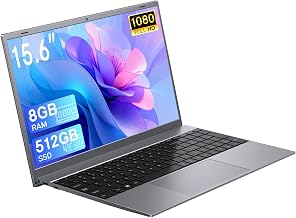
This is the most complete package on the list, pairing an 8-core Ryzen 7 H255 with 24GB of DDR5 and Radeon RX Vega 8 graphics on a roomy 16-inch panel. The extra memory bandwidth genuinely helps the integrated GPU, and WiFi 6 plus a backlit keyboard round out a spec sheet that punches well above its price bracket.
Ryzen 7 H255 Gaming Laptop (24GB DDR5)
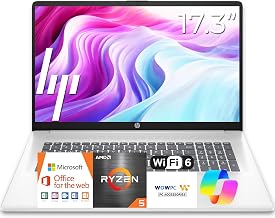
Essentially the same silicon formula in a more conventional chassis, this model delivers the same 8C/16T Ryzen 7 H255 and 24GB DDR5 configuration for buyers who prefer a standard 15.6-inch footprint. It’s a strong choice if portability matters more to you than screen real estate.
NIMO 15.6″ IPS FHD Light Gaming Laptop
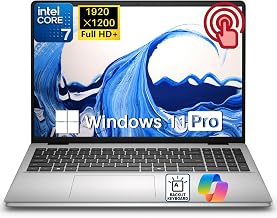
The Ryzen 5 6600H is a proper H-series mobile chip with a higher sustained power budget than the U-series parts common at this price, and NIMO pairs it with a genuinely good IPS FHD display. Frame rates in esports titles are consistently stable, making this the value pick for competitive players.
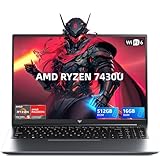
Light Gaming Laptop (Ryzen 7 7430U)
The Ryzen 7 7430U prioritizes efficiency over raw graphics muscle, so this one runs cool and quiet with excellent battery life. Treat it as a capable everyday laptop that handles lighter games well rather than a machine for demanding titles.
Tunhail 15.6″ Laptop
With 16GB RAM, a 512GB SSD, and Windows 11 Pro included, the Tunhail covers the fundamentals at the entry end of this roundup. It’s best suited to students and casual players who want a dependable FHD machine for schoolwork with weekend gaming on the side.
Frequently Asked Questions
Can an $800 laptop run modern AAA games?
With integrated graphics, yes — but at reduced settings and often 720p or upscaled 1080p in the newest titles. Esports and indie games run beautifully at native 1080p, which covers what most players actually spend their time on.
Is 16GB of RAM enough, or should I get 24GB?
16GB works, but integrated graphics share system memory, so 24GB DDR5 leaves more headroom for the GPU and lets you keep Discord, a browser, and a stream running alongside your game. If the price difference is small, take the extra memory.
Should I upgrade the storage right away?
Not necessarily, but 512GB disappears quickly once you install a few large games. Adding a second NVMe drive later is usually inexpensive and straightforward if the chassis provides a free slot.
Do these laptops need a cooling pad?
Budget chassis often have modest cooling, and a cheap pad can lower sustained temperatures by several degrees during long sessions. It’s an optional but worthwhile addition if you game for hours at a time.
Final Thoughts
For most buyers, the KAIGERR 2026 Gaming Laptop is the strongest overall value here, combining an 8-core Ryzen 7 H255, 24GB of DDR5, and a larger 16-inch display without pushing past the budget. Competitive players who prioritize consistent frame rates in esports titles should look closely at the NIMO 15.6″ with its Ryzen 5 6600H, while the alternative Ryzen 7 H255 model offers nearly identical performance in a more portable 15.6-inch form factor. Any of the three will serve you well — choose based on whether screen size, portability, or raw multithreaded performance matters most to you.