Key takeaways
- GPU with NVENC or AV1 encoding: A dedicated hardware encoder lets you stream without stealing performance from your game, so prioritize recent NVIDIA RTX or AMD Radeon GPUs over older models.
- CPU core count: Streaming software runs alongside your game, so look for at least 6-8 cores to avoid bottlenecks when encoding, chatting, and browsing at the same time.
- 16GB RAM minimum, 32GB preferred: Multitasking across a game, capture software, browser tabs, and Discord adds up fast, and 32GB gives real breathing room for heavier workflows.
- High refresh-rate display: A 165Hz or 180Hz panel keeps your own gameplay feeling responsive even while background processes eat into system resources.
- Cooling and sustained performance: Streaming sessions run long, so dual-fan cooling and good thermal design matter more than peak benchmark numbers.
What's inside
Streaming your gameplay while keeping frame rates smooth is a different challenge than gaming alone. Your laptop needs enough CPU headroom to run OBS or Streamlabs in the background, a GPU strong enough to handle NVENC encoding without tanking your FPS, and enough RAM to juggle a browser, Discord, and a capture suite simultaneously. Buy the wrong machine and you’ll see dropped frames, stutters, or a laptop that sounds like a jet engine mid-broadcast.
This guide breaks down six of the best gaming laptops for streaming in 2026, covering everything from budget-friendly RTX 4050 builds to powerhouse RTX 5060 rigs with AI-accelerated encoding. We’ll help you match the right combination of GPU, CPU, RAM, and display to your streaming setup and budget.
As an Amazon Associate we earn from qualifying purchases.





🎮 Get More From Your Setup — Free
Prime Gaming gives you free PC games every month, in-game loot, and a free Twitch channel sub — plus fast free shipping on all the gear above. New members get a 30-day free trial.
Watch: Best Gaming Laptop For Streaming — Video Review
How to Choose a Gaming Laptop For Streaming (2026)
- GPU with NVENC or AV1 encoding: A dedicated hardware encoder lets you stream without stealing performance from your game, so prioritize recent NVIDIA RTX or AMD Radeon GPUs over older models.
- CPU core count: Streaming software runs alongside your game, so look for at least 6-8 cores to avoid bottlenecks when encoding, chatting, and browsing at the same time.
- 16GB RAM minimum, 32GB preferred: Multitasking across a game, capture software, browser tabs, and Discord adds up fast, and 32GB gives real breathing room for heavier workflows.
- High refresh-rate display: A 165Hz or 180Hz panel keeps your own gameplay feeling responsive even while background processes eat into system resources.
- Cooling and sustained performance: Streaming sessions run long, so dual-fan cooling and good thermal design matter more than peak benchmark numbers.
The Best Gaming Laptop For Streaming (2026)s Reviewed
ASUS ROG Strix G16
The Strix G16 pairs an RTX 5060 with a 14650HX processor and Wi-Fi 7, making it one of the most balanced streaming rigs on this list. Its 165Hz display and strong thermal design keep gameplay smooth even during long encoding sessions.
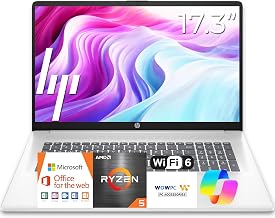
NIMO 17.3″ Gaming Laptop
With a Ryzen 7 8745HS and 32GB of RAM, this 17.3-inch NIMO is built for creators who stream and edit video on the same machine. The large display and generous RAM pool make multitasking between OBS, chat, and editing tools noticeably smoother.
Acer Nitro V 16S AI
The Nitro V 16S brings AI-accelerated processing and an RTX 5060 GPU to a 16-inch 180Hz display, giving streamers fast encoding and a fluid picture. 32GB of DDR5 RAM ensures background apps won’t choke your stream quality.
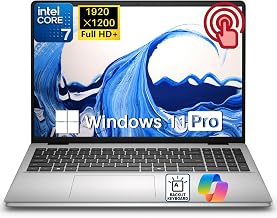
Acer Nitro V 15in (ANV15-52-73D8)
This 15-inch Nitro V combines a 13th Gen i7 with an RTX 5060 and a 165Hz IPS panel, delivering solid encoding performance in a more compact, budget-conscious chassis. Dual-fan cooling helps it hold up during extended streaming sessions.
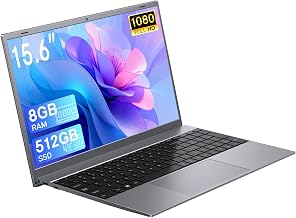
NIMO 15.6 Gaming-Creator Laptop
Built around the same Ryzen 7 8745HS and 32GB RAM combo as its 17-inch sibling, this 15.6-inch NIMO trades screen size for portability without sacrificing multitasking muscle. Its 100W fast charging is a nice bonus for streamers on the move.
Frequently Asked Questions
Do I need a dedicated capture card if I have a gaming laptop?
No. All the laptops in this roundup have GPUs with hardware encoders capable of handling game capture and streaming without a separate capture card, unless you’re also capturing an external console.
How much RAM do I actually need for streaming?
16GB is workable for basic streaming, but 32GB is strongly recommended if you plan to run OBS, a browser, Discord, and any editing software simultaneously without slowdowns.
Is a 15-inch or 17-inch laptop better for streaming?
It’s a tradeoff between portability and screen real estate. Larger 16-17 inch models make it easier to manage multiple windows and overlays at once, while 15-inch laptops are easier to travel with for on-location streams.
Does CPU or GPU matter more for streaming performance?
The GPU’s hardware encoder handles most of the streaming workload, but a strong multi-core CPU still matters for running your game engine, chat, and other background tasks without stutter.
Final Thoughts
For most streamers, the ASUS ROG Strix G16 offers the best overall balance of GPU power, cooling, and connectivity. If multitasking with creative software is a priority, the NIMO 17.3″ Gaming Laptop’s 32GB RAM makes it a strong pick, while the Acer Nitro V 16S AI is an excellent choice for streamers who want cutting-edge AI-assisted performance in a slightly more affordable package.