Key takeaways
- The best red gaming mouse adds bold color without giving up sensor, weight, or buttons. Compare four red mice and match one to your setup and games.
A red gaming mouse does two jobs at once: it has to play well, and it has to look right on your desk. Shoppers often start with color and only later ask whether the sensor, weight, and buttons fit their hand. The real decision is the same as for any gaming mouse, with one extra check. Pick the shape and sensor first, then make sure the red is real, whether that means a red shell, red lighting, or red accents, rather than a black mouse with a red logo in the listing photo.
This guide is for players building a red-themed setup, or anyone who wants a mouse that stands out on the desk without blending into a row of black gear. The four mice below were chosen from their Amazon product titles and listed specifications, comparing color, sensor, weight, connection type, and button count, so you can match a red mouse to your grip and your games instead of buying on color alone.
Quick Picks
As an Amazon Associate we earn from qualifying purchases.
| Product | Best for | Key spec from title |
|---|---|---|
| ATTACK SHARK X1 Red | A light wireless mouse with a charging dock | 53g, PAW3395 Pro sensor, 40,000 DPI |
| ATTACK SHARK X6 Red | Long battery life in a superlight body | 49g, PAW3395 sensor, 26,000 DPI |
| Redragon M656 Gainer | A wireless mouse with red LED lighting | 4000 DPI, 7 macro buttons, red LED backlit |
| HK GAMING Mira M Monza Red | A red honeycomb shell for fast play | 63g, 12,000 CPI, 6 buttons, RGB |
How to Choose
Check What Is Actually Red
Red means different things on different listings. Some mice have a red shell, some have red lighting on a black body, and some only show red accents on the scroll wheel or side grips. Read the color field in the listing and look at the product images before you buy, because a mouse that glows red in one photo may be a black mouse with RGB set to red. If you want a red shell, confirm the color name says red. If you want red lighting, confirm the lighting can be set to a steady red and stays that way without software running.
Match the Sensor to Your Games
Color does not change how a sensor tracks, so judge the sensor the same way you would for any mouse. A modern optical sensor with a wide DPI range and a high tracking speed handles fast shooters and careful aiming alike. For competitive play, look for a sensor rated at 12,000 DPI or higher and a polling rate that keeps up with quick movements. For casual play, a simpler sensor is fine as long as it tracks cleanly at the DPI you actually use. Do not pay extra for a sensor number you will never reach.
Weight, Shape, and Grip
A red mouse still has to fit your hand. Light mice under about 65 grams suit players who lift and flick often, while heavier mice feel steadier for tracking. The shape matters just as much: an ergonomic right-handed shell supports a palm grip, while a symmetrical body suits claw and fingertip grips. Check the listed weight and the shape description, and think about how you hold your current mouse. A beautiful red mouse that cramps your hand after an hour is not a good buy at any look.
Wired, Wireless, and Lighting
Wireless mice free your arm from cable drag, but they need charging, and RGB lighting drains the battery faster. If you pick a wireless red mouse, check the battery life in the listing and whether it comes with a charging dock, which makes topping up easy. Wired mice never need charging and usually weigh less, which suits players who want a simple setup. If the red comes from lighting rather than the shell, check whether the lighting works without extra software, so the color stays red on any machine.
The 4 Best Options
ATTACK SHARK X1 Red

The ATTACK SHARK X1 in red is a superlight wireless mouse built around speed. At 53 grams it lifts and flicks with very little effort, and the PixArt PAW3395 Pro sensor tracks up to 40,000 DPI for players who want headroom. The magnetic RGB charging dock keeps the mouse topped up between sessions and adds a glow to the desk, while the tri-mode connection covers Bluetooth, 2.4 GHz wireless, and wired play. Anti-slip grip tape is included, which helps keep a light mouse steady in the hand during fast movements.
Specs
- PixArt PAW3395 Pro sensor with up to 40,000 DPI
- 53 grams
- Magnetic RGB charging dock
- Tri-mode connection: Bluetooth, 2.4 GHz wireless, wired
- Optical micro switches
- Anti-slip grip tape included
- Red finish
Best for: Players who want a superlight red wireless mouse with a charging dock on the desk.
Watch out for: The red finish is a bold look that shows fingerprints and dust, and the ultralight body can feel twitchy until you adjust your sensitivity.
ATTACK SHARK X6 Red

The ATTACK SHARK X6 in red pairs a superlight body with very long battery life. At 49 grams it is the lightest mouse in this guide, and the PAW3395 sensor tracks up to 26,000 DPI with the precision competitive players expect. The magnetic RGB charging dock makes charging as simple as setting the mouse down, and the tri-mode connection lets you switch between Bluetooth, 2.4 GHz wireless, and wired play. With up to 200 hours of battery life, it covers weeks of regular sessions before it needs a full charge.
Specs
- PixArt PAW3395 sensor with up to 26,000 DPI
- 49 grams
- Magnetic RGB charging dock
- Tri-mode connection: Bluetooth, 2.4 GHz wireless, wired
- Up to 200 hours of battery life
- Grip tape included
- Red finish
Best for: Players who want the lightest red mouse here with battery life that lasts for weeks.
Watch out for: At 49 grams the mouse is very light, so players coming from a heavier mouse should lower their sensitivity gradually while they adjust.
Redragon M656 Gainer
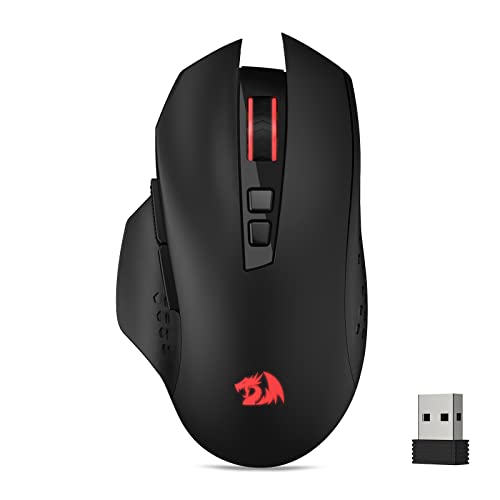
The Redragon M656 Gainer is the straightforward red-lit option in this guide. Its red LED backlight gives the desk a red glow without needing a red shell, and the wireless 2.4 GHz connection keeps the desk free of cables. The sensor covers up to 4000 DPI across five DPI levels, which suits casual and mid-level play, and seven macro buttons give you room for shortcuts and game commands. Pro software support lets you program the buttons and adjust the settings, and an auto-sleep mode saves battery when the mouse sits idle.
Specs
- Up to 4000 DPI with 5 DPI levels
- 2.4 GHz wireless connection
- 7 macro buttons
- Red LED backlit design
- Pro software support
- Energy-saving auto-sleep mode
- Ergonomic design
Best for: Players who want red lighting and a wireless mouse for casual and mid-level gaming.
Watch out for: The 4000 DPI ceiling is lower than the other mice here, so competitive players who run high sensitivity should check it against their settings first.
HK GAMING Mira M Monza Red
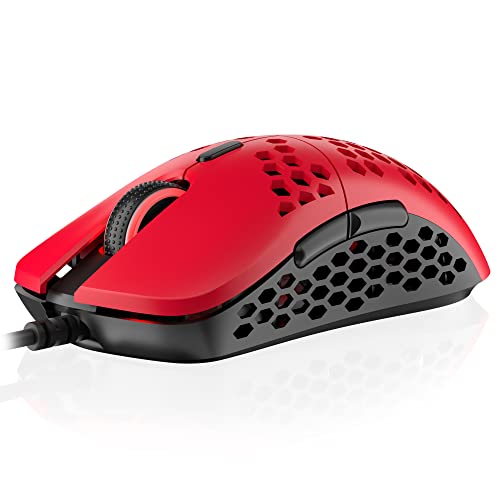
The HK GAMING Mira M in Monza Red is a wired mouse with a red honeycomb shell that stands out the moment you see it. The honeycomb design keeps the weight at 63 grams, and the Pixart PMW3360 sensor tracks up to 12,000 CPI with 50G acceleration and 250 IPS speed. Six programmable buttons cover the essentials, and the RGB lighting can be adjusted through the HK Gaming software. A paracord-style cable reduces drag, and white PTFE feet help the mouse glide smoothly across the pad.
Specs
- Pixart PMW3360 sensor with up to 12,000 CPI
- 63 grams
- Honeycomb shell in Monza Red
- 6 programmable buttons
- RGB lighting with HK Gaming software
- Paracord cable
- Omron micro switches rated for 50 million clicks
Best for: Players who want a true red shell with a light honeycomb body for fast play.
Watch out for: The honeycomb openings collect dust over time, and the wired connection means managing a cable, even a light one.
Which One Fits Your Situation
You Want the Lightest Red Mouse
Pick the ATTACK SHARK X6 Red. At 49 grams it moves with almost no effort, and the long battery life means you rarely think about charging. Lower your sensitivity slightly when you first switch, because a mouse this light can feel jumpy until your hand adjusts. Keep the charging dock on the desk where you can see it, so the mouse is always topped up before you play.
You Want a Red Mouse With a Dock
Pick the ATTACK SHARK X1 Red. The magnetic RGB charging dock keeps the mouse charged and adds light to the desk, while the 40,000 DPI sensor gives you plenty of headroom. It is a good match if you like your gear to look as good parked as it does in use. A steady red glow from the dock ties the whole setup together without needing extra lighting strips.
You Play Casually and Want Red Lighting
Pick the Redragon M656 Gainer. The red LED backlight gives your setup a red glow, the wireless connection keeps things tidy, and the seven macro buttons cover casual play well. It is the simplest red option here, with no shell color to match to the rest of your desk. Set the lighting to a steady red in the software once, and it will hold that look every time you sit down.
You Want a Red Shell, Not Just Red Light
Pick the HK GAMING Mira M Monza Red. The honeycomb shell is red through and through, so the color stays even with the lighting off. It suits players who want their mouse to match a red keyboard or case without relying on software to hold the color. Match the mouse with a red keyboard or headset, and the color theme will look planned instead of accidental.
Common Mistakes
- Buying a black mouse with RGB lighting and assuming it will stay red without software running.
- Choosing by color first and ending up with a sensor or shape that does not fit your games.
- Picking the lightest red mouse when your grip actually needs a fuller shell for support.
- Forgetting that RGB lighting drains a wireless battery faster than a plain shell does.
- Matching the mouse to a photo of a setup instead of checking the color name in the listing.
Frequently Asked Questions
Are red gaming mice as good as black ones?
Yes, color does not change how a mouse performs. A red mouse with the same sensor, switches, and shape as a black mouse will track and click the same way. The only real differences are cosmetic, such as how the finish shows fingerprints or dust. Judge a red mouse by its specifications and shape, exactly as you would any other mouse.
What makes a gaming mouse red?
A gaming mouse can be red in three ways: a red shell, red LED or RGB lighting set to red, or red accents on a black body. A red shell stays red with the lighting off, while red lighting depends on the lighting settings and may need software. Check the color field in the listing to see which kind of red you are buying.
Do red mice show dirt more easily?
A glossy red shell can show fingerprints and dust more than a matte black one, while a matte red finish hides them better. Honeycomb shells collect dust in their openings no matter the color. Wipe the mouse down regularly with a dry cloth, and keep food and drinks away from the desk to slow the buildup.
Can I set an RGB mouse to steady red?
Most RGB gaming mice let you set a steady red through their software, and many remember the setting on the mouse itself. Check whether the mouse has on-board memory for lighting, because a mouse without it may reset to a rainbow effect when you move it to another machine. A red shell avoids this entirely, since its color never depends on software.
FAQ
Are red gaming mice as good as black ones?
What makes a gaming mouse red?
Do red mice show dirt more easily?
Can I set an RGB mouse to steady red?
More from Amazon
Programs that pair well with the guide above. Offers and eligibility are set by Amazon and may change.
Free shipping on eligible items, Prime Video and more. Eligible new members can start with a free trial.
Start a Prime free trialAd-free music streaming. Eligible new subscribers can start with a free trial.
Try Music Unlimited freeA Prime membership for ages 18-24 with a trial period. Eligibility is set by Amazon.
See Prime for Young AdultsAudiobooks and podcasts to listen to on the go. Eligible new members can start with a free trial.
Try Audible freeAs an Amazon Associate we earn from qualifying purchases.