Our Top Picks


Buying a gaming mouse for a child is really a decision about reach. When the shell is too long, small fingers stretch just to hold the buttons down, clicks land late, and the hand tires long before the game ends. Shell length, grip width, and how many buttons a young player has to manage matter far more here than a headline sensitivity figure.
This guide is for parents equipping a first gaming desk, families sharing one computer between adults and children, and older kids moving up from a basic school mouse. Every pick below was chosen from its Amazon listing name and stated specifications, and each one earns its place through a compact size, a manageable button count, or a design the listing itself describes as small or simple.
Quick Picks
As an Amazon Associate we earn from qualifying purchases
| Product | Best for | Key spec from title |
|---|---|---|
| Logitech G305 LIGHTSPEED Wireless Gaming Mouse | Cable-free play on a shared family desk | HERO 12K sensor, 12,000 DPI |
| Logitech G203 Wired Gaming Mouse | A first wired gaming mouse with a simple layout | 8,000 DPI, 6 programmable buttons |
| Razer Viper Mini Ultralight Gaming Mouse | Older kids who play fast, light mouse games | 8500 DPI optical sensor, 61g |
| Razer DeathAdder V2 Mini Gaming Mouse | Right-handed kids who prefer a shaped grip | 62g lightweight design, grip tape included |
| Glorious Model O Minus Compact Wired Gaming Mouse | Small hands that want the lightest wired option | 58g superlight honeycomb design, Pixart 3360 sensor |
How to Choose
Start with shell length, not the box art
Measure the child’s hand from wrist crease to the tip of the middle finger, then compare it with the length printed in the listing. The mice in this guide run from about 4.5 to 4.72 inches long, noticeably shorter than full-size gaming models, and that gap decides whether fingertips rest naturally on the main buttons or hover stretched above them. A child who has to reach for the left click will also drag the whole mouse sideways when pressing it, which shows up as shaky aim in building games and sloppy selection in strategy titles. When two sizes seem close, pick the shorter shell, because a slightly small mouse stays controllable while an oversized one never shrinks.
Keep the button count honest
Six buttons is a sensible ceiling for most young players: two main clicks, a clickable wheel, a sensitivity button, and a pair of thumb buttons cover nearly every game a child is likely to open. Listings that advertise far more inputs usually expect software mapping sessions that younger kids will not sit through, and extra side keys invite accidental presses from a grip that is still developing. Check where the thumb buttons sit in the listing photos as well. On a short shell they should fall under the thumb without the child shifting their whole hand forward, otherwise those buttons may as well not exist during actual play.
Decide between a cable and a battery early
Wired models such as the G203, Viper Mini, and Model O Minus never need charging or a battery swap, which suits a fixed desk where the computer stays in one room. The trade-off is cable drag, softened on the Razer and Glorious picks by flexible, low-drag cords described in their listings. Wireless removes the cord entirely, and the G305 answers the battery question with a stated 250 hours on a single AA cell, so a parent is not rescuing a dead mouse every weekend. Think about where the mouse will live: a laptop that moves between kitchen table and bedroom favours wireless, while a permanent gaming corner handles a cable easily.
Treat durability and grip as learning features
Children drop mice, knock them off desks, and grip harder when a game gets tense, so the stated build details deserve a close read. Look for click ratings, included grip tape, and shell shapes that stay secure in a sweaty palm rather than glossy finishes that slide. The DeathAdder V2 Mini ships with anti-slip grip tape in the box, which helps smaller hands hold a shaped mouse without squeezing. Weight plays into this too: a lighter mouse is easier for a child to stop precisely, while a very light honeycomb shell can feel fragile to a rough younger player, so match the build to the child’s habits, not just their hand size.
The 5 Best Options
Logitech G305 LIGHTSPEED Wireless Gaming Mouse
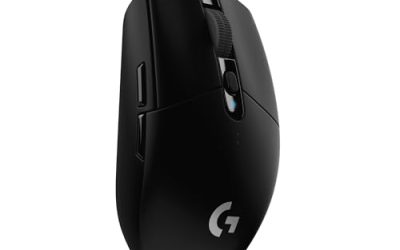
For a child whose gaming happens wherever the family laptop lands, the G305 removes the cable from the equation entirely. Its listing describes a compact, portable design with built-in storage for the USB receiver, so the small dongle travels inside the mouse instead of getting lost in a school bag. Six programmable buttons keep the layout approachable, the symmetrical shape suits either hand, and the stated 250-hour battery life on one AA battery means parents are not constantly rescuing a mouse that died mid-session.
Specs
- Sensor: HERO optical sensor, 200 to 12,000 DPI
- Connectivity: LIGHTSPEED wireless via USB receiver, 1 ms report rate
- Buttons: 6 programmable buttons
- Weight: 99 grams
- Dimensions: 4.59 x 2.45 inches (length x width, as stated in the listing)
- Battery: Up to 250 hours on a single AA battery
- Extras: On-board memory, built-in receiver storage
Best for: Kids who game on a laptop that moves around the house and need a cable-free mouse that still fits a smaller grip.
Watch out for: The receiver is tiny and easy to misplace when it is not stored inside the mouse, and the AA battery adds weight compared with the wired picks here.
ASIN: B07CMS5Q6P
Logitech G203 Wired Gaming Mouse
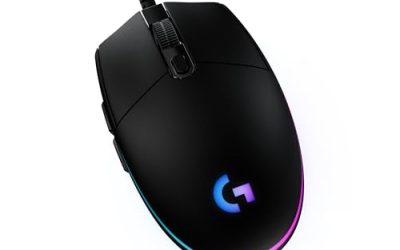
The G203 is the straightforward starting point in this group: a wired connection, a classic shape, and what the listing calls a simple 6-button layout that gets a child straight into the game. Its stated dimensions match the compact end of this guide at 4.59 inches long, and at 85 grams it is light enough for smaller arms to move for a full session without dragging. LIGHTSYNC RGB lighting gives it the glowing look many kids ask for, while the wired USB connection means there is never a battery to check before homework or play.
Specs
- Sensor: Gaming-grade optical sensor, 200 to 8,000 DPI
- Connectivity: Wired USB
- Buttons: 6 programmable buttons
- Weight: 85 grams
- Dimensions: 4.59 x 2.45 x 1.5 inches, as stated in the listing
- Lighting: LIGHTSYNC RGB
- Extras: On-board memory
Best for: A child’s first real gaming mouse at a fixed desk, where simple wired reliability matters more than extra features.
Watch out for: Customising buttons and lighting runs through Logitech G HUB software, so a parent may need to handle the initial setup for younger children.
ASIN: B07YN82X3B
Razer Viper Mini Ultralight Gaming Mouse

Older kids who have outgrown basic mice but still have smaller hands are the natural audience for the Viper Mini. Razer built it as a scaled-down version of its Viper line, and the listing states a 61-gram weight that makes quick flicks in fast games far less tiring for a child’s wrist. The ambidextrous shape works for left- or right-handed players, the Speedflex cable is described as drag-free, and six programmable buttons add just enough extra control for games with a couple of key actions without overwhelming a developing grip.
Specs
- Sensor: 8500 DPI optical sensor
- Connectivity: Wired USB with Razer Speedflex cable
- Buttons: 6 programmable buttons
- Weight: 61 grams
- Dimensions: 4.66 x 2.42 inches (length x width, as stated in the listing)
- Lighting: Razer Chroma RGB underglow
- Switches: Razer optical mouse switches
Best for: Older kids and small-handed players who play quick, aim-heavy games and want the lightest shaped option with a cable.
Watch out for: The side buttons sit on one side only, so left-handed children get the shape but not thumb-button access, and the small shell will feel cramped as hands grow.
ASIN: B084RPZD6T
Razer DeathAdder V2 Mini Gaming Mouse

Where the Viper Mini is symmetrical, the DeathAdder V2 Mini keeps the curved, right-handed shape the DeathAdder family is known for, shrunk to a stated 4.5 inches long for small to medium hands. That sculpted shape supports a palm grip, which many younger players find easier to control than a flat mouse they have to pinch. Razer includes anti-slip grip tape in the box, a genuinely useful extra for children whose hands get sweaty during longer sessions, and the 62-gram weight keeps the shaped shell from feeling sluggish when a child needs to reposition quickly.
Specs
- Sensor: 8500 DPI optical sensor
- Connectivity: Wired with Razer Speedflex cable
- Buttons: 6 programmable buttons
- Weight: 62 grams
- Dimensions: 4.5 x 2.2 x 1.52 inches, as stated for the listing
- Lighting: Razer Chroma RGB
- Extras: Anti-slip grip tape included
Best for: Right-handed kids who prefer a palm-filling ergonomic shape and need extra grip security during longer play.
Watch out for: The shape is right-handed only, and the grip tape is self-applied, so a parent should fit it carefully rather than letting a child stick it on crooked.
ASIN: B08B3K9K6P
Glorious Model O Minus Compact Wired Gaming Mouse
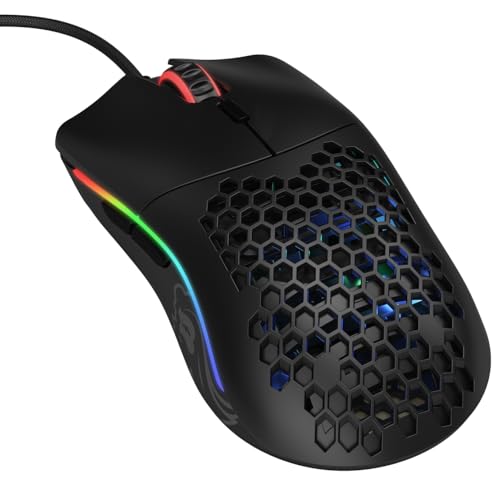
The Model O Minus is the pick for a small-handed player who wants the lightest wired mouse in this guide. Its title leads with the word compact, the stated weight is 58 grams, and the listing describes the ambidextrous shape as suited to medium to small hands. Six buttons keep the controls familiar, the Pixart 3360 sensor covers fast competitive games as a child grows into them, and the flexible Ascended cord reduces the tugging that lighter mice can suffer from. It is the most grown-up feeling option here, best saved for a careful older child.
Specs
- Sensor: Pixart 3360 sensor, up to 12,000 DPI
- Connectivity: Wired, Ascended paracord cable
- Buttons: 6 buttons
- Weight: 58 grams
- Dimensions: 4.72 x 2.48 inches (length x width, as stated in the listing)
- Shell: Honeycomb design, ambidextrous shape
- Switches: Omron switches
Best for: Careful older kids with small hands who play fast games and want the lightest wired mouse available in this group.
Watch out for: The honeycomb shell has open holes that can collect dust and crumbs from a child’s desk, and it rewards a gentler grip than a solid shell would.
ASIN: B07VMM5LKH
Which One Fits Your Situation
A first gaming mouse for a younger child
Start with the Logitech G203. Its wired connection cannot get lost or run flat, the six-button layout matches what most children’s games actually use, and the 4.59-inch shell suits a hand that is still growing into a full grip. Parents can set the sensitivity once in the software and then leave the mouse alone, which is exactly the level of involvement a first gaming setup should need day to day.
Gaming on a family laptop that moves rooms
Choose the Logitech G305 here. Wireless freedom matters when the desk is sometimes a kitchen table, and the receiver stores inside the mouse body between sessions, cutting the odds of it vanishing into a drawer. The long stated battery life also suits shared computers, because nobody has to remember whose turn it was to charge the mouse before the next person sits down to play or work.
An older kid who plays competitive games
Look at the Razer Viper Mini or the Glorious Model O Minus. Both are light, wired, and sized below full adult dimensions, so a smaller hand keeps control during fast turns. Pick the Viper Mini for a solid shell and symmetrical shape, or the Model O Minus when the lowest stated weight is the priority and the child can be trusted to keep a honeycomb shell clean and handle it with reasonable care.
A child who grips hard and slips on smooth shells
The Razer DeathAdder V2 Mini answers this problem directly, because its box includes anti-slip grip tape for the surfaces a hand actually holds. The curved right-handed shape gives the palm something to rest against instead of forcing a fingertip pinch, which helps children who squeeze when concentrating. Fit the tape with clean, dry hands and press each piece down fully so the edges do not lift during the first week of play.
Common Mistakes
- Buying an adult-sized gaming mouse because it was the one on offer, then watching a child stretch to reach the buttons and lose accuracy in every game.
- Chasing the highest DPI number in a title, when a young player will spend nearly all their time at the lower settings and needs fit far more than sensitivity headroom.
- Choosing a mouse packed with side buttons for a child who has not yet learned a stable grip, which leads to constant accidental presses and frustration.
- Forgetting to check the stated dimensions against the child’s hand, even though listings print the length and width needed to make that comparison in a minute.
- Picking a wireless mouse without a plan for its receiver or battery, so the mouse spends half its life lost, flat, or borrowed back by an adult.
Frequently Asked Questions
What size gaming mouse suits a child?
Work from the dimensions in the listing rather than age labels. The mice in this guide are roughly 4.5 to 4.72 inches long, which suits most smaller hands because the fingers can rest on the main buttons without stretching. If a child’s fingertips barely reach past the middle of a current mouse, step down to the shorter end of that range and favour a lighter model.
Is wired or wireless better for kids?
Neither wins outright. Wired mice such as the G203 never need batteries and cannot lose a connection, which suits a fixed desk. Wireless models like the G305 suit laptops that move around the house, provided the receiver has a home, ideally stored inside the mouse itself. Match the connection to where the computer actually gets used most days.
How many buttons does a child need on a gaming mouse?
Six buttons cover the vast majority of games children play: two main clicks, a clickable scroll wheel, a sensitivity button, and two thumb buttons. More than that usually means extra software setup and more chances for a small thumb to press the wrong thing mid-game. A simple layout also makes it easier for a parent to explain what each button does during the first week.
Can a child just use a regular office mouse for gaming?
An office mouse works for slow, menu-driven games, but its sensor and button design are not built for fast movement or repeated rapid clicking. A compact gaming mouse adds a proper gaming sensor, a shape sized for smaller hands, and buttons placed for play rather than paperwork. For a child who games most days, that difference shows up quickly in comfort and control.
FAQ
What size gaming mouse suits a child?
Is wired or wireless better for kids?
How many buttons does a child need on a gaming mouse?
Can a child just use a regular office mouse for gaming?
More from Amazon
Programs that pair well with the guide above. Offers and eligibility are set by Amazon and may change.
Free shipping on eligible items, Prime Video and more. Eligible new members can start with a free trial.
Start a Prime free trialAd-free music streaming. Eligible new subscribers can start with a free trial.
Try Music Unlimited freeA Prime membership for ages 18-24 with a trial period. Eligibility is set by Amazon.
See Prime for Young AdultsAudiobooks and podcasts to listen to on the go. Eligible new members can start with a free trial.
Try Audible freeAs an Amazon Associate we earn from qualifying purchases.