Key takeaways
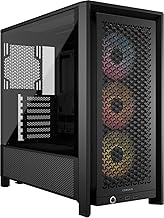
- Intake low and front, exhaust high and rear. Cool air enters at the bottom and front, hot air leaves at the top and back, following the way heat naturally rises.
- Aim for balanced or slightly positive pressure. Having a little more intake than exhaust keeps dust from being sucked in through every gap and filter.
- Do not block the panels. Give the case a few inches of breathing room and keep front and top vents clear of walls, shelves, and clutter.
What's inside
A gaming PC that runs hot is a gaming PC that quietly holds itself back. When your CPU or GPU climbs past its comfort zone, it starts throttling, dropping clock speeds to protect itself, and that shows up as stutters in the middle of a firefight or frame rates that sag the longer you play. Heat also shortens the life of the components you paid good money for. In 2026, with power-hungry chips and RTX 50-series cards packed into ever-smaller cases, cooling is no longer an afterthought; it is the difference between a rig that performs on paper and one that performs on your desk.
This guide walks you through how cooling actually works, how to choose between air and liquid, and how to dial in airflow so your temperatures stay flat during long sessions. You will learn what the numbers mean, where the heat really goes, and which upgrades give you the biggest drop in degrees for the least money and effort. Below are the coolers we recommend for builders who want quiet, reliable temperatures without overspending.
As an Amazon Associate we earn from qualifying purchases.






⚡ Save on Your Next PC — Amazon Prime
Prime members get fast free shipping on the systems above, plus early access to Prime Day & Black Friday PC deals. New members get a 30-day free trial.
Watch: How to Cool Your Gaming PC (2026 Guide) — Video Review
Understand Where the Heat Comes From
Almost all the heat in your case is produced by two parts: the CPU and the graphics card. The CPU cooler is the piece you choose and install, while the GPU ships with its own fans baked in. Everything a cooler does is move heat from the chip into the air, and eventually push that warm air out of the case. If the warm air has nowhere to go, even an expensive cooler will struggle. That is why thinking about your CPU cooler and your case airflow together, rather than in isolation, is the single most useful habit you can build.
Air Cooling vs Liquid Cooling
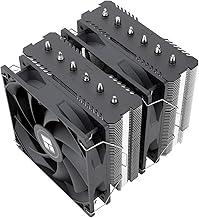
Air coolers use a metal heatsink and heat pipes to pull warmth off the CPU, then a fan blows it away. They are simple, cheap, and there is nothing to leak or fail. A strong twin-tower air cooler like the Thermalright Peerless Assassin 120 SE handles most mainstream and even high-end chips comfortably. All-in-one (AIO) liquid coolers, such as the ARCTIC Liquid Freezer III Pro 360 or the CORSAIR Nautilus 360 RS, pump coolant to a radiator mounted on the case, which lets them shed more heat and often run quieter under heavy load. For hot flagship CPUs or compact cases where a tall air cooler will not fit, a 360mm AIO is the safer pick.
Get Your Case Airflow Right
- Intake low and front, exhaust high and rear. Cool air enters at the bottom and front, hot air leaves at the top and back, following the way heat naturally rises.
- Aim for balanced or slightly positive pressure. Having a little more intake than exhaust keeps dust from being sucked in through every gap and filter.
- Do not block the panels. Give the case a few inches of breathing room and keep front and top vents clear of walls, shelves, and clutter.
Apply Thermal Paste Correctly
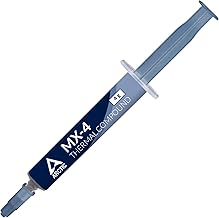
Thermal paste fills the microscopic gaps between your CPU and the cooler so heat can actually transfer. A single pea-sized dot in the center is enough for most chips; the pressure of mounting the cooler spreads it evenly. More is not better, since too much paste insulates instead of conducts. If you are reusing an old cooler, clean off the crusty leftover paste with isopropyl alcohol first. Fresh paste every few years is a cheap way to claw back a few degrees.
Keep It Cool Over Time
Cooling performance decays quietly. Dust builds up on fan blades and radiator fins, fan curves drift out of tune, and a case that was cool in winter can run warm in summer. Set a reminder to blow out the dust every few months, check your temperatures with monitoring software after big game updates, and tweak your fan curve in the BIOS so fans ramp up sooner under load. Small maintenance beats an emergency shutdown mid-match.
Tips
- Buy a cooler rated comfortably above your CPU’s heat output so it never runs at its limit.
- Add or clean case fans before spending big on an exotic cooler; airflow is often the real bottleneck.
- Route cables behind the motherboard tray so they do not choke the path of moving air.
- Use a monitoring tool to watch load temperatures, not idle ones, since idle numbers tell you almost nothing.
Frequently Asked Questions
Is liquid cooling risky because it can leak?
Modern sealed AIO units like the ARCTIC Liquid Freezer III Pro and CORSAIR Nautilus series are designed to run for years without maintenance, and leaks are rare. For most builders the bigger deciding factor is fit and noise, not leak fear.
What is a safe temperature for my CPU and GPU?
Under a heavy gaming load, staying below roughly 80°C on the CPU and mid-70s°C on the GPU is comfortable. Brief spikes are normal; sustained temperatures near the chip’s maximum mean you have a cooling problem to solve.
Do I need a giant 360mm cooler for a mid-range PC?
No. A quality air cooler such as the Cooler Master Hyper 212 or Thermalright Assassin X120 handles mid-range CPUs easily. Big AIOs shine on power-hungry flagship chips or in cases where airflow is tight.
How often should I replace thermal paste?
Every two to three years is plenty for most people, or whenever you remove the cooler for another reason. If your temperatures have crept up for no clear reason, fresh paste is a cheap first thing to try.
Conclusion
Good cooling is less about buying the most expensive part and more about matching a capable cooler to your CPU, then giving the case a clear path for hot air to escape. Start with solid airflow, add a cooler sized for your chip, apply paste properly, and keep the dust in check. Do that and your gaming PC will hold steady frame rates and quiet fans through the longest sessions of 2026.