Key takeaways
- Bandwidth: DDR4 gaming kits top out around 3200–3600MT/s, while mainstream DDR5 starts at 4800MT/s and comfortably reaches 6000–6400MT/s, roughly doubling theoretical throughput.
- Latency: DDR4 has lower CAS numbers (CL16–CL18) but DDR5’s much higher clocks close the gap; real-world latency at DDR5-6000 CL36 is broadly equivalent, with far more bandwidth on top.
- Compatibility: The two are physically and electrically incompatible. DDR5 uses a different 288-pin keying and cannot be forced into a DDR4 slot — the platform decides for you.
- Capacity: DDR5 supports far denser modules, making 48GB, 64GB and 96GB kits practical. DDR4 realistically caps out at 64GB for most gaming boards.
- Power and reliability: DDR5 runs at 1.1V nominal (1.35V for XMP/EXPO kits), moves voltage regulation onto the module via PMIC, and adds on-die ECC for improved stability at high density.
- Availability: DDR5 has the entire enthusiast ecosystem behind it in 2026; DDR4 SKUs are shrinking, and premium binned kits are increasingly hard to find.
What's inside
Choosing memory in 2026 is no longer the coin-flip it was a few years ago. DDR5 has matured from an expensive early-adopter tax into the default standard for every current gaming platform, while DDR4 has quietly slipped into legacy status. Yet millions of perfectly capable AM4 and LGA1200/1700 gaming rigs still run DDR4, and the question of whether to upgrade memory, upgrade platform, or simply top up what you already own is a genuinely difficult one.
The short version: DDR5 wins on bandwidth, capacity headroom and future-proofing, while DDR4 wins only on the narrow grounds of “you already own a DDR4 motherboard.” What has changed most recently is pricing. As DRAM makers wind down DDR4 production lines, DDR4 kits have stopped getting cheaper — and in some capacities have actually risen — while high-quality 32GB DDR5 kits sit comfortably in mainstream territory. That inversion reshapes the entire buying decision.
As an Amazon Associate we earn from qualifying purchases.


⚡ Save on Your Next PC — Amazon Prime
Prime members get fast free shipping on the systems above, plus early access to Prime Day & Black Friday PC deals. New members get a 30-day free trial.
Watch: DDR5 vs DDR4 RAM: Does It Matter in 2026? — Video Review
Quick Verdict
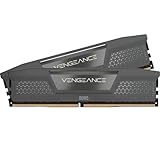
Buy DDR5 if you are building new, upgrading your CPU and motherboard, or running anything more demanding than 1080p esports — a 32GB 6000MHz CL36 kit like the CORSAIR Vengeance RGB DDR5 or G.SKILL Flare X5 is the current sweet spot for both Intel and AMD. Stick with DDR4 only if you have a working DDR4 board and no plans to replace it in the next 12–18 months; in that case, adding capacity is far better value than a full platform swap.
Key Differences
- Bandwidth: DDR4 gaming kits top out around 3200–3600MT/s, while mainstream DDR5 starts at 4800MT/s and comfortably reaches 6000–6400MT/s, roughly doubling theoretical throughput.
- Latency: DDR4 has lower CAS numbers (CL16–CL18) but DDR5’s much higher clocks close the gap; real-world latency at DDR5-6000 CL36 is broadly equivalent, with far more bandwidth on top.
- Compatibility: The two are physically and electrically incompatible. DDR5 uses a different 288-pin keying and cannot be forced into a DDR4 slot — the platform decides for you.
- Capacity: DDR5 supports far denser modules, making 48GB, 64GB and 96GB kits practical. DDR4 realistically caps out at 64GB for most gaming boards.
- Power and reliability: DDR5 runs at 1.1V nominal (1.35V for XMP/EXPO kits), moves voltage regulation onto the module via PMIC, and adds on-die ECC for improved stability at high density.
- Availability: DDR5 has the entire enthusiast ecosystem behind it in 2026; DDR4 SKUs are shrinking, and premium binned kits are increasingly hard to find.
DDR5: The Default Choice for 2026 Builds
Every current CPU socket — AMD’s AM5 and Intel’s LGA1851 — is DDR5-only, so a new build simply is a DDR5 build. The practical decision is which speed and timing combination to target. For Ryzen, DDR5-6000 CL36 remains the ideal pairing because it keeps the memory controller in its optimal 1:1 mode; the G.SKILL Flare X5 32GB 6000MT/s CL36 kit was designed specifically for this and carries both EXPO and XMP 3.0 profiles. Intel builders have more flexibility but see little benefit past 6400MT/s in games.
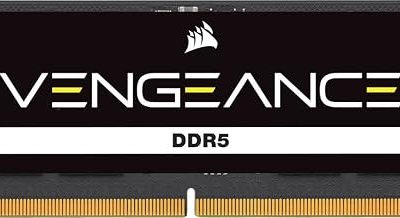
Beyond raw speed, DDR5’s advantages show up in 1% lows, heavily modded open-world titles, and anything that streams assets aggressively. The CORSAIR Vengeance RGB DDR5 6000 CL36 kit and the Vengeance RGB RS in grey are dependable, widely validated picks, while the TEAMGROUP T-Force Vulcan 6000 CL38 offers near-identical performance without RGB for less. The Lexar Thor Z RGB adds on-die ECC and PMIC in a dual-profile kit, and laptop or SFF owners should look at the Crucial 32GB SODIMM kit, which drops straight into Ryzen 7000-series and modern Core notebooks.
DDR4: Still Viable, No Longer Worth Buying Into
DDR4 is not slow. A Ryzen 5800X3D or Core i5-13600K paired with 32GB of DDR4-3600 CL16 will still push high frame rates at 1440p, and in GPU-limited scenarios the difference between DDR4 and DDR5 shrinks to low single-digit percentages. If that describes your system, memory is almost certainly not your bottleneck, and the money is better spent on a graphics card.
The problem is direction of travel. DDR4 kits are being discontinued, prices have flattened or climbed, and any DDR4 purchase is money spent on a dead-end platform you cannot carry forward. Buying a new DDR4 motherboard in 2026 means locking yourself out of every future CPU release. Topping up an existing rig from 16GB to 32GB is sensible; starting fresh on DDR4 is not.
Which Should You Buy?
- For a new gaming PC: DDR5, no exceptions — 32GB at 6000MHz CL36 covers everything from esports to 4K.
- For an AM5 Ryzen build: Pick an EXPO-certified kit such as the G.SKILL Flare X5 or CORSAIR Vengeance RGB RS for one-click stability.
- For an existing AM4 or LGA1700 DDR4 rig: Keep DDR4 and add capacity; save the upgrade budget for a full platform jump later.
- For streaming, editing or local AI work: DDR5 at 32GB minimum, with an eye on 64GB — the density and bandwidth genuinely matter here.
- For laptops and small form factor: The Crucial 32GB DDR5 SODIMM kit is the straightforward, broadly compatible option.
Frequently Asked Questions
Can I put DDR5 in a DDR4 motherboard?
No. The modules are keyed differently and use incompatible voltage regulation. Your motherboard’s chipset and CPU socket determine which standard you can use, and there is no adapter that bridges the two.
Is 32GB enough for gaming in 2026?
Yes. 32GB is the current sweet spot and handles modern titles, background apps and streaming comfortably. 16GB is increasingly marginal in demanding open-world games, while 64GB only pays off for content creation or heavy multitasking.
Does DDR5 actually improve frame rates?
At 1080p with a strong GPU, expect roughly 5–15% higher averages and noticeably better 1% lows versus DDR4-3200. At 4K the gap narrows considerably because the graphics card becomes the limiting factor.
What is the difference between XMP 3.0 and AMD EXPO?
Both are one-click overclocking profiles stored on the module — XMP 3.0 is Intel’s standard, EXPO is AMD’s. Many kits, including the Flare X5 and Lexar Thor Z, ship with both, so either platform runs at rated speed automatically.
Final Verdict
DDR5 has won, and in 2026 the only reason to choose DDR4 is that you already own the motherboard. If you are building, upgrading your CPU, or simply want a system that stays relevant for the next several years, a 32GB DDR5-6000 CL36 kit is the correct purchase — and the difference between the good options above comes down to aesthetics and price rather than performance.