Our Top Picks
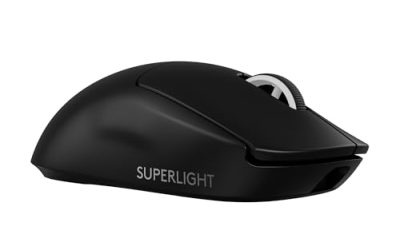
 Logitech G Pro X Superlight 2 Lightspeed WirelessClassic1.57 x 2.5 x 4.92 inches0.1 poundsCheck on Amazon

A Minecraft mouse gets clicked more than almost any other tool on the desk. You hold the button down to mine, tap it in bursts during combat, and lean on the scroll wheel and side buttons to move through the hotbar without looking away from the screen. The real decision is how the clicks feel after thousands of repetitions, how much weight your wrist carries through a long building session, and whether extra buttons genuinely help your inventory habits or just crowd the shell.

This guide is for survival builders who play for hours at a stretch, PvP players who want a light mouse with a crisp switch, and laptop players who need wireless freedom without a charging routine. The four mice below were picked from their names and stated specifications on their Amazon pages, and they split cleanly by switch type, weight, and button count, so the trade-offs are easy to see.
Quick Picks
As an Amazon Associate we earn from qualifying purchases.
| Product | Best for | Key spec from title |
|---|---|---|
| Logitech G502 X LIGHTSPEED | Hotbar and inventory binds | 13 programmable controls |
| Logitech G PRO X SUPERLIGHT 2 | Fast clicking in a light shell | 60 g with 5 programmable buttons |
| Razer Viper V3 Pro | Optical switch feel, lightest here | 54 g with Gen-3 optical switches |
| Logitech G305 LIGHTSPEED | Long sessions without charging | 250 hours on a single AA battery |
How to Choose
Start with the switch, because Minecraft is a clicking game
Mining, placing blocks, and combat all run through the two main buttons, so switch type shapes the whole experience. The listings here name two families: LIGHTFORCE hybrid optical-mechanical switches on both Logitech flagships, which pair optical actuation with a mechanical click feel, and Razer Optical Mouse Switches Gen-3 on the Viper V3 Pro, a fully optical design. Neither listing promises a click-speed figure, and you should not shop for one. Choose by the feel described: a defined tactile snap if you like clear feedback per press, or the lighter optical response if you click in rapid bursts.
Match weight to how long your sessions run
Weight decides how a mouse feels in hour three of a building project. The lightest shells here, at 54 and 60 grams as listed, ask less of your wrist during constant small corrections and quick turns, and they suit fingertip and claw grips that move the mouse often. The G502 X LIGHTSPEED, at 102 grams as listed, trades that lightness for a larger, sculpted shape that rests the hand during slower survival play. The G305 sits between them at 99 grams. There is no correct number, only the match between shell weight, your grip, and how many hours you stay in one world.
Count buttons against your hotbar habits
Minecraft gives you nine hotbar slots plus an inventory screen, and how you reach them decides whether extra buttons matter. The G502 X LIGHTSPEED lists 13 programmable controls, enough to move several hotbar slots, a sprint toggle, or a drop command onto the mouse through Logitech G HUB. The Viper V3 Pro lists eight programmable controls, the G305 six, and the SUPERLIGHT 2 five. If your left hand already lives on the number row and you rarely bind anything, a five-button mouse loses nothing. If reaching for distant slots breaks your aim, the button-heavy shell earns its size.
Pick a battery routine you will actually keep
Wireless freedom ends the first time a mouse dies mid-fight, and the four listings split into two routines. The G502 X LIGHTSPEED, SUPERLIGHT 2, and Viper V3 Pro use built-in rechargeable batteries, listed at up to 140, 95, and 95 hours respectively, and charge over USB-C or their included cable. The G305 runs up to 250 hours on a single AA battery, as listed, so a spare cell in the drawer replaces charging entirely. Also check the link itself: each mouse connects through its own wireless receiver, and the G305 stores that receiver inside the body, which suits laptop bags.
The 4 Best Options
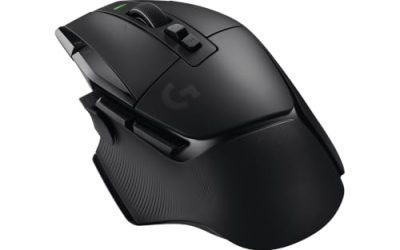
Logitech G502 X LIGHTSPEED
The G502 X LIGHTSPEED is the pick for players who treat the mouse as a second keyboard. Its 13 programmable controls, as listed, can carry hotbar slots, a perspective toggle, or a drop key, and the removable DPI-shift button sits where a thumb naturally rests. The LIGHTFORCE hybrid optical-mechanical switches give the main clicks a defined mechanical feel with optical actuation, and the dual-mode scroll wheel switches between free spin and ratchet steps, which helps when you scroll long inventories. At 102 grams it is the heaviest mouse here, so it suits palm grips and deliberate movement rather than constant flicking.
Specs
- Sensor: HERO 25K, 100 to 25,600 DPI as listed
- Switches: LIGHTFORCE hybrid optical-mechanical
- Controls: 13 programmable controls
- Connection: LIGHTSPEED wireless
- Battery: up to 140 hours of constant motion as listed
- Weight: 102 g (black) as listed
- Charging: USB-C port
- Onboard memory: 5 profiles as listed
- Model: 910-006178
Best for: Players who bind hotbar slots and commands to the mouse.
Watch out for: The 102 g shell and right-handed sculpting will not suit small hands or fingertip grips.
ASIN: B092CRH1RX
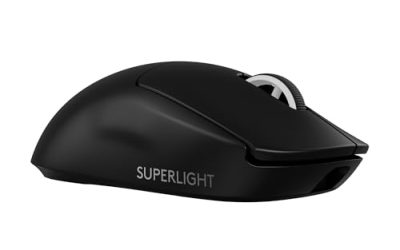
Logitech G PRO X SUPERLIGHT 2
The SUPERLIGHT 2 is built for players who click fast and move the mouse constantly. At 60 grams as listed, it is light enough that long building sessions and repeated camera turns put little load on the wrist, and the symmetrical shell works for claw and fingertip grips. Its LIGHTFORCE hybrid switches keep a crisp, tactile click feel, which gives clear feedback when you tap through blocks or trade hits in PvP. The trade-off is buttons: with five programmable buttons, your hotbar stays on the keyboard number row. Battery life is listed at up to 95 hours, and charging is over USB-C.
Specs
- Sensor: HERO 2, up to 44,000 DPI as listed
- Report rate: up to 8 kHz as listed
- Switches: LIGHTFORCE hybrid optical-mechanical
- Buttons: 5 programmable buttons
- Weight: 60 g as listed
- Battery: up to 95 hours as listed
- Charging: USB-C
- Model: 910-006628
Best for: PvP and long sessions where a light shell and crisp clicks matter most.
Watch out for: Only five buttons, so there is little room for hotbar or macro binds.
ASIN: B09NBWL8J5
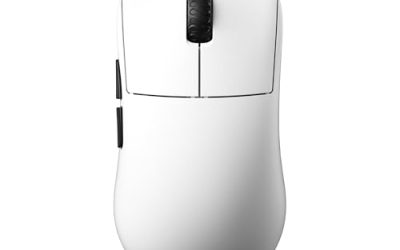
Razer Viper V3 Pro
The Viper V3 Pro is the lightest mouse here at 54 grams as listed for the black version, and the one to choose for a fully optical click. Its Razer Optical Mouse Switches Gen-3 actuate with light rather than a metal contact, and the listing pairs them with a symmetrical shape that suits claw and fingertip grips during fast, repeated clicking. Eight programmable controls cover a couple of hotbar slots or a push-to-talk key without crowding the shell. Battery life is listed at up to 95 hours, and the sensor is a 35K optical unit with 8K polling as listed.
Specs
- Weight: 54 g (black) as listed
- Sensor: 35K optical sensor as listed
- Polling: 8K as listed
- Switches: Razer Optical Mouse Switches Gen-3
- Controls: 8 programmable controls
- Battery: up to 95 hours as listed
- Shape: symmetrical
- Model: RZ01-05120100-R3U1
Best for: Players who want the lightest shell and an optical switch feel.
Watch out for: The flat symmetrical shape offers little palm support for relaxed, slow-paced play.
ASIN: B0CW25XR5R
Logitech G305 LIGHTSPEED
The G305 is the simple answer for players who want to set a mouse down and forget about it for weeks. Its listing states up to 250 hours of continuous gameplay on a single AA battery, so there is no charging cable in the routine at all, and the receiver stores inside the body for laptop play. At 99 grams it feels steadier than the ultralight pair, and six programmable buttons cover the basics, such as a sprint bind or one hotbar slot. The HERO sensor reaches 12,000 DPI with a 1 ms report rate as listed, which is more tracking than Minecraft asks for.
Specs
- Weight: 99 g as listed
- Sensor: HERO, up to 12,000 DPI, 400 IPS as listed
- Report rate: 1 ms as listed
- Buttons: 6 programmable buttons
- Battery: up to 250 hours on a single AA battery, included, as listed
- Memory: on-board memory as listed
- Storage: built-in storage for the USB wireless receiver
- Compatibility: PC and Mac as listed
Best for: Laptop players and long sessions with no charging routine.
Watch out for: It uses a replaceable AA battery, so keep a spare ready; there is no USB-C charging.
ASIN: B07CMS5Q6P
Which One Fits Your Situation
You bind hotbar slots to your mouse hand
Choose the G502 X LIGHTSPEED. Thirteen programmable controls, as listed, let you move the hotbar slots you reach for most, plus a drop or perspective command, onto the mouse, so your left hand stays on movement keys. The heavier sculpted shell also rests your hand during long survival sessions where you are managing inventory as much as aiming.
You play for hours and your wrist complains
Choose the SUPERLIGHT 2 or the Viper V3 Pro. At 60 and 54 grams as listed, both shells cut the effort of constant small movements, and their symmetrical shapes suit the claw and fingertip grips that Minecraft players often settle into. Pick the Viper if you want the optical switch feel and two extra side controls, or the Logitech if you prefer its click tuning and software.
You split time between a desktop and a laptop
Choose the G305 LIGHTSPEED. The receiver stores inside the mouse, the AA battery runs up to 250 hours as listed, and there is no charging cable to pack or forget. It is also the easiest mouse here to hand to a second player or move between rooms, because nothing about its setup needs reconfiguring when it changes machines.
You play PvP and want clicks that feel instant
Choose the Viper V3 Pro for its Gen-3 optical switches, or the SUPERLIGHT 2 if you prefer the LIGHTFORCE hybrid feel with a more defined mechanical snap. Both listings describe fast actuation without promising a click-speed number, so decide by feel: lighter and optical, or tactile and hybrid. Either way, the low weights help repeated clicking stay consistent deep into a session.
Common Mistakes
- Shopping by the DPI headline. Every sensor here lists figures far beyond what Minecraft can use, from 12,000 to 44,000 DPI. A bigger number does not make blocks place faster or aim steadier. What changes your play is switch feel, weight, and button layout, so compare those first and treat DPI as a box every mouse in this guide already ticks.
- Ignoring the button count until after you buy. If your hotbar habits depend on mouse binds, a five-button mouse will frustrate you no matter how light it is, and if you never bind anything, a 13-control shell adds size and weight you never use. Decide how many commands you honestly want under your thumb before you choose, not after the first long session.
- Picking the heaviest mouse for all-day building. A sculpted 102 gram shell feels supportive in short sessions, but constant small movements over a six-hour build can tire a wrist that a 54 or 60 gram mouse would spare. Match the weight to your longest typical session, not your shortest, and consider your grip style as well.
- Assuming the fastest polling setting is the right one for Minecraft. Listings here go up to 8K polling, but Minecraft does not reward that rate the way a competitive shooter might, and high polling can shorten battery life on the mice that offer it. Run the standard wireless setting, enjoy the longer battery, and change it only if a different game you play actually benefits.
- Forgetting the receiver and the charging plan. Each of these mice connects through its own USB receiver, so a lost dongle or a crowded USB hub becomes your problem, and rechargeable models need a cable within reach when the battery fades. The G305 avoids charging with its AA cell and stores its receiver in the body; the others ask you to keep track of both pieces yourself.
Frequently Asked Questions
Is a wireless mouse responsive enough for Minecraft PvP?
Yes, on the evidence of the listings themselves. Each mouse here connects through a gaming wireless link, and the G305 listing states a 1 ms report rate while the SUPERLIGHT 2 and Viper V3 Pro list report rates up to 8 kHz. Minecraft rewards consistent clicking and quick hotbar swaps far more than exotic connection figures, so any of these links is comfortably fast enough for PvP.
How many buttons do I actually need for the hotbar?
Most players need fewer than they expect. Two side buttons cover a sprint toggle and one favourite slot, which is why the six-button G305 works for many people. If you regularly jump between four or more slots without touching the number row, the 13 programmable controls on the G502 X LIGHTSPEED, as listed, become genuinely useful rather than decoration.
Does switch type change how clicking feels in Minecraft?
It changes the feel of every press, which matters in a game built on repeated clicking. LIGHTFORCE hybrid switches, on both Logitech flagships, combine optical actuation with a mechanical snap, while Razer’s Gen-3 optical switches use a fully optical design with a lighter response. No listing here states a click-speed number, so treat the choice as feel and consistency, not a promised speed.
Should I choose a rechargeable mouse or one that takes AA batteries?
Choose by routine. The rechargeable models list up to 95 or 140 hours and refill over USB-C, which suits a fixed desk where a cable lives nearby. The G305 lists up to 250 hours on one AA battery, so a spare cell replaces charging entirely and suits laptop bags and shared computers. Neither approach is better; the right one is the routine you will keep.
FAQ
Is a wireless mouse responsive enough for Minecraft PvP?
How many buttons do I actually need for the hotbar?
Does switch type change how clicking feels in Minecraft?
Should I choose a rechargeable mouse or one that takes AA batteries?
More from Amazon
Programs that pair well with the guide above. Offers and eligibility are set by Amazon and may change.
Free shipping on eligible items, Prime Video and more. Eligible new members can start with a free trial.
Start a Prime free trialAd-free music streaming. Eligible new subscribers can start with a free trial.
Try Music Unlimited freeA Prime membership for ages 18-24 with a trial period. Eligibility is set by Amazon.
See Prime for Young AdultsAudiobooks and podcasts to listen to on the go. Eligible new members can start with a free trial.
Try Audible freeAs an Amazon Associate we earn from qualifying purchases.