Key takeaways
- Four ultralight gaming mice from 54 to 69 grams compared on listed weight, honeycomb and solid shells, sensors, polling, and wireless battery life.
Dropping from a standard gaming mouse to an ultralight one changes how every flick and stop feels, because the shell you push across the pad carries far less mass. The real decision is not simply chasing the smallest number on a box. It is matching a listed weight to your grip, your hand size, and the shell style you can live with daily, since a perforated body and a sealed body feel nothing alike after hours of play.


This guide is for fingertip and claw players who sweep at low sensitivity, for palm players curious whether a lighter shell suits them, and for anyone replacing a heavy wireless model. The four mice below were chosen from their Amazon listing names and stated specifications, and each one sits in the lightest class its maker sells, from 54 grams up to 69 grams.
Quick Picks
As an Amazon Associate we earn from qualifying purchases.
| Product | Best for | Key spec from title |
|---|---|---|
| Razer Viper V3 Pro | The lightest wireless pick here | 54 g, 35K optical sensor, 8K polling |
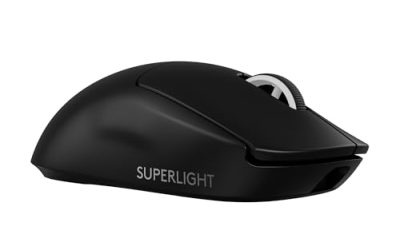
| Logitech G PRO X Superlight 2 | A safe symmetrical shape at 60 g | 60 g, HERO 2 sensor, LIGHTSPEED wireless |
| HyperX Pulsefire Haste 2 Wireless | Long battery in a solid shell | 61 g, 26K sensor, up to 100 hours |
| Glorious Model O Wireless | Honeycomb airflow and RGB | 69 g honeycomb shell, BAMF sensor |
How to Choose
Read the listed weight, then ask what was removed to reach it
Weight figures on these listings run from 54 grams to 69 grams, and the gap comes from different choices. Some makers shrink the shell and strip internal parts, others cut openings into the body, and some simply use thinner walls. A lighter mouse starts and stops with less effort, which matters most on low sensitivity settings where each swipe travels far. Check whether the figure includes the cable on wired models, and remember that a few grams matter less than where the balance sits between front and back.
Choose honeycomb or solid shell before anything else
A honeycomb shell, like the Glorious listing here, vents heat and drops grams, but the openings collect dust and can feel odd under a resting palm. A solid shell, used by the Razer, Logitech, and HyperX listings, keeps a smooth contact surface and shrugs off desk grime, at the cost of slightly warmer hands in long sessions. Neither approach is stronger by default. Decide by touching points: if your palm presses the rear of the mouse, a sealed body usually feels calmer; fingertip players often never notice the holes.
Match the sensor and polling figures to your game
Every listing here uses an optical sensor, with stated ceilings from 19,000 DPI on the Glorious model to 35,000 on the Razer. Those ceilings far exceed what anyone sets in a shooter, so the useful figures are polling and tracking consistency. The Razer lists 8K polling through its included wireless dongle, while the others list 1,000 Hz class connections. Higher polling smooths cursor movement on high refresh monitors, but it also draws more battery, so treat it as a mode you switch on for matches rather than a permanent setting.
Weigh wireless freedom against charging habits
All four picks are wireless, yet their listed endurance differs sharply: up to 71 hours for the Glorious, up to 95 hours for the Razer, and up to 100 hours for the HyperX. Those figures assume modest settings, and bright lighting or top polling cuts them down. Look at the charging port and cable too. A USB-C port, as listed on the Logitech, means the cable on your desk already fits. If you play wired during charges, the bundled cable stiffness matters as much as the sensor.
The 4 Best Options
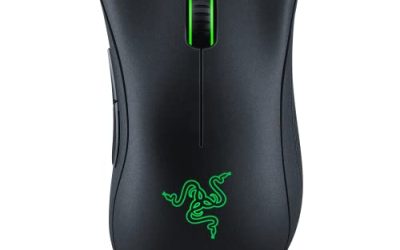
Razer Viper V3 Pro
The Viper V3 Pro is the lightest mouse in this group at a listed 54 grams in black, built around a symmetrical shape that suits claw and fingertip grips. Its listing pairs the Focus Pro 35K optical sensor with true 8K wireless polling through the bundled dongle, plus optical switches in their third generation. Eight programmable controls give enough room for a couple of game binds without crowding the sides. Players who flick hard and stop fast will feel the low mass most.
Specs
- Listed weight: 54 grams (black)
- Sensor: Razer Focus Pro 35K optical sensor
- Polling: 8K wireless polling via HyperPolling dongle
- Switches: Razer Optical Mouse Switches Gen-3
- Controls: 8 programmable buttons
- Battery: up to 95 hours as listed
- Shape: symmetrical, model RZ01-05120100-R3U1
Best for: competitive shooter players who want the lowest listed weight here.
Watch out for: the shape is flat and symmetrical, so strict palm players may find the rear support thin.
ASIN: B0CW25XR5R
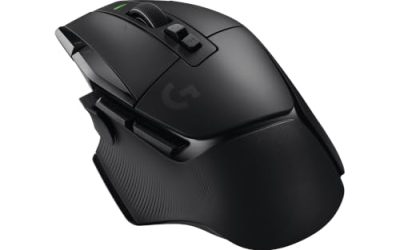
Logitech G PRO X Superlight 2
Logitech lists this mouse at 60 grams with a solid shell, a shape that has become a default recommendation because it offends almost no grip style. The listing names the HERO 2 sensor, LIGHTFORCE hybrid switches that blend optical speed with a mechanical click feel, and LIGHTSPEED wireless. Five programmable buttons keep the layout simple, and charging runs through USB-C. It is the pick for players who want ultralight numbers without a perforated body or an unusual outline under the hand.
Specs
- Listed weight: 60 grams
- Sensor: HERO 2 sensor
- Switches: LIGHTFORCE hybrid optical-mechanical switches
- Wireless: LIGHTSPEED wireless technology
- Buttons: 5 programmable buttons
- Charging: USB-C
- Model: 910-006628 (black)
Best for: players wanting a proven symmetrical outline at 60 grams.
Watch out for: only five buttons, so players who bind many actions to the mouse should count first.
ASIN: B09NBWL8J5
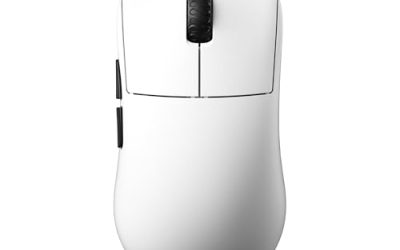
HyperX Pulsefire Haste 2 Wireless
HyperX reaches 61 grams with a solid upper shell, which separates this model from the perforated first Haste generation. The listing states a HyperX 26K sensor reaching 26,000 DPI, dual wireless through 2.4GHz and Bluetooth, and battery life up to 100 hours, the longest figure in this group. Bluetooth also makes it handy for a second machine, since the same mouse can pair to a laptop without the dongle. It fits players who want light weight and long gaps between charges.
Specs
- Listed weight: 61 grams
- Sensor: HyperX 26K sensor, up to 26,000 DPI
- Wireless: 2.4GHz wireless and Bluetooth
- Battery: up to 100 hours as listed
- Shell: solid upper shell
- Model: 6N0B0AA (black)
Best for: players who charge rarely and switch between two computers.
Watch out for: settings changes run through HyperX software, so check it supports everything you plan to adjust.
ASIN: B0BX52C4LN
Glorious Model O Wireless
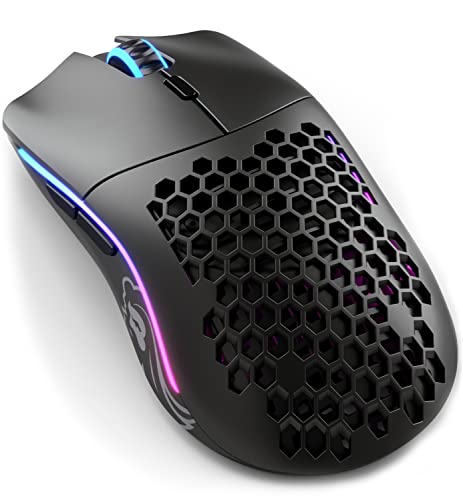
The Model O Wireless is the honeycomb entry here, listed at 69 grams with a perforated shell that vents the palm and shows the internal lighting. Glorious fits its BAMF sensor with a stated 19,000 DPI ceiling, lag-free 2.4GHz wireless with a 1 millisecond response as listed, and up to 71 hours of battery with lighting off. The ambidextrous outline and two side buttons suit left-side bind habits, and the RGB zones are the most visible of this group. It is the airflow and lighting pick.
Specs
- Listed weight: 69 grams
- Shell: honeycomb shell, matte black
- Sensor: BAMF sensor, up to 19,000 DPI
- Wireless: 2.4GHz, 1 ms response as listed
- Battery: up to 71 hours as listed
- Shape: ambidextrous, model GLO-MS-OW-MB
Best for: players who want a vented honeycomb shell and visible RGB.
Watch out for: the open shell gathers dust, so it needs a quick clean more often than sealed rivals.
ASIN: B098RDFP3J
Which One Fits Your Situation
You play tactical shooters with hard flicks
Take the Razer Viper V3 Pro. Its 54 gram listing is the lowest here, the symmetrical body lets a fingertip or claw grip change direction without fighting the shell, and the 8K polling dongle is in the box for match settings. If your monitor refreshes fast and your aim style is stop-start, this is the combination built for that pattern of movement.
You want one safe shape for mixed games
Choose the Logitech G PRO X Superlight 2. At 60 grams it is light enough to change how long sessions feel, and its rounded symmetrical outline works across shooters, strategy titles, and desktop hours without forcing a new grip. The five buttons cover the usual binds, and USB-C charging matches the cables most desks already carry for phones and keyboards.
Your desk serves both a PC and a laptop
The HyperX Pulsefire Haste 2 Wireless fits that setup best. Its 2.4GHz dongle can stay in the gaming PC while Bluetooth pairs with the laptop, so one 61 gram mouse covers both machines. The listed 100 hour battery also means the shared mouse is rarely the thing that dies midweek, and the solid shell tolerates being moved between bags and desks.
Your hands run hot during long sessions
Look at the Glorious Model O Wireless. The honeycomb openings move air across the palm, which some players find more comfortable than any solid shell in summer rooms. At 69 grams it is the heaviest listing here, yet still far below standard gaming mice, and the bright RGB suits a setup where the mouse is part of the display.
Common Mistakes
- Chasing the lowest gram figure without checking the shape, then discovering the flat or narrow shell fights your grip on day one.
- Assuming honeycomb and solid shells feel the same, when the openings change palm contact, dust buildup, and cleaning habits.
- Leaving maximum polling and full lighting on permanently, then blaming the mouse when battery life lands far below the listed figure.
- Comparing wired weight figures that exclude the cable against wireless figures that include a battery, which skews the gap.
- Ignoring side button count and placement, so a lighter mouse arrives with fewer binds than your current setup depends on.
Frequently Asked Questions
How light does a gaming mouse need to be to count as ultralight?
Listings in this class generally sit below 70 grams, and the four here run from 54 to 69 grams. There is no official cutoff, so read the figure on each product page and compare like with like: wireless models carry a battery, while wired figures often exclude the cable that still drags during play.
Is a honeycomb shell weaker than a solid one?
Not automatically. Honeycomb shells are moulded with reinforced ribs around the openings, and the Glorious listing pairs its perforated body with a standard warranty. The practical differences are feel and upkeep: holes vent heat and collect dust, while a solid shell wipes clean quickly and keeps a smooth surface under the palm.
Does a lighter mouse improve aim on its own?
A lighter shell reduces the effort needed to start, stop, and correct movement, which many low sensitivity players feel immediately. It does not fix sensitivity settings, pad choice, or posture. Treat weight as one variable: pair the mouse with a pad surface you like and give your hand a week before judging the change.
Should I use the highest polling setting all the time?
Only if your games and monitor benefit from it. The Razer listing reaches 8K polling through its dongle, and higher polling draws more power and processor time. A sensible pattern is the standard setting for desktop and casual play, then the top setting for competitive matches where the smoother tracking is worth the drain.
FAQ
How light does a gaming mouse need to be to count as ultralight?
Is a honeycomb shell weaker than a solid one?
Does a lighter mouse improve aim on its own?
Should I use the highest polling setting all the time?
More from Amazon
Programs that pair well with the guide above. Offers and eligibility are set by Amazon and may change.
Free shipping on eligible items, Prime Video and more. Eligible new members can start with a free trial.
Start a Prime free trialAd-free music streaming. Eligible new subscribers can start with a free trial.
Try Music Unlimited freeA Prime membership for ages 18-24 with a trial period. Eligibility is set by Amazon.
See Prime for Young AdultsAudiobooks and podcasts to listen to on the go. Eligible new members can start with a free trial.
Try Audible freeAs an Amazon Associate we earn from qualifying purchases.