Our Top Picks
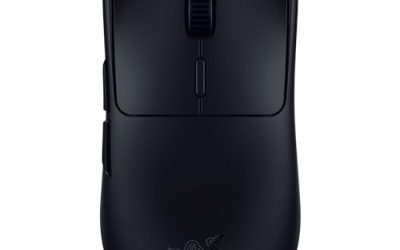
 Razer DeathAdder Essential Ergonomic Wired Gaming Mouse5.01 x 2.86 x 1.69 inches0.3 poundsCheck on Amazon

The Razer DeathAdder Essential is a wired, right-handed ergonomic gaming mouse built around a 6,400 DPI optical sensor, five programmable buttons, and Razer mechanical switches rated for up to 10 million clicks. It suits palm and claw grip players who want the proven DeathAdder shape and straightforward durability without paying for higher sensor ceilings, optical switches, or multi-colour lighting. If value and a long-serving main mouse matter more to you than maximum specifications, it remains the sensible entry point into the DeathAdder line.

As an Amazon Associate we earn from qualifying purchases
What Matters Most in the DeathAdder Essential
The Essential is best understood as a value decision, not a specifications race. Razer kept the shape that made the DeathAdder name familiar, kept a wired connection that needs no charging or pairing, and trimmed the parts that push the V2 and V3 higher: sensor range, switch technology, button count, and lighting. The sections below break down the four areas that actually decide whether that trade works for you, using only what the listings state.
Sensor and DPI Ceiling
The listing headline is a 6,400 DPI optical sensor. That number is far below the 20,000 DPI of the DeathAdder V2 and the 30,000 DPI of the DeathAdder V3, and the gap is the clearest compromise in the whole product. In practical terms, the question is not whether 6,400 is a large number in isolation, but how you set sensitivity. Players who run low in-game sensitivity multiplied by a moderate DPI setting will stay well inside this ceiling. Players who prefer very high desktop DPI, or who like to fine-tune across a wide range for different games, will feel the limit sooner and should look at the V2 or V3 instead. The Essential listing positions the sensor for fast, precise swipes in everyday competitive play, not for extreme sensitivity setups.
Shape, Grip, and Hand Fit
Every DeathAdder in this article shares the same design idea: a sculpted, right-handed ergonomic shell with a high rear hump that fills the palm. The Essential listing describes that classic ergonomic form and lists rubber side grips in its title, which help the thumb and ring finger hold the mouse during lifts and quick repositioning. The black Essential listing gives dimensions of 5 inches long by 2.43 inches wide and model number RZ01-03850100-R3U1, while the Mercury White listing gives 5.01 by 2.86 by 1.69 inches. This is a medium-to-large mouse. Small hands and fingertip-only grips usually pair better with shorter, flatter shapes, so hand size is a genuine buying check here rather than a detail to skip.
Switches, Buttons, and Rated Lifespan
Durability is where the Essential makes its strongest value argument. Its title lists mechanical switches, and the listing copy states that the Razer Mechanical Switches support up to 10 million clicks. That is a manufacturer rating, not a promise for any single unit, but it frames the mouse as a long-service purchase rather than a disposable accessory. You get five programmable buttons in total, described in listing material as independently programmable Hyperesponse buttons. That count covers the two main clicks, the clickable scroll wheel, and two side buttons. It is enough for push-to-talk, melee, ping, or a single ability per game, but it is not an MMO layout. The V2 raises the count to eight buttons, and that difference matters if you bind many actions to the mouse.
Cable, Lighting, and Everyday Simplicity
The Essential is wired and corded electric powered, so there is no battery to manage and no wireless receiver to lose. The trade is cable drag and a fixed desk setup, which is why the cable type matters more on the step-up models: the V2 and V3 both list a Speedflex cable designed for flexibility and reduced drag, while the Essential listing does not claim a Speedflex cable. Lighting follows the same stripped-back pattern. The black Essential uses single-colour green lighting on the scroll wheel and logo, and the white edition uses single-colour white lighting. There is no multi-zone or multi-colour customisation here. If your setup is built around matched RGB effects, that is a real limitation. If you want one colour, set once and forgotten, it is one less thing to configure.
The Razer DeathAdder Essential in Detail
This is the main product for this keyword, covered in two colour editions that share the same core specification. Choosing between them is a finish and lighting decision, not a performance decision, because both listings state the same sensor ceiling and button count.
Razer DeathAdder Essential — Classic Black
The black edition is the standard form of the Essential and the one most buyers should begin with. Its appeal is repetition and reliability: the same ergonomic shell, the same 6,400 DPI optical sensor, and the same mechanical switch rating, in the colourway that matches most desks. The single-colour green lighting is the traditional Razer look, visible on the scroll wheel and the logo, and it needs no colour matching against other peripherals. For a first gaming mouse or a replacement for a worn-out older DeathAdder, this version keeps the decision simple, and that restraint is exactly why it holds its place as the value pick in the family.
Specs
- Sensor: Optical sensor
- Max sensitivity: 6,400 DPI
- Buttons: 5 programmable buttons
- Switches: Razer Mechanical Switches, rated for up to 10 million clicks
- Side grips: Rubber side grips, as stated in the listing title
- Lighting: Single-colour green
- Connection: Wired, corded electric
- Colour: Classic Black
- Model number: RZ01-03850100-R3U1
- Dimensions: 5 inches long by 2.43 inches wide, as listed
Razer DeathAdder Essential — Mercury White (Alternative Edition)
The Mercury White edition is an alternative colourway of the same Essential, not a different performance tier. Its Amazon listing carries the identical headline specification: 6,400 DPI optical sensor, five programmable buttons, mechanical switches, and rubber side grips. The differences are the white finish and single-colour white lighting in place of green, which suits light-coloured desk setups where a black mouse would look out of place. Its listing gives a different model number, RZ01-02540200-R3C1, and dimensions of 5.01 by 2.86 by 1.69 inches with an item weight of 4.3 ounces. Buy this one for the look and the matching lighting colour. Do not buy it expecting a sensor, switch, or button upgrade over the black edition, because the listings do not describe one.
Specs
- Sensor: Optical sensor
- Max sensitivity: 6,400 DPI
- Buttons: 5 programmable buttons
- Switches: Mechanical switches
- Side grips: Rubber side grips, as stated in the listing title
- Lighting: Single-colour white
- Connection: Wired, corded electric
- Colour: Mercury White
- Model number: RZ01-02540200-R3C1
- Dimensions: 5.01 by 2.86 by 1.69 inches, as listed
DeathAdder Alternatives Worth Comparing
If the Essential deep-dive above leaves you wanting more sensor range, more buttons, or a lighter build, the two natural comparisons stay inside the same family and the same ergonomic idea. Both are clearly alternatives rather than replacements for the Essential brief: they cost you the Essential simplicity and add specification you may or may not use.
Razer DeathAdder V2 (Alternative)
The V2 is the middle step. Its listing title states a 20K DPI optical sensor, Chroma RGB lighting, eight programmable buttons, and rubberized side grips in Classic Black. Listing material identifies that sensor as the Razer Focus Plus optical sensor and the switches as Razer Optical Switches rated for 70 million clicks, which is a very different durability proposition from the Essential mechanical rating of 10 million clicks. The V2 also lists a Speedflex cable and a lightweight design figure of 82 grams in its feature material, plus onboard profile storage in its wider listing copy. Choose the V2 if you want the same shape language with a much higher sensitivity ceiling, three extra buttons for bindings, and lighting you can colour-match to the rest of a setup. Its Amazon technical table lists dimensions of 2.87 by 5 by 1.69 inches and model number RZ01-03210100-R3U1.
Specs
- Sensor: Razer Focus Plus optical sensor
- Max sensitivity: 20,000 DPI
- Buttons: 8 programmable buttons
- Switches: Razer Optical Switches, rated for 70 million clicks
- Lighting: Razer Chroma RGB
- Cable: Razer Speedflex cable
- Side grips: Rubberized side grips, as stated in the listing title
- Connection: Wired
- Colour: Classic Black
- Model number: RZ01-03210100-R3U1
Razer DeathAdder V3 Wired (Alternative)
The V3 is the performance end of this comparison. Its listing title states a 59 gram ultra lightweight design, a Focus Pro 30K optical sensor, fast optical switches Gen-3, 8K Hz HyperPolling, six programmable buttons, an ergonomic form, and a Speedflex cable in black. The product page comparison material lists a switch click lifecycle of 90 million clicks, a maximum speed figure of 750 IPS, and no Chroma RGB, a reminder that the newest model removes lighting to save weight. With six buttons, it sits between the Essential and the V2 on bindings while beating both on sensor ceiling and weight. Choose it if low weight and the highest listed polling and sensor figures are your priority. Its listing gives dimensions of 5.01 inches long by 2.65 inches wide, an item weight of 59 grams, and model number RZ01-04640100-R3U1.
Specs
- Sensor: Focus Pro 30K optical sensor
- Max sensitivity: 30,000 DPI
- Buttons: 6 programmable buttons
- Switches: Razer Optical Switches Gen-3, listed click lifecycle of 90 million clicks
- Polling: 8K Hz HyperPolling, as stated in the listing title
- Weight: 59 grams, as listed
- Lighting: No Chroma RGB, per the product page comparison table
- Cable: Speedflex cable
- Connection: Wired, USB
- Model number: RZ01-04640100-R3U1
Comparison Table
| Product | Sensor | Max DPI | Buttons | Switches | Lighting | Connection |
|---|---|---|---|---|---|---|
| DeathAdder Essential Black | Optical | 6,400 | 5 | Mechanical, up to 10 million clicks | Single-colour green | Wired |
| DeathAdder Essential Mercury White | Optical | 6,400 | 5 | Mechanical | Single-colour white | Wired |
| DeathAdder V2 | Focus Plus Optical | 20,000 | 8 | Optical, 70 million clicks | Chroma RGB | Wired, Speedflex cable |
| DeathAdder V3 Wired | Focus Pro 30K Optical | 30,000 | 6 | Optical Gen-3, 90 million clicks | None listed | Wired, Speedflex cable |
Read the table by the column that matches your actual bottleneck. If that column is switch lifespan, the step from mechanical switches on the Essential to optical switches on the V2 and V3 is the biggest jump here. If it is sensitivity range, the DPI column shows three distinct tiers. If it is bindings, the V2 is the outlier with eight buttons, not the newest model. And if no column shows a bottleneck for how you play, the Essential already covers your needs.
Who It Is For and Who Should Skip It
The DeathAdder Essential is for right-handed palm and claw grip players with medium to large hands who want a proven ergonomic shape, a wired connection with nothing to charge, and a switch rating that supports buying once and using the mouse for a long stretch of daily play. It also fits students, second-desk setups, and anyone replacing a basic office mouse with a proper gaming shape for the first time, because the five-button layout and single-colour lighting keep setup short.
Skip it if you are left-handed or need a symmetrical shell, since this is a right-handed ergonomic form. Skip it if you rely on more than two side-button bindings, play MMOs with mouse-heavy rotations, or want wireless freedom at your desk. Skip it, too, if you run very high DPI settings, want colour-matched RGB across your peripherals, or are chasing the lightest possible build. In each of those cases the V2 covers buttons and lighting, the V3 covers weight and sensor ceiling, and a different shape family covers small hands and left-handed use better than any DeathAdder variant will.
Frequently Asked Questions
Is the Razer DeathAdder Essential good for palm grip?
Yes, palm grip is its home territory. The listing describes a classic ergonomic form with a sculpted right-handed shell, and the listed length of about five inches gives the palm a full surface to rest on. Claw grip also works for medium and large hands. Fingertip grip on small hands is the weakest match, because the shell length and rear hump are designed to be held, not pinched.
How long do the DeathAdder Essential switches last?
The listing states that its Razer Mechanical Switches support up to 10 million clicks. That is the manufacturer rating for the switch design, not a guaranteed lifespan for an individual mouse, and real life depends on how hard and how often you click. For context inside the same family, the V2 lists optical switches rated for 70 million clicks and the V3 lists a 90 million click lifecycle, so switch longevity is one of the clearest reasons to step up.
What is the difference between the DeathAdder Essential and the V2?
Three listing differences decide it. The V2 raises the sensor ceiling from 6,400 DPI to 20,000 DPI, raises the button count from five to eight, and swaps mechanical switches for optical switches rated for 70 million clicks. It also adds Chroma RGB lighting and a Speedflex cable, where the Essential keeps single-colour lighting and does not claim a Speedflex cable. The ergonomic idea stays the same, so the choice is about specification headroom, not shape.
Does the DeathAdder Essential have RGB lighting?
No, not in the multi-colour sense. The black edition lists single-colour green lighting and the Mercury White edition lists single-colour white lighting, covering the scroll wheel and logo. You cannot colour-match it to a multi-colour setup the way you can with the Chroma RGB lighting listed for the DeathAdder V2. If a single fixed colour fits your desk, this is a non-issue. If matched effects matter, the V2 is the in-family answer.
Is the DeathAdder Essential wired or wireless?
It is wired only. Both Essential listings describe a wired, corded electric mouse, so there is no battery, no charging routine, and no wireless receiver involved. That keeps the setup permanent and the connection consistent, at the cost of cable management on the desk. Every other mouse in this comparison, the V2 and the wired V3, is also wired, so moving up the family does not change the connection type.
FAQ
Is the Razer DeathAdder Essential good for palm grip?
How long do the DeathAdder Essential switches last?
What is the difference between the DeathAdder Essential and the V2?
Does the DeathAdder Essential have RGB lighting?
Is the DeathAdder Essential wired or wireless?
More from Amazon
Programs that pair well with the guide above. Offers and eligibility are set by Amazon and may change.
Free shipping on eligible items, Prime Video and more. Eligible new members can start with a free trial.
Start a Prime free trialAd-free music streaming. Eligible new subscribers can start with a free trial.
Try Music Unlimited freeA Prime membership for ages 18-24 with a trial period. Eligibility is set by Amazon.
See Prime for Young AdultsAudiobooks and podcasts to listen to on the go. Eligible new members can start with a free trial.
Try Audible freeAs an Amazon Associate we earn from qualifying purchases.