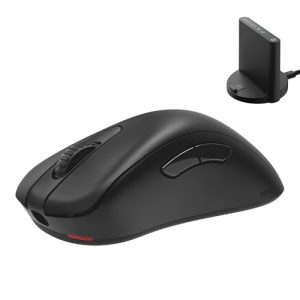
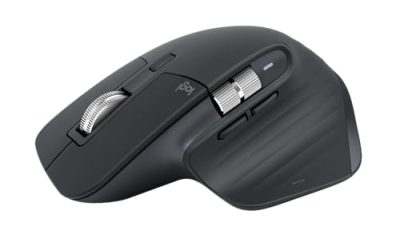
Our Top Picks
 Logitech G502 X Plus Wireless RGB Gaming MouseWireless7.1 x 4.6 x 2.7 inches0.84 poundsCheck on Amazon
 Razer DeathAdder V3 Pro Wireless Gaming Mouse1000 Hz5.01 x 2.65 x 1.69 inches0.1 poundsCheck on Amazon
A large hand on a standard gaming mouse ends up steering with fingertips while the palm hovers unsupported, and that compromise shows up as cramped fingers, a pinky dragging on the pad, and aim that drifts late in a session. The real decision here is shell size first and everything else second: length that lets your palm rest down, width that fills your grip without squeezing, and a hump placed where a palm grip actually settles.
This guide is for palm-grip players with bigger hands, for claw users who want a longer shell to anchor against, and for anyone replacing a mouse that always felt one size too small. Every pick below is a genuinely large wireless model chosen from the dimensions, weights, and battery figures stated on its Amazon listing, and each one clears 127 mm in length.
Quick Picks
As an Amazon Associate we earn from qualifying purchases.
| Product | Best for | Key spec from title |
|---|---|---|
| Logitech G502 X Plus Lightspeed | Palm grip with the most controls | 131.4 mm long, 13 programmable controls |
| Razer Basilisk V3 Pro | A wide thumb rest and long battery | 130 mm long, up to 150 hours on Bluetooth |
| Razer DeathAdder V3 Pro | A large shell that stays light | 128 mm long, 63 g, up to 90 hours |
| Corsair Dark Core RGB Pro SE | The widest palm-grip shell here | 127 by 89 mm, Qi wireless charging |
How to Choose
Read length and width before anything else
Length decides whether your palm can rest on the shell instead of hovering, and for a large hand that means looking at models around 127 mm and up. Width matters just as much: a shell near 75 mm or wider fills a broad grip, while a narrower body around 68 mm suits a large hand that still likes to steer partly with the fingers. Height and hump position complete the picture, because a taller rear hump supports a palm grip, while a lower, flatter profile rewards a relaxed claw. Compare all three listed dimensions against the mouse you already own.
Match the shape to your grip, not your game
Palm grip spreads your whole hand across the shell, so it wants length, a supportive hump, and often a thumb rest that stops your thumb dragging on the pad. A relaxed claw keeps the palm anchored on the rear while fingers arch onto the buttons, which suits a long shell with a pronounced back. Fingertip control on a large mouse is harder work, because the extra shell sits behind your hand unused. The four picks here split between sculpted right-handed shapes with thumb support and smoother ergonomic shells, so pick the outline that mirrors how your hand already rests.
Treat listed battery hours as mode-dependent
A headline battery figure only applies to one connection mode at one polling setting, and the gap between modes is wide on big feature-heavy mice. Bluetooth figures run longest, the low-latency 2.4 GHz modes sit in the middle, and turning on full RGB lighting can cut a stated figure to a fraction of itself. High polling options drain a cell faster still. When you compare these four, compare like with like: check the hours for the wireless mode you will actually use, with lighting in the state you will actually leave it in, before ranking one mouse above another.
Expect weight to climb with size, then decide your limit
Bigger shells carry bigger batteries and more hardware, so large wireless mice span a wide weight range, from the low sixties in grams for a stripped-back esports shell to well over 110 g once a tilt wheel, extra buttons, and lighting zones go in. Neither end is wrong. Extra mass steadies slow, deliberate tracking and feels planted under a resting palm, while a lighter large shell is easier to lift and re-centre during fast turns. Decide your ceiling before you shop, because returning a mouse purely for weight is the most avoidable mistake in this category.
The 4 Best Options
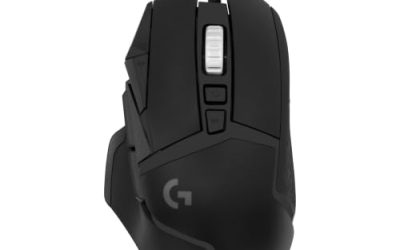
Logitech G502 X Plus Lightspeed
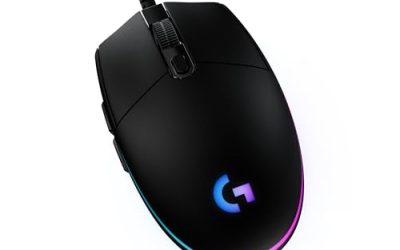
At 131.4 mm long and 79.2 mm wide, this is the longest shell in the group, and its sculpted right-handed body gives a full palm grip real estate to spread across. Thirteen programmable controls, including the removable DPI-shift button on the thumb side, suit players who bind abilities, pings, and push-to-talk across one hand. The listing states up to 120 hours of constant-motion battery with lighting off, and the shell supports PowerPlay wireless charging, so a compatible pad can remove charging stops entirely. It is the natural first look for large-handed players who use every button they are given.
Specs
- Dimensions: 131.4 x 79.2 x 41.1 mm
- Weight: 106 g
- Sensor: HERO 25K optical, 100 to 25,600 DPI
- Switches: LIGHTFORCE hybrid optical-mechanical
- Programmable controls: 13
- Battery: up to 120 hours constant motion, up to 37 hours with RGB on
- Connectivity: Lightspeed wireless, USB-C wired
- Lighting: LIGHTSYNC RGB, 8 zones
- Model number: 910-006160
Best for: Palm-grip players with large hands who want maximum buttons on a long shell.
Watch out for: The 106 g weight and dense button layout feel busy if you prefer a clean, light mouse.
ASIN: B092CB69Q4
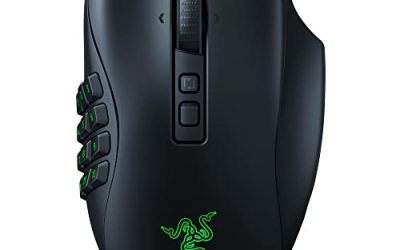
Razer Basilisk V3 Pro

The Basilisk V3 Pro pairs a 130 mm length with a wide, sculpted body and a proper thumb rest, so a broad palm settles in rather than perching on top. Its HyperScroll wheel tilts sideways and switches between tactile steps and free spinning, which earns its keep in weapon wheels and long inventory lists alike. Razer lists up to 110 hours on HyperSpeed wireless and up to 150 hours on Bluetooth, the strongest endurance figures in this group, and the mouse adds Bluetooth alongside the 2.4 GHz dongle, so it can pair with a second machine between matches.
Specs
- Dimensions: about 130 x 75.4 x 42.5 mm
- Weight: 112 g
- Sensor: Focus Pro 30K optical, up to 30,000 DPI
- Switches: Razer Optical Mouse Switches Gen-3
- Programmable buttons: 11
- Battery: up to 110 hours on HyperSpeed wireless, up to 150 hours on Bluetooth
- Connectivity: HyperSpeed wireless, Bluetooth, wired USB-C
- Wheel: HyperScroll tilt wheel with tactile and free-spin modes
- Model number: RZ01-04620100-R3U1
Best for: Large-handed players who want a thumb rest, a tilt wheel, and the longest listed battery here.
Watch out for: At 112 g it is heavy for fast flick-heavy play, and the charging dock and puck are separate purchases.
ASIN: B0B6Y3XYFG
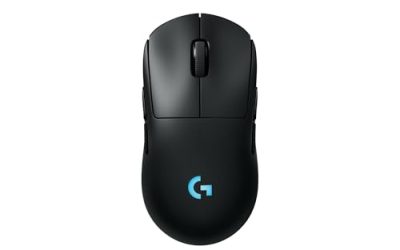
Razer DeathAdder V3 Pro
The DeathAdder shape has been the default large ergonomic outline for years, and the V3 Pro stretches it to 128 mm long and 44 mm tall while cutting the weight to 63 g, which no other mouse in this group comes close to. That combination matters if your hand is big but your play style is quick: the palm still gets a full shell to rest on, yet lifts and recentres stay easy. The listing keeps the layout simple, with the Focus Pro 30K sensor, Gen-3 optical switches, and up to 90 hours of battery on the HyperSpeed connection.
Specs
- Dimensions: 128 x 68 x 44 mm
- Weight: 63 g
- Sensor: Focus Pro 30K optical, up to 30,000 DPI
- Switches: Razer Optical Mouse Switches Gen-3, rated to 90 million clicks
- Battery: up to 90 hours
- Connectivity: Razer HyperSpeed wireless, wired USB-C
- Shape: right-handed ergonomic
- Model number: RZ01-04630100-R3U1
Best for: Large hands that play fast and want a big shell without big weight.
Watch out for: The 68 mm width is the narrowest here, and there is no Bluetooth mode or thumb rest.
ASIN: B0B6XZLNHQ
Corsair Dark Core RGB Pro SE
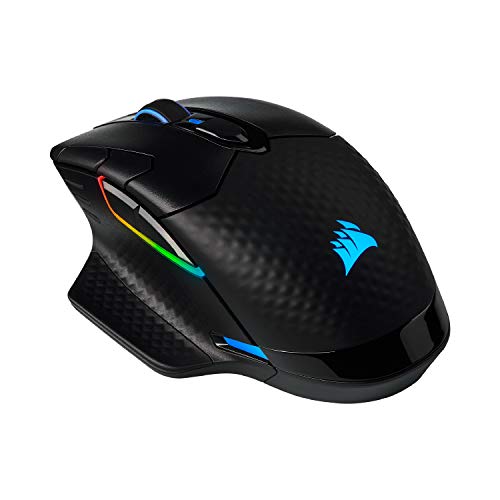
Nothing else in this group is shaped like the Dark Core. At 89 mm across, it is by far the widest shell here, with a contoured right-handed body, a textured thumb platform, and two interchangeable side grips in the box so you can tune how the left flank feels under your hand. It connects three ways, through sub-1ms Slipstream wireless, Bluetooth, or a USB-C cable, and the SE version adds Qi wireless charging on top of cable charging. Eight programmable buttons and onboard profile storage round out a mouse built for long, settled palm-grip sessions.
Specs
- Dimensions: 127 x 89 x 43 mm
- Sensor: PixArt PAW3392 optical, up to 18,000 DPI
- Programmable buttons: 8
- Battery: Slipstream up to 16 hours with lighting or 36 hours without; Bluetooth up to 18 hours with lighting or 50 hours without
- Connectivity: Slipstream wireless, Bluetooth, USB-C wired
- Charging: USB-C plus Qi wireless charging
- Side grips: two interchangeable grips included
- Model number: CH-9315511-NA
Best for: Broad hands that want the widest palm-grip shell and grip options in the box.
Watch out for: Battery life with lighting on is the shortest here, so expect frequent charging or Qi top-ups.
ASIN: B082LVNJ4W
Which One Fits Your Situation
Your palm never fully rests on your current mouse
Start with the G502 X Plus or the Basilisk V3 Pro. Both run past 130 mm in length with sculpted humps that meet a resting palm, and both add thumb-side support that keeps your hand from sliding forward. The Logitech suits you if you bind many controls; the Razer suits you if the tilt wheel and longer Bluetooth endurance matter more.
Your hand is large but you play fast, low-sensitivity shooters
The DeathAdder V3 Pro is the one built for you. It keeps a full 128 mm ergonomic shell under your palm yet weighs 63 g, so wide arm sweeps and quick recentres do not fight the mouse. You give up Bluetooth, a thumb rest, and the extra buttons the other three carry, and in exchange you get the only large shell here that moves like a small one.
Your grip is wide and your pinky always drags
Look at the Dark Core RGB Pro SE. Its 89 mm width and thumb platform give both outer fingers somewhere deliberate to sit, and the swappable side grip lets you change the contour if the stock shape crowds your ring finger. Accept the shorter battery runs with lighting on, and use the Qi charging support to keep top-ups painless between sessions.
One mouse has to cover gaming and a second computer
The Basilisk V3 Pro handles the double duty best. HyperSpeed wireless covers play, Bluetooth pairs with a laptop or second machine, and the listed figures of up to 110 hours and 150 hours across those modes mean charging rarely interrupts either job. The G502 X Plus is the fallback if you would rather have more programmable controls than a second connection mode.
Common Mistakes
- Judging size by length alone, then discovering the shell is too narrow for a broad grip or too wide for relaxed claw control.
- Comparing battery figures taken from different modes, such as one mouse on Bluetooth against another on its 2.4 GHz connection with lighting on.
- Assuming a large mouse must be heavy, when the lightest pick here weighs roughly half as much as the heaviest one.
- Ignoring thumb and pinky support, which is where large hands actually cramp during long sessions on a sculpted shell.
- Forgetting desk space: a long shell plus low-sensitivity sweeping needs a pad that fits both the mouse and the arc of your arm.
Frequently Asked Questions
How long should a gaming mouse be for a large hand?
As a working guide, hands around 20 cm or longer from wrist to middle fingertip usually settle best on shells of about 127 mm and up, which is why every pick here starts at that length. Grip style shifts the answer: a full palm grip wants the most length, while a relaxed claw can work with slightly less.
Does a wider mouse actually help, or is length enough?
Width decides how much of your grip the shell fills. A broad hand on a narrow body ends up pinching the sides, which tires the fingers holding the mouse in place. The Dark Core at 89 mm and the Basilisk near 75 mm show the wide end of the range, while the DeathAdder proves a narrower 68 mm body can still fit a large hand that steers actively.
Why do battery figures differ so much between these mice?
Connection mode, polling behaviour, and lighting explain most of the spread. Bluetooth sips power, 2.4 GHz gaming modes draw more, and RGB lighting can cut a stated figure dramatically, as the Dark Core figures show when lighting is switched on and off. Always compare the figure for the exact mode and lighting state you plan to use, not the biggest number on the page.
Can a large-handed player use a claw grip on these shells?
Yes, and the longer bodies here arguably suit it better than compact mice, because the rear hump gives your palm a fixed anchor while your fingers arch. The DeathAdder V3 Pro and G502 X Plus both place that hump where a relaxed claw settles. What matters is that your fingertips land on the front of the buttons without stretching, so check length against your current mouse first.
FAQ
How long should a gaming mouse be for a large hand?
Does a wider mouse actually help, or is length enough?
Why do battery figures differ so much between these mice?
Can a large-handed player use a claw grip on these shells?
More from Amazon
Programs that pair well with the guide above. Offers and eligibility are set by Amazon and may change.
Free shipping on eligible items, Prime Video and more. Eligible new members can start with a free trial.
Start a Prime free trialAd-free music streaming. Eligible new subscribers can start with a free trial.
Try Music Unlimited freeA Prime membership for ages 18-24 with a trial period. Eligibility is set by Amazon.
See Prime for Young AdultsAudiobooks and podcasts to listen to on the go. Eligible new members can start with a free trial.
Try Audible freeAs an Amazon Associate we earn from qualifying purchases.