Our Top Picks
 Razer Basilisk V3 Customizable RGB Wired Ergonomic GamingMouse2.96 x 5.12 x 1.67 inches0.2 poundsCheck on Amazon


Using a mouse on a PS4 sounds like a habit carried over from PC gaming, yet for the console titles that accept one, it changes aiming, inventory work and menu navigation in ways a controller cannot match. The dependable route is a wired USB mouse: it plugs straight into the console, asks for no receiver pairing, and never runs flat halfway through an evening. Every pick in this guide is wired, carries a proper gaming sensor, and was chosen to behave predictably in a living-room setup.
One platform fact shapes all three recommendations: only some PS4 games support mouse input, and that support is decided by each game’s developer rather than by the hardware. Where a title does accept a mouse, a model with on-board memory is the safest purchase, because button layouts saved on the mouse itself stay active on the console, while profiles configured in PC software do not automatically follow it. The mice below cover stored profiles, long-session comfort and simple plug-and-play use.
Quick Picks
As an Amazon Associate we earn from qualifying purchases
| Product | Best for | Key spec from title |
|---|---|---|
| Logitech G502 HERO | Profiles stored on the mouse itself | 11 programmable buttons, HERO 25K sensor |
| Razer Basilisk V3 | Ergonomic wired comfort | 26,000 DPI optical sensor, HyperScroll tilt wheel |
| Logitech G203 Lightsync | The simple plug-and-play pick | 8,000 DPI sensor, LIGHTSYNC RGB lighting |
How to Choose
Start with wired USB for console reliability
A wired connection removes the three failure points that frustrate console players most: pairing, interference and battery life. A USB cable goes into the front of the PS4 and simply works, with no dongle to lose behind the TV stand and no charge level to check before a session. Cable reach is the one thing to plan for, since a couch sits farther from the console than a desk chair sits from a PC. All three mice in this guide are wired models with standard USB plugs, which is exactly the arrangement a TV setup rewards.
Check the game before you blame the mouse
Mouse support on PS4 is a per-game decision. Some shooters and strategy titles accept a mouse and feel transformed by it, while many console games ignore mouse input completely and respond only to a controller. The console’s own menus are likewise built around the DualShock 4, so a mouse is a tool for supported games, not a replacement for the pad everywhere else. Before buying, confirm that the specific titles you play actually list mouse support. Every recommendation here assumes a supported game; within one, a wired gaming mouse delivers the precise aim and extra buttons that make the setup worthwhile.
Value on-board memory over software features
Logitech and Razer configure their mice through PC programs, and a PS4 cannot run those programs. That single fact changes what matters: settings stored in software stay behind on the computer, while settings saved to a mouse’s on-board memory travel with it to the console. Two of the picks below carry on-board memory, so DPI steps and button assignments you set up once on a PC remain active on the PS4. When comparing any mouse for console use, treat on-board profiles as a core feature and treat software-only extras as bonuses you may never touch.
Match shape and button count to the way you play
Eleven programmable buttons sound impressive, but a supported console title may only expose a handful of extra actions, and unused buttons add nothing. Think about what your games actually let you bind. Shape matters just as much at TV distance: an ergonomic shell supports the palm during long sessions, while a smaller symmetrical body suits fingertip control and smaller hands. Scroll wheels differ too, with dual-mode and tilting wheels offering extra inputs and faster menu movement. The three picks below spread across those priorities so the fit can follow your games rather than a spec sheet.
The 3 Best Options
Logitech G502 HERO

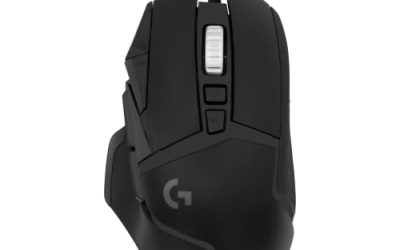
The G502 HERO earns the top spot for console players because of a feature that matters more on PS4 than on PC: on-board memory for five profiles. Button layouts and DPI settings saved to the mouse itself stay active when you plug it into the console, which sidesteps the fact that the PS4 cannot run Logitech’s configuration software. The HERO 25K sensor tracks up to 25,600 DPI, eleven programmable buttons cover the actions a supported title exposes, and the adjustable weight system with five 3.6 g weights lets you tune the balance. Its dual-mode scroll wheel switches between ratcheted steps and free spinning.
Specs
- HERO 25K sensor, 25,600 DPI max
- 11 programmable buttons
- Adjustable weight system (five 3.6 g weights)
- On-board memory for 5 profiles
- Dual-mode hyper-fast scroll wheel
- LIGHTSYNC RGB
- Wired USB
- Model: 910-005469
Best for: Profiles stored on the mouse itself.
Watch out for: The full button layout has to be configured on a PC first, because the console cannot run the setup software.
ASIN: B07GBZ4Q68
Razer Basilisk V3
Razer’s Basilisk V3 is the comfort pick of the three, built around an ergonomic right-handed shape that supports the whole palm through long sessions on the couch or at a desk. Its optical sensor reaches 26,000 DPI, and eleven programmable buttons give supported PS4 titles plenty of inputs to work with. The HyperScroll tilt wheel is the detail owners tend to keep praising: it clicks side to side for extra commands and rolls in both ratcheted and smooth modes. Optical switches register clicks with light rather than a physical contact, and because the mouse is wired over USB, there is no battery to manage.
Specs
- 26,000 DPI optical sensor
- 11 programmable buttons
- HyperScroll tilt wheel
- Chroma RGB
- Optical mouse switches
- Wired USB
- Ergonomic shape
- Model: RZ01-04000100-R3U1
Best for: Ergonomic wired comfort.
Watch out for: The shape is right-handed only, and button remapping needs Razer’s software on a PC before the mouse moves to the console.
ASIN: B09C13PZX7
Logitech G203 Lightsync
The G203 Lightsync strips the formula back to what a console corner actually uses. It connects over wired USB, carries an 8,000 DPI gaming-grade sensor that is more than sufficient for play at TV distance, and offers six programmable buttons for the modest set of extra inputs most supported titles accept. On-board memory holds your settings on the mouse itself, so a layout configured once stays put when the mouse travels between a PC and the PS4. LIGHTSYNC RGB adds a glow that sits comfortably next to the console, and the compact symmetrical shell suits smaller hands and fingertip grips alike.
Specs
- 8,000 DPI gaming-grade sensor
- LIGHTSYNC RGB lighting
- 6 programmable buttons
- Wired USB
- On-board memory
- Model: 910-005790
Best for: The simple plug-and-play pick.
Watch out for: Six buttons is the smallest count here, so players who bind many actions in supported games will outgrow it.
ASIN: B07YN82X3B
Which One Fits Your Situation
You play a supported shooter and rely on stored profiles
Take the G502 HERO. Set your DPI steps and button layout on a PC, save them to the on-board memory, and the same configuration greets you on the PS4 every time. Five profiles mean different games can each keep their own layout on the mouse, with nothing depending on software the console cannot run.
Comfort decides your long evening sessions
Choose the Basilisk V3. Its ergonomic shell is shaped for a resting palm rather than a claw grip, and the tilt wheel adds sideways inputs that suit slower, deliberate play. If your hand aches after an hour with a flatter mouse, this is the body built to prevent exactly that problem.
The mouse will live in the living room full-time
The G203 Lightsync fits a shared space best. It is compact, symmetrical and undemanding: plug it in, and it works, with lighting that looks at home beside the console. Households where several people of different hand sizes take turns will find its shape the least divisive of the three picks here.
You split your gaming between PS4 and PC
Any of the three will serve both machines, since each is a standard wired USB gaming mouse. The G502 HERO makes the split easiest because its profiles ride along on the mouse, while the G203 is the painless second mouse to leave permanently by the TV and forget about. Either way, one purchase ends up covering both of your setups.
Common Mistakes
- Assuming every PS4 game accepts a mouse, when support is decided title by title and many games ignore mouse input entirely.
- Buying a wireless mouse for the console and then dealing with pairing quirks, dongle placement and a battery that fades mid-session.
- Setting up elaborate profiles in PC software and expecting them on the console, when only settings saved to on-board memory actually travel.
- Ignoring cable reach in a living room, where the distance from console to couch is far greater than from a PC to a desk chair.
- Chasing the highest DPI figure as if console aim scales with it, when sensor quality and a comfortable shape matter far more at TV distance.
Frequently Asked Questions
Do all PS4 games work with a gaming mouse?
No. Mouse support is built into individual games by their developers, and many PS4 titles accept only controller input. A wired mouse works fully inside games that support it, but it will not drive the console menus or unsupported games. Check each title you play before relying on a mouse as your main input.
Why choose a wired mouse instead of a wireless one for PS4?
A wired USB mouse plugs in and works, with no pairing step, no receiver to position and no battery to recharge between sessions. Wireless models add those variables to a platform that already limits mouse support to certain games. For a fixed TV setup where the mouse rarely moves, the cable costs nothing and removes every one of those failure points.
Do I need a PC to set up one of these mice?
Basic clicking and movement work the moment the mouse is plugged in. Programming buttons and adjusting DPI steps, however, is done in each maker’s PC software. Mice with on-board memory, like the G502 HERO and G203 Lightsync, keep those choices on the mouse afterwards, so a single setup session on any PC is enough for console play.
Will these mice also work on a PC?
Yes. All three are standard wired USB gaming mice designed first for PC use, where their software unlocks full button programming, DPI adjustment and lighting control. The same mouse can live at your desk during the week and move to the console for supported games, carrying its on-board settings with it where that feature is present.
FAQ
Do all PS4 games work with a gaming mouse?
Why choose a wired mouse instead of a wireless one for PS4?
Do I need a PC to set up one of these mice?
Will these mice also work on a PC?
More from Amazon
Programs that pair well with the guide above. Offers and eligibility are set by Amazon and may change.
Free shipping on eligible items, Prime Video and more. Eligible new members can start with a free trial.
Start a Prime free trialAd-free music streaming. Eligible new subscribers can start with a free trial.
Try Music Unlimited freeA Prime membership for ages 18-24 with a trial period. Eligibility is set by Amazon.
See Prime for Young AdultsAudiobooks and podcasts to listen to on the go. Eligible new members can start with a free trial.
Try Audible freeAs an Amazon Associate we earn from qualifying purchases.