Our Top Picks
 Razer DeathAdder V3 Pro Wireless Gaming Mouse1000 Hz5.01 x 2.65 x 1.69 inches0.1 poundsCheck on Amazon
 Logitech G502 LIGHTSPEED Wireless Gaming MouseWireless5.19 x 2.95 x 1.57 inches0.81 poundsCheck on Amazon


Tracking is the one job a gaming mouse cannot fake. When the cursor drifts, skips, or lags behind a fast flick, the fault sits in the sensor, not in the player. A mouse with precise tracking follows every small movement of the hand and turns it into the same movement on screen, with no smoothing, no acceleration, and no spinout when the swipe gets fast. That consistency matters in every genre, from fast shooters to strategy games.
The five mice in this guide all use flagship optical sensors built for flawless tracking, and each one is listed on Amazon US with a verified ASIN. The list covers wired and wireless models, light and heavy shells, and ergonomic and ambidextrous shapes, so players with different grips and games can find a match.
As an Amazon Associate, we earn from qualifying purchases.
How to Choose
Start with the sensor
The sensor decides how well a mouse tracks. Look for a modern optical sensor with a high maximum DPI, a high tracking speed measured in IPS, and a high acceleration rating measured in G. The mice in this guide use sensors rated at 25,000 DPI or higher, with tracking speeds of 400 IPS or more. A sensor with zero smoothing, filtering, or acceleration keeps the cursor true to the hand.
Match DPI to the game and the grip
DPI sets how far the cursor moves for a given hand movement. Low sensitivity players in shooters often run between 400 and 800 DPI and move the whole arm, while high sensitivity players may run 1,600 DPI or higher and move mostly the wrist. A wide DPI range gives room to experiment.
Weigh the shell
Weight changes how a mouse feels during long sessions. Light mice under 65 grams move with less effort and suit fast flick shots, while heavier mice near 120 grams feel planted and steady. Some mice add a tunable weight system, so the balance can shift toward the front or the back. A player who lifts the mouse often will notice every gram.
Pick wired or wireless
Wired mice never need charging and add no battery weight, which is why many competitive players still choose them. Modern wireless mice use low latency radio links with a 1 millisecond report rate, so the gap between wired and wireless has closed for most players. Wireless mice need charging, and a mouse that works wired while charging removes the worry of a dead battery.
Check the shape and the buttons
Shape decides comfort over hours of play. Ergonomic right-handed shells support the palm and suit palm and claw grips, while ambidextrous shells suit both hands and fingertip grips. A mouse with 5 to 11 programmable buttons covers most needs without crowding the shell. PTFE feet help the mouse glide smoothly, and the right shape lets the hand relax, because a relaxed hand tracks better.
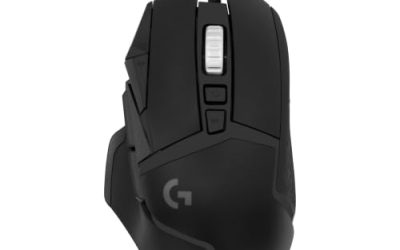
Logitech G502 HERO

The Logitech G502 HERO is the classic pick for players who want precise tracking and a full set of controls in one wired mouse. Its HERO 25K sensor tracks up to 25,600 DPI with zero smoothing, filtering, or acceleration, which keeps the cursor true to the hand across the whole sensitivity range. At 121 grams before weights, the mouse feels planted on the pad, and five removable 3.6 gram weights let the balance shift.
Eleven programmable buttons cover shooters, MOBAs, and strategy games. The dual-mode hyper-fast scroll wheel switches between a notched ratchet and a free spin, which suits both weapon cycling and long scrolling. Onboard memory stores up to five profiles, so the button layout and DPI steps travel with the mouse. The right-handed ergonomic shape suits palm and claw grips.
For tracking, the G502 HERO earns its place because the sensor stays consistent at low DPI, where many players aim. Low sensitivity shooters who move the whole arm will find the cursor follows the same path every time. The main trade-off is size and weight: the shell is large, and players with small hands may find it too bulky.
| Spec | Detail |
|---|---|
| Brand | Logitech G |
| Sensor | HERO 25K optical, 200 to 25,600 DPI |
| Tracking speed | 400 IPS |
| Connection | Wired |
| Weight | 121 g, plus five 3.6 g tuning weights |
| Buttons | 11 programmable |
| Scroll wheel | Dual-mode hyper-fast, with tilt |
| Onboard memory | 5 profiles |
| Model | 910-005469 |
| ASIN | B07GBZ4Q68 |
Who It Suits
This mouse suits players who want one wired mouse for many genres and value buttons and weight tuning over a feather-light shell. It fits palm and claw grips and low sensitivity aimers.
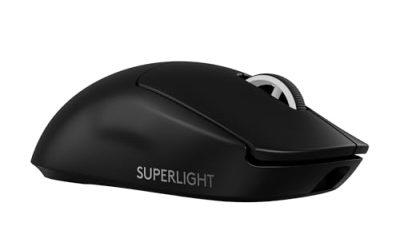
Logitech G PRO X Superlight
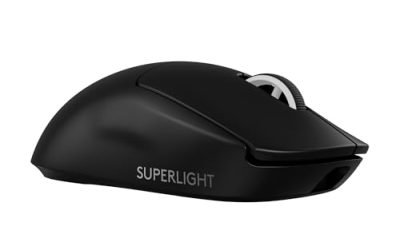
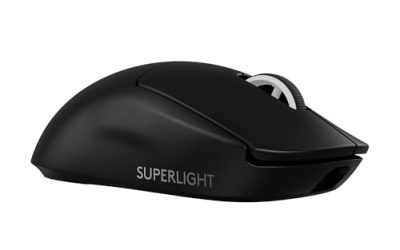
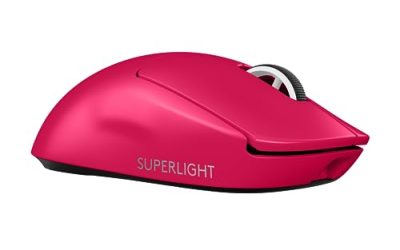
The Logitech G PRO X Superlight is built for players who want the lightest possible wireless mouse with a top-tier sensor. It weighs under 63 grams, with no holes in the shell, and its HERO 25K sensor tracks up to 25,600 DPI with the same zero smoothing, filtering, or acceleration as the wired G502 HERO. The LIGHTSPEED wireless link reports at 1 millisecond, so the mouse feels as responsive as a wired model while the hand stays free of cable drag.
The hyper-minimal design keeps only five programmable buttons, which suits players who map the essentials and keep the rest on the keyboard. The battery runs for up to 70 hours of continuous play, and the mouse charges over USB-C. The simple right-handed symmetrical shell suits claw and fingertip grips. Because the mouse is so light, fast flicks need less effort, and the hand tires less during long sessions.
For tracking, the Superlight pairs a flagship sensor with a shell that gets out of the way, so the hand can start and stop the mouse with small forces and make fine micro-adjustments near the target. The main trade-off is the small button count and the lack of extras such as RGB lighting. Players who want many side buttons or a heavier planted feel should look at the G502 models instead.
| Spec | Detail |
|---|---|
| Brand | Logitech G |
| Sensor | HERO 25K optical, up to 25,600 DPI |
| Tracking speed | 400 IPS |
| Connection | LIGHTSPEED wireless, 1 ms report rate |
| Weight | Under 63 g |
| Buttons | 5 programmable |
| Battery life | Up to 70 hours |
| Feet | Zero-additive PTFE |
| Model | 910-005878 |
| ASIN | B087LXCTFJ |
Who It Suits
This mouse suits competitive shooter players who want a light wireless mouse and a clean, minimal layout. It fits claw and fingertip grips and players who lift the mouse often.
Razer DeathAdder V3 Pro
The Razer DeathAdder V3 Pro is the ergonomic pick in this guide, pairing a light 63 gram shell with the Focus Pro 30K optical sensor. The sensor tracks up to 30,000 DPI, with a tracking speed of 750 IPS and acceleration of 70 G, and it works on a wide range of surfaces, including glass. The HyperSpeed wireless link keeps latency low, and the mouse runs for up to 90 hours on a single charge. Out of the box the polling rate is 1000 Hz, and it can rise to 8000 Hz with the HyperPolling wireless dongle, sold separately.
The right-handed ergonomic shape is the classic DeathAdder curve, which supports the palm and suits palm and claw grips. Gen-3 optical switches are rated for 90 million clicks and actuate in 0.2 milliseconds with no debounce delay, so clicks register fast and stay free of double-click faults. Five programmable buttons cover the essentials.
For tracking, the Focus Pro 30K sensor is one of the most accurate optical sensors available, and the ergonomic shape helps the hand stay relaxed during long aim sessions. The light weight keeps flicks quick, while the palm-filling shape steadies the hand. The main trade-off is the lack of side buttons for left-handed players, since the shell is right-handed only, and the 8000 Hz mode needs a separate dongle.
| Spec | Detail |
|---|---|
| Brand | Razer |
| Sensor | Focus Pro 30K optical, up to 30,000 DPI |
| Tracking speed | 750 IPS |
| Acceleration | 70 G |
| Connection | HyperSpeed wireless, USB-C wired |
| Weight | 63 g (black), 64 g (white) |
| Buttons | 5 programmable |
| Switches | Gen-3 optical, 90 million clicks |
| Battery life | Up to 90 hours |
| Polling rate | 1000 Hz, upgradable to 8000 Hz with separate dongle |
| ASIN | B0B6XZLNHQ |
Who It Suits
This mouse suits players with medium to large hands who want an ergonomic wireless mouse with a flagship sensor. It fits palm and claw grips and players who value comfort over many buttons.
Logitech G502 Lightspeed
The Logitech G502 Lightspeed takes the wired G502 HERO formula and cuts the cable, keeping the same button-rich layout and the HERO 25K sensor. The sensor tracks from 100 to 25,600 DPI with zero smoothing, filtering, or acceleration, and the LIGHTSPEED wireless link reports at 1 millisecond, so tracking feels as direct as the wired model. The battery runs for up to 60 hours of play, and the mouse works with the PowerPlay wireless charging system, sold separately, for charging at rest and during play.
Eleven programmable buttons and the dual-mode hyper-fast scroll wheel give the same control as the wired HERO, and six adjustable weights let the balance shift to suit the grip. The right-handed ergonomic shell suits palm and claw grips, and the mouse can keep working wired while charging, so a low battery never ends a match.
For tracking, the Lightspeed model gives players the G502 sensor and shape without cable drag, which helps wide swipes and fast repositioning. Players who like a planted feel can load the weights, while players who want quicker flicks can run the mouse light. The main trade-off is the same as the wired HERO, since the shell is large and best suited to medium and large hands.
| Spec | Detail |
|---|---|
| Brand | Logitech G |
| Sensor | HERO 25K optical, 100 to 25,600 DPI |
| Tracking speed | 400 IPS |
| Connection | LIGHTSPEED wireless, 1 ms report rate |
| Weight | Not stated |
| Buttons | 11 programmable |
| Battery life | Up to 60 hours |
| Scroll wheel | Dual-mode hyper-fast, with tilt |
| Weights | Six adjustable weights included |
| PowerPlay | Compatible, sold separately |
| Model | 910-005565 |
| ASIN | B07L4BM851 |
Who It Suits
This mouse suits players who love the G502 shape and buttons but want wireless freedom. It fits palm and claw grips and players who switch between shooters and strategy games.
Razer Viper V2 Pro

The Razer Viper V2 Pro is the lightest mouse in this guide at 58 grams, and it pairs that weight with the Focus Pro 30K optical sensor. The sensor tracks up to 30,000 DPI, with a tracking speed of 750 IPS and acceleration of 70 G, and it works on a wide range of surfaces, including glass. The HyperSpeed wireless link keeps latency low, and the battery runs for up to 90 hours at a 1000 Hz polling rate. On-mouse DPI controls switch between five DPI stages without software.
The symmetrical right-handed shape suits claw and fingertip grips, and the low weight makes fast flicks and quick repositioning easy. Gen-3 optical switches are rated for 90 million clicks with 0.2 millisecond actuation and no debounce delay, so clicks stay crisp and free of double-click faults. Eight buttons cover the essentials.
For tracking, the Viper V2 Pro combines a flagship sensor with a shell that moves with almost no effort, so the hand can stop the mouse exactly where the crosshair needs to sit. The main trade-off is the lack of side buttons for left-handed players, since the shape is right-handed only despite the symmetrical look, and there is no storage slot for the wireless receiver inside the mouse.
| Spec | Detail |
|---|---|
| Brand | Razer |
| Sensor | Focus Pro 30K optical, up to 30,000 DPI |
| Tracking speed | 750 IPS |
| Acceleration | 70 G |
| Connection | HyperSpeed wireless, USB-C wired |
| Weight | 58 g |
| Buttons | 8 |
| Switches | Gen-3 optical, 90 million clicks |
| Battery life | Up to 90 hours at 1000 Hz |
| On-mouse DPI | 5 DPI stages |
| Model | RZ01-04390100-R3U1 |
| ASIN | B09VCR969M |
Who It Suits
This mouse suits competitive players who want the lightest wireless mouse with a top sensor and a symmetrical shape. It fits claw and fingertip grips and players who lift the mouse often.
FAQ
What DPI should I use for the best tracking?
The best DPI depends on the game and the grip. Many shooter players run 400 to 800 DPI with a low in-game sensitivity and move the whole arm, because small hand movements translate into small cursor movements and the aim stays steady. Players who move mostly the wrist often run 1,600 DPI or higher. The mice in this guide track cleanly across the whole DPI range, so the right setting is the one that feels natural. Start near 800 DPI and adjust in small steps until the aim feels stable.
Does a higher DPI mean better tracking?
A higher maximum DPI does not mean better tracking on its own. What matters is the sensor staying accurate at the DPI that is actually used, with no smoothing, filtering, or acceleration. A high maximum DPI gives room to choose any sensitivity, but most players aim well below the maximum. The mice in this guide all use flagship sensors that track cleanly from low DPI to high DPI, so the choice should rest on shape, weight, and connection.
Is a wireless gaming mouse as accurate as a wired one?
Modern wireless gaming mice use low latency radio links with a 1 millisecond report rate, and their sensors match the wired models from the same brand. For most players, the difference in tracking between a flagship wireless mouse and a wired one is too small to notice in play. Wired mice still win on never needing a charge, while wireless mice win on freedom of movement and no cable drag. Either choice can track well if the sensor is a flagship optical model.
What is sensor smoothing and why should I avoid it?
Sensor smoothing is a filter that averages recent movement data before the cursor moves, which can make the cursor feel laggy during fast flicks. Sensor acceleration changes the cursor speed based on how fast the hand moves, which makes the same hand movement produce different cursor distances. The sensors in this guide are listed with zero smoothing, filtering, or acceleration, which means the cursor follows the hand in a one-to-one way. That consistency is what players mean by flawless tracking.
Final Verdict
The best gaming mouse for tracking pairs a flagship sensor with a shape and weight that suit the hand. The Logitech G502 HERO is the strongest all-round pick for players who want a wired mouse with many buttons, a tunable weight system, and a proven HERO 25K sensor. The Logitech G PRO X Superlight is the pick for players who want the lightest wireless mouse with the same sensor and a clean, minimal layout. The Razer DeathAdder V3 Pro is the pick for players who want an ergonomic wireless mouse with the Focus Pro 30K sensor and long battery life. The Logitech G502 Lightspeed is the pick for players who love the G502 layout but want wireless freedom. The Razer Viper V2 Pro is the pick for players who want the lightest shell in this guide with a flagship sensor and a symmetrical shape.
Every mouse in this guide tracks cleanly across its DPI range, so the decision should rest on grip, weight, and connection rather than the sensor alone. Players with large hands and a palm grip will feel at home with the ergonomic models, while players with a claw or fingertip grip will prefer the lighter symmetrical shells. A smooth pad and a DPI setting that matches the game will do more for aim than any single specification on the box.
Product and ASIN Reference
| Product | ASIN |
|---|---|
| Logitech G502 HERO | B07GBZ4Q68 |
| Logitech G PRO X Superlight | B087LXCTFJ |
| Razer DeathAdder V3 Pro | B0B6XZLNHQ |
| Logitech G502 Lightspeed | B07L4BM851 |
| Razer Viper V2 Pro | B09VCR969M |
FAQ
What DPI should I use for the best tracking?
Does a higher DPI mean better tracking?
Is a wireless gaming mouse as accurate as a wired one?
What is sensor smoothing and why should I avoid it?
More from Amazon
Programs that pair well with the guide above. Offers and eligibility are set by Amazon and may change.
Free shipping on eligible items, Prime Video and more. Eligible new members can start with a free trial.
Start a Prime free trialAd-free music streaming. Eligible new subscribers can start with a free trial.
Try Music Unlimited freeA Prime membership for ages 18-24 with a trial period. Eligibility is set by Amazon.
See Prime for Young AdultsAudiobooks and podcasts to listen to on the go. Eligible new members can start with a free trial.
Try Audible freeAs an Amazon Associate we earn from qualifying purchases.