Our Top Picks
 Razer Basilisk V3 Customizable RGB Wired Ergonomic GamingMouse2.96 x 5.12 x 1.67 inches0.2 poundsCheck on Amazon
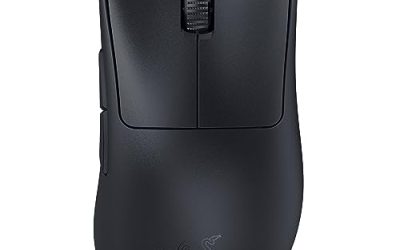
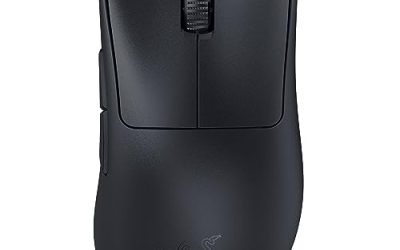
 Razer DeathAdder V3 Pro Wireless Gaming Mouse1000 Hz5.01 x 2.65 x 1.69 inches0.1 poundsCheck on Amazon

A mouse that is too small forces large hands into a cramped claw, and that cramp shows up fast: fingertips hang past the buttons, the palm gets no support, and the wrist starts compensating for every flick. The real decision is not about DPI or lighting. It is about length, width, and where the hump of the shell sits under the palm, because a mouse that matches the hand disappears during a match while one that does not keeps demanding attention.
This guide is for players with long fingers or broad palms who rest their whole hand on the mouse and want a full-size shell that fills the grip. Every pick below was chosen from the name and specifications on its Amazon product page, with length, weight, button count, and sensor details taken from that listing, so the comparison rests on what the seller actually states rather than on guesswork about fit.
Quick Picks
As an Amazon Associate we earn from qualifying purchases.
| Product | Best for | Key spec from title |
|---|---|---|
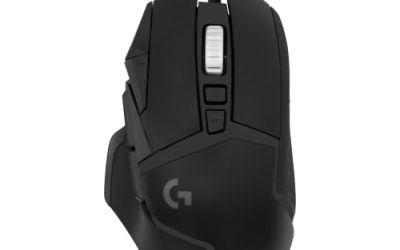
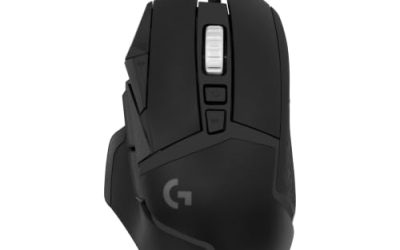
| Logitech G502 HERO | Palm-grip players who want many buttons and adjustable weight | HERO 25K sensor, 25,600 DPI, 11 programmable buttons |
| Razer Basilisk V3 | Right-handed players who want a thumb rest and a tilt scroll wheel | 26K DPI optical sensor, 11 programmable buttons, HyperScroll tilt wheel |
| Logitech G604 LIGHTSPEED | MMO and strategy players who want a wireless mouse with a full side-button panel | 15 programmable controls, up to 240-hour battery life, dual wireless modes |
| Razer DeathAdder V3 Pro | Competitive players who want a large ergonomic shape at a very low weight | 63g lightweight, Focus Pro 30K optical sensor, up to 90-hour battery |
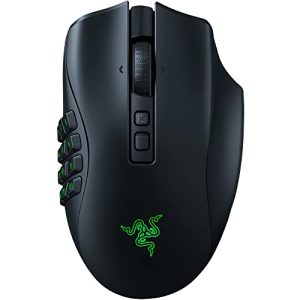
| Razer Naga V2 Pro | MMO players who want swappable side plates for different button layouts | 19+1 programmable buttons with swappable side plates, Focus Pro 30K sensor |
How to Choose
Measure the hand against the shell, not the marketing
Length is the first filter for a large hand. A mouse around 130 mm long suits a hand measuring about 19 cm from wrist to middle fingertip, while anything under 120 mm tends to leave the fingers overhanging the front. Width matters just as much: a shell near 75 mm wide gives the ring finger and little finger somewhere to rest instead of dragging on the pad. Check the dimensions line on the Amazon listing before ordering, and compare it with the mouse already on the desk, since a 10 mm difference in length changes the grip more than any sensor upgrade.
Pick the grip the shape was built for
Palm grip players need a high, long hump that supports the middle of the hand, while claw players need a shorter shell with a pronounced rear so the fingertips can arch. Most large ergonomic mice are right-handed with a thumb rest and a flared right side, which suits a palm grip but punishes anyone who plays left-handed. A symmetrical mouse can work for large hands too, but only when it is long enough; a short ambidextrous shell forces the same cramp as any small mouse, whatever its sensor can do.
Treat weight as a comfort setting, not a spec race
A heavy mouse feels planted and steady for slow, deliberate aiming, while a light one moves faster across a wide pad with less wrist effort. Large hands often prefer some heft because a featherweight shell can feel skittish under a big palm, yet anything past 130 grams can tire the wrist in long sessions. Tunable weights, as on the G502 HERO, let the balance shift toward the palm or the fingers. When the listing states no weight system, expect the listed weight to be the weight that arrives.
Count the buttons the thumb can actually reach
Extra buttons help only when the thumb lands on them without stretching. A six-button side panel looks generous on paper, but on a large mouse the rear buttons can sit too far back for a thumb that rests naturally in the middle of the panel. Two well-placed thumb buttons beat six awkward ones for most shooters, while MMO players genuinely benefit from a full grid. Read the button layout in the listing images, imagine the thumb at rest, and discount any button that would need a deliberate reach.
The 5 Best Options
Logitech G502 HERO

The G502 HERO is the default large-hand pick because its shell is long, wide, and tall enough to support a full palm, and its 121-gram body plus five removable weights lets the balance shift toward the front or the rear. Eleven programmable buttons cover shooters, strategy games, and everyday shortcuts without crowding the thumb, and the dual-mode scroll wheel switches between a notched step and a free spin. It is wired, so there is no battery to manage, and the onboard memory holds five profiles for moving between machines.
Specs
- HERO 25K optical sensor, 100 to 25,600 DPI
- 11 programmable buttons and dual-mode hyper-fast scroll wheel
- Weight 121 grams, plus five removable 3.6-gram tuning weights
- Onboard memory for up to 5 profiles
- Dimensions 1.57 x 2.95 x 5.2 inches
Best for: Palm-grip players who want a heavy, button-rich wired mouse that fills a large hand.
Watch out for: The right-handed shape gives left-handed players no option, and 121 grams before weights is heavy for fast flick aiming.
Razer Basilisk V3
The Basilisk V3 pairs a long ergonomic body with a sculpted thumb rest, which is the feature large hands notice first, because the thumb finally has a ledge instead of sliding against the side buttons. Its 26K DPI optical sensor tracks far beyond what most players use, and the HyperScroll tilt wheel adds horizontal scrolling alongside the usual vertical notches. Eleven programmable buttons include a dedicated sniper button under the thumb, and the Chroma RGB lighting runs through the scroll wheel and base. At 101 grams it sits between the heavy G502 and the ultralight esports mice.
Specs
- 26K DPI optical sensor
- 11 programmable buttons
- HyperScroll tilt wheel
- Chroma RGB lighting
- Model number RZ01-04000100-R3U1
Best for: Right-handed players who want a thumb rest, a tilt wheel, and a mid-weight ergonomic shell.
Watch out for: The thumb rest and button cluster assume a right hand, so the shape fights anyone who grips with the left.
Logitech G604 LIGHTSPEED
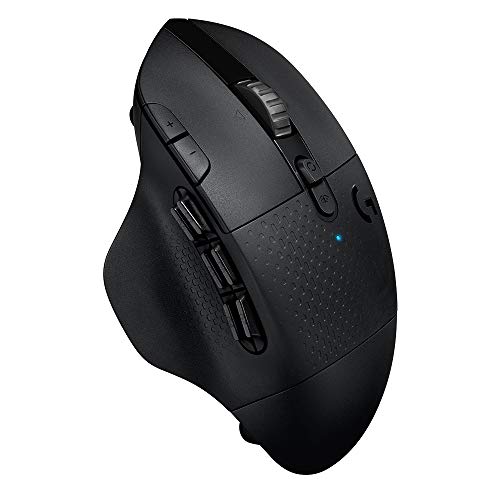
The G604 is the roomiest mouse here for players who want a wireless shell with a full command panel under the thumb. Six side buttons sit in two rows, joined by nine more programmable controls across the body, which suits MMO ability bars and strategy hotkeys better than any shooter-focused mouse. Dual wireless modes cover both a low-latency LIGHTSPEED connection and Bluetooth for a second device, and the listed battery life stretches to 240 hours on LIGHTSPEED. The 135-gram body is heavy, but that weight matches the wide, tall shell a large palm expects.
Specs
- HERO 16K sensor, up to 16,000 DPI
- 15 programmable controls, including 6 thumb buttons
- Up to 240 hours of battery life on LIGHTSPEED
- Dual wireless connectivity: LIGHTSPEED and Bluetooth
- Dual-mode hyper-fast scroll wheel
- Weight 135 grams with battery
Best for: MMO and strategy players who want many thumb buttons in a large wireless body with very long battery life.
Watch out for: At 135 grams it is one of the heaviest mice in this guide, and fast flick shots take more wrist effort.
Razer DeathAdder V3 Pro
The DeathAdder V3 Pro proves a large mouse does not have to be heavy: its ergonomic shell is long enough for big palms, yet the whole mouse weighs only 63 grams. That combination suits competitive players who palm the mouse but still want quick, low-effort flicks across a wide pad. The Focus Pro 30K optical sensor and Gen-3 optical switches sit at the top of Razer’s current range, and the HyperSpeed wireless connection keeps latency low without a cable. Battery life reaches up to 90 hours, and USB-C charging keeps the turnaround simple between sessions.
Specs
- 63 grams, ultra-lightweight ergonomic design
- Focus Pro 30K optical sensor
- Gen-3 optical switches
- HyperSpeed wireless with USB-C charging
- Up to 90 hours of battery life
- Length about 127 mm
Best for: Competitive palm-grip players who want a full-size ergonomic shape without the weight of a traditional large mouse.
Watch out for: The minimalist button layout offers far fewer controls than the G502 or G604, so MMO players will miss the side panel.
Razer Naga V2 Pro

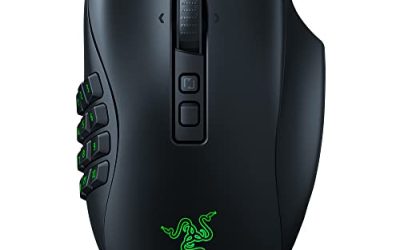
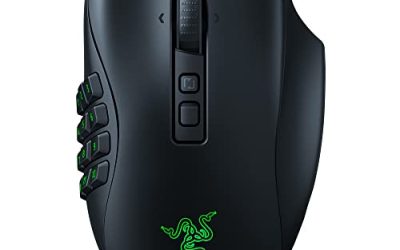
The Naga V2 Pro is built for players whose hands are large and whose games demand a dozen buttons within thumb reach. Three swappable side plates change the thumb panel between two, seven, and twelve buttons, so the same wide shell adapts from a shooter layout to a full MMO grid without buying a second mouse. The HyperScroll Pro wheel adds a free-spin mode for long documents and inventory lists, and the Focus Pro 30K sensor handles the tracking. A battery life of up to 300 hours means the wireless connection rarely interrupts a session.
Specs
- 19+1 programmable buttons with swappable side plates
- HyperScroll Pro wheel
- Focus Pro 30K optical sensor
- Optical mouse switches Gen-3
- Up to 300 hours of battery life
Best for: MMO players with large hands who want one wide wireless mouse that changes its side panel per game.
Watch out for: The twelve-button plate takes practice to use without mis-presses, and the wide body can feel bulky in fast shooters.
Which One Fits Your Situation
You palm the mouse and play mostly shooters
Pick the DeathAdder V3 Pro when the priority is a large shape that stays light during long aiming sessions, or the Basilisk V3 when a thumb rest and a tilt wheel matter more than weight. Both give the palm full support without the drag of a 130-gram body, and both keep the button layout simple enough that nothing gets pressed by accident mid-fight.
You play MMOs or strategy games with long ability bars
Pick the Naga V2 Pro for its swappable side plates, since the twelve-button grid maps a full rotation to the thumb, or the G604 when a longer battery life and a fixed six-button thumb panel sound more practical. Either way, measure the thumb panel against the hand first: the buttons only help when the thumb reaches the rear row without shifting the whole grip.
You want one wired mouse for gaming and everyday work
Pick the G502 HERO. Its weight tuning and eleven buttons cover spreadsheets and shortcuts as well as games, and the wired connection removes battery checks from the routine. The dual-mode scroll wheel is the quiet bonus here, switching from stepped scrolling in games to free spin for long pages and documents.
Your hand is large but your wrist tires easily
Pick the DeathAdder V3 Pro or the Basilisk V3, and keep the G604 and G502 HERO off the shortlist. A shell under 105 grams asks far less of the wrist over a three-hour session, even when the hand itself is big. Pair the lighter mouse with a lower sensitivity and a larger pad so the arm, not the wrist, carries the wide movements.
Common Mistakes
- Buying by DPI alone: a 26K sensor does not fix a shell that is 15 mm too short for the hand.
- Ignoring width: a long but narrow mouse still leaves the ring finger dragging on the pad.
- Choosing a left-handed or ambidextrous shape without checking the thumb rest side, since most large ergonomic shells are right-handed only.
- Loading every button on day one: extra side buttons cause mis-presses until the thumb learns their positions.
- Skipping the dimensions line on the listing: length and width are stated there, and they predict fit better than any product photo.
Frequently Asked Questions
What size mouse fits big hands?
A hand around 19 cm from wrist to middle fingertip usually fits a mouse about 125 to 135 mm long and 70 to 80 mm wide. Measure the hand flat, then compare those numbers with the dimensions on the Amazon listing. If the mouse is shorter than 120 mm, the fingertips will overhang the front buttons and the palm will lose support.
Is a heavier mouse better for large hands?
Not always. A heavier mouse feels steadier for slow aiming and suits a big palm that wants resistance, but it tires the wrist faster in long sessions. Mice near 100 grams split the difference for most players, while tunable weights let the balance change without buying another mouse. Choose by session length first, then by feel.
Do large hands need an ergonomic or an ambidextrous mouse?
An ergonomic right-handed shell usually fits large hands better because its thumb rest and flared side support the palm. An ambidextrous mouse works when it is long enough, but many symmetrical shells are built small for esports grips. Check the length before the shape label, and avoid any mouse that forces the little finger off the side.
Can a big-handed player use a lightweight esports mouse?
Yes, when the shell is long even though it is light. The DeathAdder V3 Pro is the clearest example here: a full-size ergonomic body at 63 grams. Short ultralight mice still cause cramping, so length matters more than weight. A light, long mouse suits fast shooters, while a heavy, long mouse suits slow, deliberate aiming.
FAQ
What size mouse fits big hands?
Is a heavier mouse better for large hands?
Do large hands need an ergonomic or an ambidextrous mouse?
Can a big-handed player use a lightweight esports mouse?
More from Amazon
Programs that pair well with the guide above. Offers and eligibility are set by Amazon and may change.
Free shipping on eligible items, Prime Video and more. Eligible new members can start with a free trial.
Start a Prime free trialAd-free music streaming. Eligible new subscribers can start with a free trial.
Try Music Unlimited freeA Prime membership for ages 18-24 with a trial period. Eligibility is set by Amazon.
See Prime for Young AdultsAudiobooks and podcasts to listen to on the go. Eligible new members can start with a free trial.
Try Audible freeAs an Amazon Associate we earn from qualifying purchases.