Key takeaways
- The 5 best gaming keyboard and mouse combos for Xbox in November 2026, from a lap-ready wireless set to budget wired combos, chosen from Amazon listings.
Choosing a keyboard and mouse for Xbox is not the same as choosing one for a PC, because the console only accepts keyboard and mouse input in games that support it, and the setup has to work from a sofa as well as a desk. A combo that needs drivers, a separate receiver for each device, or a mouse pad that slides off your lap will frustrate you long before the sensor or the switches matter. The real decision is whether you want one matched set that plugs in and works, or a lap-first wireless design built around the console.
This guide is for Xbox players who want to move from a controller to keyboard and mouse for shooters, strategy games, and other titles with native support, without building a PC setup. Every combo below is a keyboard and mouse set sold under one Amazon listing, and each pick was chosen from the name and specifications shown on its Amazon product page, with Xbox compatibility checked against that listing.
Quick Picks
As an Amazon Associate we earn from qualifying purchases.
| Product | Best for | Key spec from title |
|---|---|---|
| Razer Turret Wireless Mechanical Gaming Keyboard and Mouse Combo for PC, Xbox One, Xbox Series X and S | Couch play with a built-in lap mat | Chroma RGB, retractable magnetic mouse mat, 40hr battery |
| Redragon Wireless Gaming Keyboard and Mouse Combo S155-PRO | A compact wireless set for small desks | Bluetooth, 2.4G and USB-C wired, 12800 DPI mouse |
| CHONCHOW RGB Gaming Keyboard and Mouse Combo | A first wired set for supported Xbox games | USB wired, 104 keys, 1200 to 3600 DPI mouse |
| Redragon S101 Gaming Keyboard and Mouse Combo | A full-size RGB set on a tight budget | RGB backlit keyboard, 3200 DPI programmable mouse |
| MageGee K1 Gaming Keyboard and Mouse Combo | A simple full-size wired combo for shared setups | 104 keys, RGB backlit keyboard, 600 to 3200 DPI mouse |
How to Choose
Check the game before the hardware
Xbox supports keyboard and mouse only in titles that include the option, so the first check is your game library rather than any specification sheet. Fortnite, Halo Infinite, Call of Duty, and several strategy titles accept keyboard and mouse on Xbox, while many other games stay controller-only no matter which set you plug in. Open the settings of the game you play most and confirm that keyboard and mouse input appears there before ordering. A combo bought for a game that never enables the option becomes a spare PC set, which is a waste if the console was the whole point.
Decide between wired certainty and wireless freedom
A wired USB combo removes batteries, charging, and wireless dropouts from the equation, and it suits a desk or a media unit where the console sits within cable reach. Wireless suits a living room, where a single receiver and a lap-friendly board keep the coffee table clear and the cables out of the way. The trade is upkeep: wireless sets need charging and a charged spare plan for long sessions, while wired sets need enough cable length and a place to route it. Measure the distance from your seat to the console before choosing, because a short cable turns a good combo into a daily annoyance.
Match the layout to where you actually sit
A full-size 104-key board gives you a number pad and familiar spacing, which helps in strategy games and in menus, but it eats desk space and leaves less room for wide mouse sweeps. A compact 60 percent board drops the number pad and some navigation keys, which frees space for the mouse and fits a lap or a small desk, yet it forces you to relearn shortcuts that used to sit under your fingers. Think about your seating first: a lap player benefits from a compact board or a set with an attached mouse surface, while a desk player with a wide surface can take the full-size layout without compromise.
Read the mouse specification as part of the set
The mouse in a combo is often the weaker half, so its sensor range, button count, and shape deserve the same attention as the keyboard. A mouse that steps through several DPI levels lets you switch between a slow, steady aim and fast menu movement without opening software, and side buttons give you reload, melee, or ping without moving your left hand. Shape matters just as much: a low, narrow mouse suits a fingertip grip, while a taller, wider body suits a palm grip over long sessions. If the listing gives no DPI range or button count, treat the mouse as a basic pointer rather than a gaming tool.
The 5 Best Options
Razer Turret Wireless Mechanical Gaming Keyboard and Mouse Combo for PC, Xbox One, Xbox Series X and S

This is the only set here designed from the start around console play, and that shows in the shape rather than the specification sheet. The keyboard sits on a retractable magnetic mouse mat, so the mouse has a stable surface even when the whole set rests on your lap, and a dedicated Xbox key brings up the console guide without reaching for a controller. Wireless operation keeps the living room free of cables, and the mechanical board gives a firmer key feel than the membrane boards elsewhere in this guide.
Specs
- Connectivity: Wireless, for PC, Xbox One, Xbox Series X and S
- Lighting: Chroma RGB with Dynamic Lighting
- Mouse mat: Retractable magnetic mouse mat
- Battery: 40hr battery
- Mouse sensor: 16,000 DPI 5G optical sensor
- Polling rate: 1000Hz ultrapolling
- Key actuation: 50g actuation, mid-height keys
Best for: Playing supported Xbox games from a sofa without a desk.
Watch out for: The set is an older design, so confirm the listing still shows stock from a seller you trust before ordering.
Redragon Wireless Gaming Keyboard and Mouse Combo S155-PRO
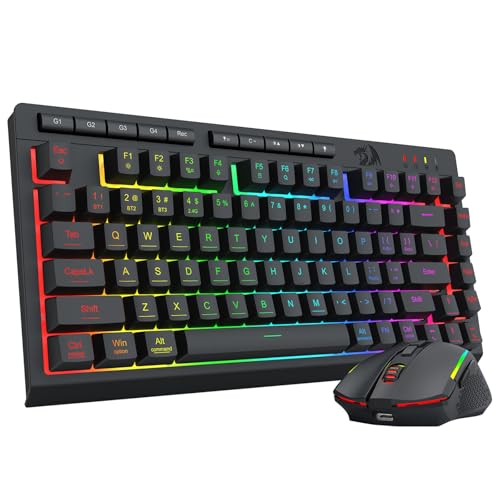
The S155-PRO is the most flexible wireless set in this guide, because it connects over Bluetooth, 2.4G wireless, or a wired USB-C cable, and a single 2.4G receiver controls both the keyboard and the mouse. That matters on Xbox, where a wired connection is the simplest route and the wireless modes stay available for a laptop or tablet. The compact 60 percent layout keeps the footprint small, and the mouse reaches 12800 DPI, which is well above the ceiling of the budget wired sets below.
Specs
- Connectivity: Bluetooth 5.0, 2.4G wireless, and USB-C wired
- Compatible devices: Laptop, PlayStation, smartphone, tablet, Xbox
- Keyboard battery: 4000mAh rechargeable battery
- Mouse battery: 700mAh rechargeable battery
- Battery life: Up to 50 hours with RGB lighting on, 300 hours with lights off
- Mouse sensor: 12800 DPI
- Layout: 60 percent portable design
- Receiver: 2-in-1 2.4G receiver controls keyboard and mouse
Best for: A small desk or a shared setup where one set moves between Xbox and another device.
Watch out for: The compact layout drops the number pad, so check that your most-used shortcuts still sit within easy reach.
CHONCHOW RGB Gaming Keyboard and Mouse Combo
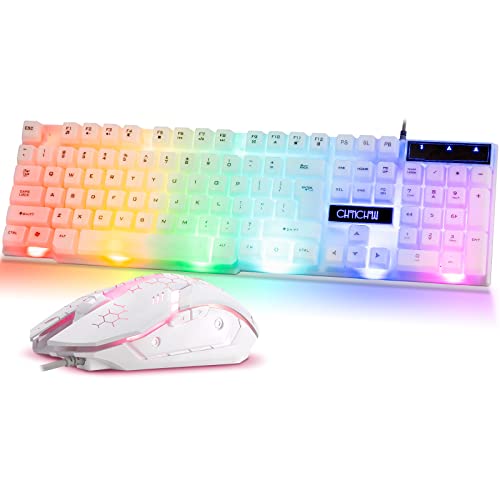
The CHONCHOW set is a straightforward wired combo for a buyer who wants the lowest fuss: plug both USB connectors in and play, with no batteries to charge and no pairing step. Its full-size keyboard carries 104 keys, including a number pad and multimedia keys, and 19 anti-ghosting keys keep common gaming combinations registering together during fast input. The mouse steps through four DPI levels, so you can slow down for aiming and speed up for menus with a single button.
Specs
- Connectivity: USB wired, plug and play
- Compatible devices: Windows, macOS, Linux, Xbox, PS4
- Keyboard: 104 keys with number pad and 12 multimedia keys
- Anti-ghosting: 19 anti-ghosting keys
- Mouse DPI: 1200, 1800, 2400, and 3600 DPI
- Mouse lighting: 7-color breathing backlight
- Keyboard lighting: Rainbow LED backlight
Best for: A first keyboard and mouse set for Xbox games that support the input.
Watch out for: The mouse tops out at 3600 DPI, which is low for players who prefer very high sensitivity.
Redragon S101 Gaming Keyboard and Mouse Combo

The S101 is the long-running budget pick of this group, pairing a full-size RGB keyboard with the M601 mouse in a single wired set. The keyboard uses 25-key rollover without conflict, so holding movement keys while pressing action keys does not drop inputs, and five breathing light levels let you dim the backlight for evening play. The mouse is programmable and adjustable to 3200 DPI, which covers the sensitivity range most console shooters need, and the set needs no software to start working.
Specs
- Connectivity: USB wired
- Keyboard: 104 keys, 25 keys without conflict, 12 multimedia keys
- Keyboard lighting: RGB backlit, 4 RGB backlight effects, 5 breathing levels
- Mouse: M601 programmable gaming mouse, 3200 DPI
- Mouse sensor: Optical, 4000 FPS, 30G acceleration
- Unit count: 2 count, keyboard and mouse
Best for: A full-size wired set for a desk beside the console.
Watch out for: The Amazon listing itself names personal computers rather than Xbox, so confirm your game supports keyboard and mouse before relying on this set.
MageGee K1 Gaming Keyboard and Mouse Combo

The MageGee K1 keeps the formula simple: a full-size wired keyboard with floating, removable keycaps and a matching optical mouse, both running from USB with no drivers. The 104-key layout includes a number pad, and the mouse switches through six DPI levels from 600 to 3200, which gives a new keyboard and mouse player room to find a comfortable sensitivity. Rainbow backlighting keeps the keys readable in a dark room, and the wired connection means there is nothing to charge between sessions.
Specs
- Connectivity: USB wired, plug and play
- Keyboard: 104 keys, floating removable keycaps
- Keyboard lighting: RGB backlit, 7-color backlight
- Mouse DPI: 6 levels from 600 to 3200 DPI
- Operating systems: Windows, macOS, Linux
- Model number: K1
Best for: A shared family setup where the same wired set serves the console and a computer.
Watch out for: The listing names computers rather than Xbox, so treat console use as dependent on the individual game, and check the listing before ordering.
Which One Fits Your Situation
You play from a sofa and hate cables
Pick the Razer Turret. Its retractable mouse mat turns your lap into a stable surface, the wireless link removes cables from the living room, and the dedicated Xbox key keeps the console guide within reach. Confirm stock first, since it is the oldest set here, and keep a controller nearby for games that never enable keyboard and mouse.
Your desk is small and the set must do double duty
Pick the Redragon S155-PRO. The 60 percent board leaves room for wide mouse movement, the single 2.4G receiver controls both devices, and Bluetooth plus USB-C wired modes let the same set move to a laptop or tablet. The trade is the missing number pad, so map your shortcuts before your first match.
You want the cheapest path into keyboard and mouse on Xbox
Pick the CHONCHOW combo. It is wired, so there is nothing to charge, and the listing names Xbox among its compatible devices. The full-size board and four DPI steps cover the basics, though the 3600 DPI ceiling will feel limiting if you later move to very high sensitivity. That simplicity is the appeal for a first set, and the wired connection keeps input steady while you learn.
You want a full-size board and a programmable mouse
Pick the Redragon S101. The 104-key keyboard, 25-key rollover, and programmable 3200 DPI mouse give you more control than the other budget sets, and the wired connection keeps input consistent. Check your game supports keyboard and mouse first, because the listing itself is written for computers. The RGB lighting and breathing levels also make the set easy to use in a dark room without extra desk lamps.
Common Mistakes
- Buying a set before checking whether your main game supports keyboard and mouse on Xbox, then discovering the game stays controller-only.
- Choosing a full-size board for a lap or a narrow desk, where the number pad pushes the mouse into an awkward angle.
- Assuming every button and macro on a combo works on Xbox, when console support usually covers basic input rather than the full software feature set.
- Picking a wireless set without a wired fallback, then losing a session to a flat battery with no cable at hand.
- Judging a combo by the keyboard alone and ignoring the mouse, which is often a basic pointer with a low DPI ceiling and few buttons.
Frequently Asked Questions
Does every Xbox game work with a keyboard and mouse?
No. Keyboard and mouse input works only in games that include support for it on Xbox, and many titles remain controller-only. Check the settings or the official game page for the titles you play most before buying, and keep a controller connected for games that never enable the option.
Do I need an adapter to use a keyboard and mouse on Xbox?
No adapter is needed for the combos in this guide in supported games, because they connect over USB or a USB wireless receiver that the console recognises as standard input. Third-party adapters exist for games without native support, but they sit outside the scope of these listings and can conflict with a game’s rules.
Is a wireless combo or a wired combo better for Xbox?
Wired suits a desk beside the console, where cable length is not a problem and you never charge anything. Wireless suits a sofa, where a single receiver and a lap-friendly board keep the setup tidy. The deciding factor is seating distance and whether you are willing to charge the set between sessions.
Can one combo work on both Xbox and a computer?
Yes, most USB and tri-mode combos in this guide work on a computer as well as on Xbox, since they present themselves as standard keyboard and mouse input. The Redragon S155-PRO is the clearest example, with Bluetooth, 2.4G, and USB-C wired modes. Console-specific keys and software features may still behave differently between platforms.
FAQ
Does every Xbox game work with a keyboard and mouse?
Do I need an adapter to use a keyboard and mouse on Xbox?
Is a wireless combo or a wired combo better for Xbox?
Can one combo work on both Xbox and a computer?
More from Amazon
Programs that pair well with the guide above. Offers and eligibility are set by Amazon and may change.
Free shipping on eligible items, Prime Video and more. Eligible new members can start with a free trial.
Start a Prime free trialAd-free music streaming. Eligible new subscribers can start with a free trial.
Try Music Unlimited freeA Prime membership for ages 18-24 with a trial period. Eligibility is set by Amazon.
See Prime for Young AdultsAudiobooks and podcasts to listen to on the go. Eligible new members can start with a free trial.
Try Audible freeAs an Amazon Associate we earn from qualifying purchases.