Our Top Picks
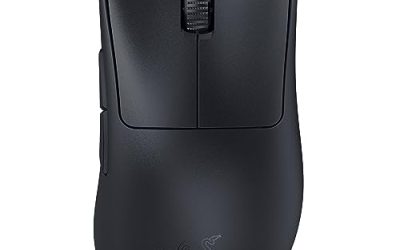
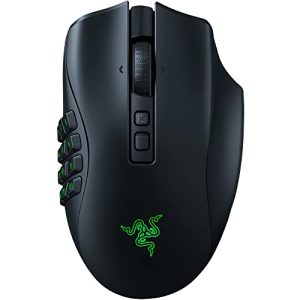
 Razer DeathAdder V3 Pro Wireless Gaming Mouse1000 Hz5.01 x 2.65 x 1.69 inches0.1 poundsCheck on Amazon
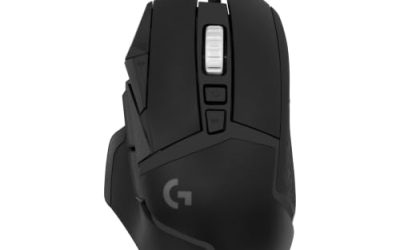
 Logitech G502 X Plus Wireless RGB Gaming MouseWireless7.1 x 4.6 x 2.7 inches0.84 poundsCheck on Amazon
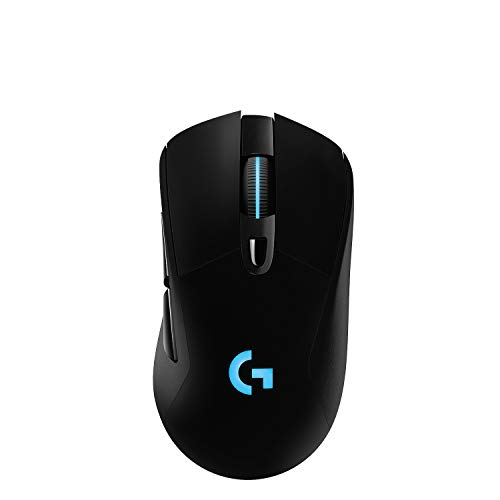 Logitech G703 LIGHTSPEED Wireless Gaming Mouse4.9" x 2.7" x 1.7"43 x 68 x 124 inches0.2 poundsCheck on Amazon
As an Amazon Associate we earn from qualifying purchases.
If your wrist aches after long gaming sessions, the shape of your mouse matters more than almost any specification on the box. A mouse that forces your hand into a twisted, clawed, or flattened posture makes your forearm muscles work harder for every flick and click, and that extra effort adds up over hours of play. An ergonomic gaming mouse takes the opposite approach: it supports the natural curve of your hand, keeps your wrist closer to a neutral position, and lets you move the pointer with less gripping force.
One thing needs to be said clearly at the start. No gaming mouse treats, cures, or prevents carpal tunnel syndrome, and nothing in this guide should be read as a medical claim. Carpal tunnel syndrome is a medical condition involving the median nerve, and a mouse is not a treatment for it. If you have persistent numbness, tingling, pain, or weakness in your hand or wrist, the right step is to talk to a doctor or another qualified professional, not to buy new hardware. What the mice below can reasonably offer is comfort: shapes and features that many players find easier on the hand and wrist during long sessions, and that reduce some common sources of strain such as excessive grip pressure, awkward wrist angles, and heavy mice that demand constant muscular effort to move and stop.
What Makes a Gaming Mouse Easier on the Wrist?
Before looking at individual models, it helps to understand which design traits actually relate to comfort, because “ergonomic” is often used as a marketing label rather than a description.
A sculpted, right-handed shape. A genuinely ergonomic gaming mouse is usually asymmetric, with a higher, rounded hump that fills the palm, a sloped top that follows the natural angle of the fingers, and a contoured left side with a thumb rest or thumb scoop. This kind of shell lets the hand rest on the mouse instead of hovering over it or pinching it between thumb and ring finger. A relaxed palm or palm-claw grip generally involves less forearm tension than a tight fingertip grip on a small, flat mouse.
Sensible size for your hand. A mouse that is too small forces your fingers to curl and your wrist to do more of the steering. A mouse that is too large can push your wrist into extension just to reach the buttons. Medium-to-large ergonomic shells suit most palm grippers, and players with smaller hands should look for compact ergonomic models rather than full-size ones.
Low weight, within reason. Every acceleration and stop of the mouse is work your wrist and forearm perform. A lighter mouse reduces that workload, which is why several picks below keep weight down while retaining a supportive shape. Extremely light mice with flat, low shells are not automatically comfortable, though; the combination that tends to suit strain-conscious players is a supportive ergonomic shape at a moderate or low weight.
Wireless freedom. A dragging cable pulls against the mouse and adds a constant sideways force your wrist has to correct. Modern wireless gaming mice with low-latency connections remove that drag entirely, and they also let you position the mouse wherever your arm naturally rests rather than wherever the cable reaches.
Button placement that avoids stretching. Thumb buttons set into a natural thumb rest, and a scroll wheel you can reach without extending your index finger, reduce repeated small strains. Tilt wheels and extra buttons can also move frequent actions off your most overworked fingers.
Grip style flexibility. Ergonomic shells generally favour palm and relaxed claw grips. If you currently use a hard fingertip grip with your wrist planted on the desk, switching to a mouse that encourages a supported palm grip, and letting your whole forearm share the movement, is often the single biggest comfort change available.
The Picks
Razer DeathAdder V3 Pro
The DeathAdder line has been the reference point for ergonomic gaming mouse shapes for years, and the V3 Pro keeps that sculpted right-handed shell while cutting the weight dramatically. The black version is listed at 63 grams, which is remarkable for a full-size ergonomic mouse, and that low mass means less force is needed to start, stop, and redirect the mouse during fast play. For a wrist that tires easily, that combination of a palm-filling shape and very low weight is the main appeal.
The shape itself is a refined version of the classic DeathAdder curve: a high, supportive hump toward the back of the mouse, gently sloped main buttons, and flared button lips that cradle the fingers. It suits palm and relaxed claw grips on medium and large hands particularly well. There is no thumb rest shelf, but the left side is contoured so the thumb sits in a natural channel rather than gripping a flat wall.
Performance hardware is flagship grade. The listing specifies Razer’s Focus Pro 30K optical sensor, third-generation optical switches, HyperSpeed wireless connectivity, five programmable buttons, and battery life of up to 90 hours. Optical switches are a small comfort bonus as well as a speed feature, since they actuate with a light, consistent click rather than a heavy mechanical snap. Players who play fast-paced shooters for long stretches and want the lightest ergonomic option on this list should start here.
See the Razer DeathAdder V3 Pro on Amazon
Logitech G502 X Plus
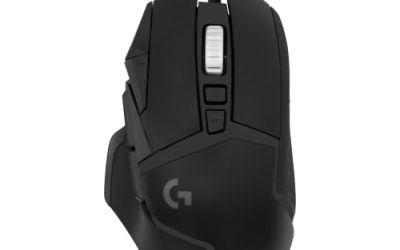
The G502 family is built around one of the most aggressively sculpted ergonomic shells in gaming, and the G502 X Plus is the wireless flagship of the current generation. The shape features a pronounced thumb rest that juts out on the left side, giving your thumb a shelf to rest on instead of dragging along the mouse pad or squeezing the body. That single design choice changes how the whole hand behaves: with the thumb supported, most players grip less tightly, and a looser grip means less sustained tension through the wrist and forearm.
The shell is tall and long, with a high arch that supports a full palm grip, and textured side surfaces that keep the mouse secure without extra squeezing. Logitech’s listing for this model specifies the HERO 25K sensor, LIGHTFORCE hybrid optical-mechanical switches, LIGHTSPEED wireless, LIGHTSYNC RGB lighting, and 13 programmable buttons in total across the mouse, including the removable DPI shift button on the thumb rest that can extend your thumb’s reach to a sniper-style low-sensitivity setting. Battery life is listed at up to 130 hours with lighting off, and the mouse is compatible with Logitech’s POWERPLAY wireless charging system, sold separately, which removes charging cables from the routine entirely.
At roughly double the weight of the DeathAdder V3 Pro, this is the pick for players who prioritise support, buttons, and a planted, controlled feel over minimum weight. MOBA, MMO, and RPG players who bind many abilities to the mouse, and who play in a relaxed palm grip, are the natural audience. If your discomfort is driven more by gripping and finger stretching than by moving the mouse itself, the G502 X Plus addresses those causes directly.
See the Logitech G502 X Plus on Amazon
Razer Basilisk V3 Pro

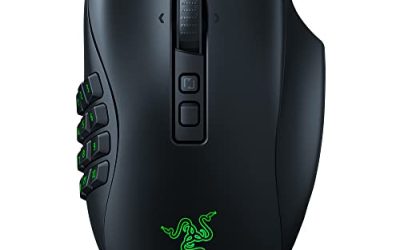
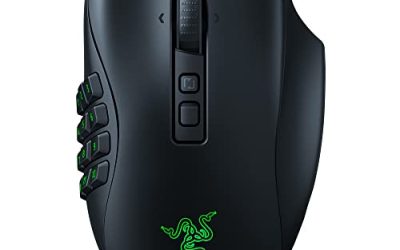
The Basilisk V3 Pro is Razer’s feature-heavy ergonomic mouse, and it is the closest rival to the G502 formula: a sculpted right-handed body, a defined thumb rest, and a long list of controls. Its standout comfort feature is the HyperScroll tilt wheel. The wheel can switch between a tactile, notched mode and a free-spinning mode, and it also tilts left and right for horizontal inputs. For players, that means scrolling through inventories, weapon lists, documents between matches, and long web pages can be done with a flick rather than dozens of repeated index-finger strokes, and some repetitive actions can be moved to the wheel tilt instead of a keyboard key or a stretched thumb button.
Razer’s listing specifies the Focus Pro 30K optical sensor, third-generation optical switches, 11 programmable buttons, and Chroma RGB lighting with an underglow ring. Connectivity is flexible: HyperSpeed wireless, Bluetooth, and wired USB are all supported, and Bluetooth is handy for pairing with a laptop or a second machine without moving a receiver. A removable clutch button beside the thumb rest temporarily drops sensitivity while held, which encourages small, controlled movements instead of large wrist sweeps for fine aiming.
The Basilisk V3 Pro is a medium-large, relatively substantial mouse, so it fits the same logic as the G502 X Plus: choose it if a supported palm grip, a thumb rest, and reduced finger repetition matter more to you than the lowest possible weight. Players with medium or large hands who split time between gaming and everyday desktop work often find this style of mouse the easiest to live with all day.
See the Razer Basilisk V3 Pro on Amazon
Logitech G703 Lightspeed
The G703 Lightspeed takes a different route to comfort: instead of an aggressively sculpted shell, it uses a smooth, rounded ergonomic shape with gentle curves and dual-injected rubber side grips. The body is symmetrical in outline but designed for right-handed use, with thumb buttons on the left side. Many players find this softer, less locked-in shape comfortable precisely because it does not force the hand into one fixed posture; the hand can rest on it in a relaxed palm or claw grip and shift position naturally during a session.
The listing specifies Logitech’s HERO 25K sensor with a range of 100 to 25,600 DPI, LIGHTSPEED wireless, six programmable buttons, and a weight of 95 grams with an optional 10-gram weight you can add or leave out. Battery life is listed at up to 35 hours of continuous play with default lighting, and up to 60 hours with lighting off. Like the G502 X Plus, it is POWERPLAY compatible, so it can charge while resting on a compatible pad rather than needing a cable plugged into the front, which also keeps the front of the mouse free of cable drag during wired fallback use.
The G703 suits players with medium hands who found the G502 shape too angular or too large, and anyone who wants a proven, simple ergonomic wireless mouse without a large button array. Its comfort comes from the rounded shell and the secure rubber grips that reduce the pinch force needed to lift and reposition the mouse, a small action repeated hundreds of times in a typical session.
See the Logitech G703 Lightspeed on Amazon
What About Vertical Gaming Mice?
Players researching wrist comfort often ask about vertical mice, which hold the hand in a handshake position. It is worth being honest about the state of this category: true vertical gaming mice are rare. The well-known vertical mice from major brands are office and productivity models, not gaming mice; they typically have basic sensors, low polling rates, and no gaming software support, so they are not included here and should not be bought expecting gaming-grade tracking. A small number of lesser-known brands sell vertical mice aimed at gamers, but specifications and availability vary, and they do not match the sensor performance of the mice above.
For most players, a well-shaped horizontal ergonomic mouse, sensible sensitivity settings, and better desk habits deliver more practical benefit than a compromised vertical mouse with a weak sensor. If a vertical shape is something you want to explore, that is a conversation worth having with a medical or ergonomics professional who can look at your specific symptoms and setup.
Settings and Habits That Matter as Much as the Mouse
Hardware is only part of the picture. A few adjustments can reduce wrist workload with any mouse:
- Raise your sensitivity slightly. Very low sensitivity forces large, repeated arm and wrist sweeps. A moderate setting, with aim refinement done through practice rather than huge movements, reduces total travel distance per session. Many ergonomic-mouse players also use a DPI shift or clutch button for brief precision moments instead of playing at a very low sensitivity full-time.
- Keep your wrist neutral and floating. Resting the heel of your hand hard on the desk edge and pivoting from that fixed point concentrates movement in the wrist. A chair height that puts your forearm roughly level, with the elbow near a right angle, helps.
- Take breaks. Short, regular pauses to open and close your hands and gently move your wrists interrupt the static load that builds up during play. No mouse offsets hours of unbroken play.
- Loosen your grip. Consciously relaxing your hand between fights or during downtime costs nothing and directly reduces forearm tension. Supportive shells and thumb rests help because they make a light grip feel secure.
- Check your whole setup. Monitor height, chair support, and desk depth all influence the posture your wrist ends up in. A mouse change works best as part of that wider picture.
How to Choose Between These Four
If low weight is your priority because moving the mouse itself is what tires your wrist, the DeathAdder V3 Pro is the standout: a classic ergonomic shape at a fraction of the usual weight. If your strain comes from gripping, reaching, and button work, the G502 X Plus and Basilisk V3 Pro both offer thumb rests and deep button sets, with the Basilisk adding its tilt wheel for players who scroll constantly and the G502 X Plus offering the longer listed battery life and the removable thumb clutch. If you want the simplest, softest shape and an easygoing palm grip, the G703 Lightspeed is the comfortable all-rounder.
Hand size is the deciding factor more often than specifications. Large ergonomic shells can overwhelm small hands and push the wrist into awkward angles, which defeats the purpose. Measure your hand, compare it honestly against each mouse’s size class, and favour the model whose shape lets your fingers rest on the buttons without stretching.
Finally, a repeat of the most important point in this guide: these mice are comfort choices, not medical devices. Persistent pain, numbness, or tingling deserves professional assessment. Choose the mouse that lets you play in a relaxed, supported posture, set it up thoughtfully, take your breaks, and treat ongoing symptoms as a health question rather than a gear question.
FAQ
What Makes a Gaming Mouse Easier on the Wrist?
What About Vertical Gaming Mice?
More from Amazon
Programs that pair well with the guide above. Offers and eligibility are set by Amazon and may change.
Free shipping on eligible items, Prime Video and more. Eligible new members can start with a free trial.
Start a Prime free trialAd-free music streaming. Eligible new subscribers can start with a free trial.
Try Music Unlimited freeA Prime membership for ages 18-24 with a trial period. Eligibility is set by Amazon.
See Prime for Young AdultsAudiobooks and podcasts to listen to on the go. Eligible new members can start with a free trial.
Try Audible freeAs an Amazon Associate we earn from qualifying purchases.