Our Top Picks
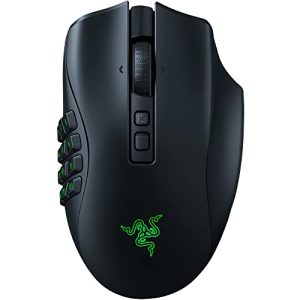
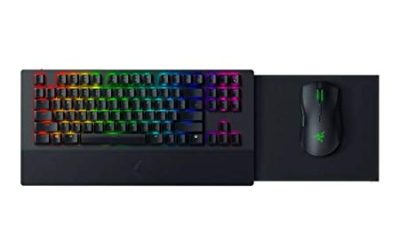
 Razer Basilisk V3 Customizable RGB Wired Ergonomic GamingMouse2.96 x 5.12 x 1.67 inches0.2 poundsCheck on Amazon


As an Amazon Associate, we earn from qualifying purchases made through links on this page.
The PlayStation 5 does support a mouse. Sony built mouse support into the console at the system level, so a standard USB or Bluetooth mouse can be plugged in or paired and used to navigate menus, browse the web, type messages faster, and play the games that choose to support it. That last point is the one that matters most: mouse support inside games is decided by each developer, not by Sony. A mouse that works beautifully in one PS5 title may do nothing at all in another, because the game itself never enabled mouse input.
That makes buying a gaming mouse for PS5 a slightly different exercise from buying one for PC. You do not need console-specific hardware, and there is no special PS5 certification for mice. What you need is a well-built gaming mouse with a reliable wired USB connection or a wireless dongle the console can read, a sensor that tracks cleanly, and buttons that feel good for long sessions. Every mouse below is a standard gaming mouse that connects to the PS5 over USB cable, a 2.4 GHz USB receiver, or Bluetooth, and each one also works perfectly on PC, which matters because most PS5 owners will use the same mouse at a desk during the week.
This guide explains how mouse support on PS5 actually works, what to look for before buying, and which four mice cover the main use cases: a wired all-rounder, a feature-rich ergonomic pick, a light wireless option, and an MMO mouse for the console MMOs that support mouse and keyboard play.
What to Look for in a PS5 Gaming Mouse
Understand the compatibility rule first. The PS5 recognises standard USB and Bluetooth mice at the system level. In-game support is per title. Games known for supporting mouse input on PS5 include the console’s MMO and strategy titles and some shooters, but the list changes with updates, so check your specific game before assuming a mouse will work in it. In the PS5 system menus, any connected mouse works for navigation regardless of the game.
Wired USB is the safest connection. A wired mouse plugs into a front or rear USB port and simply works, with no pairing, no dongle, and no battery to manage. Wireless mice with a 2.4 GHz USB receiver also work, because the console sees the receiver as a wired USB device. Bluetooth mice can be paired through the PS5 accessories settings, though Bluetooth adds a little latency and is the least consistent option of the three.
You cannot remap buttons on the console. Software suites such as Logitech G Hub, Razer Synapse, and Corsair iCUE run on PC and Mac only. Any custom button mapping, DPI profile, or lighting setup has to be created on a computer and saved to the mouse’s onboard memory if you want it to carry over to the PS5. Mice with onboard profile storage are therefore worth prioritising if you play on both platforms.
Sensor and polling rate still matter. A good optical sensor with clean tracking at 1,000 Hz polling feels responsive on a TV or monitor. Extreme DPI numbers are marketing headroom rather than something you will use; accurate tracking at the 800 to 3,200 DPI range covers console play comfortably.
Shape and weight decide comfort. The DualSense keeps your hands in a fixed position, but a mouse does not. Pick a shape that matches your grip: larger ergonomic mice suit palm grips, while smaller ambidextrous shapes suit fingertip and claw grips. If the mouse will live in a living room, a wireless model also keeps the setup tidy.
Keep expectations realistic about features. RGB lighting usually works in a basic mode, but per-game lighting effects and macros built in PC software will not run on the console. What carries over is the hardware itself: sensor, switches, wheel, and any settings stored onboard.
The Best Gaming Mice for PS5
Logitech G502 HERO

ASIN: B07GBZ4Q68 — View on Amazon
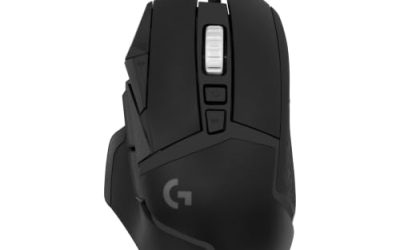
The G502 HERO is the default recommendation for a wired PS5 mouse because it does everything competently and stores its settings onboard. Its HERO 25K optical sensor tracks accurately across a wide sensitivity range, and Logitech’s G Hub software on PC lets you save DPI levels and button assignments to the mouse’s internal memory, so your setup survives the move from desk to console without any software running in the background.
The shape is a sculpted right-handed design with a pronounced thumb rest, eleven programmable buttons, and a metal scroll wheel that switches between notched scrolling and free spin. An adjustable weight system lets you add up to 16 g in small increments if you prefer a heavier, more planted feel. On PS5 it is plug and play over USB, and the extra buttons are useful in supported titles that allow additional bindings.
- Sensor: Logitech HERO 25K optical, up to 25,600 DPI
- Buttons: 11 programmable
- Connection: Wired USB
- Weight: 121 g, plus up to 16 g of optional tuning weights
- Dimensions: Approximately 132 x 75 x 40 mm
- Extras: Onboard memory, dual-mode scroll wheel, LIGHTSYNC RGB
Who it’s for: Players who want one wired mouse that works on both PS5 and PC, with settings that carry over through onboard memory.
Limitations: It is on the heavier side, the cable can drag on a TV stand setup, and lighting effects are limited to what is stored onboard when used on console.
Razer Basilisk V3
ASIN: B09C13PZX7 — View on Amazon
The Basilisk V3 is the ergonomic alternative, built around Razer’s Focus+ 26K optical sensor and a scroll wheel that is the best in this group. The wheel tilts for side inputs, ratchets firmly for weapon switching, and can spin freely for long menus, with an automatic mode that shifts between the two based on scroll speed. Eleven programmable buttons include a multi-function paddle on the thumb side that is easy to reach without disturbing your aim.
Razer’s optical switches register clicks with light instead of metal contacts, which removes debounce delay and gives the Basilisk V3 a crisp, consistent click feel. Chroma RGB lighting runs in its default spectrum mode on console. Button remapping is done in Razer Synapse on PC, and the mouse stores a profile onboard, so a single saved configuration can travel to the PS5.
- Sensor: Razer Focus+ optical, up to 26,000 DPI
- Buttons: 11 programmable (10 plus 1 profile button)
- Connection: Wired USB, Razer SpeedFlex cable
- Weight: Approximately 101 g
- Dimensions: Approximately 130 x 75 x 42.5 mm
- Extras: HyperScroll tilt wheel, optical switches, onboard profile storage
Who it’s for: Palm and claw grip players who value scroll-wheel control and a sculpted ergonomic shape for longer sessions.
Limitations: Wired only, the shape is right-handed only, and advanced Chroma effects need a PC running Synapse.
Logitech G305 LIGHTSPEED
ASIN: B07CMS5Q6P — View on Amazon
The G305 is the wireless pick, and its connection method is exactly right for a console: it uses a 2.4 GHz LIGHTSPEED USB receiver rather than Bluetooth, so the PS5 treats it as a standard USB mouse and the connection is fast and stable. Plug the small receiver into a console USB port and the mouse is ready, with no pairing menus involved.
Inside is Logitech’s HERO sensor capped at 12,000 DPI, which is far more than console play requires, and a single AA battery delivers up to 250 hours of play, so battery swaps are a rare event. At 99 g it is light and easy to flick, and the compact symmetrical shell suits claw and fingertip grips. Six programmable buttons cover the essentials, and settings can be stored onboard through G Hub on a PC. There is no RGB, which helps the battery life and keeps the design understated next to a console.
- Sensor: Logitech HERO optical, up to 12,000 DPI
- Buttons: 6 programmable
- Connection: 2.4 GHz LIGHTSPEED via USB receiver (also works wired on PC with cable)
- Weight: 99 g
- Battery: Up to 250 hours from one AA battery
- Dimensions: Approximately 116.6 x 62.2 x 38.2 mm
Who it’s for: Living-room players who want a cable-free setup and a light mouse that also doubles as a PC and laptop mouse.
Limitations: No Bluetooth, no rechargeable battery, and the smaller shell is less comfortable for large hands using a palm grip.
Corsair Scimitar RGB Elite

ASIN: B082LRMY53 — View on Amazon
The Scimitar RGB Elite exists for one job: putting twelve side buttons under your thumb. That matters on PS5 because the console has genuine MMOs, and titles in that genre are among the most likely to support mouse input. The twelve-button Key Slider panel can be positioned forward or back along the side of the mouse so the grid sits exactly where your thumb rests, and each button is textured so you can identify it by touch during a fight.
A PixArt PMW3391 optical sensor tuned for Corsair provides tracking up to 18,000 DPI, and the mouse stores profiles in onboard memory through iCUE on PC, including button remaps that remain active on console. At around 147 g it is a substantial mouse, and the wide body fills the hand in a palm grip. For supported MMO and MOBA-style games on PS5, nothing else in this guide puts as many abilities under one thumb.
- Sensor: PixArt PMW3391 optical, up to 18,000 DPI (native, 1 DPI steps)
- Buttons: 17 total, including 12 side buttons on an adjustable Key Slider panel
- Connection: Wired USB
- Weight: Approximately 147 g
- Dimensions: Approximately 119.6 x 77 x 42.4 mm
- Extras: Onboard profile storage, four-zone RGB
Who it’s for: MMO players on PS5 titles that support mouse input, and anyone who wants a full number-row of abilities on the mouse.
Limitations: Heavy and wide for fast-paced shooters, wired only, and the side grid has a learning curve before it becomes automatic.
Comparison Table
| Mouse | ASIN | Connection | Sensor | Max DPI | Buttons | Weight |
|---|---|---|---|---|---|---|
| Logitech G502 HERO | B07GBZ4Q68 | Wired USB | HERO 25K optical | 25,600 | 11 | 121 g |
| Razer Basilisk V3 | B09C13PZX7 | Wired USB | Focus+ optical | 26,000 | 11 | 101 g |
| Logitech G305 LIGHTSPEED | B07CMS5Q6P | 2.4 GHz USB receiver | HERO optical | 12,000 | 6 | 99 g |
| Corsair Scimitar RGB Elite | B082LRMY53 | Wired USB | PMW3391 optical | 18,000 | 17 | 147 g |
Frequently Asked Questions
Does the PS5 work with any USB mouse?
At the system level, yes: standard USB and Bluetooth mice are recognised for navigating menus and typing. Inside games, support is decided by each developer, so a mouse only controls the games that have chosen to enable it. Always check your specific title before buying a mouse for it.
Is a wireless mouse a good idea on PS5?
A wireless mouse with a 2.4 GHz USB receiver works well, because the console treats the receiver like a wired device. Bluetooth mice can also be paired in the accessories settings, but the connection is less consistent and adds latency, so a dongle-based mouse such as the G305 is the safer wireless choice.
Can I use my mouse’s extra buttons and macros on PS5?
Extra buttons work in games that let you bind them, but macro software does not run on the console. If you build mappings on a PC, choose a mouse with onboard memory so the saved profile stays active when you plug it into the PS5.
Will a gaming mouse work on PS5 games that support keyboard and mouse?
Yes. In titles that enable mouse and keyboard play, a standard gaming mouse behaves as it does on PC, including DPI settings stored on the device. The console’s own settings let you adjust pointer speed for system navigation as well.
Do I need a mouse pad on a TV setup?
A pad helps if your surface is glass, glossy, or uneven, since optical sensors track best on a consistent matte surface. On a plain desk or table, most modern sensors work without one.
Conclusion
A gaming mouse for PS5 is really a good standard gaming mouse, chosen with the console’s rules in mind: the PS5 accepts USB and Bluetooth mice at the system level, while each game decides whether mouse control is enabled. The Logitech G502 HERO is the safest all-round wired choice, with onboard memory that carries your settings between PC and console. The Razer Basilisk V3 adds the best scroll wheel and a comfortable ergonomic shape. The Logitech G305 removes the cable entirely with a receiver the console handles natively, and the Corsair Scimitar RGB Elite serves the MMO players whose games genuinely benefit from twelve thumb buttons. Pick based on the games you actually play and how you grip, and confirm mouse support in your favourite titles before you buy.
More from Amazon
Programs that pair well with the guide above. Offers and eligibility are set by Amazon and may change.
Free shipping on eligible items, Prime Video and more. Eligible new members can start with a free trial.
Start a Prime free trialAd-free music streaming. Eligible new subscribers can start with a free trial.
Try Music Unlimited freeA Prime membership for ages 18-24 with a trial period. Eligibility is set by Amazon.
See Prime for Young AdultsAudiobooks and podcasts to listen to on the go. Eligible new members can start with a free trial.
Try Audible freeAs an Amazon Associate we earn from qualifying purchases.