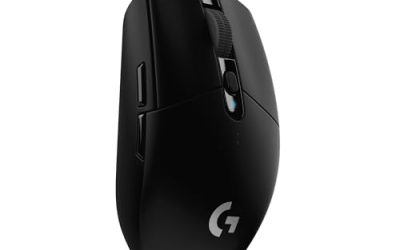
Our Top Picks
 Razer DeathAdder V3 Pro Wireless Gaming Mouse1000 Hz5.01 x 2.65 x 1.69 inches0.1 poundsCheck on Amazon
 Logitech G Pro X Superlight 2 Lightspeed WirelessClassic1.57 x 2.5 x 4.92 inches0.1 poundsCheck on Amazon

League of Legends asks a mouse to do two things at once: land precise clicks on moving champions and fire off item actives and abilities without a missed input. A mouse that feels fine in a shooter can still hold a player back in the Rift, because the game rewards a shape that stays steady during long laning phases, side buttons that sit exactly under the thumb, and a sensor that tracks cleanly at low sensitivity. The wrong pick shows up as misclicks on minions, awkward camera control, and a hand that tires before the late game.
This guide is for ranked players climbing solo queue, casual players who play a few games most evenings, and ability-heavy players who lean on item actives and summoner spells. Every mouse below was chosen from its name and specifications on its Amazon product page, with weight, button count, sensor, and battery life taken from the listing itself.
Quick Picks
As an Amazon Associate we earn from qualifying purchases.
| Product | Best for | Key spec from title |
|---|---|---|
| Logitech G502 HERO | Ability-heavy players who want many buttons | HERO 25K sensor, 25,600 DPI |
| Razer DeathAdder V3 Pro | Right-handed players who want a light ergonomic shape | 63g, Focus Pro 30K optical sensor |
| Logitech G Pro X Superlight 2 | Competitive players who want a minimal wireless mouse | 60g, 44k DPI sensor, 8kHz report rate |
| Razer Naga V2 Pro | Players who bind many actives to side buttons | 19+1 programmable buttons, swappable side plates |
| SteelSeries Aerox 5 Wireless | Players who want buttons plus long battery life | 9 buttons, 18K DPI TrueMove Air sensor |
How to Choose
Button count and placement
League of Legends rewards a mouse with enough side buttons for actives, wards, and summoner spells, but buttons only help when they sit where the thumb can reach them without shifting grip. A mouse with eleven programmable buttons sounds strong until two of them sit under the ring finger and never get pressed. Count the buttons the thumb can actually reach in a normal grip, then check whether the listing shows a thumb rest or a side panel that keeps the hand in place. Players who bind three or four actives want at least two large thumb buttons plus a DPI or wheel tilt they can reach mid-fight.
Shape and grip style
The shape decides whether the hand stays relaxed through a forty-minute game. Palm grip players need a taller shell with a filled-out rear, while claw and fingertip players need a lower, narrower body that lets the fingers curl and lift. League of Legends involves constant small movements rather than long sweeps, so a mouse that forces the wrist into an awkward angle will show up as fatigue long before the sensor becomes the problem. Measure hand length against the dimensions in the listing, and pick a shape that matches the grip used most, not the grip used in highlight clips.
Sensor accuracy at low sensitivity
Many League of Legends players run low sensitivity for steady camera control, which means the sensor must track cleanly during slow, short movements. A modern optical sensor with a high maximum DPI is not automatically better at low DPI, so look for the sensor name in the listing and check that the mouse supports on-board memory for storing sensitivity steps. A sensor that spins out during a fast reposition will cost a flash or a smite. Wired and wireless sensors both work here, so judge the sensor on its name and tracking figures rather than the connection type.
Weight and cable or battery trade-offs
Weight matters in a game built on thousands of small clicks. A mouse above 100 grams can feel sluggish during rapid repositioning, while a very light mouse can feel unstable for players who rest their palm heavily. Wireless mice remove cable drag but add battery management, so check the battery figure in the listing and whether the mouse charges over USB-C. Wired mice never need charging but need a cable that stays out of the way. Pick the trade-off that fits the desk setup, and remember that a light mouse with a stiff cable loses much of its advantage.
The 5 Best Options
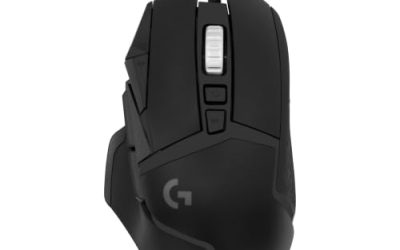
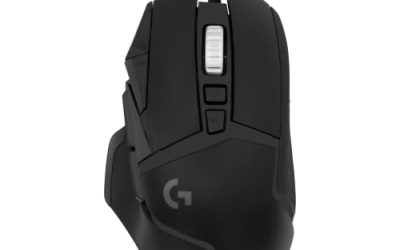
Logitech G502 HERO

The Logitech G502 HERO suits ability-heavy players who want a full row of reachable buttons without moving to a dedicated MMO mouse. Its HERO 25K sensor tracks up to 25,600 DPI, and the eleven programmable buttons cover item actives, wards, and summoner spells with room to spare. Adjustable weights let the mouse sit heavier for steady control or lighter for faster flicks, and on-board memory keeps the setup intact when moving between computers. The wired connection means no battery to watch during a long ranked session.
- Specs:
- HERO 25K sensor, 25,600 DPI
- 11 programmable buttons
- Adjustable weights
- RGB lighting
- On-board memory
- Wired, PC/Mac
- Best for: Players who bind several actives and want every button within thumb reach.
- Watch out for: The 121-gram starting weight is heavy for fingertip players, so check the weight before buying.
Razer DeathAdder V3 Pro
The Razer DeathAdder V3 Pro suits right-handed players who want a light ergonomic mouse for long sessions. At 63 grams it moves with very little effort, and the Focus Pro 30K optical sensor tracks cleanly at the low sensitivities many League of Legends players prefer. Optical Switches Gen-3 give the main clicks a crisp feel, and the 90-hour battery means the mouse runs for weeks of evening games before needing a charge. Five programmable buttons keep the layout simple, which suits players who bind only one or two actives.
- Specs:
- 63g lightweight design
- Focus Pro 30K optical sensor
- Optical Switches Gen-3
- HyperSpeed Wireless
- 5 programmable buttons
- 90-hour battery
- Best for: Right-handed players who want a light, comfortable mouse for ranked play.
- Watch out for: Left-handed players cannot use this right-handed shape, so confirm the hand fit first.
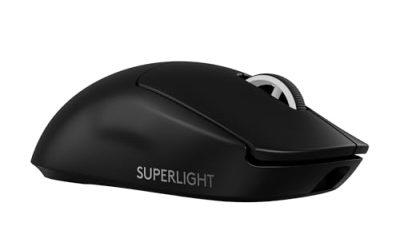
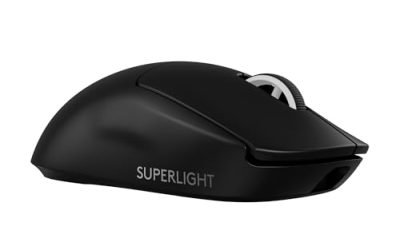
Logitech G Pro X Superlight 2
The Logitech G Pro X Superlight 2 suits competitive players who want nothing extra between hand and game. At 60 grams with a symmetrical shape, it moves fast and stays neutral for claw and fingertip grips, and the HERO 2 sensor with 44,000 DPI and an 8kHz report rate keeps tracking tight during quick repositioning. LIGHTFORCE hybrid switches combine optical speed with a mechanical click feel, and USB-C charging keeps the setup simple. Five programmable buttons cover the essentials without adding bulk.
- Specs:
- 60g pro-grade design
- HERO 2 sensor, 44,000 DPI
- 8kHz report rate
- LIGHTFORCE hybrid switches
- 5 programmable buttons
- USB-C charging
- Best for: Competitive players who want a minimal, fast wireless mouse.
- Watch out for: The symmetrical shell has no thumb rest, so palm players should check the shape first.
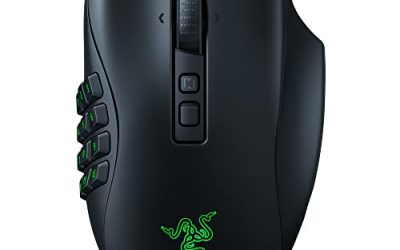
Razer Naga V2 Pro

The Razer Naga V2 Pro suits players who run many actives and want a dedicated button for each one. Its 19+1 programmable buttons use swappable side plates, so the thumb panel can switch between two, seven, or twelve buttons depending on the champion and the number of actives in the build. The Focus Pro 30K optical sensor tracks cleanly, the HyperScroll Pro wheel handles long scrolls through the shop, and the 300-hour battery covers months of play. This is the most button-heavy mouse in the guide by a wide margin.
- Specs:
- 19+1 programmable buttons
- Swappable side plates
- HyperScroll Pro wheel
- Focus Pro 30K optical sensor
- Optical Mouse Switches Gen-3
- 300-hour battery
- Best for: Players who bind many item actives and want a thumb grid for them.
- Watch out for: The mouse is larger and heavier than the others here, so small hands should check the dimensions first.
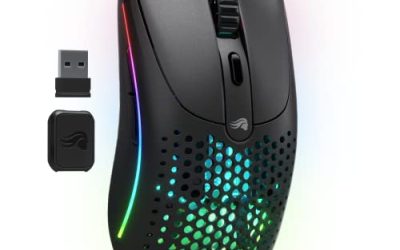
SteelSeries Aerox 5 Wireless

The SteelSeries Aerox 5 Wireless suits players who want extra buttons without giving up a light body or long battery life. Nine buttons cover actives and camera controls, and the 74-gram honeycomb shell keeps the mouse light enough for fast repositioning. The TrueMove Air sensor reaches 18,000 DPI, and the mouse connects over Bluetooth or 2.4 GHz wireless, so it works with a laptop as well as a desktop. AquaBarrier water resistance protects the shell against spills, and the 180-hour battery lasts through long stretches of games.
- Specs:
- 74g ultra-lightweight design
- 9 programmable buttons
- 18K DPI TrueMove Air optical sensor
- Bluetooth and 2.4 GHz wireless
- AquaBarrier water resistance
- 180-hour battery
- Best for: Players who want many buttons, a light body, and a long battery life in one mouse.
- Watch out for: The honeycomb shell has open holes, so players who dislike the perforated feel should check it first.
Which One Fits Your Situation
You play champions with many item actives
Pick the Razer Naga V2 Pro. Its swappable side plates put a full thumb grid under one thumb, so each active gets its own button instead of sharing a key. The 300-hour battery also means the mouse stays ready through long ranked sessions without a mid-week charge. That grid also keeps the thumb from reaching for the keyboard during a fight.
You play long ranked sessions every evening
Pick the Razer DeathAdder V3 Pro. Its 63-gram ergonomic shape stays comfortable through forty-minute games, and the 90-hour battery covers weeks of evening play. The simple five-button layout keeps the focus on the game rather than on remembering bindings. The light body also keeps the wrist fresh when a match runs past forty minutes.
You want the fastest, lightest mouse possible
Pick the Logitech G Pro X Superlight 2. At 60 grams with an 8kHz report rate, it moves with the least resistance in the guide, and the symmetrical shape suits claw and fingertip grips. The five-button layout covers the essentials for players who bind actives to the keyboard instead. It charges over USB-C, so a short break tops it up.
You want buttons and battery life together
Pick the SteelSeries Aerox 5 Wireless. Nine buttons cover actives and camera controls, the 74-gram body stays light, and the 180-hour battery outlasts most wireless mice. Bluetooth support also makes it easy to move between a desktop and a laptop. The nine buttons cover actives and camera controls without adding weight, which keeps the mouse light for fast repositioning.
Common Mistakes
- Buying the mouse with the most buttons without checking whether the thumb can actually reach them in a normal grip.
- Choosing a heavy mouse for a game built on thousands of small clicks, then wondering why the wrist tires by the late game.
- Setting sensitivity by copying a pro player instead of testing what keeps the camera steady at the player’s own desk.
- Ignoring battery life on a wireless mouse and running out of charge during a ranked match.
- Picking a right-handed ergonomic shape for a left hand, or a symmetrical shell for a palm grip that needs a filled-out rear.
Frequently Asked Questions
How many buttons does a League of Legends mouse need?
Five buttons cover most players, since League of Legends puts most abilities on the keyboard. Two side buttons handle one or two actives, a ward, or a summoner spell. Players who run several actives benefit from nine or more buttons, and the Naga V2 Pro suits those who want a full thumb grid. More buttons only help when the thumb can reach them without shifting grip.
Is a wireless mouse good enough for ranked League of Legends?
Yes, modern wireless mice track as cleanly as wired ones for this game. League of Legends involves short, precise movements rather than the long flicks of a shooter, so connection type matters less than shape and sensor. Check the battery figure in the listing and keep a charging cable nearby, since a dead battery mid-game is the real risk with wireless.
What DPI should I use for League of Legends?
Most players do well between 800 and 1600 DPI with in-game sensitivity tuned to taste. Lower DPI keeps the camera steady during laning, while higher DPI suits players who move the camera with the mouse edge. The sensor matters more than the maximum DPI figure, so pick a mouse with a modern optical sensor and set the DPI that keeps clicks landing where intended.
Does mouse weight matter in League of Legends?
Yes, because the game involves thousands of small clicks and constant repositioning. A mouse under 75 grams feels quick and reduces wrist strain over long sessions, while a mouse above 100 grams can feel slow during fast fights. Players who rest their palm heavily may still prefer a slightly heavier mouse for stability, so weight is a personal choice rather than a strict rule.
FAQ
How many buttons does a League of Legends mouse need?
Is a wireless mouse good enough for ranked League of Legends?
What DPI should I use for League of Legends?
Does mouse weight matter in League of Legends?
More from Amazon
Programs that pair well with the guide above. Offers and eligibility are set by Amazon and may change.
Free shipping on eligible items, Prime Video and more. Eligible new members can start with a free trial.
Start a Prime free trialAd-free music streaming. Eligible new subscribers can start with a free trial.
Try Music Unlimited freeA Prime membership for ages 18-24 with a trial period. Eligibility is set by Amazon.
See Prime for Young AdultsAudiobooks and podcasts to listen to on the go. Eligible new members can start with a free trial.
Try Audible freeAs an Amazon Associate we earn from qualifying purchases.