
Key takeaways
- Response Time (GtG vs. MPRT): Look for honest GtG specs with well-tuned overdrive. A true 0.5ms to 1ms GtG Fast IPS minimizes ghosting without coronas, while MPRT with backlight strobing is useful but dims the image.
- Refresh Rate Headroom: 144Hz is smooth for most players, 180Hz to 200Hz gives noticeably cleaner motion on mid-range GPUs, and 240Hz benefits competitive FPS titles only if your system can sustain 200+ fps.
- Panel Tech and Sync: Fast IPS offers the best color and response balance. Ensure Adaptive-Sync, FreeSync Premium, or G-Sync Compatible support to eliminate tearing without adding input lag at variable frame rates.
- Resolution and GPU Load: Full HD 1080p keeps frame rates high for fast response on affordable GPUs, while QHD 1440p like the KTC H24T7 adds sharpness but demands more GPU power to hit high refresh.
- Ergonomics and Connectivity: Height-adjustable stands, VESA mounting, and dual HDMI plus DisplayPort 1.4 ensure console-ready use and long-session comfort. Low blue light and flicker-free certification reduce eye strain.
What's inside
The best overall 24-inch gaming monitor for fast response times is the AOC 24G51F2 (FHD 180Hz Fast IPS, 0.5ms), with the Dell SE2426HG (240Hz) as the runner-up for pure esports speed. The AOC delivers the best balance of true 0.5ms GtG response, overclocked 180Hz refresh, and Adaptive-Sync smoothness at a mid-range price, while the Dell pushes frames further for competitive players who prioritize maximum refresh rate.
Shopping for a fast 24-inch monitor is tricky because advertised response times mix GtG and MPRT, aggressive overdrive can cause inverse ghosting, and the jump from 144Hz to 180Hz to 240Hz affects motion clarity differently depending on your GPU and game type. This guide compares real-world responsiveness, panel technology, sync support, and ergonomics across top Full HD and QHD models so you can choose the right monitor for FPS competition, console play, or versatile daily gaming.
As an Amazon Associate we earn from qualifying purchases.




🛒 Best Price Today on Amazon
Prime members get fast, free shipping on everything above, plus member-only deals. New members get a 30-day free trial — cancel anytime.
Quick Comparison
| Product | Best For | Standout Feature | Rating |
|---|---|---|---|
| AOC 24G51F2 180Hz Fast IPS | Best Overall | 180Hz / 0.5ms GtG, Adaptive-Sync | 4.9/5 |
| Amzfast AMZG24X1 200Hz | Best Budget | 200Hz / 1ms, 3000:1 Contrast | 4.6/5 |
| KTC H24T7 QHD 180Hz | Best Premium | QHD 1440p / OC 185Hz, HDR400 | 4.8/5 |
| Dell SE2426HG 240Hz | Esports Speed | 240Hz IPS, FreeSync Premium | 4.8/5 |
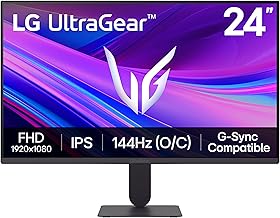
| LG Ultragear 24G411A-B | Everyday Versatility | 144Hz OC / 1ms MBR, HDR10 | 4.7/5 |
How to Choose a 24 Inch Gaming Monitor for Fast Response Times
- Response Time (GtG vs. MPRT): Look for honest GtG specs with well-tuned overdrive. A true 0.5ms to 1ms GtG Fast IPS minimizes ghosting without coronas, while MPRT with backlight strobing is useful but dims the image.
- Refresh Rate Headroom: 144Hz is smooth for most players, 180Hz to 200Hz gives noticeably cleaner motion on mid-range GPUs, and 240Hz benefits competitive FPS titles only if your system can sustain 200+ fps.
- Panel Tech and Sync: Fast IPS offers the best color and response balance. Ensure Adaptive-Sync, FreeSync Premium, or G-Sync Compatible support to eliminate tearing without adding input lag at variable frame rates.
- Resolution and GPU Load: Full HD 1080p keeps frame rates high for fast response on affordable GPUs, while QHD 1440p like the KTC H24T7 adds sharpness but demands more GPU power to hit high refresh.
- Ergonomics and Connectivity: Height-adjustable stands, VESA mounting, and dual HDMI plus DisplayPort 1.4 ensure console-ready use and long-session comfort. Low blue light and flicker-free certification reduce eye strain.
The Best 24 Inch Gaming Monitors for Fast Response Times Reviewed
Best Overall: AOC 24G51F2 180Hz Fast IPS Gaming Monitor
Ideal for competitive and casual PC gamers who want the cleanest motion at 1080p without paying for 240Hz. Its 0.5ms Fast IPS panel, 180Hz refresh, and well-tuned Adaptive-Sync deliver sharp, ghost-free tracking in shooters with excellent color and console-ready HDMI support.
Best Budget: Amzfast AMZG24X1 200Hz Gaming Monitor
Perfect for budget-focused players chasing high refresh on a tight budget. The 200Hz 1080p panel with 1ms Adaptive Sync, 3000:1 contrast, and 129% sRGB coverage offers surprisingly fluid gameplay and strong image depth for the price, with VESA and eye-care features included.
Best Premium: KTC H24T7 QHD 180Hz Gaming Monitor
Built for players who want sharper visuals without sacrificing speed. This QHD Fast IPS panel overclocks to 185Hz, hits 1ms response with G-Sync and FreeSync support, and adds HDR400 and a fully height-adjustable stand for enthusiast setups that need both clarity and ergonomics.
Best for Esports Speed: Dell SE2426HG 240Hz Gaming Monitor
Designed for serious FPS competitors chasing every millisecond. The 23.8-inch 240Hz Fast IPS display with FreeSync Premium and TUV-certified eye comfort maintains ultra-low input lag and tear-free motion when your rig can push 240 fps consistently.
Best for Console and Everyday Gaming: LG Ultragear 24G411A-B Gaming Monitor
Great for hybrid PC, console, and daily use where versatility matters. Its 144Hz overclockable IPS panel with 1ms MBR, G-Sync Compatible and FreeSync support, HDR10, and slim stand delivers reliable fast response with accurate colors and simple plug-and-play setup.
Frequently Asked Questions
Is a 0.5ms response time noticeably better than 1ms?
In real gameplay the difference between 0.5ms and 1ms GtG is subtle, but monitors like the AOC 24G51F2 with tighter overdrive tuning show less ghosting and clearer motion during fast pans. Panel tuning and refresh rate matter more than the number alone.
Do I need 240Hz on a 24-inch 1080p monitor?
240Hz, as on the Dell SE2426HG, helps competitive FPS and esports players who consistently achieve high frame rates. For most gamers, 180Hz to 200Hz offers nearly the same perceived smoothness with lower GPU requirements and often better value.
Is QHD worth it for fast response gaming at 24 inches?
QHD on the KTC H24T7 adds detail and sharper HUD text without hurting response, but it requires a stronger GPU to maintain 180Hz. If you prioritize maximum frames and low latency, 1080p remains more efficient; choose QHD for visual fidelity.
Is IPS better than VA for fast response times?
Fast IPS generally provides faster pixel transitions and wider viewing angles with less smearing than VA, making it preferable for pure speed. VA panels like the Amzfast offer higher contrast but can show dark-level ghosting if overdrive is not well optimized.
Final Thoughts
For most players seeking fast, clean motion at 24 inches, the AOC 24G51F2 stands out as the best overall, the Dell SE2426HG is the top pick for 240Hz esports performance, and the KTC H24T7 is the premium choice if you want QHD clarity with high-speed gaming. Choose based on your frame-rate targets and GPU, and you will get responsive, tear-free gameplay without overspending.





