
Key takeaways
- Color Gamut Coverage: Look for 99% to 100% sRGB for accurate web and gaming color, and 90%+ DCI-P3 if you edit video or want more saturated HDR content. Calman Verified or factory-calibrated panels offer tighter Delta E and more trustworthy out-of-the-box accuracy.
- Resolution and Panel Size: 27-inch QHD (2560×1440) is the sweet spot for sharpness and performance, while 4K UHD adds detail for productivity and single-player visuals but demands a stronger GPU. At 24 inches, Full HD remains smooth and affordable for competitive play.
- Refresh Rate and Response Time: For color-accurate gaming, 120Hz is the baseline, 144Hz to 180Hz is ideal for most players, and 240Hz benefits esports-focused buyers. Pair a low response time (1ms to 0.5ms) with AdaptiveSync, FreeSync Premium, or G-Sync compatibility to avoid tearing.
- Viewing Angles and Coating: IPS should maintain color and brightness up to 178 degrees horizontally and vertically. An anti-glare or 3H coating reduces reflections without dulling colors, which matters for bright rooms and multi-person viewing.
- Ergonomics and Connectivity: Height, tilt, swivel, and pivot adjustments help you maintain an optimal viewing angle for color consistency. HDMI 2.1, DisplayPort 1.4, and USB-C give you flexibility for PC, console, and laptop connections while supporting higher refresh rates at native resolution.
What's inside
The Alienware AW2725DM is our Best Overall pick for IPS gaming monitors with top-tier color accuracy and viewing angles, with the ASUS ProArt PA278QV as the runner-up for creators who need factory-calibrated color. Both deliver wide color gamuts, consistent color from edge to edge, and excellent off-axis performance, but the Alienware adds high-refresh gaming speed that makes it the more versatile choice for most players.
Shopping for an IPS gaming monitor means balancing two competing priorities: accurate, vibrant color and fast, fluid gameplay. Many gaming displays sacrifice color coverage for speed or suffer from washed-out colors when viewed off-center, which is frustrating for immersive single-player games, co-op setups, and color-sensitive creative work. This guide cuts through the specs to compare sRGB and DCI-P3 coverage, resolution, refresh rate, and viewing angle performance, so you can find the right IPS panel for gaming, streaming, and content creation.
As an Amazon Associate we earn from qualifying purchases.






🛒 Best Price Today on Amazon
Prime members get fast, free shipping on everything above, plus member-only deals. New members get a 30-day free trial — cancel anytime.
Quick Comparison
| Product | Best For | Standout Feature | Rating |
|---|---|---|---|
| Alienware AW2725DM 27″ WQHD Gaming Monitor | Overall Gaming & Color Accuracy | 95% DCI-P3, 1.07B Colors, 180Hz Fast IPS | 4.8/5 |
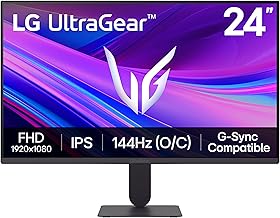
| LG Ultragear 24G411A-B 24″ FHD Gaming Monitor | Budget Gaming | 144Hz (O/C), 1ms MBR, G-Sync Compatible | 4.6/5 |
| Dell S2725QS 27″ 4K UHD Monitor | Premium 4K Entertainment | 4K UHD, 99% sRGB, USB-C, 120Hz | 4.7/5 |
| ASUS ProArt PA278QV 27″ QHD Professional Monitor | Color-Critical Creative Work | Calman Verified, 100% sRGB & Rec.709 | 4.8/5 |
| Acer Nitro XV272U W2bmiiprx 27″ QHD Gaming Monitor | Competitive High-Refresh Gaming | 240Hz, 0.5ms, FreeSync Premium, HDR400 | 4.7/5 |
How to Choose a/an IPS Gaming Monitors for Color Accuracy and Viewing Angles
- Color Gamut Coverage: Look for 99% to 100% sRGB for accurate web and gaming color, and 90%+ DCI-P3 if you edit video or want more saturated HDR content. Calman Verified or factory-calibrated panels offer tighter Delta E and more trustworthy out-of-the-box accuracy.
- Resolution and Panel Size: 27-inch QHD (2560×1440) is the sweet spot for sharpness and performance, while 4K UHD adds detail for productivity and single-player visuals but demands a stronger GPU. At 24 inches, Full HD remains smooth and affordable for competitive play.
- Refresh Rate and Response Time: For color-accurate gaming, 120Hz is the baseline, 144Hz to 180Hz is ideal for most players, and 240Hz benefits esports-focused buyers. Pair a low response time (1ms to 0.5ms) with AdaptiveSync, FreeSync Premium, or G-Sync compatibility to avoid tearing.
- Viewing Angles and Coating: IPS should maintain color and brightness up to 178 degrees horizontally and vertically. An anti-glare or 3H coating reduces reflections without dulling colors, which matters for bright rooms and multi-person viewing.
- Ergonomics and Connectivity: Height, tilt, swivel, and pivot adjustments help you maintain an optimal viewing angle for color consistency. HDMI 2.1, DisplayPort 1.4, and USB-C give you flexibility for PC, console, and laptop connections while supporting higher refresh rates at native resolution.
The Best IPS Gaming Monitors for Color Accuracy and Viewing Angless Reviewed
Best Overall: Alienware AW2725DM 27″ WQHD Gaming Monitor
Ideal for gamers who want both accurate color and serious speed, this Fast IPS panel pairs 95% DCI-P3 and 1.07 billion colors with 180Hz, 400 nits brightness, and G-Sync plus FreeSync support while keeping wide viewing angles and an anti-glare coating for consistent image quality.
Best Budget: LG Ultragear 24G411A-B 24″ FHD Gaming Monitor
Best for budget-conscious and competitive players who need dependable IPS color and viewing angles in a compact setup, offering 144Hz overclockable refresh, 1ms MBR, and both G-Sync Compatible and FreeSync support with HDR10.
Best Premium: Dell S2725QS 27″ 4K UHD Monitor
Perfect for premium 4K gaming and streaming setups where detail and color matter, this monitor delivers 99% sRGB, 350 nits brightness, 1,500:1 contrast, and 120Hz with FreeSync Premium via HDMI, DisplayPort, and USB-C in a fully adjustable stand.
Best for Color-Critical Creators: ASUS ProArt PA278QV 27″ QHD Professional Monitor
Built for photo editors, designers, and streamers doing color-sensitive work who also game casually, it offers Calman Verified factory calibration, 100% sRGB and Rec.709 coverage, and an ergonomic, anti-glare IPS panel tuned for viewing angle stability.
Best for Competitive Gaming: Acer Nitro XV272U W2bmiiprx 27″ QHD Gaming Monitor
Tailored for esports and high-refresh enthusiasts who still want strong color, it combines 240Hz, 0.5ms response, 99% sRGB, HDR400, and FreeSync Premium with two HDMI ports and DisplayPort for versatile low-latency play.
Frequently Asked Questions
Is IPS better than VA or TN for color accuracy and viewing angles?
Yes, IPS is the preferred choice when color accuracy and wide viewing angles are the priority. IPS maintains color and gamma with minimal shift even when viewed off-center, while VA offers deeper contrast but more angle-dependent color shift, and TN is fastest but weakest for color reproduction.
What does 99% sRGB vs. 95% DCI-P3 mean for gaming?
99% sRGB means nearly complete coverage of the standard web and game color space, ensuring accurate everyday colors. 95% DCI-P3 is a wider cinema-grade gamut that shows more saturated reds and greens, which benefits HDR games and video editing. For most gamers, 99% sRGB is excellent, while creators benefit from both metrics.
Do I need a factory-calibrated or Calman Verified monitor?
For gaming alone, factory calibration is nice but not essential if sRGB coverage is high. For streaming, YouTube editing, photo work, or any color-critical task, a Calman Verified monitor like the ProArt saves time and ensures lower Delta E out of the box, so what you see is what your audience sees.
Will a 120Hz or 144Hz IPS monitor be enough for color-accurate gaming?
Absolutely. 120Hz to 180Hz provides smooth motion for most PC and console games without sacrificing color quality, and many IPS panels now hit those refresh rates while keeping wide gamuts. Only competitive esports players chasing every millisecond need 240Hz and above.
Final Thoughts
For the best balance of color accuracy, viewing angles, and gaming performance, the Alienware AW2725DM stands out, while the ASUS ProArt PA278QV is the top pick if calibrated color is your priority. If you want premium 4K detail, the Dell S2725QS offers a sharp, versatile upgrade that still delivers trustworthy color for play and productivity.





