
Key takeaways
- Resolution vs. Size: At 32 inches, 1080p (FHD) stretches pixels and can look soft up close; QHD (2560×1440) is the sweet spot for sharpness without requiring an ultra-high-end GPU like 4K does.
- Refresh Rate and Response Time: For competitive shooters aim for 165Hz or higher with 1ms MPRT. For immersive single-player and console gaming, 120Hz to 165Hz is plenty smooth.
- Curvature and Panel Type: 1500R is subtle and versatile, 1000R wraps your peripheral vision for deeper immersion. VA panels offer high contrast for dark games, IPS offers wider viewing angles and color accuracy.
- Adaptive Sync and Connectivity: Look for AMD FreeSync or Adaptive Sync and HDMI 2.0 / DisplayPort 1.4 to eliminate tearing on both PC and PS5/Xbox Series X. Dual HDMI ports add flexibility for console + PC setups.
- Ergonomics and Eye Care: VESA compatibility, tilt/height adjustment, flicker-free backlighting, and low blue light matter for long sessions on a large screen that dominates your field of view.
What's inside
The Samsung 32″ Odyssey G55C QHD Curved Gaming Monitor is our Best Overall pick for big-screen gaming thanks to its sharp QHD resolution and immersive 1000R curve, with the SANSUI 32 Inch Curved 240Hz Gaming Monitor as the runner-up for ultra-high refresh rate competitive play.
Choosing a 32-inch gaming monitor is a trade-off between immersion, sharpness, and speed — go too low on resolution and a big panel looks soft, go too high on refresh without the right panel and you lose responsiveness. This guide cuts through the specs to compare the best 32-inch (and one versatile 27-inch) options for big-screen gaming, so you can match refresh rate, resolution, curvature, and features to your PC, console, and desk setup.
As an Amazon Associate we earn from qualifying purchases.





🛒 Best Price Today on Amazon
Prime members get fast, free shipping on everything above, plus member-only deals. New members get a 30-day free trial — cancel anytime.
Quick Comparison
| Product | Best For | Standout Feature | Rating |
|---|---|---|---|
| Samsung 32″ Odyssey G55C QHD Curved Gaming Monitor | Overall Immersion | QHD 165Hz, 1000R Curve, HDR10 | 4.8/5 |
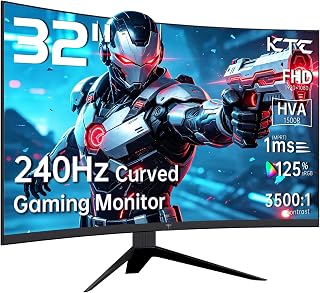
| KTC 32 Inch 240Hz Curved Gaming Monitor H32S17F | Budget High Refresh | 240Hz, 1ms MPRT, 1500R | 4.6/5 |
| SANSUI 32 Inch Curved 240Hz Gaming Monitor | Premium 240Hz Value | 240Hz FHD, Metal Stand, HDR | 4.7/5 |
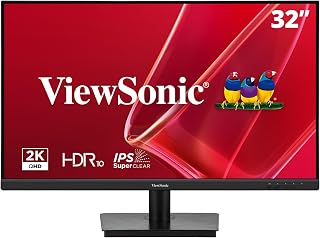
| ViewSonic VS3225-2K 32 Inch QHD IPS Monitor | Mixed Use and Eye Care | QHD IPS, 75Hz VRR, Built-in Speakers | 4.5/5 |
| KTC 27 Inch 240Hz QHD Gaming Monitor H27E6S | Competitive QHD Gaming | QHD 240Hz (275Hz OC), Fast IPS, Height Adjustable | 4.6/5 |
How to Choose a/an 32 Inch Gaming Monitors for Big Screen Gaming
- Resolution vs. Size: At 32 inches, 1080p (FHD) stretches pixels and can look soft up close; QHD (2560×1440) is the sweet spot for sharpness without requiring an ultra-high-end GPU like 4K does.
- Refresh Rate and Response Time: For competitive shooters aim for 165Hz or higher with 1ms MPRT. For immersive single-player and console gaming, 120Hz to 165Hz is plenty smooth.
- Curvature and Panel Type: 1500R is subtle and versatile, 1000R wraps your peripheral vision for deeper immersion. VA panels offer high contrast for dark games, IPS offers wider viewing angles and color accuracy.
- Adaptive Sync and Connectivity: Look for AMD FreeSync or Adaptive Sync and HDMI 2.0 / DisplayPort 1.4 to eliminate tearing on both PC and PS5/Xbox Series X. Dual HDMI ports add flexibility for console + PC setups.
- Ergonomics and Eye Care: VESA compatibility, tilt/height adjustment, flicker-free backlighting, and low blue light matter for long sessions on a large screen that dominates your field of view.
The Best 32 Inch Gaming Monitors for Big Screen Gamings Reviewed
Best Overall: Samsung 32″ Odyssey G55C QHD Curved Gaming Monitor
Best for most big-screen gamers who want sharpness and immersion without sacrificing speed. The QHD panel delivers noticeably crisper detail than FHD at 32 inches, while the aggressive 1000R curve, 165Hz refresh rate, and HDR10 create a wrap-around experience ideal for open-world and racing titles.
Best Budget: KTC 32 Inch 240Hz Curved Gaming Monitor H32S17F
Best for budget-focused competitive gamers who prioritize pure speed. With a true 240Hz refresh rate, 1ms MPRT, 1500R curvature, and Adaptive Sync over HDMI 2.0 and DP 1.4, it delivers esports-level smoothness at a big-screen size for far less than premium QHD models.
Best Premium: SANSUI 32 Inch Curved 240Hz Gaming Monitor
Best for gamers who want 240Hz performance with a more refined build. The SANSUI adds a sturdy metal stand, 1500R curvature, HDR support, and VESA compatibility with a DP cable included, making it a polished, high-refresh pick for dedicated gaming rigs and multi-monitor setups.
Best for Eye Care and Mixed Use: ViewSonic VS3225-2K 32 Inch QHD IPS Monitor
Best for players who split time between gaming, work, and media. Its QHD IPS panel offers accurate colors, wide viewing angles, and Variable Refresh Rate for casual gaming, plus eye-care technology, anti-glare coating, and built-in speakers for all-day comfort.
Best for Competitive QHD Performance: KTC 27 Inch 240Hz QHD Gaming Monitor H27E6S
Best for competitive players who want higher pixel density in a slightly smaller footprint. This Fast IPS QHD display hits 240Hz (overclockable to 275Hz), HDR400, and full ergonomic adjustments with pivot and swivel, perfect for fast-paced FPS games where clarity and agility matter.
Frequently Asked Questions
Is QHD or FHD better for a 32-inch gaming monitor?
QHD is generally better at 32 inches because it provides about 78 percent more pixels than FHD, which keeps text and in-game details sharp at typical desk distances. FHD can work for pure esports where you prioritize 240Hz and lower GPU load, but it will look softer up close.
Do I need 240Hz for big-screen gaming?
You do not need it for all games, but 240Hz makes motion noticeably smoother in shooters and racing titles, especially on a large panel that fills your view. For story-driven or console gaming, 144Hz to 165Hz is already excellent, and many consoles max out at 120Hz.
What does 1000R vs. 1500R curvature mean?
The number is the radius of the curve in millimeters — 1000R is a tighter, more immersive curve that matches your natural field of view, while 1500R is gentler and often more comfortable for mixed work and gaming. Both help reduce edge distortion compared to a flat 32-inch screen.
Will these monitors work well with PS5 and Xbox Series X?
Yes, all of these models support HDMI connections and Adaptive Sync/FreeSync to reduce tearing on consoles. For 120Hz console play, use the HDMI 2.0 ports and enable performance mode in your console settings, and choose QHD models if your console supports 1440p output for sharper scaling.
Final Thoughts
For immersive big-screen gaming, the Samsung 32″ Odyssey G55C stands out as the most balanced choice, while the KTC H32S17F and SANSUI 32 Inch Curved 240Hz models are excellent if maximum refresh rate is your priority. If you mix productivity and play or prefer a denser QHD image in a more compact size, the ViewSonic VS3225-2K and KTC 27 Inch H27E6S round out the setup beautifully.





