Our Top Picks


A glowing mouse can change the whole feel of a desk setup. The right RGB gaming mouse adds color that matches a keyboard, a headset stand, or a case full of fans, while still handling the fast, precise work that gaming demands. A tight budget does not force a choice between lighting and performance: plenty of wired mice pair bright, customizable lighting with sensors and buttons that hold up in everyday play.


This guide rounds up five RGB gaming mice that keep spending modest while covering the features that matter most: a responsive sensor, lighting worth showing off, programmable buttons, and a shape that stays comfortable through long sessions. Every pick below is wired, which keeps the connection steady and removes charging from the routine entirely.
As an Amazon Associate, we earn from qualifying purchases.
Quick Answer
The Redragon M711 Cobra RGB is the safest first pick, with a bright 16.8-million-color backlight, a wide DPI range, and seven programmable buttons. The Corsair Harpoon RGB PRO suits players who want a light frame and a stronger sensor. The Redragon M612 Predator RGB offers the most buttons, the DeathAdder Essential fits larger hands, and the M602 Griffin is the classic value choice.
How to Choose
Start with the sensor, because it decides how the mouse feels in every game. Look for an optical sensor with a wide DPI range and a polling rate of 1000 Hz, which keeps cursor movement smooth and responsive. A high maximum DPI number matters less than clean, steady tracking at the sensitivity you actually use.
Lighting varies more than most buyers expect. Some mice offer full-spectrum RGB with millions of colors and several effects, while others use a single accent color or a smaller set of zones. Think about whether you want lighting that syncs with other gear, cycles through effects on its own, or simply glows in one steady color. A good companion app lets you pick colors, set effects, and save profiles, while simpler mice change lighting with a button on the shell.
Buttons and software decide how much the mouse can do beyond pointing and clicking. Extra side buttons help in shooters, strategy games, and everyday shortcuts, and macro support turns a button into a sequence of commands. Check how many buttons are programmable and whether the software is easy to install and use. A mouse with strong software can grow with you as you learn new games and new keybinds.
Shape, grip, and weight are personal, and they matter more over long sessions than any single specification. Palm grip players usually want a taller, fuller shell, claw grip players want a shorter body with a defined hump, and fingertip players want a light mouse they can lift easily. Weight plays into this as well: lighter mice flick faster, while heavier mice feel planted and steady. If possible, compare the length and width of each pick against a mouse you already like.
Finally, look at the cable and build. A braided cable resists tangling and survives being dragged across a desk edge, while a rubber cable is lighter and more flexible. Check the switch durability rating, the scroll wheel, and the feet, since those parts take the most wear.
Redragon M711 Cobra RGB
The Redragon M711 Cobra RGB is the most well-rounded pick in this guide, and it earns that spot by packing the brightest lighting and the widest sensor range into a budget-friendly frame. Its ergonomic right-handed shape suits small to medium hands and works with palm and claw grips, which makes it an easy recommendation when you are buying a first gaming mouse or replacing one you have never measured. The shell has a comfortable grip with textured side panels, so the mouse stays steady during fast movements and long sessions alike.
RGB lighting is the highlight here. The backlighting offers 16.8 million colors across seven effects, including breathing, rainbow, wave, and reactive modes, and you can switch effects on the fly or tune colors through the Redragon software. The optical sensor covers a range from 100 to 10,000 DPI, with five presets stepping through 500, 1000, 2000, 3000, and 5000 DPI, so you can dial in a sensitivity that matches your game and your mousepad. Seven programmable buttons cover the essentials: left and right click, a clickable scroll wheel, two side buttons, and DPI controls, with macro support and five memory profiles in the software so your setup travels with the mouse.
Build quality is a strong point for a budget-friendly mouse. The braided-fiber cable resists tangling and survives being dragged across a desk edge, while the polling rate switches between 125, 250, 500, and 1000 Hz to match your preference. Onboard memory stores your settings, so the mouse keeps its lighting and button setup when you move it to another computer. For a first gaming mouse, or for a reliable spare, the M711 Cobra RGB is hard to fault.
Specs
| Spec | Detail |
|---|---|
| Sensor | Optical, 100 to 10,000 DPI |
| Buttons | 7 programmable |
| Lighting | RGB, 16.8 million colors, 7 effects |
| Weight | 114 g |
| Cable | Wired USB, 1.8 m braided |
| Software | Redragon software with macro support |
Razer DeathAdder Essential
The Razer DeathAdder Essential is the ergonomic pick of this group, built around the tall, right-handed shape that has made the DeathAdder line a favorite for years. Its curved shell fills the palm and gives the ring finger and pinky a natural resting place, which suits palm grip players and anyone with larger hands. If long sessions leave your hand cramped on a small mouse, the fuller body here is the fix.
Its sensor is a true 6,400 DPI optical unit with five programmable buttons, including two side buttons placed where the thumb rests naturally. Mechanical switches under the main buttons are rated for long service life, and the rubber side grips add control during fast movements. The lighting is a single-color green glow rather than full-spectrum RGB, which gives the mouse a clean, understated look that pairs well with a green-accented setup or a desk where you want light without a rainbow of colors.
Razer Synapse software handles DPI steps, button remapping, and lighting control. For players who value comfort above all else and like a proven ergonomic shape, the DeathAdder Essential remains one of the smartest budget-friendly choices available.
Specs
| Spec | Detail |
|---|---|
| Sensor | Optical, up to 6,400 DPI |
| Buttons | 5 programmable |
| Lighting | Green LED accent lighting |
| Weight | 96 g |
| Cable | Wired USB, 1.8 m |
| Software | Razer Synapse |
Redragon M612 Predator RGB
The Redragon M612 Predator RGB is the button king of this guide, packing eleven programmable buttons into a budget-friendly frame. That count makes it a natural fit for MMO and MOBA players, for anyone who leans on push-to-talk and ability hotkeys, and for desktop work where shortcuts save time. The ergonomic right-handed shell has a frosted coating and textured side grips, so the extra buttons stay easy to reach without the mouse slipping in your hand.
Its PixArt P3104 optical sensor reaches 8,000 DPI across five redefinable levels, with defaults stepping through 500, 1000, 2000, 3000, and 4000 DPI. A dedicated rapid-fire button sits near the left click for games where repeated clicks matter. The RGB backlighting runs through five modes that you can switch on the fly, and the companion software supports DIY keybinds, macros, and onboard memory, so your setup travels with the mouse.
At 145 g, the M612 is the heaviest pick here, and that weight gives it a planted, deliberate feel that some players prefer for steady aiming. The braided-fiber cable resists tangling, while the Huano switches are rated for 20 million clicks. If you want maximum controls and lighting for modest spending, the M612 Predator RGB delivers more buttons than any other mouse in this guide.
Specs
| Spec | Detail |
|---|---|
| Sensor | PixArt P3104 optical, up to 8,000 DPI |
| Buttons | 11 programmable |
| Lighting | RGB, 5 backlit modes |
| Weight | 145 g |
| Cable | Wired USB, 1.8 m braided |
| Software | Redragon software with macro support |
Redragon M602 RGB Griffin
The Redragon M602 RGB Griffin is the veteran of this group, a long-running budget favorite that has stayed popular because it covers the basics with confidence. Its ergonomic right-handed shape is designed to fit a wide range of hand sizes, with dedicated finger positions and a contoured body that supports the hand during long sessions. A built-in weight tuning system lets you adjust the balance to taste, which is rare at this level of spending.
The sensor reaches 7,200 DPI in steps of 800, 1200, 1600, 2400, and 7200 DPI, with 10G acceleration for responsive tracking. Nine programmable buttons include seven MMO-style controls plus the standard clicks, and five memory profiles each carry a distinct LED color so you can tell profiles apart at a glance. Seven RGB backlight modes cycle through the lighting options, and the backlight can be switched off entirely when you want a plain look.
Teflon feet pads help the mouse glide smoothly, and the anti-skid scroll wheel adds control during fast scrolling. The software supports macros and button remapping for games and office shortcuts alike. For buyers who want a proven, button-rich mouse with lighting and tuning options, the M602 Griffin is a dependable choice.
Specs
| Spec | Detail |
|---|---|
| Sensor | Optical, up to 7,200 DPI |
| Buttons | 9 programmable |
| Lighting | RGB, 7 backlit modes |
| Weight | Adjustable weight tuning system |
| Cable | Wired USB, 6 ft braided |
| Software | Redragon software with macro support |
Corsair Harpoon RGB PRO
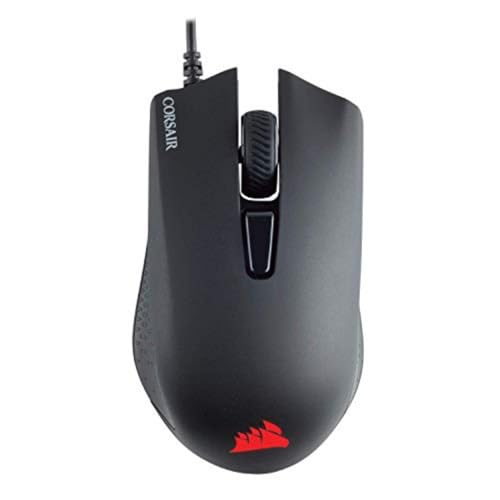
The Corsair Harpoon RGB PRO is the lightweight performance pick, weighing only 85 g while carrying the strongest sensor in this guide. Its 12,000 DPI optical sensor tracks at up to 220 IPS, which gives fast-paced FPS and MOBA players the headroom they need for quick turns and precise flicks. The compact, contoured shape with rubber side grips suits small to medium hands and works well with claw and fingertip grips.
Six fully programmable buttons cover the essentials, and Omron switches rated for more than 20 million clicks keep the main buttons feeling crisp over time. Dynamic RGB backlighting runs through Corsair iCUE software, which also handles macro programming, DPI steps, and lighting synchronization with other compatible Corsair gear. Onboard profile storage means your settings stay with the mouse when you switch computers.
The polling rate is adjustable across 125, 250, 500, and 1000 Hz to match your preference. For players who want the lightest frame and the highest sensor ceiling in this guide, the Harpoon RGB PRO is the clear performance-first choice.
Specs
| Spec | Detail |
|---|---|
| Sensor | Optical, up to 12,000 DPI |
| Buttons | 6 programmable |
| Lighting | Dynamic RGB via iCUE |
| Weight | 85 g |
| Cable | Wired USB, 1.8 m |
| Software | Corsair iCUE |
Who Should Skip It
A budget RGB mouse is not the right pick for everyone, and knowing that upfront saves a disappointing purchase. If you play competitive shooters at a high level, the heavier picks in this guide may feel slow next to ultralight esports mice, and the sensors here, while solid, do not match the top-end tracking of premium models. Players who chase the lowest possible weight should look at the lightest options here first and skip the heavier ones.
Wireless fans should also look elsewhere, since all five picks in this guide are wired. A cable can drag on the desk edge and limit how far you move the mouse, so if you value a clean, cable-free desk or you play on a couch setup, a wireless mouse will suit you better. Left-handed players should note that most of these shells are shaped for the right hand, so check the shape carefully before buying.
Finally, skip the RGB focus entirely if lighting does not matter to you. A plain mouse with the same sensor and a simpler shell often costs less, and money saved on lighting can go toward a better mousepad or a spare cable. The picks in this guide make sense when you want color and performance together; if you only want performance, a non-RGB mouse may be the better buy.
FAQ
Do RGB gaming mice need software to change the lighting?
Most of them do for full control, but not all. The mice in this guide let you switch lighting modes with a button on the shell for quick changes, while the companion software unlocks the full range of colors, effects, and profiles. If you want a single steady color, the onboard controls are usually enough, but syncing lighting with other gear needs the software installed.
Is a wired RGB mouse better than a wireless one for gaming?
A wired mouse has a steady connection with no batteries to charge and no wireless interference to worry about, which is why all five picks here are wired. Wireless mice have improved a lot and suit players who hate cable drag, but they cost more for the same sensor and need regular charging. For a budget-friendly setup, wired is the practical choice.
How many DPI do I actually need for gaming?
Most players use a sensitivity between 400 and 3,200 DPI, and all five mice in this guide cover that range with room to spare. A higher maximum DPI is useful for high-resolution displays or very fast arm movements, but it does not make a mouse more accurate on its own. Pick a DPI that feels natural, then adjust in small steps until aiming feels smooth.
Can I use an RGB gaming mouse for office work and school?
Yes, and the extra buttons make it a good fit for everyday computing. Programmable buttons can hold shortcuts for copy, paste, browser navigation, and push-to-talk, while the RGB lighting can be set to a single calm color or switched off entirely. The ergonomic shapes in this guide also help during long work sessions, though heavier models may tire smaller hands faster.
Final Verdict
The best RGB gaming mouse in this guide for most buyers is the Redragon M711 Cobra RGB, because it balances shape, sensor, lighting, and software better than any single rival here. Its ergonomic shell fits a wide range of hands, its RGB effects look great on any desk, and its seven programmable buttons cover the needs of most games without adding clutter.
If your priorities differ, the rest of the group has you covered. Choose the Corsair Harpoon RGB PRO for the lightest frame and the strongest sensor, the Redragon M612 Predator RGB for the most programmable buttons, the Razer DeathAdder Essential for the most comfortable ergonomic shape, and the Redragon M602 RGB Griffin for proven value with weight tuning. Any of the five will brighten a setup and handle daily gaming well, so let your grip style and your favorite games make the final call.
Product and ASIN Reference
| Product | ASIN |
|---|---|
| Redragon M711 Cobra RGB | B0751D11BL |
| Razer DeathAdder Essential | B07F7T8J9P |
| Redragon M612 Predator RGB | B08SJ5Z8JL |
| Redragon M602 RGB Griffin | B011HMDZ0Q |
| Corsair Harpoon RGB PRO | B07QVB51L9 |
FAQ
Do RGB gaming mice need software to change the lighting?
Is a wired RGB mouse better than a wireless one for gaming?
How many DPI do I actually need for gaming?
Can I use an RGB gaming mouse for office work and school?
More from Amazon
Programs that pair well with the guide above. Offers and eligibility are set by Amazon and may change.
Free shipping on eligible items, Prime Video and more. Eligible new members can start with a free trial.
Start a Prime free trialAd-free music streaming. Eligible new subscribers can start with a free trial.
Try Music Unlimited freeA Prime membership for ages 18-24 with a trial period. Eligibility is set by Amazon.
See Prime for Young AdultsAudiobooks and podcasts to listen to on the go. Eligible new members can start with a free trial.
Try Audible freeAs an Amazon Associate we earn from qualifying purchases.