Key takeaways
- Find the best gaming mouse for Diablo: thumb grids, extra buttons, and sensors built for long dungeon runs. Compare five MMO-ready mice.
Introduction
The best gaming mouse for Diablo is not the lightest esports mouse or the one with the highest sensor number on the box. Diablo is an action role-playing game built around skill rotations, potion timing, dodging, mounting up, and hours of dungeon crawling, and the mouse that serves it best is the one that puts those commands under your thumb without forcing your left hand to dance across the keyboard. A mouse with a thumb grid or a generous set of side buttons turns a six-skill build, a potion, and a dodge into quick thumb presses, which keeps your movement hand free and your reactions fast when an elite pack surrounds you.
This guide compares five mice that fit Diablo well, from full MMO thumb grids to a versatile all-rounder with eleven buttons. Every pick below is a gaming mouse with programmable buttons, a sensor suited to precise cursor control, and a shape made for long sessions. Read the buying advice first, then match the picks to your hand size, grip, and budget tier.
What Diablo Actually Asks of Your Mouse
Diablo IV and its predecessors share a control scheme that rewards extra mouse buttons more than almost any other genre. Your core skills sit on a small set of keys, your potion has its own key, dodge or evade matters constantly, and interacting with shrines, portals, and loot means the cursor is always busy. A standard five-button mouse can play Diablo, but it leaves most of the work to the keyboard, and that split slows you down in exactly the moments when speed matters.
A Diablo mouse should do three things well. First, it should give you enough programmable buttons to hold a full skill bar, a potion, and a movement skill without reaching across the keyboard. Twelve-button thumb grids are the classic answer, but mice with seven to eleven well-placed buttons also work if the layout suits your thumb. Second, it should stay comfortable for sessions that run two hours or longer, which means an ergonomic right-handed shape, a textured grip, and a weight that does not tire your wrist. Third, it should track cleanly at the sensitivity you use for fast cursor flicks between enemies, loot, and the map, with a sensor that holds steady during rapid movement.
Wireless versus wired is a secondary choice for Diablo. The game does not punish a few milliseconds of latency the way a competitive shooter does, so a modern wireless mouse with a stable connection is perfectly usable, and it removes cable drag from long sessions. A wired mouse removes charging from the equation entirely. Either option works; pick the one that fits your desk setup and your tolerance for charging.
How These Five Mice Were Selected
Every mouse in this guide meets the same baseline. It is a gaming mouse from an established peripheral brand, it offers programmable buttons beyond the standard five, it has a sensor rated for precise tracking, and it is designed for the kind of long play sessions Diablo encourages. Mice built purely for competitive shooters, with only two side buttons and an ultra-light shell, were left out, because they do not add anything to a Diablo build. Mice with thumb grids, side-button clusters, and software that supports profiles and macros earned their place here.
Button count is not the whole story, so the guide also weighs shape, grip, sensor, connectivity, and onboard memory. A thumb grid you cannot reach comfortably is worse than a smaller set of buttons placed exactly where your thumb rests. Keep that in mind as you read: the best mouse is the one whose layout matches your hand, not the one with the biggest number on the specification sheet.
Top Picks for Diablo
1. Razer Naga V2 Pro

Check the Razer Naga V2 Pro on Amazon
The Razer Naga V2 Pro is the most flexible mouse in this guide, and that flexibility is exactly why it leads the list. It ships with three swappable side plates, so the thumb panel can be a two-button layout, a seven-button layout, or a full twelve-button grid. That means one mouse can serve a Diablo build that needs only a few extra buttons and a build that maps every skill, potion, and utility command to the thumb. If you play other games too, the same mouse adapts to each of them without buying a second device.
Under the shell, the Naga V2 Pro uses a Focus Pro 30K optical sensor, a HyperScroll Pro wheel that switches between tactile and free-spin modes, and third-generation optical mouse switches. Connectivity covers HyperSpeed wireless and Bluetooth, with a battery life rated up to 300 hours, so charging is an occasional task rather than a nightly chore. Chroma RGB lighting is built in, and profiles can be stored for different games.
For Diablo specifically, the twelve-button plate is the highlight. Map four skills, a potion, dodge, and a mount command to the grid, and your left hand is free to focus on movement alone. The seven-button plate is a good middle ground if a full grid feels crowded, and the two-button plate suits players who want a simpler layout. The mouse is a right-handed ergonomic design with a palm-filling shape, which suits palm and relaxed claw grips during long dungeon runs.
One consideration is size. The Naga V2 Pro is a full-size mouse, and players with small hands may find the thumb grid a stretch at the far rows. Try to check the dimensions against your hand length before committing, and remember that the swappable plates let you tune the layout after purchase.
2. Razer Naga V2 HyperSpeed
The Razer Naga V2 HyperSpeed takes the same MMO-first idea and trims it into a lighter, more focused package. It keeps a nineteen-button layout with a twelve-button thumb grid, the Focus Pro 30K optical sensor, and a HyperScroll wheel, but it drops the swappable plates and the Bluetooth connection in favor of a simpler wireless design with a battery life rated up to 400 hours. For a player who knows they want a thumb grid and does not need to swap plates, that trade is sensible.
In Diablo, the HyperSpeed covers a full skill bar with room to spare. The thumb grid maps skills, potions, and utility commands, while the top buttons handle DPI shifts and extra commands. Second-generation mechanical mouse switches give the clicks a crisp feel, and the HyperSpeed wireless connection keeps the cursor responsive without a cable.
The main difference from the V2 Pro is flexibility. You cannot swap the side plate, so the twelve-button grid is the layout you live with. That is fine for most Diablo players, since the grid is the point, but players who prefer fewer thumb buttons should look at the V2 Pro or at the G502 HERO below. The HyperSpeed is also a full-size right-handed mouse, so the same hand-size note applies: it suits medium and large hands best.
3. Logitech G600 MMO Gaming Mouse
The Logitech G600 MMO Gaming Mouse is the veteran of this list, and it remains relevant because its design was built for exactly this kind of game. Twenty programmable buttons include a twelve-button thumb panel, and a dedicated G-Shift button doubles the function of every other button while it is held, giving the mouse an enormous command capacity for complex builds and multiple characters.
The G600 uses a laser sensor rated up to 8,200 DPI, with on-the-fly sensitivity shifting, and RGB lighting that can be set per profile. Its sculpted right-handed shape fills the palm, and the thumb panel is angled so each of the twelve buttons is reachable without shifting your grip. For Diablo, that means skills, potions, town portal, and mount commands can all live on the mouse, with G-Shift providing a second layer for less-used commands such as emotes or inventory shortcuts.
Because the G600 is an older model, availability deserves a note. It has been in production for many years, and the listing you find may come from a marketplace seller rather than the standard retail channel. Check that the listing describes the standard new retail version, with the full button layout and RGB lighting, before ordering. If the standard version is hard to find, the Razer Naga V2 HyperSpeed above is the closest modern equivalent in layout and purpose.
4. Corsair Scimitar RGB Elite

Check the Corsair Scimitar RGB Elite on Amazon
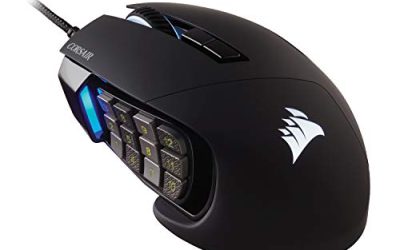
The Corsair Scimitar RGB Elite is built around its Key Slider thumb panel: twelve mechanical side buttons mounted on a panel that slides forward and back, so you can position the grid exactly where your thumb rests. That single feature solves the most common complaint about MMO mice, which is that a fixed grid never quite matches every hand. Seventeen programmable buttons in total, an 18,000 DPI optical sensor, and iCUE software for profiles and macros complete the package.
For Diablo, the sliding panel is genuinely useful. Set the grid to match your thumb reach, map your skills and potion to the front rows, and put dodge and mount on the buttons your thumb hits most naturally. The sensor tracks cleanly at the sensitivities Diablo players use, and onboard profile storage keeps your bindings on the mouse when you move between machines. The braided cable is durable, and the RGB lighting can be set to match a build or a setup theme.
The Scimitar RGB Elite is a wired mouse, which suits players who never want to think about charging. Its shape is a full-size right-handed ergonomic design, and like the other grid mice here, it favors medium and large hands. If you prefer wireless, the wireless version of the Scimitar line exists as a separate model with its own specifications, so confirm the exact model name when you shop.
5. Logitech G502 HERO
The Logitech G502 HERO is the all-rounder of this guide, and it earns its place because not every Diablo player wants a thumb grid. Eleven programmable buttons cover a full skill bar with a potion and a dodge, and the layout is easier to learn than a twelve-button grid for players coming from a standard mouse. The HERO 25K sensor tracks up to 25,600 DPI with clean, consistent movement, and the dual-mode hyper-fast scroll wheel switches between precise clicks and free spinning for fast inventory scrolling.
What sets the G502 HERO apart is tuning. Five removable 3.6-gram weights let you adjust the balance and heft, from the base weight of 121 grams up to a heavier planted feel. Onboard memory stores up to five profiles, so your Diablo bindings travel with the mouse, and RGB lighting is customizable through Logitech software. The right-handed ergonomic shape suits palm and claw grips, and the textured grips keep the mouse steady during long sessions.
For Diablo, map four skills to the side buttons, the potion to a thumb button, and dodge to the remaining side button, and the keyboard handles only movement. The G502 HERO is also the most versatile pick here for players who split time between Diablo and shooters or strategy games, since its button layout and sensor suit all of them. Its main trade-off is button count: if you want every command on the mouse, a grid mouse gives you more room.
Comparison Table
| Mouse | Programmable Buttons | Thumb Layout | Sensor | Connection | Best For |
|---|---|---|---|---|---|
| Razer Naga V2 Pro | 19 plus 1 | Swappable 2, 7, or 12 buttons | Focus Pro 30K optical | Wireless and Bluetooth | Maximum flexibility |
| Razer Naga V2 HyperSpeed | 19 | Fixed 12-button grid | Focus Pro 30K optical | Wireless | Long battery life with a grid |
| Logitech G600 MMO | 20 | Fixed 12-button grid, G-Shift layer | Laser up to 8,200 DPI | Wired | Most commands per mouse |
| Corsair Scimitar RGB Elite | 17 | Sliding 12-button panel | Optical up to 18,000 DPI | Wired | Adjustable grid position |
| Logitech G502 HERO | 11 | Side-button cluster | HERO 25K up to 25,600 DPI | Wired | Versatile all-rounder |
Which One Is Right for You?
Choose the Razer Naga V2 Pro if you want one mouse that adapts to every game you play. The swappable plates mean you never have to guess whether a twelve-button grid will suit you, because you can switch to a simpler layout in seconds. It is the safest pick for players who are new to MMO mice.
Choose the Razer Naga V2 HyperSpeed if you already know a thumb grid is what you want and you value wireless freedom and long battery life. It gives you the core Naga experience with fewer parts to manage.
Choose the Logitech G600 MMO if you want the most commands available on a single mouse and you like the idea of a shift layer that doubles every button. It is the pick for players with complex builds and many characters.
Choose the Corsair Scimitar RGB Elite if your thumb reach is the deciding factor. The sliding panel lets you tune the grid position to your hand, which matters more than any specification once you are several hours into a session.
Choose the Logitech G502 HERO if you want a mouse that plays Diablo well and also covers shooters, strategy games, and everyday use without a learning curve. Eleven buttons are enough for a full Diablo build, and the tunable weight system lets you dial in the feel.
Hand size should guide the final call. Grid mice are full-size devices, and players with hands under about 17 centimeters long may find the far rows of a twelve-button grid a stretch. If that describes you, the G502 HERO or the Naga V2 Pro with its seven-button plate will be more comfortable. Players with larger hands can pick any mouse on this list and focus on layout preference instead.
Frequently Asked Questions
How many buttons do I need for Diablo?
A full Diablo build uses four skills, a potion, a dodge or evade, and a mount command, plus interaction and menu shortcuts. Eleven programmable buttons cover that comfortably, and a twelve-button thumb grid adds room for town portal, emotes, and extra utility commands. More buttons help, but only if you can reach them without looking down or shifting your grip.
Is a wireless mouse good enough for Diablo?
Yes. Diablo does not demand the ultra-low latency of a competitive shooter, and modern wireless gaming mice hold a stable connection during long sessions. The practical differences are charging and cable management: wireless removes cable drag, while wired removes charging entirely. Either option plays Diablo well.
Do I need a thumb grid, or are side buttons enough?
A thumb grid is the fastest way to reach many commands, but it takes time to learn, and the far rows can be a stretch for smaller hands. A mouse with seven to eleven well-placed side buttons covers a full skill bar and is easier to learn. If you have never used a grid mouse, a flexible option such as the Naga V2 Pro with swappable plates lets you try both layouts with one purchase.
What DPI should I use for Diablo?
There is no single correct DPI for Diablo, because the right setting depends on your monitor size, your sensitivity setting in the game, and how far you like to move the mouse. A common approach is to start in the 800 to 1600 DPI range, set the in-game sensitivity to a comfortable level, and adjust in small steps until cursor movement feels precise without being twitchy. A higher sensor ceiling does not make a mouse better for Diablo; consistent tracking at your chosen setting matters more.
Disclosure: As an Amazon Associate, we may earn from qualifying purchases.
FAQ
Which One Is Right for You?
How many buttons do I need for Diablo?
Is a wireless mouse good enough for Diablo?
Do I need a thumb grid, or are side buttons enough?
What DPI should I use for Diablo?
More from Amazon
Programs that pair well with the guide above. Offers and eligibility are set by Amazon and may change.
Free shipping on eligible items, Prime Video and more. Eligible new members can start with a free trial.
Start a Prime free trialAd-free music streaming. Eligible new subscribers can start with a free trial.
Try Music Unlimited freeA Prime membership for ages 18-24 with a trial period. Eligibility is set by Amazon.
See Prime for Young AdultsAudiobooks and podcasts to listen to on the go. Eligible new members can start with a free trial.
Try Audible freeAs an Amazon Associate we earn from qualifying purchases.