Key takeaways
- CPU: Ableton Live, FL Studio and Cubase depend on single-thread speed for real-time plugin processing and on many cores for freezing and bouncing tracks. Guides report that high boost clocks allow small buffer sizes, meaning lower monitoring latency.
- RAM: 32GB is the usual baseline; 64GB makes sense for large sample libraries and orchestral templates.
- Storage: NVMe solid-state drives for the system and sample libraries. Spinning drives add mechanical noise.
- Noise: Fan noise can bleed into a microphone. Large coolers on slow fan curves, solid or dampened panels and a GPU with a zero-RPM idle mode all help.
- Latency: Low latency comes mostly from the audio interface and its ASIO driver. Windows drivers, including some GPU and Wi-Fi drivers, can cause crackles through deferred procedure call (DPC) latency; guides suggest monitoring tools and a high-performance power plan.
- Ports: Many interfaces use USB-C or Thunderbolt. Confirm that the desktop offers the connection your interface requires.
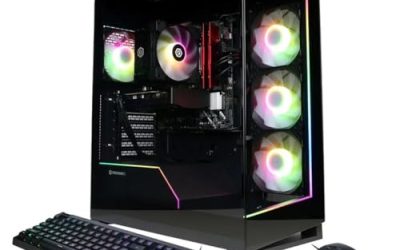
A quiet-cooled mid-tower with a fast eight-core or better CPU, 32GB of RAM and NVMe storage suits most producers who also game, and the Corsair Vengeance a7500 is the clearest example of that recipe. Producers who record vocals or acoustic instruments in the same room as the PC should rank noise above raw frame rates, while those who only mix in headphones can chase gaming horsepower freely. This guide explains what a digital audio workstation (DAW) actually needs, which current gaming desktops fit, and where a gaming build is the wrong tool.
Our top picks


As an Amazon Associate we earn from qualifying purchases at no extra cost to you.
What a DAW Asks of a Gaming PC
Gaming and music production stress a computer in opposite ways. A game leans on the graphics card; a DAW leans on the CPU, memory and the audio interface driver. Several 2026 buying guides make the same point: the GPU matters little for audio work, because the DAW uses it mainly to draw its interface. That means a premium graphics card adds heat and fan noise without improving your sessions, while a strong CPU helps both worlds.
- CPU: Ableton Live, FL Studio and Cubase depend on single-thread speed for real-time plugin processing and on many cores for freezing and bouncing tracks. Guides report that high boost clocks allow small buffer sizes, meaning lower monitoring latency.
- RAM: 32GB is the usual baseline; 64GB makes sense for large sample libraries and orchestral templates.
- Storage: NVMe solid-state drives for the system and sample libraries. Spinning drives add mechanical noise.
- Noise: Fan noise can bleed into a microphone. Large coolers on slow fan curves, solid or dampened panels and a GPU with a zero-RPM idle mode all help.
- Latency: Low latency comes mostly from the audio interface and its ASIO driver. Windows drivers, including some GPU and Wi-Fi drivers, can cause crackles through deferred procedure call (DPC) latency; guides suggest monitoring tools and a high-performance power plan.
- Ports: Many interfaces use USB-C or Thunderbolt. Confirm that the desktop offers the connection your interface requires.
At a Glance
| Option | Best for | Key stated specs | Limits |
|---|---|---|---|
| Corsair Vengeance a7500 (RTX 5070 version) | Gaming plus plugin-heavy sessions in one room | The maker lists Ryzen 7 9800X3D, GeForce RTX 5070, 32GB DDR5, 1TB NVMe SSD, B850 board, 850W 80 Plus Gold power supply, liquid-cooled CPU | Two-year warranty; GPU is more than a DAW needs |
| Alienware Area-51 | Buyers who want a premium, very quiet tower | Tom’s Hardware’s reviewer singled out how quiet it ran | Premium tier; configurations vary widely |
| HyperX Omen 35L | Quiet operation with a conventional layout | Tom’s Hardware reports quiet operation | Same outlet notes no USB4 or Thunderbolt 4 ports; base configurations were seen as weaker value |
| CLX Horus (Ryzen 9 9950X3D) | Heavy multi-core mixing and rendering | Ranked first by Gaming PC Guru; 16-core class CPU | Higher heat output; tune fan curves |
| Skytech O11 Vision class | Eight-core value builds in airflow cases | Gaming PC Guru mentions eight-core models | Glass-panel airflow cases are less sound-dampened |
| Mac mini (M4) | Silence above all | MusicRadar leads its list with it | Not a gaming machine; different software ecosystem |
Corsair Vengeance a7500: The Balanced Pick
Corsair lists the RTX 5070 configuration with a Ryzen 7 9800X3D, 32GB of DDR5 and a 1TB NVMe drive on a B850 motherboard. AMD lists the 9800X3D as an eight-core, 16-thread Zen 5 chip with a 5.2GHz maximum boost clock, 96MB of L3 cache and a 120W default TDP. For a DAW that means ample headroom for plugin chains, while the large cache is the reason the chip is popular for gaming.
The a7500 uses a liquid-cooled CPU and an air-cooled GPU, and an 850W Gold-rated power supply gives generous headroom for the 250W-class RTX 5070 (NVIDIA lists 650W as the recommended system power for that card). PC Gamer’s verdict on the a7500 was simply that it is quiet, and Tom’s Hardware also flags its quiet running and build quality. Corsair backs it with a two-year warranty, which is shorter than some workstation lines. Reviewers note some published reviews covered a higher-tier GPU version, so treat noise reports as indicative rather than guaranteed for every configuration.
Alienware Area-51 and HyperX Omen 35L: The Quiet Towers
Tom’s Hardware reports that its reviewer was most impressed by how quiet the Alienware Area-51 ran. It sits at the premium end, so it makes sense only if you also want top-tier gaming. The HyperX Omen 35L is also described as quiet by the same outlet, though the base configurations were not seen as great value and the lack of USB4 or Thunderbolt 4 ports matters if your interface needs them. In both cases, configuration decides noise: a larger GPU and a hot CPU will spin fans harder under load regardless of chassis.
CLX Horus and Other High-Core Builds
If you routinely run dozens of tracks with heavy virtual instruments, or you export stems constantly, more cores shorten the wait. Gaming PC Guru places the CLX Horus, built around the Ryzen 9 9950X3D, first in its music-production list. Sixteen cores speed up multi-threaded rendering, but they also draw more power, so a large cooler and a slow, steady fan curve become important. ArmaggeddonPC similarly points to Intel Core Ultra 9 285K systems for multi-core mixing and to a Ryzen 7 7700 with an RTX 5060 as a balanced option; those are retailer opinions rather than lab results, so read them as direction, not proof.
Budget Tiers
Entry tier
An eight-core Ryzen or comparable Intel chip with 32GB of RAM and an RTX 5060-class card covers most home-studio projects. NVIDIA lists the RTX 5060 at 3,840 CUDA cores, 8GB of GDDR7 and 145W total graphics power, with a 550W recommended power supply. The trade-off is that entry prebuilts often use basic coolers and glass-panel cases, so fans may need tuning.
Mid-range
This is where the a7500 class sits: an X3D processor, an RTX 5070-class card and a well-ventilated case with liquid cooling. It leaves room for modern games at high-refresh 1440p while staying manageable in noise if you set fan curves in the BIOS.
Premium
Flagship towers add 16-core processors and larger graphics cards. For music alone this is overkill; justify it by gaming, video editing or heavy rendering alongside audio work.
Pick X If…
| If you… | Pick | Why |
|---|---|---|
| Record microphones in the PC’s room | Corsair Vengeance a7500 or Alienware Area-51 | Reviewers describe both as quiet |
| Need Thunderbolt or USB4 for an interface | A desktop whose spec sheet lists it | Omen 35L is reported to lack it |
| Render stems and run huge sample sets | CLX Horus class, 64GB RAM | More cores and memory |
| Mix mostly in headphones and game hard | Mid-range X3D build | Gaming speed with plenty of DAW headroom |
| Want near silence over gaming | Mac mini M4 or a small-form-factor desktop | MusicRadar highlights its ultra-quiet running |
Fit and Compatibility Notes
- Match the interface connection (USB-A, USB-C, Thunderbolt) to the rear and front ports before buying.
- Prefer solid steel panels over tempered glass if sound matters; guides suggest dampened cases and note that glass offers little noise control.
- DDR5 beyond about 6000MHz was described by one guide as not worth the premium for DAW work.
- Check that the prebuilt’s BIOS lets you adjust fan curves; the quietest results come from slow, steady fans rather than aggressive ramping.
- Keep the tower on a desk shelf or an isolation pad rather than directly under the microphone path.
Alternatives
- Mac mini (M4): highly rated for quiet, small-room recording, but it will not run the PC game library.
- Workstation-class towers: some refurbished workstations list very low idle noise in the maker’s documentation, at the cost of gaming graphics.
- Custom build: a large air cooler, a solid-panel silent case and a card with a zero-RPM idle mode give the quietest results of all, if you are comfortable assembling a PC.
Frequently Asked Questions
Do I need a powerful graphics card for music production?
No. A DAW uses the GPU mostly to draw its interface, and even integrated graphics handle that. A gaming card matters only for your games, so choose it for those and keep the CPU, RAM and cooling in mind for audio.
How much RAM does a producer need?
Guides treat 32GB as the working baseline and 64GB as sensible for large sample libraries and orchestral templates. If you only run a few audio tracks and synths, 16GB can work, but gaming and a DAW open together favour 32GB.
Why do I hear crackles even on a fast PC?
Crackles are often caused by DPC latency from drivers rather than weak hardware. Guides suggest checking with a latency-monitoring tool, disabling Wi-Fi during sessions and using the high-performance power plan, and updating the audio interface driver.
Will a gaming PC be too noisy for recording?
It can be, since gaming parts produce more heat. Pick a model reviewers describe as quiet, use slow fan curves, and consider placing the tower away from the microphone or recording while the system is idle.
Is an Intel or AMD CPU better for DAW work?
Both work. Reviewers cite strong results from X3D Ryzen chips for gaming and Intel Core Ultra 9 chips for multi-core mixing, so compare specific models, core counts and boost clocks rather than brand alone.
Do I need Thunderbolt?
Only if your audio interface uses it. Many interfaces connect over USB, so check the interface’s requirements before choosing a desktop that lacks Thunderbolt or USB4.
FAQ
Do I need a powerful graphics card for music production?
How much RAM does a producer need?
Why do I hear crackles even on a fast PC?
Will a gaming PC be too noisy for recording?
Is an Intel or AMD CPU better for DAW work?
Do I need Thunderbolt?
More from Amazon
Programs that pair well with the guide above. Offers and eligibility are set by Amazon and may change.
Free shipping on eligible items, Prime Video and more. Eligible new members can start with a free trial.
Start a Prime free trialAd-free music streaming. Eligible new subscribers can start with a free trial.
Try Music Unlimited freeA Prime membership for ages 18-24 with a trial period. Eligibility is set by Amazon.
See Prime for Young AdultsAudiobooks and podcasts to listen to on the go. Eligible new members can start with a free trial.
Try Audible freeAs an Amazon Associate we earn from qualifying purchases.