Our Top Picks
 Razer Basilisk V3 Customizable RGB Wired Ergonomic GamingMouse2.96 x 5.12 x 1.67 inches0.2 poundsCheck on Amazon

A mid-range gaming mouse sits in a sweet spot that is easy to miss. Go too cheap and the sensor stutters during fast flicks, the clicks feel mushy, and the cable drags across the desk. Spend at the very top and much of the extra outlay buys features most players never touch, such as extreme polling rates or exotic materials. The real decision is about balance: a sensor that tracks cleanly at high speed, a shape that fits your hand for long sessions, and a build that survives daily use.
This guide covers competitive players who need a light, fast pointer, MMO and MOBA players who want extra buttons within thumb reach, and everyday gamers who split time between work and play. The five mice below were chosen from the names and specifications on their Amazon product pages, with attention to sensor resolution, weight, button count, and wired or wireless connection.
Quick Picks
As an Amazon Associate we earn from qualifying purchases
| Product | Best for | Key spec from title |
|---|---|---|
| Logitech G502 HERO | Button-heavy games and tuned weight | HERO 25K sensor, 25,600 DPI, 11 programmable buttons |
| Razer DeathAdder V2 | Long sessions with a palm grip | 20K DPI optical sensor, 8 programmable buttons, Chroma RGB |
| Razer Basilisk V3 | Custom scroll control and many commands | 26K DPI optical sensor, 11 programmable buttons, HyperScroll tilt wheel |
| SteelSeries Rival 5 | Switching between FPS, MOBA, and MMO | 18,000 CPI TrueMove Air sensor, 9 programmable buttons, 85 g |
| HyperX Pulsefire Haste 2 Wireless | Lightweight wireless play on the move | 61 g, 100-hour battery life, dual wireless, HyperX 26K sensor |
How to Choose
Match the sensor to your sensitivity
Sensor resolution gets the headlines, yet tracking quality matters more than the biggest number on the box. A modern optical sensor in this class tracks reliably at high speeds without acceleration or angle snapping, which keeps flick shots and fast turns predictable. Check the listed DPI or CPI range and whether the listing mentions a high maximum tracking speed, then set the sensitivity in your game rather than chasing the maximum figure. Players on low sensitivity move the mouse further and benefit most from a sensor that never loses tracking mid-swipe.
Pick a shape for your grip, not for the photo
Palm, claw, and fingertip grips place different demands on a mouse, and a shape that looks sleek can still cramp your hand after an hour. Palm grippers generally want a longer body with a raised back that fills the hand, while claw and fingertip players often prefer a lower, narrower shell they can lift easily. Measure your hand from wrist to middle fingertip and compare it with the dimensions in the listing, then consider whether the side buttons sit where your thumb naturally rests. A mouse that fits poorly will hurt your aim more than any sensor upgrade.
Decide between wired certainty and wireless freedom
Wired mice never need charging and usually cost less for the same sensor, which makes them a strong default for a fixed desk setup. Wireless models in this tier use a dedicated 2.4 GHz receiver for low-latency play, and some add Bluetooth for pairing with a laptop or a second machine. If you choose wireless, look at the stated battery life and whether the mouse can keep playing while charging over a cable. A heavy cable can also drag, so braided or flexible cords deserve a look on wired models.
Count the buttons you will actually press
Extra buttons help only when they fall under fingers you already use. Two side buttons cover forward and back in most shooters, while MMO and MOBA players may want a thumb grid or a sniper button for temporary sensitivity drops. Check whether the listing states how many buttons are programmable and whether on-board memory stores your bindings without software running. A scroll wheel with tilt or free-spin modes adds another layer of control for weapon switching and document scrolling, so weigh it against a simpler wheel if you prefer fewer moving parts.
The 5 Best Options
Logitech G502 HERO

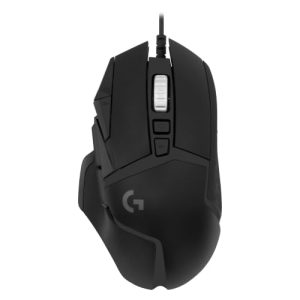
Among wired mice, the G502 HERO has stayed relevant because its shape and button layout suit players who map many commands to the mouse. Its HERO 25K sensor reaches 25,600 DPI, and the listing pairs that with RGB lighting, adjustable weights, and on-board memory for stored profiles. Eleven programmable buttons give MOBA and MMO players room for abilities, pings, and push-to-talk without reaching for the keyboard, while the dual-mode scroll wheel switches between precise clicks and free spinning.
Specs
- HERO 25K sensor with up to 25,600 DPI
- 11 programmable buttons
- Adjustable weights for tuning balance
- RGB lighting
- On-board memory for saved profiles
Best for: Players who want many programmable buttons and a tunable weight in a wired mouse.
Watch out for: Confirm the wired length and the weight system suit your desk, since the mouse is heavier than ultra-light rivals even with weights removed.
Razer DeathAdder V2

For palm-grip players, the DeathAdder V2 remains one of the most comfortable shapes in this tier, with a tall ergonomic body and rubberized side grips that steady the hand during long matches. Its 20K DPI optical sensor tracks fast movement cleanly, and eight programmable buttons cover the essentials without crowding the shell. Chroma RGB lighting runs along the logo and scroll wheel, and the Speedflex cable is designed to reduce drag compared with stiff braided cords.
Specs
- 20K DPI optical sensor
- 8 programmable buttons
- Chroma RGB lighting
- Rubberized side grips
- Speedflex cable for reduced drag
Best for: Palm-grip players who want a comfortable ergonomic wired mouse for long sessions.
Watch out for: Check the listed dimensions against your hand size, since the tall right-handed shape suits medium to large hands better than small ones.
Razer Basilisk V3
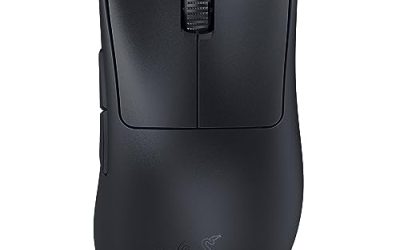
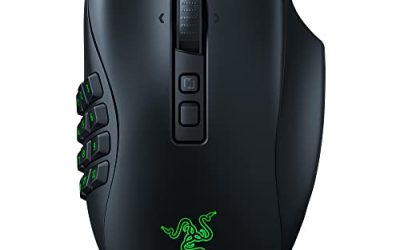
Where the DeathAdder keeps things simple, the Basilisk V3 leans into customization, starting with a HyperScroll tilt wheel that switches between tactile notched scrolling and free-spin mode. Its 26K DPI optical sensor sits at the top of this group on paper, and eleven programmable buttons include a thumb rest area that supports the hand during extended play. Chroma RGB lighting covers eleven zones, so the mouse can match a wider desk setup without extra accessories.
Specs
- 26K DPI optical sensor
- 11 programmable buttons
- HyperScroll tilt wheel
- Chroma RGB lighting with 11 zones
- Optical mouse switches
Best for: Players who want a highly customizable wired mouse with a versatile scroll wheel and many buttons.
Watch out for: Verify the software requirements for remapping, since full customization of the lighting zones and wheel modes needs the companion app.
SteelSeries Rival 5

Built as a multi-genre mouse, the Rival 5 tries to serve FPS, MOBA, and MMO players with one shell, using nine programmable buttons and a five-button side panel that keeps abilities close to the thumb. Its TrueMove Air optical sensor reaches 18,000 CPI, and the 85 g weight keeps the mouse light enough for quick repositioning without feeling hollow. PrismSync RGB lighting syncs with other SteelSeries gear, which suits players who already own a keyboard or headset from the same brand.
Specs
- 18,000 CPI TrueMove Air optical sensor
- 9 programmable buttons
- 85 g weight
- PrismSync RGB lighting
- 100 percent PTFE mouse feet
Best for: Players who switch between genres and want one mouse with a thumb panel and a light body.
Watch out for: Test the side panel layout before committing, since five thumb buttons take practice if you are used to a two-button layout.
HyperX Pulsefire Haste 2 Wireless

As the only wireless pick here, the Pulsefire Haste 2 Wireless trades buttons for lightness, weighing 61 g with a solid shell that avoids the dust traps of honeycomb designs. Dual wireless connectivity covers 2.4 GHz gaming and Bluetooth for a second device, and the listing states up to 100 hours of battery life. Its HyperX 26K sensor matches the highest resolution in this group, while PTFE skates and included grip tape help the mouse glide and stay secure during fast movement.
Specs
- HyperX 26K sensor
- 61 g ultra-lightweight design
- Up to 100-hour battery life
- Dual wireless connectivity with 2.4 GHz and Bluetooth
- PTFE skates and grip tape included
Best for: Players who want a very light wireless mouse with long battery life for fast-paced games.
Watch out for: Check the charging cable and dongle storage before buying, since a lost receiver is harder to replace than a wired connection.
Which One Fits Your Situation
You play shooters for hours with a palm grip
Choose the Razer DeathAdder V2. Its tall ergonomic body and rubberized grips support a relaxed palm grip, and the 20K sensor tracks fast flicks without fuss. Eight buttons keep the layout simple, so nothing gets pressed by accident during tense rounds, and the flexible cable stays out of the way on a wide mousepad.
You play MMO or MOBA games with many abilities
Pick the Logitech G502 HERO or the Razer Basilisk V3. Both offer eleven programmable buttons, so abilities, items, and push-to-talk can live on the mouse. The G502 HERO adds adjustable weights for tuning the feel, while the Basilisk V3 adds a HyperScroll tilt wheel that helps with weapon and inventory scrolling.
You switch genres every night
Take the SteelSeries Rival 5 for this role. Its nine-button layout with a five-button side panel covers MOBA and MMO commands, yet the 85 g body stays light enough for shooters. One mouse that handles several genres also saves desk space and avoids relearning a new shape each time you change games.
You want wireless freedom without a heavy shell
Go with the HyperX Pulsefire Haste 2 Wireless. At 61 g it is the lightest mouse here, and dual wireless modes let it pair with a laptop over Bluetooth when you step away from the main rig. Long battery life means charging becomes a weekly habit rather than a daily interruption.
Common Mistakes
- Buying the highest DPI figure instead of a shape that fits your grip and hand size.
- Choosing a button-heavy mouse when you only ever press the two side buttons.
- Ignoring cable drag on wired models or battery habits on wireless ones.
- Picking a right-handed ergonomic shell when you play left-handed or switch hands.
- Skipping the software check, then finding your bindings and lighting need an app you did not plan to install.
Frequently Asked Questions
What makes a gaming mouse mid-range?
A mid-range gaming mouse pairs a modern optical sensor with solid switches and a comfortable shell, without the flagship extras that push cost higher. Expect reliable tracking, programmable buttons, and either a flexible wired connection or low-latency wireless. The value comes from getting the parts that affect aim and comfort right, rather than paying for experimental features.
Is wireless as good as wired for gaming now?
Wireless mice in this tier use a dedicated 2.4 GHz receiver that keeps latency low enough for competitive play, and many players cannot feel a difference from wired. Battery life and charging habits are the real trade-offs, so check the stated hours and whether the mouse plays while charging. A wired mouse still wins for players who never want to think about charging.
How many buttons do I need on a gaming mouse?
Most shooter players do fine with two side buttons plus the standard clicks and wheel. MMO and MOBA players benefit from more, since abilities and items can sit under the thumb. Count the commands you press during a typical match, then choose a layout with that many reachable buttons and no more, because extra buttons you never press only add weight and confusion.
Does a lighter mouse improve aim?
A lighter mouse changes direction faster and causes less fatigue during long sessions, which helps players who lift and reposition often. Heavier mice can feel steadier for players who rest their whole hand and move slowly. Neither weight is better for everyone, so treat lightness as a preference tied to your grip and sensitivity rather than a universal upgrade.
FAQ
What makes a gaming mouse mid-range?
Is wireless as good as wired for gaming now?
How many buttons do I need on a gaming mouse?
Does a lighter mouse improve aim?
More from Amazon
Programs that pair well with the guide above. Offers and eligibility are set by Amazon and may change.
Free shipping on eligible items, Prime Video and more. Eligible new members can start with a free trial.
Start a Prime free trialAd-free music streaming. Eligible new subscribers can start with a free trial.
Try Music Unlimited freeA Prime membership for ages 18-24 with a trial period. Eligibility is set by Amazon.
See Prime for Young AdultsAudiobooks and podcasts to listen to on the go. Eligible new members can start with a free trial.
Try Audible freeAs an Amazon Associate we earn from qualifying purchases.