Key takeaways
- Buying a gaming PC? Use this spec checklist to verify the exact GPU model and VRAM, RAM, SSD and PSU wattage in any prebuilt listing before you order.
The reliable way to buy a gaming PC is to choose your graphics card tier first, then verify four lines in the listing before ordering: the exact GPU model with its VRAM amount, the RAM capacity and generation, the SSD type and size, and the power supply wattage. If one of those lines is vague, missing, or buried behind a style selector, treat the whole listing as unverified and keep looking. The four prebuilt desktops below pass that check on paper, and for each one this guide also flags the line its listing still leaves open.
This guide is for first-time prebuilt buyers, parents ordering a machine for a teenager, and players replacing an aging rig who would rather not decode marketing names at the checkout page. Every system here is a Windows gaming desktop sold on Amazon US, and every specification quoted comes from the listing title or its specification table, never from a configurator page or a review roundup.
Quick Picks
As an Amazon Associate we earn from qualifying purchases
Run the four-line check on any listing, starting with these:
| Product | Best for | Key spec from title |
|---|---|---|
| CyberPowerPC Gamer Xtreme VR (GXiVR8040A14) | Verifying the VRAM variant before you buy | RTX 4060 Ti 16GB |
| Skytech Gaming Chronos 3 | Buyers who want the PSU wattage in writing | RTX 5070 12GB, 850W Gold PSU |
| CyberPowerPC Gamer Xtreme (GXiVR8080A41) | Gaming plus streaming on one machine | Ryzen 9 9900X, RTX 5070 12GB |
| CyberPowerPC Gamer Xtreme VR (GXiVR8680A12) | The largest verified spec sheet in this guide | RTX 5070 Ti 16GB, 2TB SSD |
How to Choose
Check the GPU line word by word
The graphics card decides how a gaming PC performs, and it is also the line listings most often blur. Read the full model name and the number after it: an RTX 4060 Ti exists in two VRAM sizes, and the smaller one is a different purchase even though the headline looks identical. Phrases like “RTX graphics” or “dedicated GPU” without a model number are a stop sign. Cross-check three places that should all agree: the listing title, the specification table’s graphics coprocessor field, and the model number, which usually encodes the exact configuration the box contains.
Audit the RAM line like an invoice
Memory listings compress four facts into one short line, so unpack each one. Capacity comes first: 16GB is the working minimum for current games, and 32GB is the comfortable figure for anyone who streams or keeps many apps open. Generation matters next, because DDR5 platforms carry a longer upgrade path than DDR4 ones. Speed, when printed, should match the platform’s normal range rather than a suspiciously round number. Finally, look for how the capacity is arranged; a listing that states the stick layout tells you whether a free slot remains for a later upgrade.
Decode the storage line before trusting the capacity
A big capacity number means little until you know what kind of drive holds it. The line you want names an NVMe SSD and, ideally, its PCIe generation, because that is the drive games should live on. Be careful with hybrid listings that pair a small SSD with a large hard drive and advertise the combined total; the hard drive portion loads games slowly no matter how large it is. Match the verified SSD size against your library: a handful of large modern titles can consume most of a 1TB drive, which is why 2TB appears in this guide’s top configuration.
Find the power supply wattage, or flag its absence
The power supply is the line prebuilt listings most often leave blank, and it decides whether a future graphics card upgrade is simple or impossible. When a listing prints wattage and an 80 Plus tier, as the Skytech below does, you can judge headroom immediately. When it prints nothing, that silence is information too: message the seller or check the manufacturer’s page for that exact model number before ordering. Never infer wattage from the case size or the GPU tier, and treat any listing that hides the model number as one you cannot verify at all.
The 4 Best Options
CyberPowerPC Gamer Xtreme VR (GXiVR8040A14)
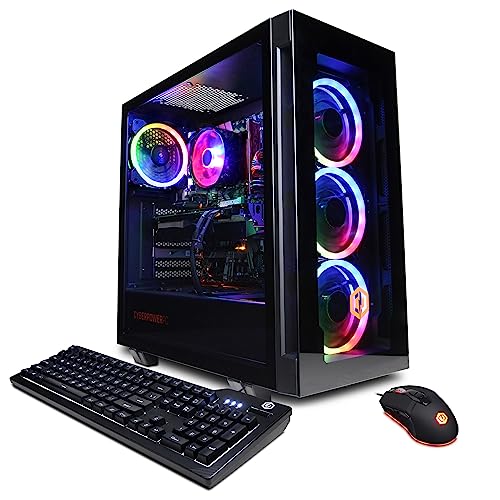
This is the listing to study if you want to see the VRAM check done properly. The title states the 16GB version of the RTX 4060 Ti outright, the specification table names the Intel B760 chipset instead of hiding the motherboard class, and the storage line specifies a PCIe Gen4 NVMe drive rather than a bare capacity figure. The Core i7-13700F pairs well with that card for 1080p and 1440p play. Its one soft spot is memory capacity: 16GB of DDR5 is adequate today, but it is the first line you would upgrade.
Specs
- Processor: Intel Core i7-13700F, 2.1GHz, 8+8 cores
- Chipset: Intel B760
- Graphics: NVIDIA GeForce RTX 4060 Ti 16GB, 1x HDMI and 2x DisplayPort
- Memory: 16GB DDR5
- Storage: 1TB PCIe Gen4 NVMe SSD
- Operating system: Windows 11 Home 64-bit
- Model number: GXiVR8040A14
Best for: Players at 1080p or 1440p who want the VRAM question settled in the title itself.
Watch out for: The power supply wattage is not printed in the listing summary, so confirm it with the seller before planning any graphics card upgrade.
ASIN: B0CBL8N3FC
Skytech Gaming Chronos 3

Most prebuilt listings make you hunt for the power supply line; this one’s title answers it directly with an 850W Gold unit, which is exactly the habit this checklist tries to teach. The rest of the spec sheet is equally explicit: a Ryzen 7 7700X, an RTX 5070, DDR5 memory with its 5600 speed printed, and a 360mm liquid cooler named by size. For a buyer learning to read listings, the Chronos 3 is the reference example of a seller stating the important numbers up front instead of leaving them to a configurator page.
Specs
- Processor: AMD Ryzen 7 7700X, 4.5 GHz (5.4GHz max boost)
- Graphics: NVIDIA GeForce RTX 5070 12GB
- Memory: 32GB DDR5 5600 RGB
- Storage: 1TB NVMe SSD
- Power supply: 850W Gold PSU
- Cooling: 360mm ARGB AIO liquid cooler
- Wireless: Wi-Fi
- Operating system: Windows 11
Best for: Buyers who want every checklist line, wattage included, stated before they pay.
Watch out for: Skytech notes the graphics card brand may vary, and the storage line does not name a PCIe generation, so read the full specification table on the listing before ordering.
ASIN: B0F4DMPZ4Z
CyberPowerPC Gamer Xtreme (GXiVR8080A41)
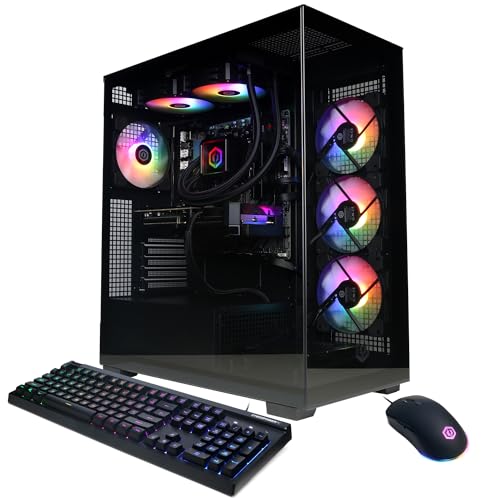
Read this listing for its processor line. The Ryzen 9 9900X is a twelve-core chip, well beyond what games alone require, which makes this configuration the one aimed at players who also stream, record, or edit video on the same desk. The graphics line matches the Chronos 3 at an RTX 5070 with 12GB, and the memory line confirms 32GB of DDR5, so the checklist differences come down to the stronger CPU and the details the summary omits. It is a good example of two listings sharing a GPU while serving different buyers.
Specs
- Processor: AMD Ryzen 9 9900X, 4.4GHz
- Graphics: NVIDIA GeForce RTX 5070 12GB
- Memory: 32GB DDR5
- Storage: 1TB PCIe 4.0 SSD
- Wireless: WiFi Ready
- Operating system: Windows 11 Home
- Model number: GXiVR8080A41
Best for: Players who stream or edit on the same machine and want the CPU verified in the title.
Watch out for: RAM speed and power supply wattage are not stated in the listing summary, and the 1TB drive fills quickly once a streaming library grows.
ASIN: B0DXVFWSS7
CyberPowerPC Gamer Xtreme VR (GXiVR8680A12)
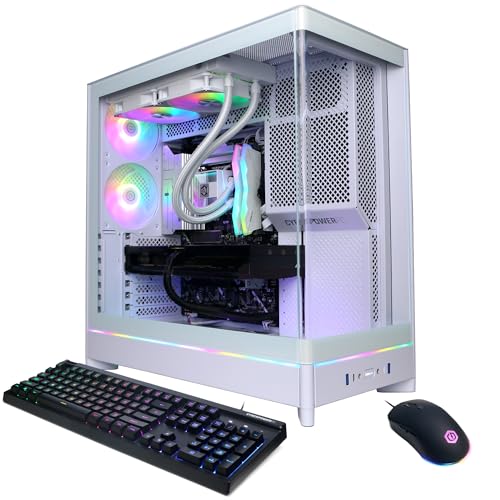
This configuration tops the guide because it removes the two compromises the other listings ask you to accept. Its graphics line pairs the RTX 5070 Ti with a full 16GB of graphics memory, and its storage line doubles capacity to a 2TB PCIe 4.0 SSD, so neither VRAM nor shelf space needs a second thought at checkout. The Core Ultra 7 265KF and 32GB of DDR5 complete a spec sheet with no weak line. It suits 1440p high-refresh play today and gives entry-level 4K room without an immediate upgrade list.
Specs
- Processor: Intel Core Ultra 7 265KF, 3.9 GHz
- Graphics: NVIDIA GeForce RTX 5070 Ti, 16GB graphics memory
- Memory: 32GB DDR5
- Storage: 2TB PCIe 4.0 SSD
- Wireless: WiFi Ready
- Operating system: Windows 11 Home
- Model number: GXiVR8680A12
Best for: Buyers purchasing once for several years of 1440p or entry 4K play.
Watch out for: As with the other CyberPowerPC listings here, the wattage is not printed in the summary, and the “WiFi Ready” wording deserves a check against the full specification table.
ASIN: B0DXVD4PX4
Which One Fits Your Situation
You play competitive titles and want the decision kept simple
Choose the Gamer Xtreme VR with the RTX 4060 Ti 16GB. Esports and competitive games reward frame rate over raw resolution, and this is the configuration whose listing verifies the VRAM variant, the chipset, and the NVMe generation without any detective work. Add a second memory stick later if multitasking starts to strain the 16GB it ships with.
You plan to upgrade the graphics card in a few years
Choose the Skytech Chronos 3. An upgrade plan lives or dies on power supply headroom, and this is the only listing in the guide that states its wattage and efficiency tier in the title. The DDR5 platform and the 360mm cooler also leave room for a stronger processor later, so the machine can grow in stages instead of being replaced.
You stream or make videos on the same desk
Choose the Gamer Xtreme with the Ryzen 9 9900X. Games use only part of its twelve cores, leaving real capacity for encoding, recording, and editing timelines while you play. The RTX 5070 and 32GB of memory keep the gaming side uncompromised, and your first upgrade should be storage rather than anything on the checklist’s performance lines.
You are buying once and do not want a project
Choose the Gamer Xtreme VR with the RTX 5070 Ti. It is the configuration with no line that needs fixing after delivery: 16GB of graphics memory, 32GB of system memory, and a 2TB SSD cover the checklist completely. Verify the power supply wattage with the seller before ordering, then treat the purchase as finished rather than as the start of an upgrade list.
Common Mistakes
- Trusting the headline GPU name and skipping the VRAM figure, which is how buyers end up with the smaller memory variant of the same card.
- Ordering whichever style a multi-configuration listing defaults to, without noticing the processor and graphics card change between styles.
- Reading a combined storage total at face value when part of it is a mechanical hard drive rather than NVMe SSD space.
- Ignoring the power supply line entirely, then discovering during a graphics card upgrade that the wattage was never stated anywhere.
- Comparing product photos instead of specification tables, even though listings warn that the installed card brand may vary from the pictures.
Frequently Asked Questions
How much VRAM should a gaming PC have in 2026?
Treat 12GB as the sensible floor for a new machine bought to last several years, and 16GB as the comfortable figure for 1440p high settings or entry 4K. The number matters more than small clock differences between cards, so verify it in the specification table rather than assuming the model name guarantees a single memory size.
Is 16GB or 32GB of RAM the right amount for a prebuilt?
Sixteen gigabytes still runs current games, especially at 1080p, but 32GB is the safer purchase for anyone who streams, records, or keeps a browser and chat apps open while playing. If you buy 16GB, check the listing for the stick layout so you know whether an empty slot is waiting for a matching upgrade.
What power supply wattage does a midrange gaming PC need?
Builds in the RTX 5070 class are commonly paired with units in the 750W to 850W range, and the important habit is confirming the exact figure for the exact model number you are ordering. A listing that prints wattage and an 80 Plus tier in its title, like the Chronos 3 here, saves you that step entirely.
Can I upgrade a prebuilt gaming PC later?
Usually yes, provided the checklist lines cooperate: free memory slots accept more RAM, a spare M.2 slot accepts another SSD, and a power supply with stated headroom accepts a stronger graphics card. The upgrades that get difficult are the ones tied to unstated parts, which is why verifying the wattage and motherboard chipset before ordering matters more than any single benchmark.
FAQ
How much VRAM should a gaming PC have in 2026?
Is 16GB or 32GB of RAM the right amount for a prebuilt?
What power supply wattage does a midrange gaming PC need?
Can I upgrade a prebuilt gaming PC later?
More from Amazon
Programs that pair well with the guide above. Offers and eligibility are set by Amazon and may change.
Free shipping on eligible items, Prime Video and more. Eligible new members can start with a free trial.
Start a Prime free trialAd-free music streaming. Eligible new subscribers can start with a free trial.
Try Music Unlimited freeA Prime membership for ages 18-24 with a trial period. Eligibility is set by Amazon.
See Prime for Young AdultsAudiobooks and podcasts to listen to on the go. Eligible new members can start with a free trial.
Try Audible freeAs an Amazon Associate we earn from qualifying purchases.