Key takeaways
- GPU: Standard PCIe. Measure case clearance and match the power connector.
- RAM: DDR5 on current builds; confirm slot count.
- Storage: Extra M.2 slots on most ATX boards.
- CPU: AM5 builds offer a path to newer Ryzen chips subject to BIOS support. Intel Core Ultra 200S uses its own socket, so check which processors the board supports.
The Skytech Azure is the better pick for gamers who want a more upscale prebuilt from Skytech, with the current Azure 3 line reaching from mid-range RTX 5060 Ti systems up to RTX 5080 builds, and it fits buyers aiming for 1440p or 4K play who still want standard, upgradeable parts. It is also one of the lines the maker’s storefront was actively featuring at the time of research, which is not true of every Skytech name.
Our top picks
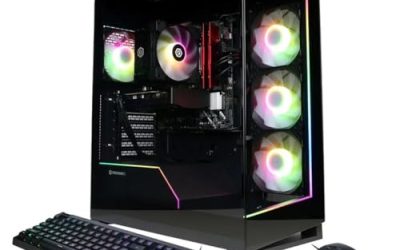
 Skytech Gaming PC Desktop
- AMD Ryzen 7 9850X3D 4.7GHz (5.6GHz Turbo Boost)…
- AMD Radeon RX 9070 XT 16GB GDDR6 Graphics…
- High-spec AIO liquid coolers used, delivering unmatched cooling…


As an Amazon Associate we earn from qualifying purchases at no extra cost to you.
What Azure Means in Skytech’s Lineup
Azure has been a recurring name for Skytech’s higher-end white-or-black-chassis gaming desktops with glass panels and liquid cooling. As with other Skytech lines, the same name has covered very different hardware over the years. Older reviews describe an Azure with an Intel Core i7-12700F and RTX 4070 Ti, a budget unit with a Core i3-10105F and GTX 1650, and a 2022 build with an RTX 3070. The current coverage centers on Azure 3 and Azure 3 Plus with RTX 50-series graphics.
Because configurations change by year and by listing, the most useful approach is to treat Azure as a family and judge each listing by its parts.
At a Glance: Azure Configurations as Reported
| Variant | Stated parts (as reported) | Best for | Limits |
|---|---|---|---|
| Azure 3 mid-range | Ryzen 5 9600X, RTX 5060 Ti 16GB, 16GB DDR5-6000, 1TB NVMe SSD, 650W Gold PSU (TechGuided) | Balanced 1440p play | 16GB of RAM is the minimum for a modern build |
| Azure with RTX 5070 | Ryzen 7 7700X, RTX 5070 12GB GDDR7, 32GB DDR5-6000, 1TB Gen4 SSD, 750W Gold PSU, 360mm ARGB AIO (a retail listing) | 1440p high settings | 12GB graphics memory restricts native 4K |
| Azure 3 Plus | Intel Core Ultra 7 265K, RTX 5070 Ti 16GB, 32GB RAM, 2TB NVMe SSD (PCVarge review unit) | High-end 1440p and entry 4K, users who like upgrading | Intel Core Ultra 200S platform, check board and cooler details |
| Azure 3 high-end | Ryzen 7 9800X3D, RTX 5080 16GB, 32GB DDR5-6000, 2TB NVMe SSD, 850W Gold PSU, 360mm AIO (TechGuided) | 4K gaming with a top gaming CPU | Premium tier of the line |
| Previous generation | Core i7-12700F with RTX 4070 Ti (PCVarge) | Used or leftover stock | Older platform, RAM not running at full speed per the reviewer |
These are descriptions from reviewers and listings, not a single maker spec sheet. The Skytech homepage described Azure 3 as a value-oriented offering without the detail shown here.
Who the Azure Suits
Players aiming above 1080p
Because the Azure line spans RTX 5060 Ti through RTX 5080, it covers 1440p to 4K targets. TechGuided’s summary points to excellent 4K performance on the RTX 5080 model with the 9800X3D and a main drawback of cost.
Buyers who care about upgrading
PCVarge calls the Azure 3 Plus excellent value for gamers seeking a midrange machine that is super-upgradeable, and TechGuided notes that Skytech uses standard parts, so the PCs are easy to upgrade.
People who want a whole-system warranty
The maker’s warranty covers the original installed hardware for one year of parts and one year of labor, which some buyers prefer to managing a warranty per part.
Specs to Read Closely
CPU choice
Azure listings have used AMD Ryzen 5 9600X, Ryzen 7 7700X, Ryzen 7 9800X3D and Intel Core Ultra 7 265K. The 9800X3D is the gaming-focused choice. The Intel option may suit users who also run creative or multi-threaded work.
Graphics tier
RTX 5060 Ti suits 1440p, RTX 5070 Ti and RTX 5080 target high-refresh 1440p and 4K. Confirm VRAM on the listing, since the 5060 Ti exists in more than one memory size.
Power supply
Reported supplies range from 650W to 850W Gold-rated units. Pair a future graphics card upgrade with the card maker’s stated requirement, and do not open the supply itself.
Memory speed
A reviewer of an older Azure noted RAM not running at its full rated speed. On any build, enabling the memory profile in the BIOS is a common step, though BIOS changes carry some risk and should follow the motherboard manual.
Cooling, Noise and Case
Azure builds are pitched with tempered glass, ARGB lighting and 360mm all-in-one coolers on higher tiers, per the listings. Liquid cooling can help sustained boost clocks, but independent noise measurements for Azure units were not found. Glass panels need careful handling during shipping and installation. If acoustics are important, owner reports on your exact configuration and BIOS fan-curve adjustments are the practical route.
Upgrade Path
- GPU: Standard PCIe. Measure case clearance and match the power connector.
- RAM: DDR5 on current builds; confirm slot count.
- Storage: Extra M.2 slots on most ATX boards.
- CPU: AM5 builds offer a path to newer Ryzen chips subject to BIOS support. Intel Core Ultra 200S uses its own socket, so check which processors the board supports.
Shut down and unplug before opening the case. Skytech states that unauthorized modifications are not covered, though third-party upgrades alone do not void the warranty.
Warranty and Support
Skytech’s warranty page states one year for parts and one year for labor, with exclusions for accidents, liquid exposure, overclocking, mining, improper installation, third-party components and software problems. Customers contact support by phone or email on weekdays, Pacific time, with serial number and proof of purchase. The brand advertises lifetime technical support, and says each PC is assembled in the USA. Back up data before any service.
Pick the Azure If …
| Your goal | Direction |
|---|---|
| Balanced 1440p system | Azure 3 with RTX 5060 Ti or RTX 5070 |
| Strong all-round midrange with upgradeability | Azure 3 Plus with RTX 5070 Ti |
| 4K gaming with a gaming-focused CPU | Azure 3 with RTX 5080 and Ryzen 7 9800X3D |
| Tightest budget | Look at Skytech Chronos, Shadow or Nebula lines instead |
| Full control over each part | Self-build |
Alternatives
- Skytech Archangel 5: Ryzen 7000 and 9000 with RTX 50-series graphics, aimed at the mid-range.
- Skytech Blaze 5: Shown on the storefront with RTX 5070 Ti in some configurations.
- Skytech King 45 or King 95: Higher-end lines on the storefront with RTX 5070 Ti to RTX 5080 graphics.
How to Choose Between Azure Tiers
The jump between Azure configurations is mostly about graphics memory and the processor. A mid-range build with an RTX 5060 Ti is the sensible stopping point for a 1440p monitor at 144Hz or below. Stepping to an RTX 5070 adds headroom for ray tracing and newer titles. The RTX 5070 Ti and RTX 5080 tiers are the ones to consider for a 4K display, since 16GB of graphics memory helps with high-resolution textures.
Processor choice should follow the games you play. Competitive shooters and simulation titles often favor the cache-heavy Ryzen 7 9800X3D, while video editing, streaming and compiling can benefit from the extra cores in an Intel Core Ultra 7 265K. Reviewers describe the Azure 3 Plus as aimed at users who want both gaming and upgrade flexibility.
Questions to Ask Before You Buy
- Which exact CPU, GPU, RAM, storage and power supply does the listing name?
- Is the memory DDR5, and what speed does the maker or seller state?
- How many M.2 slots and DIMM slots remain free on the motherboard?
- Does the seller state a warranty start date and who handles service?
- Does the monitor you own match the performance tier, for example a 1440p or 4K panel?
Answering these keeps buyers from paying for hardware that does not match their screen or their games.
Limits and Caveats
Even a well-regarded prebuilt carries trade-offs. Reviewers note that prebuilt systems usually cost more than the same parts bought separately, the case and motherboard are chosen by the builder, and component brands can differ between production runs. Some pages about the Azure line, such as promotional blog posts about very high-end Core i9 and RTX 4090 builds, read like marketing copy and carry no independent measurements, so they were not relied on here. Performance claims in this guide come from the reviewers named, not from any measurement made for this article.
Frequently Asked Questions
What is the Skytech Azure 3?
It is the current generation of the Azure line, described by reviewers as RTX 50-series builds with Ryzen or Intel processors, DDR5 memory and NVMe storage. Specific parts vary by listing.
Is the Skytech Azure good for 4K gaming?
The RTX 5080 configuration with a Ryzen 7 9800X3D is described by TechGuided as excellent for 4K. Lower tiers are better suited to 1440p.
What is the Azure 3 Plus?
PCVarge describes it with an Intel Core Ultra 7 265K, an RTX 5070 Ti, 32GB RAM and a 2TB SSD, and calls it a very upgradeable midrange option.
Can I upgrade a Skytech Azure?
Reviewers say standard parts make upgrades easy. Check the motherboard, power supply and case clearance before buying parts.
Does Skytech Azure include a warranty?
The maker lists one year for parts and one year for labor, plus lifetime technical support as advertised on its site.
How do I know which Azure I am buying?
Ignore the line name and read the CPU, GPU model, graphics memory, RAM, storage and power supply on the listing, because the name has covered many generations.
FAQ
What is the Skytech Azure 3?
Is the Skytech Azure good for 4K gaming?
What is the Azure 3 Plus?
Can I upgrade a Skytech Azure?
Does Skytech Azure include a warranty?
How do I know which Azure I am buying?
More from Amazon
Programs that pair well with the guide above. Offers and eligibility are set by Amazon and may change.
Free shipping on eligible items, Prime Video and more. Eligible new members can start with a free trial.
Start a Prime free trialAd-free music streaming. Eligible new subscribers can start with a free trial.
Try Music Unlimited freeA Prime membership for ages 18-24 with a trial period. Eligibility is set by Amazon.
See Prime for Young AdultsAudiobooks and podcasts to listen to on the go. Eligible new members can start with a free trial.
Try Audible freeAs an Amazon Associate we earn from qualifying purchases.