Key takeaways
- 1080p high, demanding recent titles: RX 7600 often in the 50–75 FPS range; RTX 5060 Ti 16GB often in the 75–110 FPS range.
- 1440p high, same titles: RX 7600 frequently drops into the 35–55 FPS range and may need settings cut to stay inside 8 GB; RTX 5060 Ti 16GB generally holds 55–80 FPS.
- Competitive esports titles: both cards push well past 144 FPS at 1080p, so in those games your CPU usually matters more than the GPU.
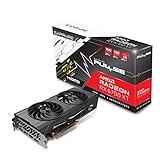
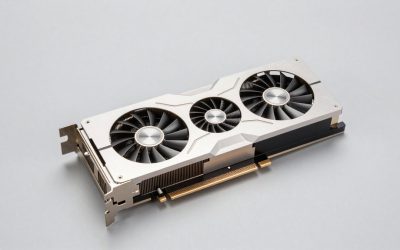
Buy the RTX 5060 Ti 16GB if you game at 1440p, care about ray tracing, or want a card that will still handle new releases in three or four years. Buy the RX 7600 only if you play at 1080p on a tight budget and can pick one up well below its original price. The two cards sit in different performance classes. The RTX 5060 Ti 16GB is roughly 40–55% faster across most review averages and has twice the VRAM. The RX 7600 wins on price, and that’s about it.
The two cards are about two years apart and aimed at different buyers. The RX 7600 launched in May 2023 as AMD’s 1080p card, with 8 GB of memory. The RTX 5060 Ti 16GB arrived in April 2025 as part of NVIDIA’s current Blackwell lineup and is built to cope with heavier textures and modern upscaling. The sections below cover raster, ray tracing, memory, power and physical fit, then match each card to a resolution and budget.
Specifications Side by Side
| Specification | Radeon RX 7600 | GeForce RTX 5060 Ti 16GB |
|---|---|---|
| Architecture | RDNA 3.0 | Blackwell 2.0 |
| Release date | 24 May 2023 | 16 April 2025 |
| Launch MSRP | $269 | $429 |
| Shaders / CUDA cores | 2048 | 4608 |
| Boost clock | 2655 MHz | 2572 MHz |
| Process | 6 nm | 5 nm |
| Board power (TDP) | 165 W | 180 W |
| Memory | 8 GB GDDR6 | 16 GB GDDR7 |
| Memory bus | 128-bit | 128-bit |
| Bandwidth | 288.0 GB/s | 448.0 GB/s |
| Cache | 2 MB L2 + 32 MB Infinity Cache (L3) | 32 MB L2 |
| PCIe interface | PCIe 4.0 x8 | PCIe 5.0 x8 |
| Power connector | 1x 8-pin | 1x 8-pin |
| Reference length / width | 204 mm, 2-slot | 241 mm, 2-slot |
| Display outputs | 1x HDMI 2.1a, 3x DisplayPort 2.1 | 1x HDMI 2.1b, 3x DisplayPort 2.1b |
Both cards use a 128-bit bus, so the bandwidth gap comes from memory type. The 5060 Ti’s GDDR7 delivers about 55% more bandwidth than the RX 7600’s GDDR6. NVIDIA’s large 32 MB L2 cache does a similar job to AMD’s 32 MB Infinity Cache, keeping frequently used data close to the shaders.
Rasterized Gaming: How Far Apart Are They?
The reviews put these cards about one full tier apart. TechPowerUp’s RTX 5050 review found the RX 7600 a little slower than the RTX 5050, which is already slightly behind the old RTX 4060. Its RTX 5060 Ti 16GB review placed that card a bit ahead of the Radeon RX 7700 XT and about 11% behind the RX 7800 XT at 1440p. Combining those placements, the RTX 5060 Ti 16GB comes out roughly 40–55% faster than the RX 7600 in average raster performance. The gap is at the low end of that range at 1080p and grows at 1440p.
Hardware Unboxed’s results line up with this. In their testing the RX 7600 sits just above the RTX 5050. The RTX 5060 Ti lands in the RTX 3070 / RX 7700 XT bracket, which Gamers Nexus also reported in its launch coverage.
For a rough sense of frame rates, treat these as ranges that shift with settings, CPU and game patches:
- 1080p high, demanding recent titles: RX 7600 often in the 50–75 FPS range; RTX 5060 Ti 16GB often in the 75–110 FPS range.
- 1440p high, same titles: RX 7600 frequently drops into the 35–55 FPS range and may need settings cut to stay inside 8 GB; RTX 5060 Ti 16GB generally holds 55–80 FPS.
- Competitive esports titles: both cards push well past 144 FPS at 1080p, so in those games your CPU usually matters more than the GPU.
Ray Tracing and Upscaling
Ray tracing is the RX 7600’s weakest area. RDNA 3’s ray accelerators are a clear step behind NVIDIA’s, and at the RX 7600’s performance level, turning on RT effects in demanding games usually drops frame rates below what most players will accept without heavy upscaling. The RTX 5060 Ti 16GB can run light-to-medium RT at 1080p and, with DLSS, at 1440p. Path tracing is still beyond this class of card unless you lean heavily on frame generation.
Upscaling has changed a lot recently. The RTX 5060 Ti gets the full DLSS 4 package: the transformer-based Super Resolution model, Ray Reconstruction, and Multi Frame Generation, which is exclusive to RTX 50-series cards and inserts up to three generated frames per rendered frame. Frame generation works best when the base frame rate is already around 50–60 FPS, so treat it as a smoothness feature rather than a way to rescue an unplayable game.
On the AMD side, the RX 7600 gained official support for FSR 4.1 upscaling in July 2026, after AMD brought an INT8 version of the model to RDNA 3. That’s a real image-quality improvement over FSR 3.1. However, TechPowerUp reported that FSR 4.1 runs noticeably slower on RDNA 3 than FSR 3.1 does, so you trade some of the frame-rate gain for better image quality. FSR 3.1 frame generation remains available on the RX 7600 too.
VRAM: The Deciding Factor for Many Buyers
For many buyers, VRAM is what settles this matchup. Eight gigabytes is now a hard ceiling in a growing list of games. Hardware Unboxed’s 8 GB vs 16 GB testing of the RX 9060 XT showed the kind of damage a full frame buffer does. Average frame rates dropped by double digits in many titles, 1% lows fell much further, and in the worst cases, such as Indiana Jones and the Great Circle at high settings, the 16 GB card was well over twice as fast. The RX 7600 hits the same wall.
A practical VRAM guide by resolution:
| Resolution | Comfortable VRAM for high textures | RX 7600 (8 GB) | RTX 5060 Ti (16 GB) |
|---|---|---|---|
| 1080p | 8–10 GB | Workable; lower textures in the heaviest games | Ample headroom |
| 1440p | 10–12 GB | Frequently constrained | Comfortable |
| 1440p + RT + frame generation | 12 GB+ | Not realistic | Workable |
Ray tracing and frame generation both use extra memory, so the 16 GB buffer is what lets the 5060 Ti actually use its feature set. One more caveat: both cards use a PCIe x8 link. On an older PCIe 3.0 motherboard, an 8 GB card that spills over its memory gets hit harder, because the overflow traffic travels over a slower bus. That’s another strike against the RX 7600 in older platforms.
Value Math: Cost per Unit of Performance
Using launch MSRPs and the review consensus, here’s a simple cost-per-performance comparison. Set the RX 7600 as the baseline at 100 performance points, and give the RTX 5060 Ti 16GB 140–155 points based on the 40–55% gap above.
- RX 7600: $269 / 100 = about $2.69 per point.
- RTX 5060 Ti 16GB: $429 / 140 = $3.06 per point at the conservative end; $429 / 155 = $2.77 per point at the optimistic end.
At launch prices the RX 7600 delivers slightly more frames per dollar, but the gap is small, between about 3% and 14% depending on the review data you use. In return, the NVIDIA card gives you double the VRAM, much better ray tracing, DLSS 4 and a longer useful life. If you can get the RX 7600 at a clearance or used price far below its MSRP, its value case improves considerably. At similar street prices, there’s no contest.
Power, PSU and Case Fit
Power draw is close. The RX 7600 is rated at 165 W and the RTX 5060 Ti 16GB at 180 W, and both use a single 8-pin connector. A simple sizing rule is GPU board power plus CPU power plus roughly 150 W of headroom for the rest of the system and transient spikes:
- RX 7600 + a 125 W gaming CPU: 165 + 125 + 150 = 440 W, so a quality 450–550 W unit is enough.
- RTX 5060 Ti 16GB + the same CPU: 180 + 125 + 150 = 455 W, so a quality 550 W unit is the sensible choice.
For case fit, the reference RX 7600 is a compact 204 mm, and the RTX 5060 Ti’s reference length is 241 mm. Both are two-slot designs. Most partner cards are longer than the reference dimensions, especially triple-fan models, so check your case’s GPU clearance against the specific model you buy. Both cards fit most mATX cases, and short dual-fan versions of each exist for small-form-factor builds.
Buying the RX 7600 Used
The RX 7600 is now previous-generation and shows up often on the second-hand market, usually in the $170–$220 range used depending on condition and region. At the bottom of that range it makes sense for a 1080p esports or older-games machine. Check that the fans spin quietly, ask whether the card was used for mining (less common for this model), and run a stress test before you pay. The RTX 5060 Ti 16GB is a current model, so buying new gets you the full warranty.
Which One Fits Your Setup?
| Your situation | Pick | Reason |
|---|---|---|
| 1080p esports, budget under $250 | RX 7600 | Plenty of frames in lighter games for less money |
| 1080p AAA, want high textures for years | RTX 5060 Ti 16GB | 16 GB avoids texture compromises |
| 1440p high refresh | RTX 5060 Ti 16GB | About one tier faster; DLSS 4 helps |
| Ray tracing interest | RTX 5060 Ti 16GB | Much stronger RT and Ray Reconstruction |
| Older PCIe 3.0 system, 1080p | RTX 5060 Ti 16GB (if budget allows) | 16 GB avoids bus-bound memory overflow |
| Very small case, cheapest playable card | RX 7600 (used) | Compact reference size and low entry price |
For most buyers who can stretch the budget, the RTX 5060 Ti 16GB is the better long-term purchase. The RX 7600 still makes sense when the budget is fixed at the low end and the games are lighter.
Frequently Asked Questions
Is the RTX 5060 Ti 16GB worth the extra money over the RX 7600?
For 1440p or modern AAA games, yes. It’s roughly 40–55% faster in review averages and has twice the VRAM, which together extend its useful life considerably. For a pure 1080p esports machine, the RX 7600 offers similar frames per dollar and saves cash.
Can the RX 7600 use FSR 4?
Yes. AMD added official FSR 4.1 upscaling support for RX 7000-series cards in July 2026. It looks clearly better than FSR 3.1, but it has a higher performance cost on RDNA 3 than on RDNA 4. FSR 3.1 is still available if you want maximum frame rates.
Do I need a new power supply to upgrade from an RX 7600 to an RTX 5060 Ti?
Usually not. The RTX 5060 Ti 16GB is rated at 180 W versus 165 W for the RX 7600, and both use one 8-pin connector. A good-quality 550 W unit covers either card paired with a mainstream gaming CPU.
Is 8 GB of VRAM still enough for 1080p?
For most games at medium-to-high settings, yes. But a growing number of releases need lower texture settings to avoid stutter on 8 GB cards. If you play new AAA games at high or ultra textures, 12–16 GB is the safer amount.
Does the PCIe x8 interface hurt either card?
On PCIe 4.0 or 5.0 motherboards the x8 link makes little difference. On PCIe 3.0 boards it matters mainly when a card runs out of VRAM, which makes the 8 GB RX 7600 more exposed than the 16 GB RTX 5060 Ti.