Key takeaways
- Step 1: Check your current system storage usage. Turn on your console, navigate to the System Settings icon on the home screen, and scroll down to “Data Management.” Note how much of your internal 32GB (or 64GB on OLED models) is currently occupied.
- Step 2: Audit your physical vs. digital game buying habits. Look at your entertainment center. Do you prefer a tidy, minimalist media console free of plastic cases, or do you enjoy displaying physical game spines on your bookshelves? If you collect physical cartridges, your digital storage needs drop significantly.
- Step 3: Calculate your dream game library. Estimate the sizes of the games you want to keep installed simultaneously. Major first-party titles typically require 10GB to 16GB of space, while massive third-party ports can easily exceed 30GB. Cozy, casual indie titles usually require less than 3GB each.
- Step 4: Measure your physical storage accessories. If you use a carrying case or a desk organizer, measure the elastic slots or plastic cartridge holders. Because microSD cards are tiny (0.59 inches by 0.43 inches), they require dedicated slots. If your current case only holds full-sized SD adapters, you will need to plan your storage organization accordingly.
The Short Answer
For the vast majority of players, a 256GB microSD card is the absolute sweet spot for the Nintendo Switch. This capacity offers the perfect balance between price and longevity, allowing you to store between 15 and 25 major game titles without constantly archiving your data. If you primarily buy physical game cartridges and only need space for system updates, save files, and occasional digital indie games, a 128GB card (typically priced between $35 and $40) will serve your home media setup perfectly. However, if you prefer a completely digital library clean of physical clutter on your living room shelves, investing in a 256GB card (ranging from $55 to $65) or even a 512GB card is the best way to future-proof your console.
Standard Sizes
When organizing your gaming space, understanding both the physical dimensions of your storage media and its digital capacity is essential. MicroSD cards are incredibly compact, requiring dedicated storage slots in your media console drawers or travel cases to prevent them from getting lost. Below are the physical and digital specifications for standard Nintendo Switch memory cards:
Our top picks
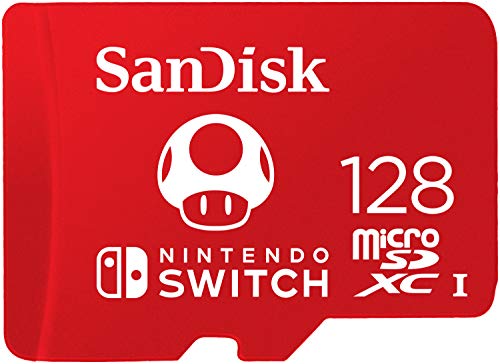 SANDISK 128GB microSD Card
- Compatible with Nintendo-Switch (NOT Nintendo-Switch 2)
- Incredible speeds in a microSD card officially licensed…
- Spend less time waiting and more time playing…
 Samsung microSD Express Card
- Nintendo Switch 2 uses a new standard of…
- Please note: Nintendo Switch 2 is only compatible…
 SANDISK 128GB Ultra microSD UHS-I Card
- EXPAND YOUR STORAGE
- SPACE FOR MORE
- MOVE FILES FAST
| Product | Key specs | |
|---|---|---|
| SANDISK 128GB microSD Card | Compatible with Nintendo-Switch (NOT Nintendo-Switch 2) Incredible speeds in a microSD card officially licensed… Spend less time waiting and more time playing… | Check price |
| Samsung microSD Express Card | Nintendo Switch 2 uses a new standard of… Please note: Nintendo Switch 2 is only compatible… | Check price |
| SANDISK 128GB Ultra microSD UHS-I Card | EXPAND YOUR STORAGE SPACE FOR MORE MOVE FILES FAST | Check price |
 Amazon Basics microSDXC Memory Card with Full Amazon Basics microSDXC Memory Card with Full | Amazon Basics 256GB Micro SDXC memory card provides… Read speed up to 100MB/s & write speed… Compatible with smartphones, tablets & cameras for versatile… | Check price |
As an Amazon Associate we earn from qualifying purchases at no extra cost to you.
| Storage Capacity | Physical Dimensions (Inches) | Physical Dimensions (Metric) | Average Weight | Estimated Game Capacity (AAA Titles) | Estimated Game Capacity (Indie Titles) |
|---|---|---|---|---|---|
| 64GB | 0.59 in x 0.43 in x 0.04 in | 15 mm x 11 mm x 1.0 mm | 0.25 grams / 0.0088 oz | 3 to 5 games | 20 to 30 games |
| 128GB | 0.59 in x 0.43 in x 0.04 in | 15 mm x 11 mm x 1.0 mm | 0.25 grams / 0.0088 oz | 8 to 12 games | 45 to 60 games |
| 256GB | 0.59 in x 0.43 in x 0.04 in | 15 mm x 11 mm x 1.0 mm | 0.25 grams / 0.0088 oz | 18 to 25 games | 90 to 120 games |
| 512GB | 0.59 in x 0.43 in x 0.04 in | 15 mm x 11 mm x 1.0 mm | 0.25 grams / 0.0088 oz | 35 to 50 games | 200+ games |
| 1TB | 0.59 in x 0.43 in x 0.04 in | 15 mm x 11 mm x 1.0 mm | 0.25 grams / 0.0088 oz | 70 to 100 games | 400+ games |
How to Measure Your Space
To determine exactly what size micro sd card is best for nintendo switch setups in your household, you need to calculate both your digital storage requirements and evaluate your physical organization space. Follow these simple steps to measure your needs:
- Step 1: Check your current system storage usage. Turn on your console, navigate to the System Settings icon on the home screen, and scroll down to “Data Management.” Note how much of your internal 32GB (or 64GB on OLED models) is currently occupied.
- Step 2: Audit your physical vs. digital game buying habits. Look at your entertainment center. Do you prefer a tidy, minimalist media console free of plastic cases, or do you enjoy displaying physical game spines on your bookshelves? If you collect physical cartridges, your digital storage needs drop significantly.
- Step 3: Calculate your dream game library. Estimate the sizes of the games you want to keep installed simultaneously. Major first-party titles typically require 10GB to 16GB of space, while massive third-party ports can easily exceed 30GB. Cozy, casual indie titles usually require less than 3GB each.
- Step 4: Measure your physical storage accessories. If you use a carrying case or a desk organizer, measure the elastic slots or plastic cartridge holders. Because microSD cards are tiny (0.59 inches by 0.43 inches), they require dedicated slots. If your current case only holds full-sized SD adapters, you will need to plan your storage organization accordingly.
By Room or Use Case
Depending on who is using the console and where it is situated in your home, the ideal card size will vary. Here is how to choose based on your specific household setup:
The Living Room Family Console (Casual & Shared Play)
If your Nintendo Switch lives in the main living room docked to the primary television, it is likely used for multiplayer family nights, fitness games, or casual weekend play. For this setup, a 128GB microSD card is generally perfect. It provides ample space for popular party games, digital board games, and extra downloadable content (DLC) without requiring a massive investment. A reliable option like the SANDISK 128GB Ultra microSD UHS-I Card (priced around $35.99) or the themed SANDISK 128GB microSD Card Super Mario Super Mushroom Edition (priced around $39.99) adds a fun, themed touch to your console setup while keeping family games readily available.
The Cozy Bedroom Setup (Indie & Simulation Gamers)
For those who love curling up in bed with cozy simulation games, puzzle games, and indie visual novels, your library likely consists of many smaller digital downloads. Because indie games are highly digital-focused but low in file size, a 256GB microSD card is the ideal choice. This size keeps your entire cozy collection downloaded simultaneously so you do not have to wait for downloads while relaxing. An option like the Amazon Basics 256GB microSDXC Memory Card (priced around $61.70) offers plenty of room for dozens of indie titles, keeping your bedroom sanctuary peaceful and clutter-free.
The Home Office or Hardcore Media Room (Digital-Only Enthusiasts)
For the dedicated gamer who demands a high-performance setup in their home office or private media room, a premium high-capacity card is essential. If you exclusively download digital games, play massive open-world RPGs, or want to prepare for next-generation performance as we head into 2026, you should look at high-speed 256GB or 512GB options. The cutting-edge Samsung microSD Express Card (256GB, priced around $59) is designed to handle rapid load times and high-speed data transfers, making it a stellar option for enthusiasts who hate waiting on loading screens during their off-work hours.
Common Sizing Mistakes
When selecting a microSD card, it is easy to make simple mistakes that can disrupt your gaming experience or clutter your physical space. Avoid these common pitfalls:
- Buying too small to save a few dollars: Purchasing a 64GB card might seem economical initially, but you will quickly run out of space after downloading just two or three major games. Upgrading later means transferring files, which is a tedious chore.
- Falling for unbranded, cheap online listings: Be cautious of incredibly cheap high-capacity cards (such as a 1TB card for $15). These are almost always counterfeit cards with spoofed capacities that will corrupt your save data and ruin your gaming sessions. Stick to reputable brands like SanDisk, Samsung, or Amazon Basics.
- Ignoring the speed class ratings: The Nintendo Switch requires a card that supports UHS-I (Ultra High Speed Phase I) with a minimum transfer speed of 60 to 95 MB/s. Buying an older, slower card will result in sluggish loading screens and pop-in textures during gameplay.
- Losing track of loose physical cards: Because these cards are smaller than a postage stamp, storing multiple loose cards in a drawer is a recipe for loss. Buy one large card that stays inside your console permanently rather than swapping multiple smaller cards in and out.
FAQ
Can I use any standard microSD card in my Nintendo Switch?
Yes, the Nintendo Switch is compatible with standard microSD, microSDHC, and microSDXC cards. To use a microSDXC card (which includes capacities of 64GB and above), you will need to perform a quick one-time system update on your console while connected to the internet.
How many games can a 128GB microSD card hold?
On average, a 128GB card can hold about 8 to 12 major, high-budget games (which average 10GB to 15GB each) or upwards of 50 smaller indie games (which average 1GB to 2GB each). It is an excellent mid-tier choice for casual households.
Is a 512GB card overkill for a home setup?
A 512GB card is not overkill if you prefer a completely digital library and do not want to delete games to make room for new ones. However, if you mostly buy physical game cartridges, a 512GB card is unnecessary, and a 128GB or 256GB card will save you money.
Do I need a different size card for the Nintendo Switch Lite or Switch OLED?
No, all models in the Nintendo Switch family use the exact same physical size of microSD cards. While the OLED model comes with 64GB of internal storage (compared to 32GB on the standard and Lite models), the external card requirements, transfer speeds, and physical slots remain identical across all versions.