Key takeaways
- The processor. Gaming results track the CPU, and reviewers regularly rank AMD X3D chips and top Intel Core Ultra chips against each other using their own tests.
- The graphics card. At higher resolutions it is the main driver of frame rates.
- Memory choice. Fast DDR5 with a proper profile enabled helps, as covered in motherboard manuals.
- Cooling and power delivery. A board with a stronger power stage keeps high-end processors stable.
- Firmware quality. Updates from the board maker affect stability, memory support and sometimes performance.
For gaming, the chipset matters far less than the processor and graphics card: both Intel’s Z890 and AMD’s X870E, X870 and B850 can run a top gaming build, so pick the platform for the CPU you want and the features you need. AMD’s AM5 socket is the usual choice for upgrade flexibility, while Intel’s Z890 suits builders who want its connectivity and CPU overclocking.
Our top picks
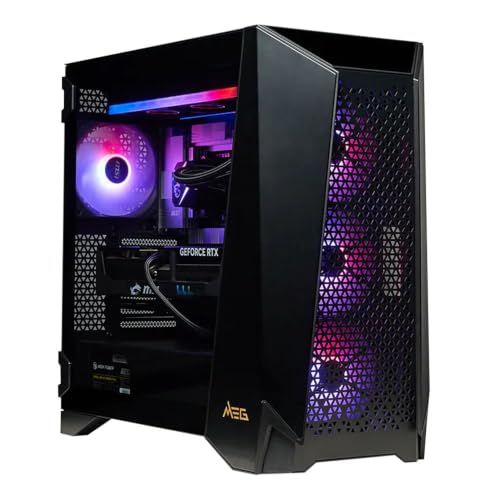

 CyberPowerPC Gaming PC
- System: Intel Core i7-14700F 2.1GHz 20 Cores |…
- Graphics: NVIDIA GeForce RTX 5060 Ti 8GB Graphics…
- Connectivity: 1 x USB-C 3.2 | 3 x…

As an Amazon Associate we earn from qualifying purchases at no extra cost to you.
What a Chipset Actually Does
The chipset is the motherboard’s traffic controller. The processor connects directly to the graphics slot, the main memory and often one fast storage slot; the chipset adds extra USB ports, more storage connections, networking options and additional PCI Express lanes. It does not change how fast games run on its own. What it changes is how many parts you can attach, whether you can overclock, and which processors the board accepts.
Current Platforms at a Glance
| Platform | Socket and CPUs | Memory | Positioning |
|---|---|---|---|
| Intel Z890 | LGA1851, Core Ultra 200S desktop chips | DDR5 | Enthusiast; supports CPU overclocking |
| Intel B860 and H810 | LGA1851 | DDR5 | Mainstream and budget; limited CPU overclocking |
| AMD X870E and X870 | AM5, Ryzen 7000, 8000G and 9000 series | DDR5 | High end; extra connectivity |
| AMD B850 | AM5 | DDR5 | Mainstream sweet spot for many builds |
| AMD B840 and A620 | AM5 | DDR5 | Entry level; fewer features |
Intel and AMD describe their lineups on their own product pages, and exact feature sets differ by motherboard model, so the board maker’s spec sheet is the final word on any individual board.
Key Differences That Affect Gamers
Upgrade path
AM5 has been used across several Ryzen generations, which lets builders swap in a newer processor without changing the board. AMD has said it plans to support the socket for a long period, though specific end dates should be read from AMD’s own announcements. Intel moved to LGA1851 for Core Ultra 200S, and reviewers have noted that Intel has used each socket for a limited number of generations, so ask whether a future chip will fit before counting on it.
Overclocking
On Intel, CPU multiplier overclocking is tied to unlocked K-series processors on Z-series boards, which makes Z890 the choice if you intend to tune the processor manually. On AMD, Precision Boost Overdrive is described by reviewers as available across the AM5 chipsets, so even B850 boards leave room for tuning. Memory overclocking, such as running EXPO or XMP profiles, is supported on most mid-range and high-end boards. Overclocking can void warranties and cause instability, so stay conservative.
PCI Express lanes and storage
Modern graphics cards use a x16 link, and recent platforms offer a PCIe 5.0 graphics slot on higher-end boards. AMD requires PCIe 5.0 on X870 and X870E for the graphics slot and a storage slot, while on B850 it is optional and depends on the board. Intel’s Z890 pairs a PCIe 5.0 graphics slot with many extra chipset lanes, which boards often use for more M.2 drive slots. For gaming today, reviewers generally report small differences between PCIe generations for graphics cards, so this matters mostly if you plan on many fast drives.
USB and networking
X870E boards typically include USB4 and WiFi 7 on many models, and Z890 boards often provide Thunderbolt 4 or Thunderbolt 5, depending on the model. These help if you move big files or use fast external storage but do little for frame rates.
Which Chipset Fits Which Buyer
| If you are… | Consider | Reason |
|---|---|---|
| Building a high-frame-rate gaming PC around an AMD X3D chip | B850 or X870 | Chip drives performance; B850 covers most needs |
| Wanting the most upgrade options later | AM5 board | Socket spans multiple CPU generations |
| Intending to overclock an Intel K chip | Z890 | Required for multiplier tuning |
| Wanting many M.2 drives and fast ports | Z890 or X870E | More lanes and connectivity |
| On a tight budget | B850, B840 or Intel B860 | Fewer extras, same gaming core |
| Mixing gaming with video work | Either; check ports and M.2 count | Workload decides the board |
What Matters More Than the Chipset
- The processor. Gaming results track the CPU, and reviewers regularly rank AMD X3D chips and top Intel Core Ultra chips against each other using their own tests.
- The graphics card. At higher resolutions it is the main driver of frame rates.
- Memory choice. Fast DDR5 with a proper profile enabled helps, as covered in motherboard manuals.
- Cooling and power delivery. A board with a stronger power stage keeps high-end processors stable.
- Firmware quality. Updates from the board maker affect stability, memory support and sometimes performance.
Common Mistakes When Choosing
- Paying for X870E to gain frame rates. The extra cost buys connectivity, not speed in games.
- Mixing up chipset and socket. The socket decides which CPU fits; the chipset decides features.
- Ignoring VRM and board layout. A bare-bones board paired with a power-hungry chip can limit it.
- Not checking memory support. Each board lists tested memory kits, and four-module setups may run slower.
- Buying older sockets. Previous generation boards may have cheaper prices but limited upgrade room and DDR4 or DDR5 differences depending on socket.
- Trusting a single blog. Cross-check claims with the maker’s pages and established review outlets.
A Simple Way to Decide
Start with the processor you want, based on independent gaming reviews. Then pick a chipset tier: B-series or equivalent if you want value, X870 or Z890 if you need more ports and M.2 slots or CPU overclocking. Finally, compare specific boards for power delivery, rear ports, WiFi, and the number of M.2 slots rather than relying on the chipset label alone.
Frequently Asked Questions
Does the chipset change FPS in games?
Very little by itself. Frame rates depend mainly on the CPU, GPU and memory. A better chipset adds features, not game speed.
Is B850 good enough for gaming?
Yes for most builders. It supports AM5 processors and DDR5 memory, and PCIe 5.0 for graphics on many models. The board maker’s spec sheet lists exactly what each model includes.
Do I need Z890 for an Intel gaming build?
Only if you want to overclock an unlocked CPU or need its extra connectivity. Mainstream chipsets such as B860 can run the same processors at stock speeds, with more limited tuning.
Which platform lasts longer?
AM5 has a record of supporting several CPU generations, which is why many reviewers see it as more flexible. Check each maker’s announcements for current plans.
Can I use PCIe 5.0 storage in gaming?
You can on supported boards, but reviewers generally report minimal gaming gains over PCIe 4.0 drives. Large file transfers benefit more.
Is Intel or AMD better for gaming overall?
It depends on the processor models you compare. Independent reviews of specific CPUs are a better guide than the brand label, and the chipset should follow your CPU choice.
FAQ
Does the chipset change FPS in games?
Is B850 good enough for gaming?
Do I need Z890 for an Intel gaming build?
Which platform lasts longer?
Can I use PCIe 5.0 storage in gaming?
Is Intel or AMD better for gaming overall?
More from Amazon
Programs that pair well with the guide above. Offers and eligibility are set by Amazon and may change.
Free shipping on eligible items, Prime Video and more. Eligible new members can start with a free trial.
Start a Prime free trialAd-free music streaming. Eligible new subscribers can start with a free trial.
Try Music Unlimited freeA Prime membership for ages 18-24 with a trial period. Eligibility is set by Amazon.
See Prime for Young AdultsAudiobooks and podcasts to listen to on the go. Eligible new members can start with a free trial.
Try Audible freeAs an Amazon Associate we earn from qualifying purchases.