Key takeaways
- Memory matters. Integrated graphics shares system memory, so two memory modules in dual channel can give noticeably higher graphics performance than one. Check the maker’s spec sheet to see whether the memory is removable or soldered.
- Heat is the limit. Small chassis can limit sustained clock speeds. Reviewers often report fan noise rising under gaming loads.
- External graphics. Some mini PCs offer OCuLink or USB4 for an external GPU dock. Check the exact model’s ports and the dock’s requirements. This path adds cost and complexity, and Beelink and other makers vary in what they support.
If you want a compact PC in 2026, Beelink is generally the easier route because it is actively developing and selling a wide range of mini PCs, while the Intel NUC brand now lives on as ASUS NUC after Intel stepped away from the business. Pick an ASUS NUC if you want a brand with a large company behind support and a more conservative design, and pick Beelink if you prefer more choices in processors and ports. Neither is a replacement for a full gaming tower.
Our top picks



As an Amazon Associate we earn from qualifying purchases at no extra cost to you.
What Happened to the Intel NUC
Intel announced in July 2023 that it would stop investing directly in its Next Unit of Computing line. PCWorld reports that Intel granted ASUS a non-exclusive license to the NUC designs, and ASUS formed a business unit, ASUS NUC BU, to handle manufacturing, sales, and support. So today, “Intel NUC” in practice refers to ASUS NUC products, which include models using Intel Core Ultra processors. Reviewers report that ASUS discontinued the modular, high-performance NUC Extreme series, and that availability of some ASUS NUC models can be patchy depending on region.
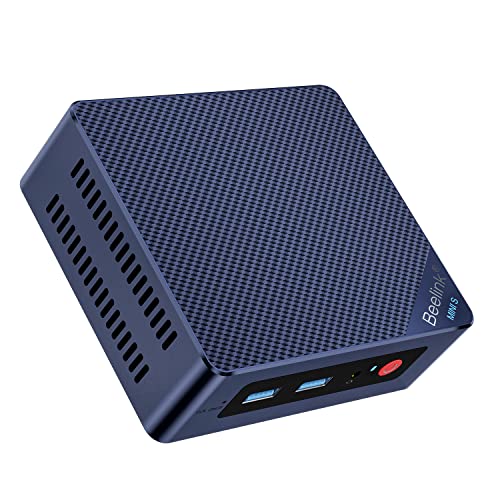
Beelink is a Chinese mini-PC maker that sells models using Intel and AMD processors. Its range runs from low-power Intel N-series machines through Ryzen-based units for general computing and light gaming. EveZone’s comparison of mini-PC brands describes ASUS as leading on brand backing, Beelink on spec per unit, and Minisforum as aimed at power users.
Comparison Table
| Factor | ASUS NUC (Intel NUC lineage) | Beelink |
|---|---|---|
| Maker status | Intel exited; ASUS licenses and builds NUC designs | Independent mini-PC maker |
| Processor options | Mostly Intel Core Ultra for the NUC Pro line, with some AMD options in ASUS mini PCs | Intel N-series and Core Ultra, AMD Ryzen families |
| Range of models | Smaller and more focused | Large, with many size and power tiers |
| Upgradeability | Many models allow RAM and SSD swaps; modular Extreme line is gone | Many models allow RAM and SSD swaps; some use soldered memory |
| Gaming ability | Integrated graphics on most; ROG-branded models offer more | Integrated Radeon graphics on Ryzen models; handles lighter games |
| Support and warranty | Backed by a major hardware maker | Varies by region and seller |
| Availability | Reviewers report uneven stock | Broadly available |
| Extras | Business-oriented features on Pro models | Ports such as USB4 and dual LAN on some models |
Gaming Capability
Neither product line is built to match a desktop with a dedicated RTX 50-series or Radeon RX 9000 graphics card. Mini PCs with integrated graphics can play older titles and many esports games at modest settings, and the stronger Ryzen units with higher-end Radeon integrated graphics can handle more. Specific performance depends on the processor, memory speed, and cooling.
- Memory matters. Integrated graphics shares system memory, so two memory modules in dual channel can give noticeably higher graphics performance than one. Check the maker’s spec sheet to see whether the memory is removable or soldered.
- Heat is the limit. Small chassis can limit sustained clock speeds. Reviewers often report fan noise rising under gaming loads.
- External graphics. Some mini PCs offer OCuLink or USB4 for an external GPU dock. Check the exact model’s ports and the dock’s requirements. This path adds cost and complexity, and Beelink and other makers vary in what they support.
Who Should Pick Which
Pick an ASUS NUC if
- You want a brand with a large manufacturer behind warranty and drivers.
- The machine will serve as an office, media, or small server PC where steady, conservative engineering counts.
- You are working in a business environment that prefers a known vendor.
Pick a Beelink if
- You want more variety in processors, from low-power N-series to Ryzen chips.
- You want a small PC for home theater, light gaming, retro emulation, or a home lab.
- You value port selection, such as multiple video outputs or dual Ethernet, on some models.
- You are comfortable checking which models are officially supported in your region.
Pick neither if
You want strong 1440p gaming. A small-form-factor desktop with a dedicated graphics card is a better fit, and a compact case with a mini-ITX motherboard can still be small.
Things to Check Before Buying Any Mini PC
- Is the RAM soldered or in SODIMM slots? Soldered memory cannot be upgraded.
- How many M.2 slots are there and what PCIe generation do they use?
- Does the model support the Wi-Fi standard you use? Some current models list Wi-Fi 6E or Wi-Fi 7.
- Which video outputs does it have, and what resolution and refresh rate does each support?
- What does the maker say about cooling and sustained power limits?
- Is a BIOS update or driver download available from the maker’s own support page?
- How long is the warranty, and who handles it in your country?
Opening a mini PC for upgrades means powering it down, unplugging the power adapter, and handling the components by their edges. Upgrading memory or storage may void the warranty on some models, so read the maker’s terms first.
Common Myths
- “Intel NUC is dead.” The Intel-run business ended, but ASUS continues to produce NUC products under license.
- “Beelink is the same quality as a major brand.” Reviewers describe a wide range of quality and support. Read independent reviews for the specific model.
- “A mini PC can replace a gaming desktop.” Only for lighter games. Cooling and power limits restrict sustained performance.
- “More cores always means faster gaming.” Graphics performance and memory speed often matter more on integrated graphics.
Practical Recommendation
If the goal is a small, quiet machine for browsing, office work, streaming media, and a few games, shortlist specific models from both brands and compare ports, memory configuration, and independent reviews rather than relying on brand reputation. When a model has a feature you need, such as dual Ethernet or an OCuLink port, that often settles the choice faster than comparing brands.
Frequently Asked Questions
Is the Intel NUC still made?
Intel stopped making NUC systems itself, but ASUS took over the business under license and continues to sell NUC-branded models. The modular NUC Extreme series was discontinued, according to reviewers.
Is Beelink a good alternative to the NUC?
Many reviewers consider Beelink a strong alternative because of its broad range and competitive specifications. Quality and support experience vary, so read model-specific reviews and the warranty terms for your region.
Can a Beelink mini PC run modern games?
Models with Ryzen processors and integrated Radeon graphics can run many games at lower settings and resolutions. Demanding new releases usually need reduced settings, and an external graphics dock or a desktop is the route for higher performance.
Can I upgrade the memory and storage?
On many models, yes, through SODIMM slots and M.2 slots. Some units use soldered memory, so confirm on the maker’s specification page before buying.
Do these mini PCs support Windows and Linux?
Most ship with Windows and also run Linux. Check the maker’s driver downloads for your chosen operating system.
Which is quieter?
It depends on the model. Low-power processors can run nearly silent, while Ryzen units with stronger chips may spin fans up under load. Independent noise measurements for the exact model are the best guide.