Key takeaways
- Isolated audio section: a physically separated area of the circuit board (sometimes shown as a lit line along the PCB) that keeps analog audio traces away from digital noise.
- Shielding: a metal cover or shield over the codec to reduce electromagnetic interference.
- Audio capacitors: makers list branded capacitors in the audio path as a selling point; their real effect is modest compared with layout.
- Headphone amplifier: some boards add a dedicated amplifier to drive higher-impedance headphones. Check the manual for the supported impedance range.
- Front-panel connection: the case’s front audio cable plugs into a motherboard header. A poor or loose cable can add hiss or cut the channel.
A motherboard “audio chipset” is really a small audio codec chip, most often made by Realtek, that turns digital game audio into the analog signal sent to your headphones and takes microphone input back in. The codec model (for example ALC897, ALC1220 or ALC4080) tells you the class of the audio hardware, but the board design around it, meaning shielding, power filtering and output stage, matters at least as much as the model number.
Our top picks

As an Amazon Associate we earn from qualifying purchases at no extra cost to you.
Short Answer: What the Audio Chipset Does
Your CPU and the platform chipset handle the data side. Games produce digital sound, Windows mixes it, and the data travels to the audio codec. Inside the codec, a digital-to-analog converter (DAC) creates the signal for the rear and front jacks, while an analog-to-digital converter (ADC) handles the microphone. Because this conversion happens on a crowded board full of high-speed electronics, the quality of the layout around the codec decides how clean the result is.
Most buyers searching for this term want to know three things: which codec their board uses, whether it is “good enough,” and whether a separate sound card or USB DAC is worth adding. The sections below answer each in turn.
Codec vs Chipset: Clearing Up the Terms
Two different parts get confused with each other. The platform chipset (such as an Intel Z-series or AMD B-series part) manages storage, USB and expansion lanes. The audio codec is a separate, much smaller chip placed near the rear I/O panel. Board makers often advertise the codec name on the box and in the specification list, which is why people call it the audio chipset.
Historically many onboard codecs connected through the High Definition Audio link provided by the platform chipset. Some newer boards use a codec that connects over USB instead, which is how the Realtek ALC4080 is generally described by board makers. Either way, Windows treats the result as an ordinary audio device and uses a Realtek-style driver or the generic Windows driver to control it.
Common Realtek Codec Tiers
Board makers list codec names in their spec sheets, and these tiers are a rough guide. Individual vendors customize the surrounding hardware, so two boards with the same codec name can sound different.
| Codec family | Typical board class | What it usually offers | Limits |
|---|---|---|---|
| ALC897 and similar | Budget boards | Basic stereo and multichannel output, microphone input, enough for everyday gaming | Minimal extra filtering; fewer premium parts nearby |
| ALC1200 and ALC1220 families | Mid-range and enthusiast boards | Higher-grade converters per the maker’s specification, support for higher-impedance headphones on some boards | Output quality still depends on board layout and amplifier |
| ALC4080 (USB-connected) | Newer mid-range to premium boards | Described by board makers as a USB-based codec with high-resolution playback support | Needs correct driver; some features vary by board vendor |
| Vendor-tuned variants (marketed under brand names) | Premium boards | Custom tuning, added headphone amplifiers, premium capacitors, isolated audio layers | Marketing names are not a standard; read the actual component list |
Realtek publishes its codec families on its own product pages, and motherboard makers such as ASUS, MSI and Gigabyte describe their own audio designs in each board’s manual and product page. Treat those pages as the authoritative source for any specific board.
What Else on the Board Affects Sound
Reviewers who cover motherboard audio often point to the same design features that separate a clean implementation from a noisy one:
- Isolated audio section: a physically separated area of the circuit board (sometimes shown as a lit line along the PCB) that keeps analog audio traces away from digital noise.
- Shielding: a metal cover or shield over the codec to reduce electromagnetic interference.
- Audio capacitors: makers list branded capacitors in the audio path as a selling point; their real effect is modest compared with layout.
- Headphone amplifier: some boards add a dedicated amplifier to drive higher-impedance headphones. Check the manual for the supported impedance range.
- Front-panel connection: the case’s front audio cable plugs into a motherboard header. A poor or loose cable can add hiss or cut the channel.
Is Onboard Audio Good Enough for Gaming?
For most gamers using a typical gaming headset or a pair of desktop speakers, yes. Modern onboard audio is adequate for game sound, voice chat and streaming. Wired headsets with their own USB sound card bypass the motherboard codec entirely, so the board’s audio matters only if you plug into the 3.5 mm jacks.
Onboard audio becomes a weak point in a few situations: audible static that changes with GPU load or mouse movement, difficulty driving demanding headphones, or a desire for balanced outputs and extra inputs. In those cases an external USB DAC and amplifier is the more common fix than a PCIe sound card, because it sits away from the noisy interior of the case.
Decision Table: What Should You Do?
| Your situation | Reasonable choice |
|---|---|
| Using a USB or wireless gaming headset | Ignore the board codec; it is not in the signal path |
| Using 3.5 mm earbuds or a light headset | Any modern onboard codec is fine |
| Using higher-impedance studio headphones | Look for a board with a stated headphone amplifier, or add an external DAC and amp |
| Hearing buzz or static that follows GPU or mouse activity | Try the rear jack, a different USB port, or an external USB DAC |
| Buying a new board mainly for audio | Compare the full audio component list in the manual, not just the codec name |
Common Mistakes
- Judging by codec name alone. A mid-range codec on a well-laid-out board can outperform a higher-tier codec on a crowded one.
- Paying extra for the “audio” tier on the box. Marketing labels differ between brands and are not an industry standard.
- Using the front panel jack with a loose or poorly shielded cable. Try the rear jack first when troubleshooting noise.
- Forgetting the driver. Missing or outdated audio drivers cause missing jacks, wrong channel layouts and absent microphone input. Use the driver from the board maker’s support page.
- Cranking software enhancements. Equalizers and virtual surround add processing; switch them off while diagnosing noise or distortion.
- Expecting a codec to fix a bad headset. Speaker drivers and tuning in the headset set most of the sound character.
How to Find Your Board’s Audio Codec
- Read the specification page for your exact board model on the maker’s site; the audio line lists the codec.
- Open Device Manager in Windows and expand “Sound, video and game controllers” to see the driver name in use.
- If you use the Realtek control software, its device name often identifies the codec family.
- Check the board manual for jack colors, supported channel layouts and any headphone amplifier notes.
If the listing is ambiguous, the board’s manual is the safest reference. Do not rely on third-party spec aggregators that may mix up revisions.
Surround and Software Features
Many boards bundle software for virtual surround, equalization and noise reduction on the microphone. These features are applied in drivers or in Windows, not by the codec hardware alone. Windows also offers its own spatial audio options. If you play competitive shooters, keep processing simple and make sure only one spatial or surround effect is active, since stacking several can muddy positional cues.
Alternatives to Onboard Audio
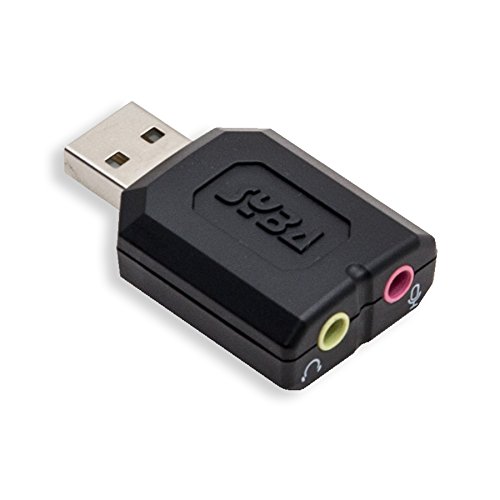
- External USB DAC and amplifier: keeps conversion away from the PC’s electrical noise and often adds more power for demanding headphones.
- USB gaming headset or headset base station: carries its own converter, so board audio is bypassed.
- Internal PCIe sound card: still sold, but offers less benefit for most users than a modern external DAC; consider it only if you need specific multichannel or input features.
Frequently Asked Questions
Is Realtek the only maker of motherboard audio codecs?
Realtek supplies the large majority of codecs seen on consumer motherboards, but it is not the only option. Some premium boards pair a Realtek codec with separate DAC or amplifier parts from other manufacturers. The board’s specification page lists exactly what is used.
Does a better audio codec improve gaming performance?
No, the codec does not change frame rates in any meaningful way. It affects sound quality, headphone drive strength and noise. Positional awareness in games depends more on your headset and the game’s audio settings than on the codec model.
Why do I hear static when I move my mouse or when the GPU is busy?
A common cause is electrical interference picked up by the analog audio path, often through the front panel cable or a shared ground. Switching to the rear jack, changing the cable routing, or using a USB DAC are the usual remedies. If the noise persists across devices, contact the board maker.
Do I need a sound card if my board has a premium audio codec?
Usually not. A well-designed premium board is fine for typical gaming headsets. Add an external DAC only if you hear noise or own headphones that your board cannot drive properly.
Is the ALC4080 different from the ALC1220?
Board makers describe the ALC4080 as a USB-connected codec, while the ALC1220 uses the traditional High Definition Audio connection. Drivers and some settings therefore differ. Which one sounds better depends on the board design rather than the codec label alone.
Will my headset’s microphone work through the motherboard?
If the headset has a single combined 3.5 mm plug, the board needs a matching combo jack or an adapter and a driver that allows the jack to be set to headset mode. Separate pink microphone and green headphone plugs work with the standard rear jacks. A USB headset avoids the issue entirely.
FAQ
Is Onboard Audio Good Enough for Gaming?
Is Realtek the only maker of motherboard audio codecs?
Does a better audio codec improve gaming performance?
Why do I hear static when I move my mouse or when the GPU is busy?
Do I need a sound card if my board has a premium audio codec?
Is the ALC4080 different from the ALC1220?
Will my headset’s microphone work through the motherboard?
More from Amazon
Programs that pair well with the guide above. Offers and eligibility are set by Amazon and may change.
Free shipping on eligible items, Prime Video and more. Eligible new members can start with a free trial.
Start a Prime free trialAd-free music streaming. Eligible new subscribers can start with a free trial.
Try Music Unlimited freeA Prime membership for ages 18-24 with a trial period. Eligibility is set by Amazon.
See Prime for Young AdultsAudiobooks and podcasts to listen to on the go. Eligible new members can start with a free trial.
Try Audible freeAs an Amazon Associate we earn from qualifying purchases.