Key takeaways
- Compressed Air Can: Essential for blowing dust out of tight spaces. Look for cans specifically designed for electronics to avoid propellant spray.
- Microfiber Cloths: Soft, lint-free cloths are perfect for wiping down surfaces without scratching. Have at least two on hand.
- Soft-Bristled Brush: A clean paintbrush or a specialized anti-static brush can help dislodge stubborn dust from fan blades and heatsinks.
- Isopropyl Alcohol (90%+): For stubborn grime on fan blades or filter frames, a small amount on a microfiber cloth can be effective. Ensure it evaporates completely before reassembly.
- Screwdrivers: You’ll likely need a Phillips head screwdriver to remove your PC case panels and potentially fan screws. Magnetic tips are a lifesaver.
- Anti-Static Wrist Strap (Recommended): While not strictly mandatory for a simple cleaning, it’s good practice to prevent electrostatic discharge (ESD) from damaging sensitive components.
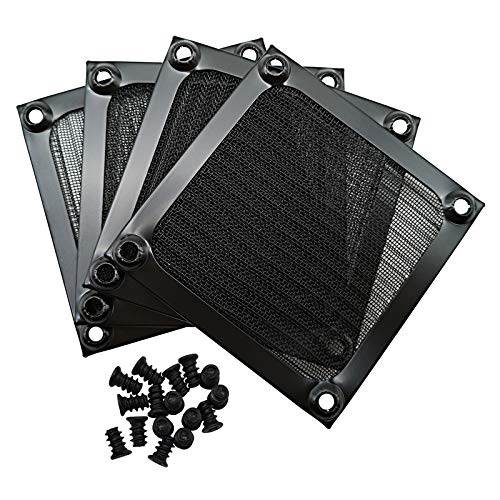
- Dust Filters: If you don’t already have them, now is the perfect time to invest. Options like the ThreeBulls 120mm and 140mm filters, or the more versatile MoKo DIY mesh filters, can significantly reduce future dust buildup. Magnetic filters, such as the Dust Filter PC 120mm and MoKo 400x300mm variants, are particularly easy to install and clean.
Keeping your gaming rig pristine isn’t just about aesthetics; it’s crucial for performance and longevity. Over time, dust and grime accumulate, clogging your PC fans and filters, restricting airflow, and forcing your components to work harder and hotter. This can lead to thermal throttling, reduced FPS, and even premature hardware failure. Fortunately, a thorough cleaning is a straightforward process that most gamers can tackle themselves. This guide will walk you through everything you need to know to get your PC running cool and clean.
This year, with components pushing the boundaries of power and heat, maintaining optimal cooling is more vital than ever. We’ll cover the tools you’ll need, the step-by-step cleaning process for both fans and filters, and some essential tips to keep your PC in top condition. Let’s get your rig breathing easy again.
Our top picks


![MoKo 400x300mm DIY PC Case Dust Mesh Filter, [4 Pack] PVC Dustproof Magnetic Dust Filter Cover, PC Mesh Grill with Magnetic Frame Strip Computer Cooler Fan Dust Filter for Computer PC Case, Black](https://m.media-amazon.com/images/I/51YgJYNN2-L._SL500_.jpg)

As an Amazon Associate we earn from qualifying purchases at no extra cost to you. Ratings are shown as listed on Amazon.
⚡ Save on Your Next PC — Amazon Prime
Prime members get fast free shipping on the systems above, plus early access to Prime Day & Black Friday PC deals. New members get a 30-day free trial.
Watch: How to Clean Your PC Fans and Filters — Video Review
Gather Your Arsenal: Tools for the Job
Before you dive in, ensure you have the right equipment. This isn’t a job for a feather duster or a vacuum cleaner directly on your components. You’ll need:
- Compressed Air Can: Essential for blowing dust out of tight spaces. Look for cans specifically designed for electronics to avoid propellant spray.
- Microfiber Cloths: Soft, lint-free cloths are perfect for wiping down surfaces without scratching. Have at least two on hand.
- Soft-Bristled Brush: A clean paintbrush or a specialized anti-static brush can help dislodge stubborn dust from fan blades and heatsinks.
- Isopropyl Alcohol (90%+): For stubborn grime on fan blades or filter frames, a small amount on a microfiber cloth can be effective. Ensure it evaporates completely before reassembly.
- Screwdrivers: You’ll likely need a Phillips head screwdriver to remove your PC case panels and potentially fan screws. Magnetic tips are a lifesaver.
- Anti-Static Wrist Strap (Recommended): While not strictly mandatory for a simple cleaning, it’s good practice to prevent electrostatic discharge (ESD) from damaging sensitive components.
- Dust Filters: If you don’t already have them, now is the perfect time to invest. Options like the ThreeBulls 120mm and 140mm filters, or the more versatile MoKo DIY mesh filters, can significantly reduce future dust buildup. Magnetic filters, such as the Dust Filter PC 120mm and MoKo 400x300mm variants, are particularly easy to install and clean.
Detoxifying Your PC Fans
Your PC’s fans are the workhorses of its cooling system. Over time, they gather dust on their blades, bearings, and shrouds, hindering their ability to move air efficiently. Here’s how to clean them:
- Power Down and Disconnect: The absolute first step is to shut down your PC completely and unplug the power cord from the wall outlet. For added safety, press and hold the power button for about 10 seconds to discharge any residual power.
- Open the Case: Remove your PC case side panel. Refer to your case manual if you’re unsure how.
- Locate the Fans: Identify all the fans within your system – CPU cooler fan, case intake and exhaust fans, and GPU fans (if accessible).
- Hold the Fan Blades: This is crucial. Before spraying compressed air, gently hold the fan blades with your finger or a soft object. Spinning the fan too fast with compressed air can generate voltage that can damage the motherboard.
- Blast Away Dust: Use short, controlled bursts of compressed air to blow dust off the fan blades, motor housing, and surrounding areas. Work from the center outwards.
- Gentle Wiping: For any stubborn dust or residue, lightly dampen a microfiber cloth with isopropyl alcohol and gently wipe the fan blades. Ensure they are completely dry before proceeding.
- Clean the Heatsinks: Don’t forget the heatsinks, especially the CPU cooler’s fins. Dust buildup here is a major impediment to heat dissipation. Use compressed air and a brush to clear out the fins.
Filter Frenzy: Cleaning Your Dust Filters
Dust filters are your first line of defense against airborne particles. They trap the dust before it reaches your sensitive components. Keeping them clean ensures they can do their job effectively without becoming a blockage themselves.
- Locate Your Filters: Most modern PC cases have filters on the front intake, bottom intake (for the PSU and/or additional fans), and sometimes on top exhaust vents.
- Removal: Depending on your case and filter type, they might be snap-on, slide-out, or held in place by magnets. Gently remove them. If you have DIY mesh filters like the MoKo 400x300mm variants, they might be attached directly to fan mounts or magnetically to the case edge.
- Cleaning Methods:
- Washing: For most mesh filters (like those from ThreeBulls or IMSurQltyPrise), the easiest method is to rinse them under lukewarm water. You can use a soft brush or your fingers to gently dislodge stubborn dust.
- Vacuuming: For less dusty filters, a gentle vacuum with a brush attachment can work. Be careful not to pull or damage the mesh.
- Wiping: For rigid frames or stubborn spots, a damp microfiber cloth with a little isopropyl alcohol can be used.
- Thorough Drying: This is critical. Ensure the filters are completely dry before reinstallation. Air drying in a well-ventilated area is usually sufficient. Any residual moisture can attract more dust or potentially cause corrosion.
- Reinstallation: Once dry, reattach your filters securely. Ensure they are oriented correctly for airflow.
Advanced Techniques and Stubborn Grime
Sometimes, you’ll encounter more than just a layer of dust. Here’s how to handle tougher situations:
- Fan Bearing Lubrication (Advanced Users): If a fan is making grinding noises, its bearing might be dry. For some fans, you can carefully remove a sticker on the hub, expose a small rubber plug, and apply a drop of specialized bearing lubricant. This is an advanced step and not recommended for beginners.
- Residue on Fan Blades: If dust has caked on and is difficult to remove, a slightly stronger solution of isopropyl alcohol and a gentle scrub with a soft brush or cloth is usually effective. Always allow ample drying time.
- PSU Fan: Cleaning the PSU fan requires extra caution as opening the PSU itself is dangerous. For most users, the best approach is to use compressed air through the PSU vents. If you suspect significant internal dust buildup, consider professional cleaning or replacement.
Tips for a Dust-Free Future
- Invest in Dust Filters: As mentioned, filters are your best friend. Magnetic filters like the Dust Filter PC 120mm or MoKo 400x300mm variants are easy to install and remove for cleaning.
- Regular Maintenance: Aim to clean your fans and filters at least every 3-6 months, depending on your environment. More frequent cleaning might be necessary in dusty areas.
- Positive Air Pressure: Configure your case fans so you have slightly more intake than exhaust. This creates positive pressure, pushing air out through any un-filtered gaps and reducing dust intake.
- Location, Location, Location: Place your PC in a cleaner environment. Avoid placing it directly on the floor, especially carpets, where it can easily suck up dust and pet hair.
Frequently Asked Questions
How often should I clean my PC fans and filters?
For most users, a good rule of thumb is every 3 to 6 months. If you live in a particularly dusty area, have pets that shed a lot, or notice a significant buildup of dust faster than that, increase the frequency to every 1 to 3 months.
Can I use a regular vacuum cleaner?
It’s strongly advised against using a regular vacuum cleaner directly on your PC components or fans. The suction can be too powerful, potentially damaging delicate parts. The brush attachment can also generate static electricity. Compressed air is the safest and most effective method for fan cleaning.
My fans are still noisy after cleaning. What should I do?
If cleaning doesn’t resolve fan noise, the fan bearings might be worn out. You may need to replace the fan. For very specific cases, advanced users might attempt bearing lubrication, but replacement is often the more straightforward solution.
Are dust filters really worth it?
Absolutely. Investing in quality dust filters like the ThreeBulls or MoKo options can significantly reduce the amount of dust entering your system, leading to less frequent deep cleans, better component temperatures, and potentially a longer lifespan for your hardware.
Conclusion
A clean PC is a happy PC, and a happy PC performs better. By following these steps, you can effectively clean your PC fans and filters, ensuring optimal airflow and cooling. Regularly scheduled maintenance will not only keep your rig looking its best but also protect your valuable gaming hardware from the detrimental effects of dust and heat. So, grab your tools, get to work, and enjoy smoother, cooler gaming sessions!