Shopping for a new keyboard often means choosing between a full-size board packed with keys you rarely touch or a compact layout that actually fits your desk and your mouse hand. A tenkeyless (TKL) keyboard splits the difference: you keep the full function row and arrow keys but drop the number pad, freeing up space for wider mouse swings without sacrificing the keys most people actually use.
This guide breaks down what separates a good TKL board from a great one, then reviews six popular options ranging from budget membrane boards to premium hot-swappable mechanical keyboards. Whether you’re building a competitive gaming setup or just want a cleaner desk, you’ll find a solid pick below along with answers to the most common questions buyers have before checking out.
Our top picks
 SteelSeries Apex Pro TKL Gen 3 Gaming
- Apex Pro is the only line of keyboards…
- Stop fast, start your next move faster
- Snaps to your latest key press to strafe…
 SteelSeries Apex 3 TKL RGB Gaming Keyboard
- The compact tenkeyless design is the most popular…
- Our whisper quiet gaming switches with anti-ghosting technology…
- Designed with IP32 Water & Dust Resistant for…
 Logitech G413 TKL SE Mechanical Gaming Keyboard
- Take your gaming skills to the next level:…
- PBT keycaps: Heat- and wear-resistant, this computer gaming…
- Tactile mechanical switches: Uncompromising performance is always within…
| Product | Key specs | |
|---|---|---|
| SteelSeries Apex Pro TKL Gen 3 Gaming | Apex Pro is the only line of keyboards… Stop fast, start your next move faster Snaps to your latest key press to strafe… | Check price |
| SteelSeries Apex 3 TKL RGB Gaming Keyboard | The compact tenkeyless design is the most popular… Our whisper quiet gaming switches with anti-ghosting technology… Designed with IP32 Water & Dust Resistant for… | Check price |
| Logitech G413 TKL SE Mechanical Gaming Keyboard | Take your gaming skills to the next level:… PBT keycaps: Heat- and wear-resistant, this computer gaming… Tactile mechanical switches: Uncompromising performance is always within… | Check price |
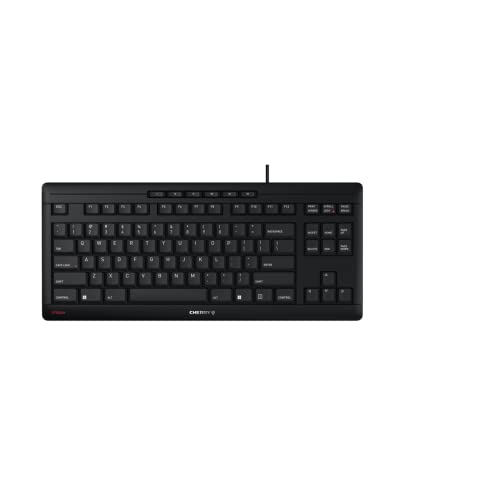 Cherry Stream Wired Keyboard Without Number Pad Cherry Stream Wired Keyboard Without Number Pad | High-quality wired keyboard without numeric keypad: Flat, reliable,… Space-saving design: Without the number pad, mouse and… Type faster and get more done: CHERRY SX… | Check price |
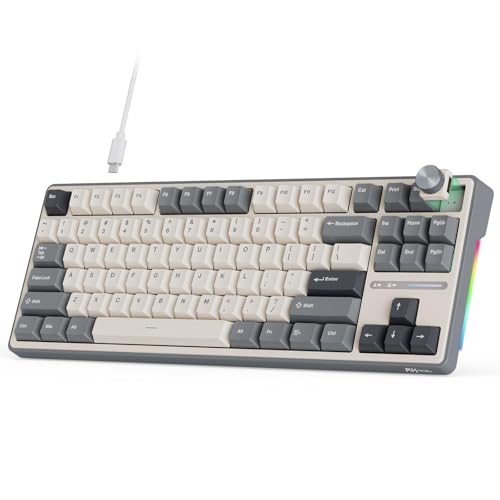 RK ROYAL KLUDGE R87 Pro Wired Mechanical RK ROYAL KLUDGE R87 Pro Wired Mechanical | Multi-function Programmable Knob: The CNC metal knob on… 75 Percent Mechanical Keyboard: R87 Pro wired keyboard… Hot Swappable Custom Keyboard: RK R87 Pro creamy… | Check price |
 Corsair K55 CORE TKL RGB Gaming Keyboard Corsair K55 CORE TKL RGB Gaming Keyboard | More Room to Make Big Plays: A compact,… Eight Zone RGB Backlighting: Create personalized lighting as… 300ml Spill Resistance: K55 CORE TKL is built… | Check price |
 Keychron K8 Ultra 8K Wireless Mechanical Keyboard Keychron K8 Ultra 8K Wireless Mechanical Keyboard | 8000Hz Polling Rate for Fast Response 80% TKL Layout for Work and Gaming Triple Connectivity with Long Battery Life | Check price |
 SteelSeries Apex Pro TKL Gen 3 Gaming SteelSeries Apex Pro TKL Gen 3 Gaming | Apex Pro is the only line of keyboards… Stop fast, start your next move faster Snaps to your latest key press to strafe… | Check price |
As an Amazon Associate we earn from qualifying purchases at no extra cost to you.
🎮 Get More From Your Setup — Free
Prime Gaming gives you free PC games every month, in-game loot, and a free Twitch channel sub — plus fast free shipping on all the gear above. New members get a 30-day free trial.
Watch: Best Tkl Keyboard: Top Picks Reviewed — Video Review
How to Choose a Tkl Keyboard
- Switch Type: Mechanical switches (linear, tactile, or magnetic) offer faster response and better feel for gaming, while membrane or scissor switches prioritize quiet typing and lower cost.
- Actuation and Polling: Look for adjustable actuation points or rapid trigger features if you play competitive shooters, and a high polling rate (1000Hz or better) for minimal input lag.
- Build and Mounting: Gasket-mounted or hot-swappable boards feel more premium and let you customize switches later, while budget boards typically use fixed plastic switches.
- RGB and Extra Features: Per-key or zone-based RGB, OLED displays, and dedicated media controls add convenience but usually come at a higher price point.
- Connectivity and Compatibility: Check for USB-C versus USB-A, cross-platform support (Windows/macOS), and cable length if your setup requires reaching a PC under a desk.
The Best Tkl Keyboards Reviewed
SteelSeries Apex Pro TKL Gen 3
The Apex Pro TKL Gen 3 uses OmniPoint 3.0 analog magnetic switches with adjustable actuation, rapid trigger, and SOCD cleanup built into quick presets, making it one of the most tunable boards available for competitive play. The OLED display and PBT keycaps round out a premium package that justifies its position at the top of the lineup.
SteelSeries Apex 3 TKL
The Apex 3 TKL delivers whisper-quiet gaming switches and IP32 water/dust resistance at a fraction of the Apex Pro’s price, making it a practical choice for everyday gaming and typing. Eight-zone RGB and solid anti-ghosting performance make it a well-rounded budget-friendly option.
Logitech G413 TKL SE
The Logitech G413 TKL SE keeps things simple with reliable tactile switches, anti-ghosting, and a compact aluminum-alloy chassis that feels sturdier than its price suggests. It’s a dependable pick for anyone who wants clean cross-platform compatibility without RGB distractions.
Cherry Stream TKL
The Cherry Stream TKL trades mechanical switches for quiet SX scissor switches, resulting in a slim, office-friendly board with a distinct typing feel. It’s best suited to buyers who prioritize a low-profile design and near-silent operation over gaming-specific features.
RK ROYAL KLUDGE R87 Pro
The R87 Pro stands out with a gasket-mounted 75% TKL layout, hot-swappable sockets, linear creamy switches, and full QMK/VIA support for deep customization. It’s the best option here for enthusiasts who want a premium typing feel and the flexibility to tweak switches and keymaps down the line.
Frequently Asked Questions
What does TKL mean on a keyboard?
TKL stands for “tenkeyless,” meaning the keyboard omits the numeric keypad found on full-size boards while keeping the main alphanumeric keys, function row, and arrow keys intact.
Is a TKL keyboard good for gaming?
Yes, many competitive gamers prefer TKL layouts because the missing number pad gives your mouse hand more room to move, which is especially useful in fast-paced FPS titles.
Are hot-swappable keyboards worth it?
Hot-swappable boards like the RK ROYAL KLUDGE R87 Pro let you change switches without soldering, making them worth the investment if you want to experiment with different feels or upgrade later without buying a new keyboard.
Do I need RGB lighting on a TKL keyboard?
RGB lighting is purely cosmetic and doesn’t affect performance, so it’s worth prioritizing switch quality and build first, then choosing RGB as a bonus if your budget allows.
Final Thoughts
For most buyers, the SteelSeries Apex 3 TKL offers the best balance of value and gaming performance, while the SteelSeries Apex Pro TKL Gen 3 is the clear choice for serious competitive players who want top-tier customization. If you’d rather prioritize typing feel and long-term upgradability, the RK ROYAL KLUDGE R87 Pro is a standout pick.