
Key takeaways
- Port count and type: Match the hub to your peripherals—streamers using capture cards and VR base stations should prioritize at least two USB-A ports and one USB-C for modern controllers.
- Weighted base stability: A stand must support a 300-gram-plus headset without tipping when you bump the desk mid-stream; look for rubberized feet and a low center of gravity.
- RGB control and brightness: If your monitors and capture setup already flood the room with color, choose a stand with dimmable or static lighting modes to avoid distraction on camera.
- Cable routing and extension length: A short tether limits placement; aim for at least a 1.2-meter extension cord so the hub reaches your PC’s rear I/O without a daisy chain of adapters.
- Footprint versus desk space: Measure the area beside your monitor arm—compact hook-style holders suit narrow desks, while wider RGB bases need at least 15 cm of clearance.
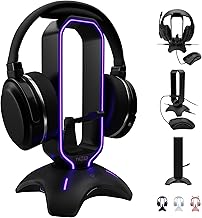
The COZOO RGB Headphone Stand with dual USB 2.0 ports is our best overall pick for streaming desks, while the KAFRI RGB Headphone Stand earns runner-up honors for its reliable single-port hub at a lower price. Both consolidate cable management, headset storage, and peripheral charging into a single footprint—exactly what a cluttered capture-card-and-monitor setup demands.
Streamers juggling VR headsets, capture cards, and multiple controllers quickly run out of desk real estate and USB lanes. This guide cuts through the noise by evaluating six popular headset stands with integrated USB hubs, focusing on port selection, RGB quality, build stability, and how well each fits a multi-monitor streaming workflow.
Our top picks




As an Amazon Associate we earn from qualifying purchases at no extra cost to you. Ratings are shown as listed on Amazon.
🛒 Best Price Today on Amazon
Prime members get fast, free shipping on everything above, plus member-only deals. New members get a 30-day free trial — cancel anytime.
Quick Comparison
| Product | Best For | Standout Feature | Rating |
|---|---|---|---|
| COZOO RGB Headphone Stand | All-around streaming desks | 2 USB 2.0 extension ports with RGB base | 4.5/5 |
| KAFRI RGB Headphone Stand | Budget-conscious gamers | Lightweight hub with extension cord | 4.4/5 |
| Tilted Nation Gaming Headset Stand | Premium setup aesthetics | Built-in mouse bungee plus USB hub | 4.6/5 |
| cozoo Desk Headphone Holder Hook | Multi-device cable organization | 2 USB-A and 1 USB-C with bag/watch hooks | 4.4/5 |
| cozoo Headphone Stand with Charger | Power-hungry streaming rigs | 3 USB ports plus 2 AC outlets | 4.5/5 |
How to Choose a/an Headset Stands with USB Hubs for Streaming Desks
- Port count and type: Match the hub to your peripherals—streamers using capture cards and VR base stations should prioritize at least two USB-A ports and one USB-C for modern controllers.
- Weighted base stability: A stand must support a 300-gram-plus headset without tipping when you bump the desk mid-stream; look for rubberized feet and a low center of gravity.
- RGB control and brightness: If your monitors and capture setup already flood the room with color, choose a stand with dimmable or static lighting modes to avoid distraction on camera.
- Cable routing and extension length: A short tether limits placement; aim for at least a 1.2-meter extension cord so the hub reaches your PC’s rear I/O without a daisy chain of adapters.
- Footprint versus desk space: Measure the area beside your monitor arm—compact hook-style holders suit narrow desks, while wider RGB bases need at least 15 cm of clearance.
The Best Headset Stands with USB Hubs for Streaming Deskss Reviewed
Best Overall: COZOO RGB Headphone Stand
With two USB 2.0 extension ports and a vivid RGB ring, this COZOO stand handles the headset-plus-controller charging duo most streamers need without adding another hub to the desk. Its weighted base keeps a heavy VR-ready headset stable even during animated commentary segments.
Best Budget: KAFRI RGB Headphone Stand
The KAFRI delivers a functional single-port USB 2.0 hub and full RGB lighting at a price that suits first-time streamers still building out their capture-card chain. It is light enough to reposition between recording sessions yet sturdy enough for daily use.
Best Premium: Tilted Nation Gaming Headset Stand
Streamers who want a clean, on-camera aesthetic will appreciate the integrated mouse bungee and tidy USB hub that eliminate two separate accessories in one sculpted unit. The build quality and cable management justify the higher cost for dedicated content creators.
Best for Multi-Device Charging: cozoo Desk Headphone Holder Hook
If your desk hosts a VR headset, smartwatch, and cable bag alongside your gaming headphones, this cozoo hook-style organizer with two USB-A and one USB-C port keeps everything within arm’s reach. Its compact clamp design preserves precious monitor-adjacent space.
Best for Power-Hungry Streaming Setups: cozoo Headphone Stand with Charger
Featuring three USB ports (including USB-C) and two AC outlets, this stand is built for streamers powering a ring light, phone, and controller simultaneously without hunting for a free wall socket. It pairs naturally with multi-monitor and dual-capture-card rigs.
Frequently Asked Questions
Do USB hubs on headset stands affect capture card performance?
Most stands use USB 2.0 pass-through suitable for controllers and charging, not high-bandwidth video. Route your capture card directly to a motherboard USB 3.0 port and reserve the stand’s hub for low-speed peripherals.
Will RGB lighting interfere with my webcam or lighting setup?
At typical desk distances the glow is minimal, but if you shoot with a shallow depth of field, choose a stand with a static or off mode to prevent color shifts in your background.
Can these stands support heavy VR headsets like the Valve Index?
Weighted-base models such as the COZOO and Tilted Nation stands handle headsets up to roughly 800 grams. For the Index’s 809-gram weight, verify the stand’s rated capacity and ensure the hook width accommodates the wider strap.
Is a USB-C port worth prioritizing over USB-A?
If you charge a modern controller, phone, or wireless earbuds via USB-C, one Type-C port future-proofs your setup. Otherwise, dual USB-A ports cover most legacy peripherals at a lower cost.
Final Thoughts
For most streaming desks, the COZOO RGB Headphone Stand strikes the best balance of port selection, stability, and visual polish. Budget-focused builders should grab the KAFRI RGB stand, while power users running multiple capture devices will benefit from the cozoo Headphone Stand with built-in AC outlets. Whichever you choose, consolidating headset storage and USB connectivity into one stand frees valuable desk space for your monitors and VR play area.





