
Key takeaways
- Connectivity options: Prioritize soundbars with USB-C, optical, or ARC inputs so you can tap directly into your capture card or PC audio output without introducing latency or extra DACs into your signal chain.
- Frequency response and driver quality: Full-range drivers or multi-driver configurations reproduce footstep transients, weapon reports, and voice chat with the accuracy you need to monitor a live mix in real time.
- Size and placement: Measure the gap beneath your monitor; compact bars under 24 inches fit most 27-inch displays, while wider units suit dual-monitor or ultrawide streaming desks.
- EQ and game-specific modes: Built-in equalizer presets or dedicated game modes flatten the response curve so you hear what your viewers hear rather than a bass-boosted consumer tuning.
- Bluetooth version and latency: If you plan to route audio wirelessly, look for Bluetooth 5.0 or higher to keep latency under 40 ms and avoid noticeable lip-sync drift on stream.
What's inside
For monitoring game audio while streaming, the Razer Leviathan V2 X is our best overall pick thanks to its full-range drivers and USB-C plug-and-play simplicity, while the Samsung S60D earns the runner-up spot for streamers who want wireless Dolby Atmos and a dedicated Game Mode Pro.
Most streamers quickly discover that headset fatigue is real and that built-in monitor speakers simply cannot reproduce the directional cues, low-end impact, and vocal clarity needed to mix a broadcast in real time. A dedicated soundbar sits neatly beneath your capture setup, keeps your ears free for long sessions, and lets you hear exactly what your audience hears. In this guide we break down five standout soundbars spanning budget to premium tiers, explain what specs matter most for a streaming workflow, and answer the questions buyers ask most before hitting “Add to Cart.”
As an Amazon Associate we earn from qualifying purchases.




🛒 Best Price Today on Amazon
Prime members get fast, free shipping on everything above, plus member-only deals. New members get a 30-day free trial — cancel anytime.
Quick Comparison
| Product | Best For | Standout Feature | Rating |
|---|---|---|---|
| Razer Leviathan V2 X | PC streamers wanting compact, accurate monitoring | Full-range drivers with Chroma RGB sync | 4.6 / 5 |
| Saiyin 11.7-inch Sound Bar | Budget-conscious streamers with limited desk space | 48W peak power in a compact 11.7-inch chassis | 4.4 / 5 |
| Samsung S60D 5.0ch | Streamers seeking cinematic Atmos monitoring | Wireless Dolby Atmos with Game Mode Pro | 4.7 / 5 |
| Creative Sound Blaster GS3 | Under-monitor placement in tight streaming setups | Superwide stereo stage with RGB lighting | 4.5 / 5 |
| Detachable 2-in-1 Sound Bar for Smart TV | Multi-source rigs using ARC, Optical, and AUX | Detachable design with three EQ modes | 4.3 / 5 |
How to Choose a/an Soundbars for Monitoring Game Audio While Streaming
- Connectivity options: Prioritize soundbars with USB-C, optical, or ARC inputs so you can tap directly into your capture card or PC audio output without introducing latency or extra DACs into your signal chain.
- Frequency response and driver quality: Full-range drivers or multi-driver configurations reproduce footstep transients, weapon reports, and voice chat with the accuracy you need to monitor a live mix in real time.
- Size and placement: Measure the gap beneath your monitor; compact bars under 24 inches fit most 27-inch displays, while wider units suit dual-monitor or ultrawide streaming desks.
- EQ and game-specific modes: Built-in equalizer presets or dedicated game modes flatten the response curve so you hear what your viewers hear rather than a bass-boosted consumer tuning.
- Bluetooth version and latency: If you plan to route audio wirelessly, look for Bluetooth 5.0 or higher to keep latency under 40 ms and avoid noticeable lip-sync drift on stream.
The Best Soundbars for Monitoring Game Audio While Streamings Reviewed
Best Overall: Razer Leviathan V2 X
The Leviathan V2 X pairs full-range drivers with a compact, USB-C-powered chassis that drops cleanly under any gaming monitor, making it ideal for streamers who want accurate, low-latency monitoring without cluttering a busy desk. Chroma RGB syncs with your broadcast overlay lighting, and Bluetooth 5.0 gives you a quick wireless fallback when you step away from the capture PC.
Best Budget: Saiyin 11.7-inch Sound Bar
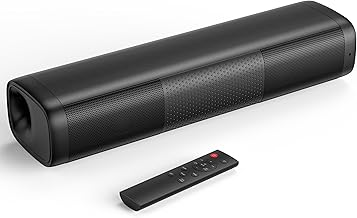
At just under 12 inches and powered by a simple AC adapter, the Saiyin delivers 48 watts of peak output with Bluetooth 5.3, optical, and auxiliary inputs, giving new streamers a surprisingly capable monitoring solution without breaking the bank. It is the right call if your setup is a single 24-inch monitor and a capture card and you need clean, present mids for voice monitoring.
Best Premium: Samsung S60D 5.0ch
Streamers producing high-production content will appreciate the S60D’s wireless Dolby Atmos rendering, SpaceFit Sound Pro room calibration, and a dedicated Game Mode Pro that tightens transient response for competitive titles. Q-Symphony integration means you can layer it with a compatible Samsung monitor’s built-in speakers for an enveloping reference mix during long broadcast sessions.
Best for Under-Monitor Setups: Creative Sound Blaster GS3
Designed explicitly to slide beneath a monitor, the GS3’s superwide stereo image and compact black chassis suit streamers running 27- to 32-inch displays where every millimeter of desk depth matters. USB-C power and Bluetooth connectivity keep cable runs minimal, while subtle RGB lighting adds production value visible on a facecam without washing out your key light.
Best for Multi-Source Streaming Rigs: Detachable 2-in-1 Sound Bar for Smart TV
If your streaming station pulls audio from a capture card, a console, and a PC simultaneously, this detachable soundbar’s Bluetooth, ARC, optical, and auxiliary inputs let you switch sources on the fly. The three EQ modes and Auto Volume Boost keep levels consistent whether you are monitoring a quiet narrative game or a loud FPS lobby.
Frequently Asked Questions
Can I use a soundbar instead of studio monitors for stream audio checking?
For most Twitch and YouTube streamers, a quality soundbar provides more than enough accuracy to catch clipping, panning issues, and game-to-mic balance. Dedicated studio monitors offer a flatter response, but a soundbar with a flat or game EQ preset keeps you in the same ballpark while saving desk space and budget.
Does Bluetooth latency affect my stream if I monitor wirelessly?
Bluetooth 5.0 and newer typically introduce 30 to 40 ms of latency, which is imperceptible for monitoring purposes because your audience hears the wired capture feed. Reserve Bluetooth for casual listening and use USB-C or optical when you need sample-accurate monitoring during recording sessions.
Should I choose a soundbar with a subwoofer for game audio?
A wireless subwoofer adds visceral low-end for explosions and vehicle engines, but it can muddy the midrange where footsteps and voice cues live. If monitoring clarity is the priority, a sealed all-in-one bar like the Samsung S60D or Razer Leviathan V2 X gives you tight bass without a separate sub competing for floor space under your desk.
Will a soundbar work with my Elgato or AVerMedia capture card?
Yes. Capture cards output audio over USB or HDMI, both of which your PC or TV can route to a soundbar via USB-C, optical, or ARC. Simply set the soundbar as your default playback device in your streaming software’s audio settings, and you will hear the same mix your viewers receive.
Final Thoughts
For most streamers, the Razer Leviathan V2 X hits the sweet spot of accuracy, compact size, and plug-and-play USB-C convenience. If your budget is tighter, the Saiyin 11.7-inch Sound Bar punches well above its price with 48 watts and modern Bluetooth 5.3. And if you want a broadcast-grade listening experience with Dolby Atmos and a purpose-built Game Mode Pro, the Samsung S60D is the premium upgrade that will keep up with your channel as it grows.





