
Key takeaways
- Resolution and Framerate: Look for cards that reliably capture at 1080p 60fps. True 4K capture is rare at budget prices, so prioritize stable 1080p output over inflated 4K marketing claims.
- HDMI Loop-Out: A passthrough or loop-out port lets you send the console signal to both your capture card and your gaming monitor simultaneously, which is essential for playing without added latency.
- Latency Performance: Low-latency encoding matters more than almost anything else. Cards with noticeable delay make gameplay segments and interactive chat moments feel disconnected on stream.
- Audio Handling: Check for dedicated 3.5mm mic and headphone ports or reliable embedded audio passthrough. Good audio routing prevents echo and simplifies your stream mix inside OBS.
- Console and Software Compatibility: Confirm the card works with your specific console, whether PS5, Xbox Series X, or Switch, and that it is recognized as a standard video device by OBS, Streamlabs, and your operating system without proprietary drivers.
What's inside
Streaming console gameplay to Twitch, YouTube, or Kick requires a reliable bridge between your console and your computer. The problem most buyers face is a flooded market of look-alike capture devices, many of which advertise 4K passthrough while only delivering subpar 1080p capture riddled with latency, audio desync, and dropped frames. Choosing the wrong card can mean the difference between a smooth, professional-looking stream and one that frustrates both you and your viewers.
This guide cuts through the noise and covers the best capture cards for streaming console gameplay right now. We focus on devices that deliver clean 1080p 60fps capture, low-latency HDMI loop-out for real-time play, broad compatibility with PS5, Xbox, and Switch, and hassle-free plug-and-play setup in OBS and other broadcasting software. Whether you are a first-time streamer or upgrading your rig, these picks balance performance, reliability, and value.
As an Amazon Associate we earn from qualifying purchases.




🛒 Best Price Today on Amazon
Prime members get fast, free shipping on everything above, plus member-only deals. New members get a 30-day free trial — cancel anytime.
Watch: Best Capture Cards for Streaming Console Gameplay — Video Review
How to Choose a Capture Cards for Streaming Console Gameplay
- Resolution and Framerate: Look for cards that reliably capture at 1080p 60fps. True 4K capture is rare at budget prices, so prioritize stable 1080p output over inflated 4K marketing claims.
- HDMI Loop-Out: A passthrough or loop-out port lets you send the console signal to both your capture card and your gaming monitor simultaneously, which is essential for playing without added latency.
- Latency Performance: Low-latency encoding matters more than almost anything else. Cards with noticeable delay make gameplay segments and interactive chat moments feel disconnected on stream.
- Audio Handling: Check for dedicated 3.5mm mic and headphone ports or reliable embedded audio passthrough. Good audio routing prevents echo and simplifies your stream mix inside OBS.
- Console and Software Compatibility: Confirm the card works with your specific console, whether PS5, Xbox Series X, or Switch, and that it is recognized as a standard video device by OBS, Streamlabs, and your operating system without proprietary drivers.
The Best Capture Cards for Streaming Console Gameplays Reviewed
4K HDMI Video Capture Card (1080P 60FPS)
This no-frills HDMI-to-USB 3.0 capture card is a dependable plug-and-play workhorse that delivers clean 1080p 60fps capture for OBS and major consoles without requiring extra drivers. It is an ideal budget-friendly starting point for streamers who just need things to work reliably.
acer USB 3.0 HDMI Capture Card
Acer’s entry stands out with a true 4K HDMI loop-out and dual USB Type-A and Type-C connectivity, giving you lag-free gameplay on your monitor while capturing a crisp 1080p 60Hz feed. It is a versatile, low-latency pick that covers nearly every modern console and PC setup with minimal friction.
Capture Card 4K HDMI Video Streaming to USB 3.0
This card pairs 4K HDMI loop-out with solid 1080p 60fps capture, making it a strong all-around streaming device for PS5, Xbox, and Switch players. Its broad compatibility and straightforward OBS integration make it a safe, value-oriented choice for growing channels.
Fifine AmpliGame Video Capture Card
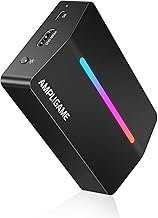
Fifine brings genuine streamer-friendly features to the table, including a 3.5mm audio input, flowing RGB lighting, and 4K 30fps passthrough alongside 1080p 60fps capture. It is the best pick for creators who want an all-in-one audio and video solution without buying a separate mixer.
Monster Video Capture Card
Monster’s capture card focuses on the fundamentals done right: 1080p 60fps recording, USB 3.0 throughput, and dedicated mic and headphone ports for direct audio monitoring. It is a rugged, straightforward option for console streamers who prioritize audio control and capture stability.
Frequently Asked Questions
Do I need a capture card to stream console gameplay?
If you stream directly from a PS5 or Xbox using their built-in broadcasting features, you do not need a capture card. However, a capture card gives you significantly more control over overlays, scenes, alerts, and audio mixing through OBS on a separate PC.
What is the difference between 4K passthrough and 4K capture?
4K passthrough means the card sends a 4K signal to your TV or monitor for you to play on, while still capturing at 1080p. True 4K capture records the feed at 4K resolution, which is far less common and typically requires more expensive internal capture cards.
Are USB capture cards good enough for serious streaming?
Yes. Modern USB 3.0 capture cards can reliably handle 1080p 60fps capture with low latency, which is the standard for the vast majority of console streams. They are also portable and easy to set up compared to internal PCIe cards.
Will these capture cards work with the Meta Quest 3 or other VR headsets?
Some USB capture cards, including the Guermok model, list Meta Quest 3 compatibility for capturing mixed-reality or casted footage. Results vary depending on your software pipeline, so check the specific card’s supported devices before committing.
Final Thoughts
For most console streamers, the acer USB 3.0 HDMI Capture Card and the Fifine AmpliGame Video Capture Card represent the best balance of low-latency performance, audio flexibility, and reliable 1080p 60fps capture. If you want a simpler, budget-minded plug-and-play solution, the 4K HDMI Video Capture Card gets the core job done without unnecessary extras.





