
Key takeaways
- Excellent ergonomics for medium and large hands over long sessions
- MagSpeed scroll wheel and Darkfield tracking are best in class
- Quiet Clicks make it office and shared-space friendly
- USB-C fast charging with multi-device Flow switching
What's inside
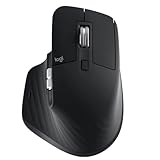
The Logitech MX Master 3S is the wireless mouse that most productivity-focused users end up comparing everything else against, and in 2026 it remains the benchmark for a reason. It pairs an 8,000 DPI Darkfield sensor with the near-silent version of Logitech’s clicks, a sculpted right-handed shell, and the MagSpeed metal scroll wheel that ratchets or free-spins depending on how hard you flick it.
It is aimed squarely at people who spend all day in spreadsheets, code editors, timelines, or design tools rather than at competitive gamers. If you juggle multiple machines, live inside long documents, or simply want a mouse that disappears into your workflow, this is the one to beat. Fast-twitch FPS players and anyone on a tight budget should look elsewhere.
As an Amazon Associate we earn from qualifying purchases.




⚡ Save on Your Next PC — Amazon Prime
Prime members get fast free shipping on the systems above, plus early access to Prime Day & Black Friday PC deals. New members get a 30-day free trial.
Watch: Logitech MX Master 3S Review — Video Review
Design & Build
The 3S keeps the tall, thumb-cradling silhouette that made the MX Master line famous, and the matte coating resists fingerprints better than the glossy older models. It is a genuinely large mouse at around 141 grams, so smaller hands and claw-grippers may find it a stretch, but for medium-to-large palms it is one of the most comfortable shapes you can buy. Build quality feels premium: no creaks, a solid metal wheel, and a thumb wheel plus gesture button that are easy to reach without hunting.
Performance
Day to day the 3S is close to flawless. The Darkfield sensor tracks on glass and glossy desks where cheaper mice stutter, USB-C charging gives roughly 70 days per charge, and a one-minute top-up buys hours of use. The headline upgrade over the older 3 is the Quiet Click mechanism, which cuts click noise by about 90% without feeling mushy.
The MagSpeed wheel is the star for anyone scrolling long files, snapping from clicky precision to a flywheel spin that coasts through thousands of lines. Logi Options+ lets you set per-app button profiles and Flow to glide the cursor across two computers. The trade-offs are real, though: the 1,000 Hz polling and click latency are fine for work but not for competitive shooters, and there is no low-latency 2.4 GHz USB dongle in the box, only Bluetooth or the optional Bolt receiver.
Pros & Cons
- Excellent ergonomics for medium and large hands over long sessions
- MagSpeed scroll wheel and Darkfield tracking are best in class
- Quiet Clicks make it office and shared-space friendly
- USB-C fast charging with multi-device Flow switching
- Too big and right-hand-only for small hands and lefties
- Not suited to competitive gaming latency needs
- No 2.4 GHz dongle included; Bluetooth or Bolt only
Alternatives to Consider
If you want the newest features, the Logitech MX Master 4 with Haptics adds tactile feedback and a refined actuation ring, though it costs more for gains most users will barely notice. Travelers and small-desk users should look at the Logitech MX Anywhere 3S, a compact version with the same fast scrolling in a pocketable body. And if you are rebuilding a whole desk, the MX Keys S Combo bundles a matching keyboard and mouse for a unified Options+ experience.
Frequently Asked Questions
Does the MX Master 3S work on glass?
Yes. The Darkfield sensor is rated to track on glass at least 4 mm thick, and in practice it handles glossy and reflective desks that trip up most other mice.
Can I use it with more than one computer?
It pairs with up to three devices and switches between them with a button, while Logitech Flow lets you move the cursor and even copy-paste across two computers on the same network.
Is it good for gaming?
For casual and slower-paced games it is fine, but the 1,000 Hz polling and click feel are tuned for productivity, so competitive FPS players will prefer a dedicated gaming mouse.
How is the battery life?
Logitech rates it at about 70 days per full charge, and a quick one-minute USB-C charge delivers roughly three hours of use.
Verdict
The MX Master 3S is not cheap and it is not for everyone, but for anyone who works all day at a desk it is close to the perfect pointing device: comfortable, quiet, endlessly configurable, and durable. Unless you have small hands or need competitive gaming performance, it is an easy recommendation and still the productivity mouse to beat in 2026.





