
Key takeaways
- Base Stability: Look for a weighted or wide ABS base that won’t tip when you place heavier headsets on the arm. A solid foundation prevents wobble and protects your headphones from accidental falls.
- Lighting Customization: More modes and color options give you better control over your desk vibe. Stands offering anywhere from 9 to 213 lighting modes let you match existing RGB sync setups or create a standalone accent.
- Extra Ports and Features: Built-in USB hubs, Type-C charging ports, controller hooks, and even wireless charging pads add real utility. These extras can replace a separate hub and reduce cable clutter.
- Build Material: Acrylic stands offer a sleek, modern look with vibrant light diffusion, while ABS plastic provides durability and a solid feel. Choose based on your desk style and how much wear the stand will take.
- Compatibility: Make sure the stand’s cradle fits your headset’s headband width. Universal designs work with most gaming headphones, but checking dimensions avoids a disappointing fit with larger or unusually shaped models.
What's inside
A great gaming headset deserves a great home on your desk. But too many gamers end up tossing their expensive headphones flat on the surface, risking scratches, cable tangles, and premature wear on the headband. Worse, a cluttered desk undermines the carefully curated RGB lighting setup you spent weeks perfecting with your gaming monitor, VR headset dock, and peripherals. The right headset stand doesn’t just protect your gear — it elevates your entire desk aesthetic and ties your lighting theme together.
This guide focuses on RGB gaming headset stands that combine practical organization with eye-catching lighting effects. We evaluated stands based on build quality, base stability, lighting customization options, extra features like USB hubs and controller hooks, and overall value. Whether you’re housing a premium gaming headset alongside your Bigscreen Beyond or Meta Quest 3, or simply want a cleaner desk to match your high-refresh-rate monitor, these picks cover every budget and feature set.
As an Amazon Associate we earn from qualifying purchases.






🛒 Best Price Today on Amazon
Prime members get fast, free shipping on everything above, plus member-only deals. New members get a 30-day free trial — cancel anytime.
Watch: Best RGB Gaming Headset Stands for Desk Aesthetics — Video Review
How to Choose an RGB Gaming Headset Stand for Desk Aesthetics
- Base Stability: Look for a weighted or wide ABS base that won’t tip when you place heavier headsets on the arm. A solid foundation prevents wobble and protects your headphones from accidental falls.
- Lighting Customization: More modes and color options give you better control over your desk vibe. Stands offering anywhere from 9 to 213 lighting modes let you match existing RGB sync setups or create a standalone accent.
- Extra Ports and Features: Built-in USB hubs, Type-C charging ports, controller hooks, and even wireless charging pads add real utility. These extras can replace a separate hub and reduce cable clutter.
- Build Material: Acrylic stands offer a sleek, modern look with vibrant light diffusion, while ABS plastic provides durability and a solid feel. Choose based on your desk style and how much wear the stand will take.
- Compatibility: Make sure the stand’s cradle fits your headset’s headband width. Universal designs work with most gaming headphones, but checking dimensions avoids a disappointing fit with larger or unusually shaped models.
The Best RGB Gaming Headset Stands for Desk Aesthetics Reviewed
Dual Controller MagSafe Charger Headphone Stand
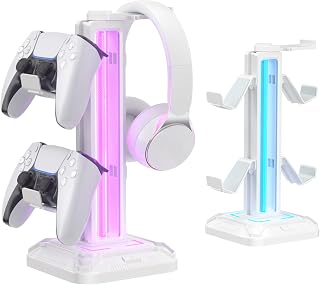
This stand goes beyond headphone storage with a dual controller holder and MagSafe charging for iPhone and Apple Watch, making it a true all-in-one desk organizer. The RGB lighting and included adapter round out a feature set that’s hard to beat for gamers juggling multiple devices.
CoolGift Mart Light Up PCB Acrylic Stand
The transparent acrylic body with a PCB pattern creates a striking RGB glow effect that stands out on any desk. With 16 color options plus USB and Type-C charging ports, it’s a solid gift choice for gamers and DJ music lovers who want style and function in one package.
Tilted Nation RGB Stand with Mouse Bungee
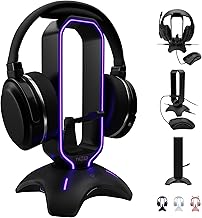
Tilted Nation packs a mouse bungee and USB hub into this RGB stand, targeting gamers who want a clean, organized setup without sacrificing functionality. The sturdy build and thoughtful accessory integration make it one of the most practical options on this list.
OAPRIRE Acrylic RGB Stand
With a massive 213 lighting modes and 60,000 color combinations, this OAPRIRE stand is the pick for RGB enthusiasts who want granular control over their desk lighting. The acrylic construction diffuses light beautifully, and the sturdy base keeps heavier headsets secure.
KDD RGB Rotatable Stand
KDD’s stand features a rotatable headphone arm and a detachable controller hook, giving you flexibility in how you arrange your desk. Nine light modes cover the essentials without overwhelming, making it a great choice for gamers who want RGB flair without complexity.
Frequently Asked Questions
Do RGB headset stands require separate power?
Most RGB stands draw power through a USB cable connected to your PC or a wall adapter. Some models include an adapter in the box, while others rely on your computer’s USB port for both lighting and any built-in charging ports.
Will these stands hold heavy gaming headsets?
Yes, provided the base is weighted or wide enough. Stands with solid ABS or thick acrylic bases handle heavier headsets without tipping. Always check the base dimensions and material before buying if you own a particularly heavy model.
Can I sync RGB headset stands with my other peripherals?
It depends on the stand. Budget RGB stands typically operate independently with their own lighting controls. If sync with software like Razer Chroma or ASUS Aura is important to you, verify compatibility before purchasing.
Are controller hooks included with all these stands?
No. Some stands like the Dual Controller MagSafe model and the KDD rotatable stand include controller hooks, while others focus purely on headphone storage. If you need to store a controller too, prioritize stands that list this feature explicitly.
Final Thoughts
For the ultimate all-in-one desk upgrade, the Dual Controller MagSafe Charger Stand delivers unmatched versatility. RGB purists will love the 213 lighting modes on the OAPRIRE Acrylic stand. And if you want practical extras like a mouse bungee and USB hub, the Tilted Nation stand is the smart pick for a clean, functional gaming setup.





